Free browser extension · Edge · Firefox
AEO Checker: Can AI Engines Reach This Page?
One click tells you whether the crawlers behind ChatGPT, Perplexity, Claude and Google’s AI Overviews can reach the page you’re on, and what to fix first if they can’t.
Free. No account. Runs on your device and sends nothing.
 Built by Christopher Jan Benitez, AI SEO specialist
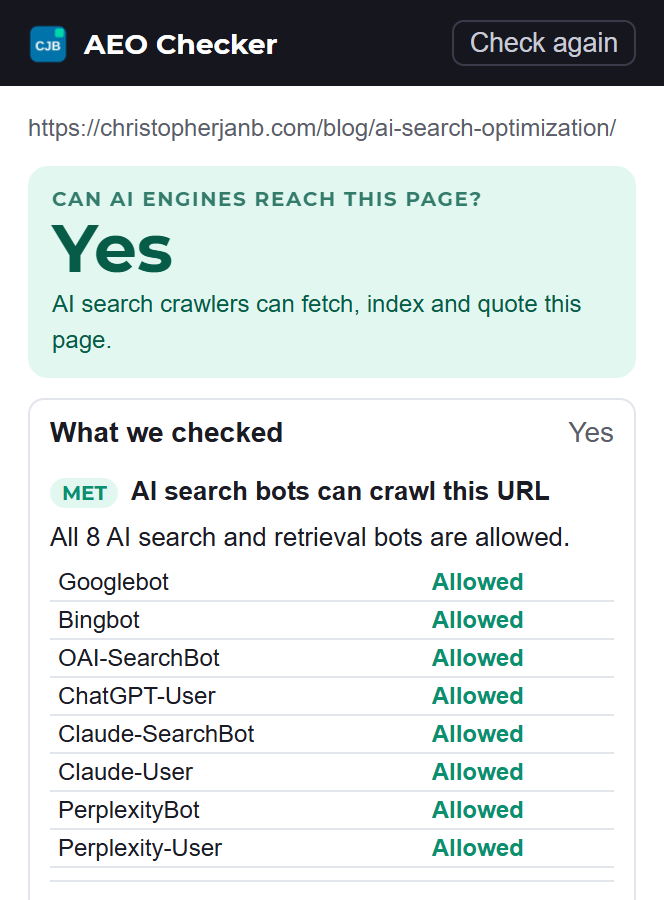
What is the AEO Checker extension?
AEO Checker is a free browser extension that checks whether AI search engines can reach the page you’re looking at. It gives a plain answer, Yes, Mostly or No, and lists the fixes that matter first.
An AI engine can only cite a page its crawler can fetch. A single robots.txt rule, a noindex tag or a page that only shows its text after JavaScript runs can keep a page out of ChatGPT, Perplexity or Google’s AI Overviews, and nothing on the page itself tells you. The extension checks for those problems where you already are, without copying URLs into another tool.
What does AEO Checker check?
It checks the three things on a page that most often block AI crawlers without anyone noticing.
robots.txt rules
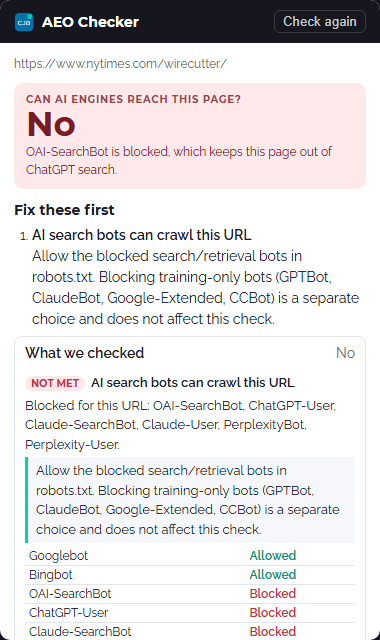
Whether the 8 crawlers behind Google AI Overviews, ChatGPT search, Claude and Perplexity are allowed on this URL, with the exact rule that allows or blocks each one. Training-only bots such as GPTBot and CCBot are listed separately and don’t count against you.
noindex and snippet rules
noindex, nosnippet and max-snippet tags or headers, which keep text out of Google’s AI features.
JavaScript-only content
Whether the main text is in the page’s HTML or only appears after scripts run. Many AI crawlers don’t run JavaScript.
Below the access check, an optional “Easy for readers to use” checklist looks at things like an answer near the top, short paragraphs, sources and dates. It’s a reader-quality pass, not a citation score.
How do I use AEO Checker?
- Install it from the Edge Add-ons store or Firefox Add-ons, and pin the icon to your toolbar.
- Open any web page you want to check, such as a blog post, product page or a competitor’s page.
- Click the AEO Checker icon. The result appears in a second or two: Yes, Mostly or No, the fixes that matter first, and the details for each crawler.
Why doesn’t AEO Checker give an AEO score?
Because in testing, a best-practices score didn’t predict which pages AI engines cite.
In my November 2026 study of 51 searches, pages that followed more AEO best practices weren’t cited more often by Google’s AI Overviews, ChatGPT or Perplexity than pages the engines read and skipped. Access is different: an engine can’t cite a page it can’t fetch. So the extension focuses on access and doesn’t hand out a number that looks precise but doesn’t predict anything.
What can’t the extension check?
It can’t test firewalls, and it doesn’t show who AI actually cites.
- Firewall blocks. A browser can’t send requests as an AI bot, so it can’t see a site that allows a bot in robots.txt but refuses it at the firewall or CDN. In my study, 8% of 120 sites did that. The free AI Citation Map runs that test from my server.
- Who gets cited. Being reachable doesn’t mean being cited. The button at the bottom of the popup opens the AI Citation Map with your page’s topic, showing which pages Google’s AI Overview, ChatGPT and Perplexity cite for it.
- Whole sites. It checks one page at a time, the one you’re on.
Is AEO Checker private?
Yes. It runs entirely in your browser: no account, no analytics, no tracking, and it stores nothing.
It uses two permissions: activeTab, which gives it access to the current tab only after you click the icon, and scripting, which runs the check inside that tab. Its only network requests go to the site you’re already viewing: the page itself, its robots.txt and its llms.txt. If you click the AI Citation Map button, the page’s address and title go to christopherjanb.com in that link. The full details are in the extension privacy policy.
Who made AEO Checker?
Christopher Jan Benitez
I’m an AI SEO specialist based in the Philippines. I help businesses get found and cited in Google and in AI answers, and I publish my own studies on what actually earns AI citations. I built AEO Checker because the access problems it finds are easy to miss and easy to fix.
Frequently asked questions
Is AEO Checker free?
Yes. It’s free, with no account, no limits and no paid tier.
Which browsers does AEO Checker work in?
Microsoft Edge and Firefox today. The Chrome version is in review at the Chrome Web Store, and this page will link to it once it’s approved.
Does AEO Checker slow down my browser?
No. It does nothing in the background. It only runs when you click its icon, and only on that tab.
Can I check a competitor’s page?
Yes. It works on any public web page you can open, including competitors’ pages.
What’s the difference between AEO Checker and the AI Citation Map?
AEO Checker tells you whether AI engines can reach a page. The AI Citation Map tells you which pages they actually cite for a search, and whether you’re one of them. Use the extension for quick checks on any page and the map when you want to know who wins a search.
Reachable, but still not cited?
Most pages pass the access check and still don’t get cited. AI Search Visibility finds where AI gets its answers for the searches that matter to your business, and gets you onto those pages.
See AI Search Visibility