The best free Screaming Frog alternative I have tested is LibreCrawl, an open-source crawler that does most of what a £259-a-year license does, for nothing. But “most” is carrying weight in that sentence. I installed it, drove it from Claude Code through its API, and pointed it at four real websites across three different platforms. Two things surprised me. On my own site, the free tool caught a structured-data error that Screaming Frog got wrong. On two client stores, it invented hundreds of server errors that did not exist.
So this is not a “10 best free SEO crawlers” list. It is one tool, four real crawls, and a straight answer to the only question that matters: can a free crawler replace the paid one you are already paying for?
What LibreCrawl is, and why I tested it against Screaming Frog
LibreCrawl vs Screaming Frog in one line
Screaming Frog SEO Spider is the desktop crawler most technical SEOs already run. It costs £259 per year. LibreCrawl is a free, open-source, web-based crawler that pulls the same kind of data: status codes, titles, meta descriptions, headings, canonicals, the internal link graph, images, and structured data. One is the polished industry default. The other is a community project you host yourself.
How I ran the test (driven from code, not just clicking)
I did not just open the LibreCrawl interface and watch a progress bar. I drove it programmatically through its REST API, the same crawl-then-reason loop I described in my Screaming Frog MCP write-up. Start a crawl, poll it, pull the per-page data as structured output, and analyze it. That matters here, because driving both tools the same way is the only way to compare them fairly rather than comparing my patience with two different dashboards.
The test setup: four sites, three platforms, one honest method
The four sites, and why they are a fair spread
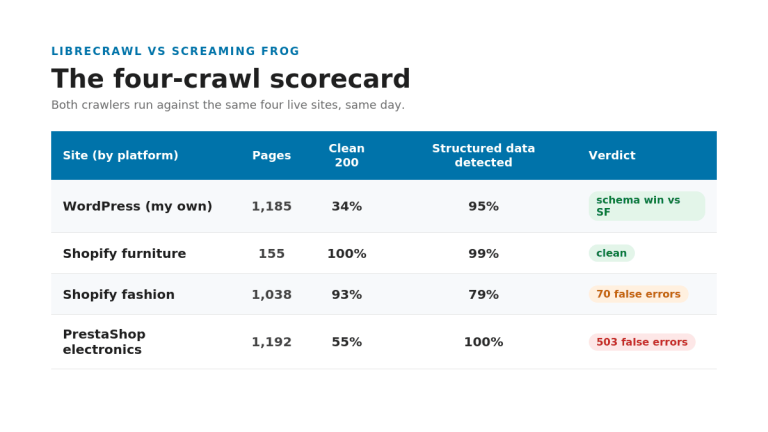
I crawled my own WordPress site, a Shopify furniture store, a Shopify fashion store, and a PrestaShop electronics retailer. Three platforms, three very different technical setups, one open-source crawler. The client sites stay anonymous; the numbers do not.
| Site | Platform | Pages crawled | Clean (200) |
|---|---|---|---|
| My own site | WordPress | 1,185 | 34% |
| Furniture store | Shopify | 155 (sample) | 100% |
| Fashion store | Shopify | 1,038 | 93% |
| Electronics retailer | PrestaShop | 1,192 | 55% |
Polite settings, and verifying every finding
I ran every crawl gently: one request at a time, with a two-second delay between pages. This was not a brute-force hammering. And when a result looked dramatic, I checked it by hand with a single request, rather than trusting the crawler’s word for it. That verification step is where the most interesting finding of the whole test came from.
Where the free tool won: it caught a schema error Screaming Frog missed

Screaming Frog said “zero structured data.” It was wrong.
When I audited my own site with Screaming Frog earlier, the crawl reported zero structured data across the entire site. On a site competing for AI Overview citations, that reads like a five-alarm fire. Except it was not true. My schema framework had been switched on the whole time. Screaming Frog had surfaced a problem that did not exist, and a less careful audit would have sent me “fixing” something that was already working.
LibreCrawl detected schema on 1,156 of 1,185 pages
I ran the free tool over the same site. It correctly parsed the JSON-LD schema and reported it present on 1,156 of the 1,185 pages it crawled. The 29 pages it flagged as missing schema genuinely had none. This was not a one-site fluke either. Across all four sites, LibreCrawl’s structured-data detection held between 79 and 100 percent, and every spot-check I ran confirmed it was reading the markup correctly.
Why this is the finding that matters for AI Overviews
Structured data is one of the levers that decides whether your pages get pulled into AI Overviews and other generative answers. A false “zero” pushes you in exactly the wrong direction: you either waste a day implementing schema you already have, or you rip out working markup chasing a ghost. On the single highest-stakes check in the audit, the free tool was the more accurate one. That is not the result I expected to write.
Where it was a near-perfect match: redirects
The default-settings trap: LibreCrawl is blind to redirects
Here is the catch that will bite you if you do not know it. By default, LibreCrawl follows redirects and records the final destination. A link pointing at a 301 gets logged as the 200 it eventually lands on. So on its first pass over my site, it reported zero redirects, on a site I know is full of them. Screaming Frog reports every redirect as its own hop, out of the box. LibreCrawl hides them unless you tell it not to.
194 versus 197, once you run the second pass
So I ran it again with redirect-following turned off. This time it saw them: 194 redirecting URLs, against the 197 Screaming Frog found on the same site. That is agreement within two percent, from two independent crawlers, which is about as much validation as you can ask for. The cost is that you have to run two separate crawls to get what Screaming Frog hands you in one, and the second pass discovers fewer pages because it stops at each redirect instead of following it through. The data is accurate. The workflow is clunkier.
Where it broke: it invented 503 server errors that did not exist

A Shopify fashion store: 70 fake Cloudflare challenges
This is the part that would have embarrassed me in front of a client. On the Shopify fashion store, the crawl reported 70 pages returning 503 and 429 errors. They were not broken pages. They were Cloudflare bot-challenge responses, served because the crawler tripped the store’s protection even at one request every two seconds.
A PrestaShop electronics retailer: 503 fake 500s
The electronics store was worse. The crawl flagged 503 pages returning HTTP 500, more than 40 percent of the crawl. That is a catastrophic-looking result that would set off every alarm in a status report.
I verified every one with a single request, and they all returned 200
So I did the thing every audit should do and I checked. I requested those exact “broken” URLs by hand, one at a time. Every single one returned a clean 200. The pages were fine. The crawler had provoked the errors itself, by requesting product pages faster than a fragile server, or a defensive one, wanted to answer. The errors were real HTTP responses. They were not real problems.
The pattern: the more protected the store, the more noise
Put the four sites in a row and the rule is obvious. My WordPress site, with no aggressive protection, returned mostly real errors that were worth fixing. The protected and fragile stores returned storms of fake ones. The more defensive the platform, the more garbage LibreCrawl pours into your issue list. The takeaway is simple and non-negotiable: on any e-commerce store, filter the 5xx pages and re-check them before you trust a single count.
The noise tax: 8,000 “issues” that are not 8,000 problems
What is noise, and there is a lot of it
LibreCrawl threw between roughly 4,000 and 8,400 raw issues per full-site crawl. The electronics store alone showed 7,830. That number is almost meaningless until you clean it. A huge slice is the fake 5xx pages from the section above. Another huge slice is correct but not actionable: noindexed archive pages flagged for “missing meta description,” login and cart pages flagged for missing canonicals, the normal furniture of a CMS that the tool dutifully reports as problems.
What is actually worth fixing
Strip the noise and the real, actionable list is small and consistent across every site: images missing alt text (a template-level issue almost everywhere), slow response times, overlong or too-short titles, and genuinely missing meta descriptions. Screaming Frog does this triage for you and hands back a curated list. LibreCrawl hands you everything and makes the filtering your job. That filtering pass is not optional. It is the difference between an audit and a panic.
The engineering reality of “free”
The bugs and limits I hit
Free has a price, it is just not on the invoice. Getting clean crawls out of LibreCrawl meant working around real rough edges. A session-cookie bug had it polling empty sessions and reporting zero pages until I fixed how it held state. Its settings persist in a shared database in a way that leaks between runs. The stores rate-limited it. And when I ran two large crawls at once, the server ran out of memory and crashed, taking a half-finished crawl down with it.
Free in dollars, not in hours
None of that is fatal. All of it is fixable, and a more careful setup avoids most of it. But it is time, and time is the thing a £259 license quietly buys back. Screaming Frog’s polish is not a luxury; it is hours you do not spend debugging your crawler instead of auditing your site.
So can a free tool replace your £259 Screaming Frog license?

The honest answer is: for some of your work, yes, and you should know which.
Use LibreCrawl when
Reach for the free tool for internal sweeps, quick structured-data checks, and budget projects where you are going to read and filter the data yourself anyway. It is genuinely good at the core job, it is more accurate on schema than I expected, and the price is unbeatable. If you are technical enough to drive it and skeptical enough to verify it, it earns its place.
Stick with Screaming Frog when
Keep the license for client-billed audits, for protected or fragile e-commerce stores where the false-error problem is worst, for redirect-heavy migrations where you need the full picture in one pass, and for any job where curated, trustworthy output is the product you are selling. The polish, the reliability, and the clean list are what you are paying for, and on client work they are worth it.
That is the line. Free for the work you check yourself. Paid for the work someone else is counting on. I went in expecting the free tool to be a toy and the paid one to be untouchable. The truth was more useful than that, and on the one finding that mattered most, the free tool was the one that got it right.
FAQ
Is LibreCrawl a good free alternative to Screaming Frog?
Yes, for internal and budget work. LibreCrawl captures the same core technical SEO data as Screaming Frog and is free and open-source. It is noisier and needs more verification, so it suits practitioners who will filter the data themselves rather than hand it straight to a client.
Is LibreCrawl as accurate as Screaming Frog?
On structured data it was more accurate in my test, correctly detecting schema that Screaming Frog reported as missing. On redirects it matched Screaming Frog within two percent, but only after a second crawl with redirect-following disabled. Out of the box it hides redirects, so accuracy depends on configuring it correctly.
Why does LibreCrawl report server errors that are not real?
Because its crawler can trip bot protection and overload fragile servers, which then return 503, 429, or 500 responses. In my test, hundreds of these “errors” returned a clean 200 when I requested them by hand. Always re-check 5xx pages before trusting the count.
Is LibreCrawl really free?
Yes. It is open-source and free to run. The real cost is your time: setup, working around bugs, and filtering a much noisier issue list than a paid tool produces.

