Your blog host is one of the few decisions that is a pain to undo later.
Pick well and you get fast pages, near-zero downtime, and support that answers when something breaks. Pick badly and you spend a weekend migrating away from it.
I have run blogs and client sites on a lot of hosts over the years. This is my honest take on the best blog hosting for bloggers in 2026.
Quick disclosure: three of the hosts below (SiteGround, Cloudways, and Namecheap) are ones I earn a commission from. I only kept them here because I actually use and recommend them. The rest have no affiliate link at all, and I still think you should consider them.
- The Best Blog Hosting at a Glance
- How I Evaluate a Blog Host
- Blog Host vs. Blogging Platform: What You Actually Need
- The 7 Best Blog Hosting Providers, Reviewed
- Namecheap: Best for Brand-New Blogs on a Budget
- SiteGround: Best Balance of Ease and Performance
- Cloudways: Best Performance and Pay-for-What-You-Use
- Hostinger: Cheap All-Rounder for Beginners
- Bluehost: Best for WordPress Beginners Who Want Hand-Holding
- DreamHost: Best for Month-to-Month, No Long Lock-In
- WP Engine: Best for High-Traffic Blogs That Can Pay for It
- How to Choose the Best Blog Hosting (A Buyer’s Guide for Bloggers)
- Is Free Blog Hosting Worth It?
- How to Migrate Your Blog to a Better Host
- My Verdict: The Best Blog Hosting by Type of Blogger
- Frequently Asked Questions
- The Bottom Line
The Best Blog Hosting at a Glance
Here is the short version if you just want a pick and a price.
| Host | Best for | Starts around | The catch |
|---|---|---|---|
| Namecheap | Brand-new blogs on a budget | $2/mo | You will outgrow it |
| SiteGround | Ease of use plus solid speed | $4/mo | Renewal jumps 50%+ after year one |
| Cloudways | Performance and pay-for-what-you-use | $11/mo | Not beginner-friendly |
| Hostinger | Cheap all-rounder for beginners | $3/mo | Renewal rises sharply |
| Bluehost | WordPress beginners who want hand-holding | $3/mo | Constant upsells |
| DreamHost | Month-to-month, no long lock-in | $3/mo | Fewer flashy features |
| WP Engine | High-traffic blogs that can pay for it | $20/mo | Expensive for a new blog |
Prices are intro rates and change often, so check the current number before you buy. The renewal price matters more than the intro price, and I will come back to that.
How I Evaluate a Blog Host
I am not going to pretend I ran a lab with uptime graphs for every host on this page.
What I can give you is the view from actually building and running blogs on these platforms, plus what I have seen go wrong on client sites.
Here is what I weigh:
- Speed: how fast pages load once real content and images are on them, not just on an empty demo.
- Renewal pricing: the price after the first term ends, which is the one you actually live with.
- Ease of use: whether a non-technical blogger can manage it without a developer.
- WordPress fit: most bloggers run WordPress, so smooth WordPress support matters.
- Support: whether a human answers when your site goes down at a bad time.
Where I have hands-on experience, I say so. Where I am giving you the general read, I say that too.
Blog Host vs. Blogging Platform: What You Actually Need
Before you pick a host, decide what kind of blog you want.
A self-hosted blog means you run WordPress on hosting you control. You own everything, you can install any plugin, and you can move whenever you want. Every host in this guide is for this route.
A hosted platform like WordPress.com, Medium, or Squarespace runs everything for you. It is simpler, but you rent your home instead of owning it. Your monetization, design, and SEO options are limited by their rules.
If you are serious about a blog that ranks and makes money, go self-hosted. That is the whole reason this list exists.

The 7 Best Blog Hosting Providers, Reviewed
I put the three I use first, because those are the ones I can speak to from real experience.
Namecheap: Best for Brand-New Blogs on a Budget
Namecheap does what the name promises. It is cheap.
That is exactly what you want when the blog is brand new and you have no traffic and no revenue yet. You want to get the thing online without a big bill.
Its control panel is clean and easy, which matters a lot when you are still learning. You are not going to feel lost.
The honest limit: you will outgrow it. Once your traffic climbs, you will want a more powerful platform. Think of Namecheap as the host that gets you off the ground, not the one you scale on.
SiteGround: Best Balance of Ease and Performance
SiteGround sits in the middle of the ground for me, in the best way.
It has the ease of use that Namecheap gives you, thanks to a genuinely good control panel. A non-technical blogger can run a site here without help.
It also performs well and its WordPress support is strong. For most bloggers, it is a safe, capable choice.
My one real gripe is the renewal price. When I used it, the cost jumped by more than 50% after the first year. The intro price is great. The year-two price is a different conversation, so budget for it going in.
Cloudways: Best Performance and Pay-for-What-You-Use
Cloudways is one of the best-performing hosting platforms I have used.
The pricing model is what sets it apart. You pay for the hosting your site actually uses, not a fixed plan. If your site is not pulling huge traffic and you are not on one of their premium servers, you do not pay premium.
That is a rare thing in hosting. Most hosts lock you into a tier whether you use it or not.
The trade-off is that Cloudways is not beginner-friendly. There is no traditional cPanel hand-holding, and it assumes you are comfortable managing a server-style setup. If you are past the beginner stage and you care about speed, it is excellent.
Hostinger: Cheap All-Rounder for Beginners
Hostinger competes with Namecheap on price and wins a lot of “cheapest host” roundups.
It is a reasonable beginner pick with a friendly dashboard and low intro pricing.
The same caution applies as with any budget host. The renewal price rises sharply, and the cheapest plans are shared, so performance is fine for a small blog and not much more.
Bluehost: Best for WordPress Beginners Who Want Hand-Holding
Bluehost is the host WordPress.org officially recommends, so beginners land on it constantly.
It is built for people who have never touched hosting. The WordPress install is guided and the dashboard is simple.
The downside is the steady stream of upsells during setup, plus the usual renewal jump. It is a fine place to start, not a place to stay forever.
DreamHost: Best for Month-to-Month, No Long Lock-In
DreamHost is also officially recommended by WordPress.org, and it has a feature the others hide from.
You can pay month to month instead of committing to three years to get the headline price. If you hate long contracts, that alone makes it worth a look.
It is less flashy than the others and the interface is its own thing rather than cPanel. For a no-drama, no-lock-in blog host, it holds up.
WP Engine: Best for High-Traffic Blogs That Can Pay for It
WP Engine is managed WordPress hosting built for scale.
It is fast, it handles traffic spikes, and it takes care of the technical maintenance for you. This is the host you graduate to when a blog becomes a real business.
It is also expensive, and overkill for a new blog. Do not pay WP Engine prices until your traffic and revenue actually justify it.
How to Choose the Best Blog Hosting (A Buyer’s Guide for Bloggers)
If you strip away the marketing, a good blog host comes down to a handful of things.
Speed and Core Web Vitals
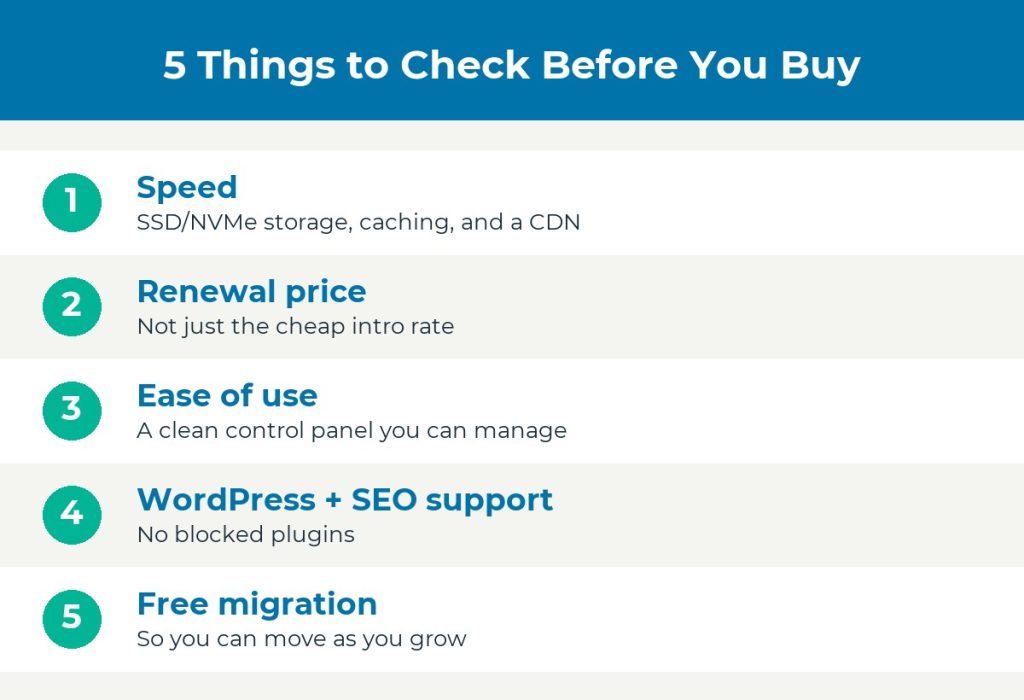
Slow pages lose readers and rankings. Look for hosting with SSD or NVMe storage, built-in caching, and a CDN. Cloudways and SiteGround both do this well.
Renewal Pricing, Not Just the Intro Price
This is the trap almost every host sets. The $3 intro price becomes $12 or more at renewal.
Always find the renewal rate before you buy, and budget for the year-two price. It is the number you actually pay long term.
Ease of Use
If you are not technical, a clean control panel is worth a lot. Namecheap and SiteGround are strong here. Cloudways is not, so match the host to your comfort level.
WordPress and SEO Plugin Support
Most bloggers run WordPress. Make sure the host supports it cleanly and does not block common SEO and caching plugins.
Free Migration and Room to Grow
You will likely switch hosts at least once as you grow. Check whether the new host offers free migration, because paying to move or doing it by hand is a headache.
Is Free Blog Hosting Worth It?
For a real blog, no.
Free hosting usually means a clunky subdomain, forced ads you do not control, and no room to monetize or move. You do not own anything.
The moment you want to make money or rank in Google, you will migrate off it. Start on cheap paid hosting like Namecheap instead and skip the wasted step.
How to Migrate Your Blog to a Better Host
Outgrowing your first host is normal, not a failure. Here is the short version of moving without breaking your site.
- Check if your new host offers free migration. Most of the better ones do.
- Back up your entire site first, files and database.
- Move the site to the new host and test it on a temporary URL before going live.
- Point your domain to the new host only after you have confirmed the site works.
- Keep the old hosting active for a week in case you need to roll back.
Done in that order, your readers never notice the switch.
My Verdict: The Best Blog Hosting by Type of Blogger
There is no single best host. There is a best host for where you are right now.
- Brand-new blogger on a budget: start with Namecheap. Cheap, easy, gets you online.
- Blogger who wants ease plus solid performance: go with SiteGround, just budget for the renewal price.
- Performance-focused blogger past the beginner stage: use Cloudways and only pay for what you use.
- High-traffic blog that is now a business: move to WP Engine.

Most bloggers I know start on Namecheap, move to SiteGround or Cloudways as they grow, and only reach WP Engine once the blog pays for itself.
Frequently Asked Questions
How much does blog hosting cost?
Budget hosting starts around $2 to $4 a month on an intro rate. Expect that to roughly double at renewal. Managed hosting like WP Engine starts around $20 a month.
What is the best hosting for a WordPress blog?
For most bloggers, SiteGround gives the best balance of WordPress support and ease of use. If you want raw speed and can handle a less beginner-friendly setup, Cloudways is faster.
Can I move my blog to another host later?
Yes. Most good hosts offer free migration, so switching is straightforward. Back up first and test on a temporary URL before pointing your domain over.
Is Namecheap good for blogging?
It is great for starting out. It is cheap and easy, which is exactly what a new blog needs. You will likely want a more powerful host once your traffic grows.
Should I use free blog hosting?
Not for a serious blog. Free hosting limits monetization, forces ads, and keeps you from owning your site. Cheap paid hosting is a better starting point.
The Bottom Line
Match the host to your stage, not to a headline price.
Start cheap with Namecheap, step up to SiteGround or Cloudways as you grow, and save WP Engine for when the blog is earning.
Whichever you pick, check the renewal price before you buy. That one habit will save you more than any coupon.