The DataForSEO MCP server lets Claude (or Codex) pull live SEO data in the middle of a conversation: keyword volumes, Google results, backlinks, competitor rankings. You connect it once, then ask in plain English. This post covers the three setups I have used, the one mistake that breaks most first attempts, and five prompts to run before you build anything.
Disclosure: links to DataForSEO in this post are affiliate links. If you sign up through them, I may earn a commission on every successful sale, at no extra cost to you. I paid for DataForSEO for a year before joining their program.
What you are connecting, and what it costs
MCP (Model Context Protocol) is the plug standard AI assistants use to call outside tools. DataForSEO runs an MCP server that sits between your assistant and their API. Your assistant asks for “search volume for these ten keywords,” the server turns that into the right API call, and the numbers come back as a table.
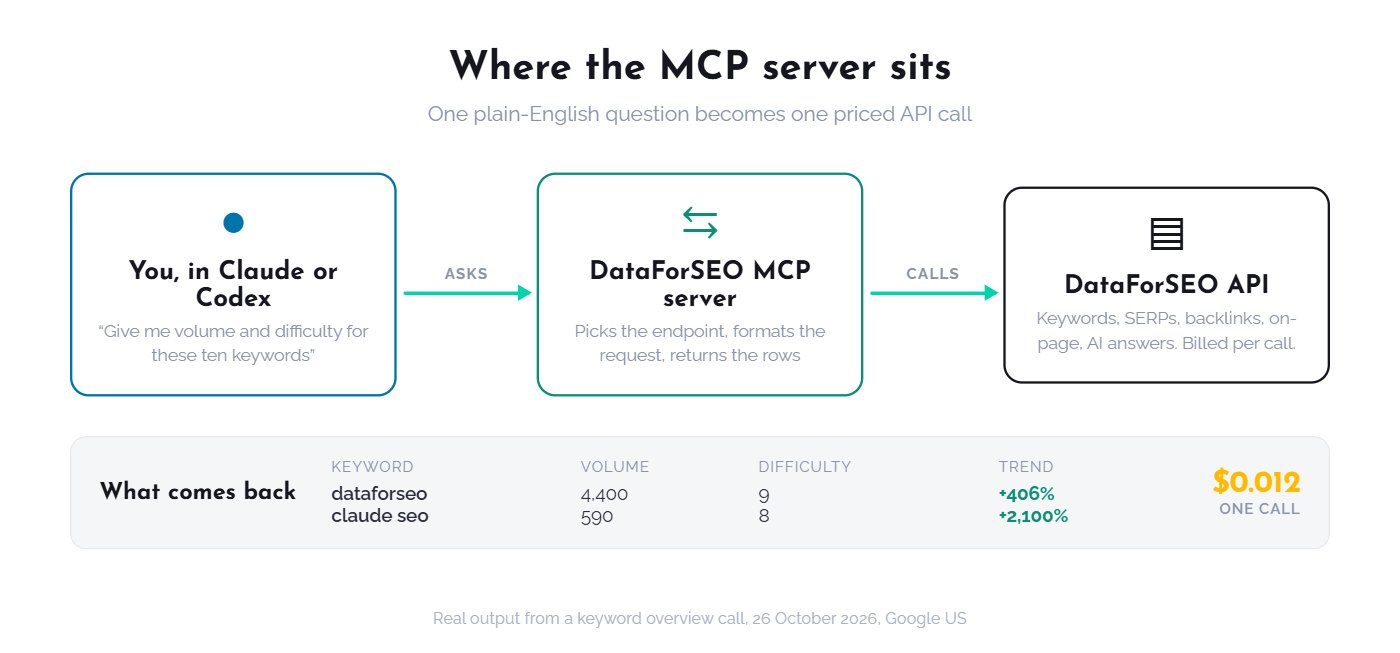
There is no subscription. You top up a balance once and pay per request, usually a fraction of a cent. The balance does not expire. A new account gets a free trial, so you can run everything in this post before you pay. Create a DataForSEO account here (affiliate link), then open the API Access page in the dashboard. You will need two things from it.
Before you start: the credential mistake
DataForSEO gives you two sets of credentials. The email and password you log into the dashboard with, and a separate API login and API password on the API Access page. Every MCP setup wants the second pair. Most “invalid auth” errors in the Reddit and GitHub threads about this server come from pasting the dashboard password.
Two more prerequisites for the local setups: Node.js 18 or newer, and whichever client you are connecting (Claude Desktop with a paid plan, Claude Code, or Codex).
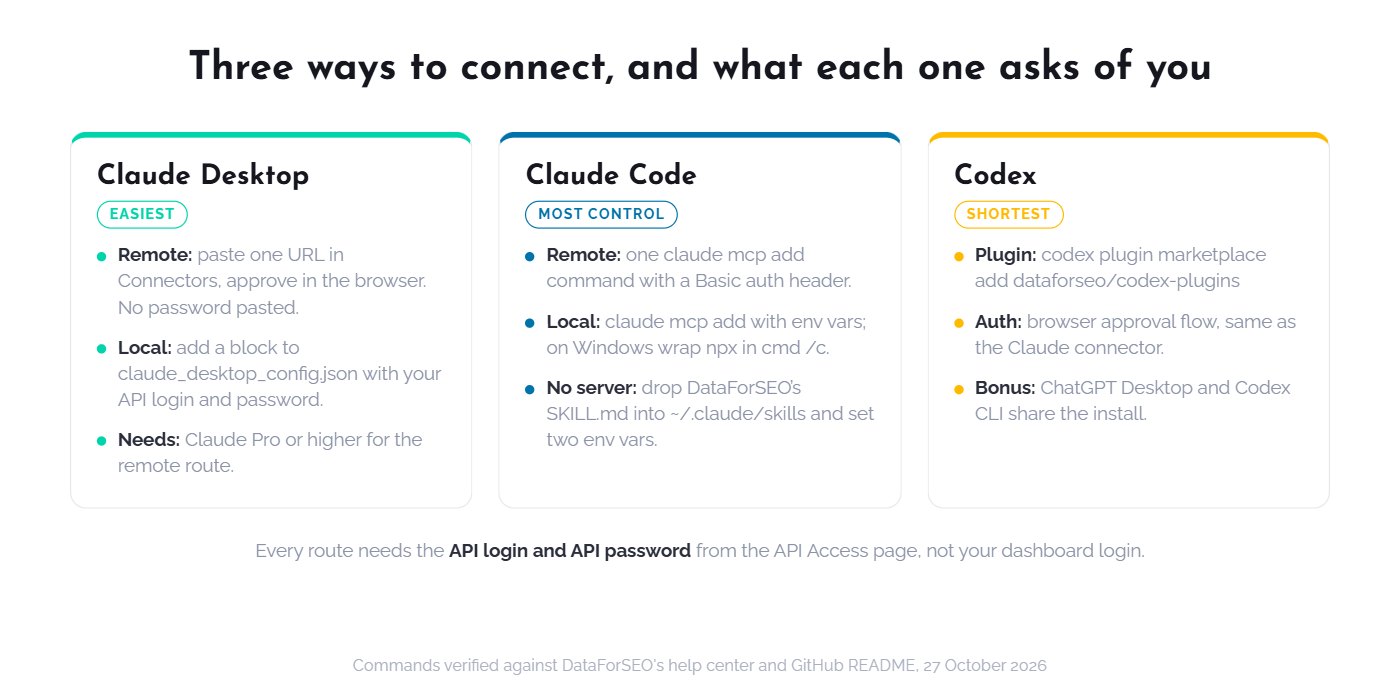
Setup 1: Claude Desktop
Two routes. The remote one is easier. The local one gives you more control.
Remote (OAuth, no config file)
- In Claude Desktop, open Settings, then Connectors, then add a custom connector.
- Paste the server URL:
https://mcp.dataforseo.com/mcp - Claude opens a DataForSEO page in your browser. Sign in and click Approve.
- Back in Claude, set the tool permissions you want (ask every time, or allow).
This needs a Claude Pro plan or higher. No API password is pasted anywhere, which is the reason I point non-technical clients here first.
Local (config file, runs on your machine)
Open Settings, Developer, Edit Config. That opens claude_desktop_config.json. Add this inside mcpServers and replace the two placeholders with your API login and API password:
{
  "mcpServers": {
    "dataforseo": {
      "command": "npx",
      "args": ["-y", "dataforseo-mcp-server"],
      "env": {
        "DATAFORSEO_USERNAME": "your_api_login",
        "DATAFORSEO_PASSWORD": "your_api_password"
      }
    }
  }
}
Restart Claude Desktop. The tools icon should list the DataForSEO server. If you see “Fetch not defined,” your Node.js is too old. Update it and restart.
Setup 2: Claude Code
DataForSEO documents three methods for Claude Code. The first two are the ones that matter.
Remote server
Base64-encode your_api_login:your_api_password (the API Access page shows the encoded token for you), then run:
claude mcp add --header "Authorization: Basic YOUR_BASE64_TOKEN" --transport http dfs-mcp https://mcp.dataforseo.com/httpLocal server via npm
claude mcp add dfs-mcp --env DATAFORSEO_USERNAME=your_api_login --env DATAFORSEO_PASSWORD=your_api_password -- npx -y dataforseo-mcp-serverOn Windows the one-liner sometimes fails to spawn npx. The fix DataForSEO recommends, and the one I use on my Windows machine, is editing %USERPROFILE%\.claude.json directly and wrapping the command in cmd /c:
"dfs-mcp": {
  "type": "stdio",
  "command": "cmd",
  "args": ["/c", "npx", "-y", "dataforseo-mcp-server"],
  "env": {
    "DATAFORSEO_USERNAME": "your_api_login",
    "DATAFORSEO_PASSWORD": "your_api_password"
  }
}
Start Claude Code and type /mcp. The server should show as connected with its tools listed. If it shows “failed,” the credential mistake above is the first thing to check.
No server at all: the skill-file route
DataForSEO’s newer approach skips the MCP server entirely for CLI agents. You drop their SKILL.md into ~/.claude/skills/dataforseo/, set the two environment variables in your shell, and Claude Code reads the API docs and calls endpoints itself. Fewer moving parts, and it is the same mechanism my own SEO skill pack uses. I cover that pairing in the hub.
Setup 3: Codex (ChatGPT Desktop or Codex CLI)
Codex has the shortest path because DataForSEO ships a plugin. In the ChatGPT desktop app, switch to Codex, open the side panel terminal, and run:
codex plugin marketplace add dataforseo/codex-pluginsThen go to Plugins, Personal, and add the DataForSEO plugin. It opens the same browser approval flow as the Claude connector. No password pasting. Codex CLI shares the plugin, so one install covers both.
The URL confusion, and which one to use
This is the part that sent me back and forth between three doc pages. DataForSEO’s own docs give three different remote URLs depending on which page you read:
| URL | Where it appears | What it is |
|---|---|---|
https://mcp.dataforseo.com/mcp | Help center setup guide, OAuth guide | The original server. Exposes 80+ named tools, one per endpoint. |
https://mcp.dataforseo.com/http | Claude Code guide | Same server, HTTP transport name. |
https://mcp.dataforseo.com/v3/mcp | GitHub README, product page | The new v3 server. Four tools: a docs index, section list, docs search, and one generic api_request. |
I tested all three on 27 October 2026. All three are live and answer an unauthenticated request with the same “invalid auth” response, so none of them is dead. They differ in what your assistant sees once connected.
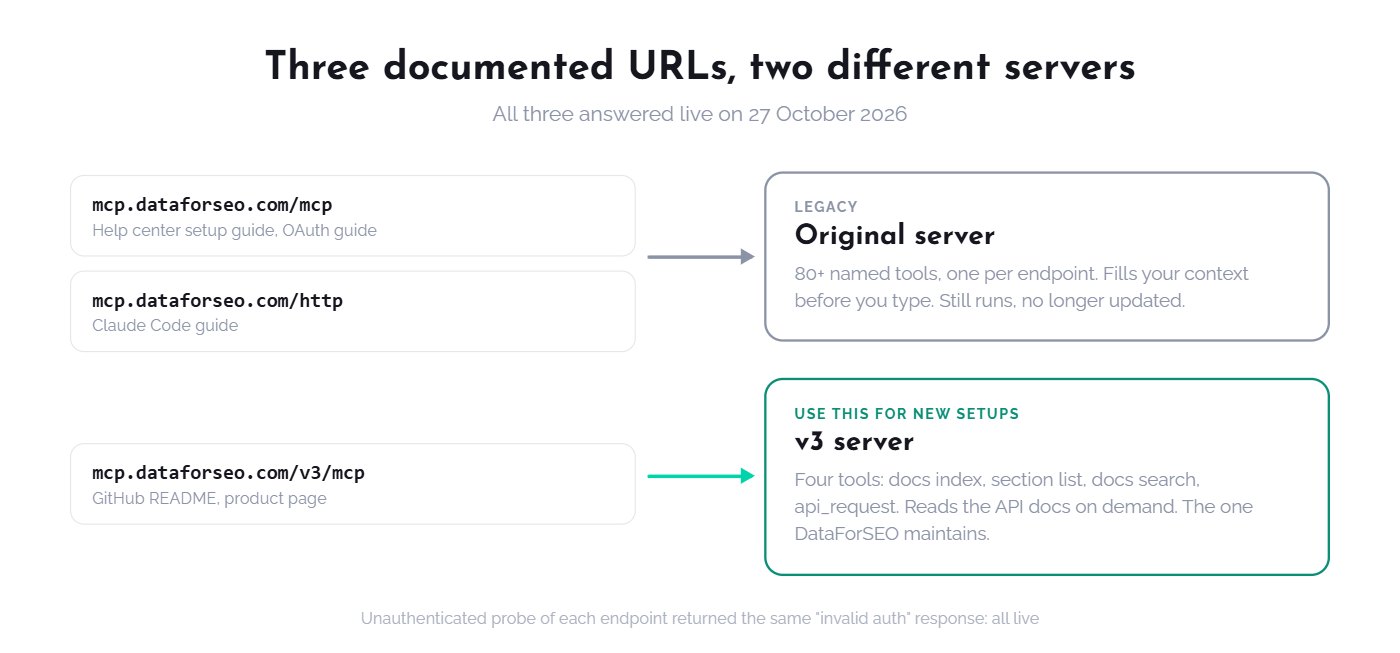
The original server hands Claude a list of 80-plus tools with explicit names like dataforseo_labs_google_keyword_overview. That is easy to reason about, but every one of those tool definitions takes up context before you have typed a word. Cursor caps active MCP tools at 40, which is why DataForSEO’s Cursor guide tells you to trim the list. The v3 server fixes this by giving Claude four tools and letting it read the API docs on demand. It is lighter and it is the one DataForSEO now maintains. The old one still runs but is no longer updated.
My recommendation: new setups should use /v3/mcp. If you already run the original server and your prompts work, there is no urgency to move. The research session behind this hub ran on the original tool set, and every number in the next section came from it.
Five prompts to run first
Do not start with “audit my site.” Start with questions where you can check the answer. These five took me about ten minutes and told me whether the connection, the credentials, and Claude’s tool choice were all working. The outputs below are real, pulled on 26 October 2026 for Google, United States.
1. Volume, difficulty and trend for a short list
Prompt: “Give me US monthly search volume, keyword difficulty and the 12-month trend for: dataforseo, claude seo, seo mcp.”
| Keyword | Volume | Difficulty | 12-month trend |
|---|---|---|---|
| dataforseo | 4,400 (8,100 in Sep 2026) | 9 | +406% |
| claude seo | 590 (880 to 1,000 recent months) | 8 | +2,100% |
| seo mcp | 90 | 6 | +75% |
What to check: the numbers should arrive in one call, not three, and Claude should name the endpoint it used (keyword overview). If it answers from memory without calling a tool, the connection is not active.
2. Who ranks for a query, and who is not the vendor
Prompt: “Pull the top 10 Google US results for ‘dataforseo mcp’ and tell me which ones are not dataforseo.com.”
Output: six of the ten results were dataforseo.com pages (the product page, help center guides, an update post). The other four: a community MCP server on GitHub at position 3, a DataForSEO YouTube tutorial at 5, an MCP directory listing from Paralect at 9, and an MCP Market listing at 10. That told me the keyword is open: no independent tutorial ranks for it. This post exists because of that answer.
3. What a competitor ranks for, filtered
Prompt: “List the keywords ryandoser.com ranks for in the US that contain ‘mcp’ or ‘seo’, with position and volume.”
Output: 25 keywords. The useful ones: “dataforseo mcp” at position 19 (210 searches), “data for seo mcp” at 14, “claude seo skill” at 35 (480 searches), “best mcp servers” at 46. One domain, one call, and I knew exactly which pages of theirs to beat and by how much.
4. Related searches, two levels deep
Prompt: “Starting from ‘dataforseo’, pull Google’s related searches two levels deep with volume.”
Output: 19 keywords. The surprise was “serpapi” at 12,100 searches a month sitting in the same related-search graph, next to “dataforseo api” (320), “dataforseo mcp” (210), “dataforseo pricing” (70) and “dataforseo alternative” (40). That one call reshaped the comparison section of my content plan.
5. Long-tail suggestions for a seed
Prompt: “Give me every keyword containing ‘claude seo’ with volume and difficulty, sorted by volume.”
Output: 50 keywords. “claude seo skill” and “claude seo skills” at 480 each with difficulty 3. “claude code for seo” at 110. “claude for seo” at 70, up 1,000% year on year. Ask Claude to drop everything under 10 searches and group the rest by intent, and you have the skeleton of a content cluster in one message.
After the five prompts, open the DataForSEO dashboard and look at the usage statistics. Each endpoint you called is listed with what it cost. That is your first receipt, and the habit I want you to build before trusting any automation with your balance.
What breaks, and the fix
- “invalid auth” or 401. You used the dashboard password. Go to API Access and copy the API password.
- “Fetch not defined.” Node.js is older than 18. Update and restart the client.
- Server listed but no tools. On Windows, use the
cmd /cwrapper shown above. Elsewhere, runnpx -y dataforseo-mcp-serverin a terminal on its own and read the error. - Claude answers without calling a tool. Say “use the DataForSEO tools” in the prompt once. After it has called them once in a session it keeps doing so.
- Context fills up fast. You are on the original 80-tool server. Switch to
/v3/mcp, or disable the modules you do not use.
The manual prompts are the slow version
Everything above is you typing a question and reading a table. That is the right way to learn what the data looks like. It is the wrong way to run a client month. Once the connection works, the next step is a skill: a plain-text procedure that tells Claude which calls to make, how to classify what comes back, and where to stop and ask you. My free pack has five of them, covering audit, planning, execution and reporting, and they are built to run with DataForSEO as the data layer.
Get the Claude SEO skill pack. It is free. If you still need the data side, open a DataForSEO account (affiliate link) and run the five prompts above on the trial balance.
Next in the hub: what 30 days of real SEO work cost on DataForSEO, with the per-endpoint receipts.