Claude SEO is the practice of running repeatable SEO work inside Claude: research, audits, briefs, drafts and reports. On its own, Claude has no rankings, search volumes or crawl data, so your results depend on what you connect it to. This guide covers the three ways to set it up, the data each one needs, how the main skill packs compare, and the errors I had to correct on a client account in October 2026.
Disclosure: links marked “affiliate link” in this post go to DataForSEO and SE Ranking. If you sign up through them, I may earn a commission on every successful sale, at no extra cost to you. I also publish a free skill pack, which is compared below alongside the others.
What are the three ways to run SEO in Claude?
You can run SEO in Claude through chat prompts, saved skills, or Claude Code working in a project folder. Each step up takes more setup and repeats more reliably. The setups also combine, because a skill runs in both chat and Claude Code.
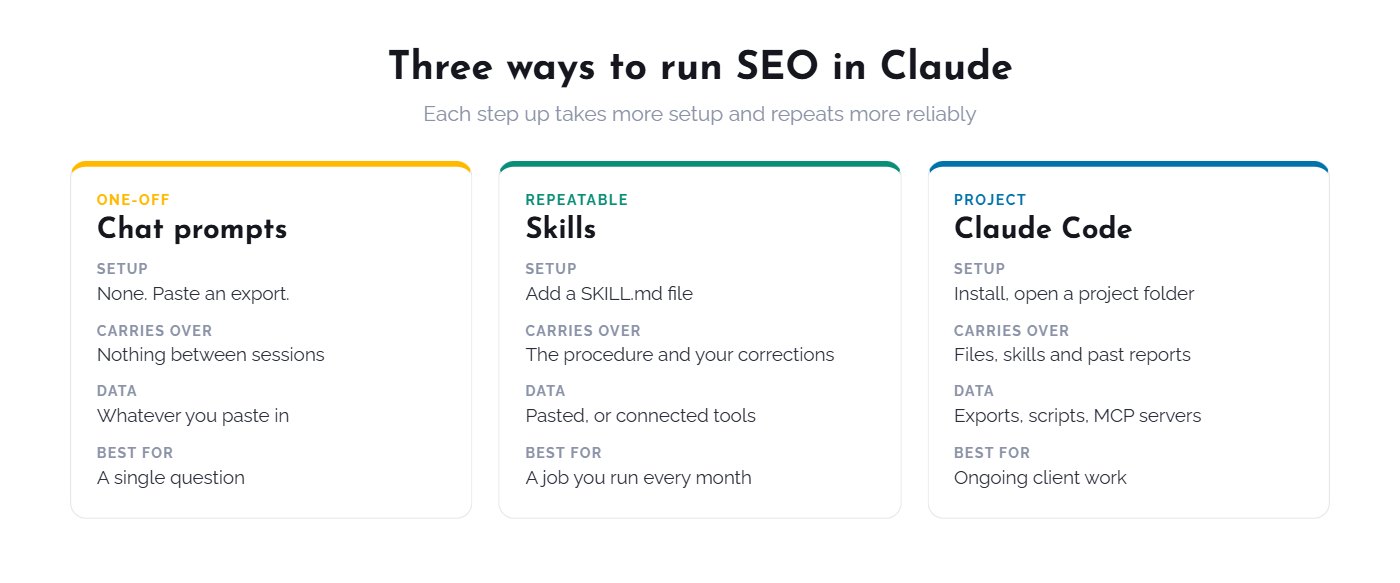
- Chat prompts. Paste an export and ask a question. There is nothing to install, and nothing carries over to the next session.
- Skills. A skill is a
SKILL.mdfile holding the procedure for one job. Claude keeps the short description in view and loads the full instructions only when the skill is used, so you can keep many on hand. Anthropic lists skills on every plan from Free to Enterprise, with code execution turned on. - Claude Code. Claude works inside a folder on your machine, where it can read exports, write reports, run scripts and call connected tools. I use this for client work because each month’s files sit next to the last month’s.
What can Claude not do for SEO without connected data?
Without connected data, Claude cannot see your rankings, your clicks, current search results or a competitor’s backlinks. It can still reason well about whatever you paste in. If you ask for search volume with no data source, treat any number it gives you as a guess.
Four kinds of data cover most SEO work:
| Question | Data you need | Where I get it |
|---|---|---|
| What is my site already getting? | Clicks, impressions, queries, sessions | Search Console and GA4 |
| What is broken on the site? | Crawl data | A crawler export or an audit tool |
| What does the market look like? | Volume, difficulty, live results, competitors, backlinks | DataForSEO (affiliate link) |
| Do AI engines mention me? | Citations and mentions in AI answers | DataForSEO LLM Mentions and an AI visibility tracker |
Search Console only tells you about your own site, so the market row is usually the first gap to fill. DataForSEO charges per call with no subscription. My setup guide covers the connection, and my pricing post shows what 30 days cost me. DataForSEO is one option among several. On client accounts I also use SE Ranking (affiliate link) for site audits and tracked positions.
Which Claude SEO skills should you use?
Choose a broad open-source pack for a one-off audit, a platform’s own pack if you already pay for that platform, or a sequenced pack for repeating client months. This table is a comparison, not a ranking, and one row is my own pack. I checked the details on 5 November 2026.
| Pack | Size | Data it relies on | Cost and access | Best for |
|---|---|---|---|---|
| Claude SEO by Daniel Agrici | 26 sub-skills, 19 sub-agents | The site itself, with optional extensions for live data | Free, MIT licence | Broad audits in Claude Code |
| Marketing Skills by Corey Haines | 53 skills, with SEO as one area among many | Whatever you give it, with optional connections to your marketing accounts | Free, MIT licence | SEO alongside copy, CRO and other marketing work |
| SE Ranking SEO Skills | 26 skills | SE Ranking’s MCP server | MIT licence, needs API access from SE Ranking (affiliate link) | Teams already on SE Ranking |
| Hawk Academy by StudioHawk | About 58 single-task files | Whatever you paste in, no API keys | Free, no email gate | Trying one task with no setup |
| Claude SEO Skill by Alex Labat | Single skill | Crawls the site you give it | Free, open source | A scored DOCX or PDF report |
| SEO Starter Skill Pack (mine) | 5 skills plus a keyword research add-on | Search Console and a crawl, market data optional | Free, email signup | One client month as a loop |
My pack is small, and the larger packs cover far more audit types. What it adds is sequence: each stage’s output feeds the next, and each stage stops for your approval. If you want a thorough audit of one site today, start with Agrici’s. StudioHawk’s Claude SEO guide is also worth reading for how an agency organises this work. It calls DataForSEO “the data spine” of its stack.
What do the five skills in the starter pack do?
The five skills run a client month in order: one setup step, then audit, plan, execution and report. The report ends with task candidates for the next audit, so each month feeds the one after it.
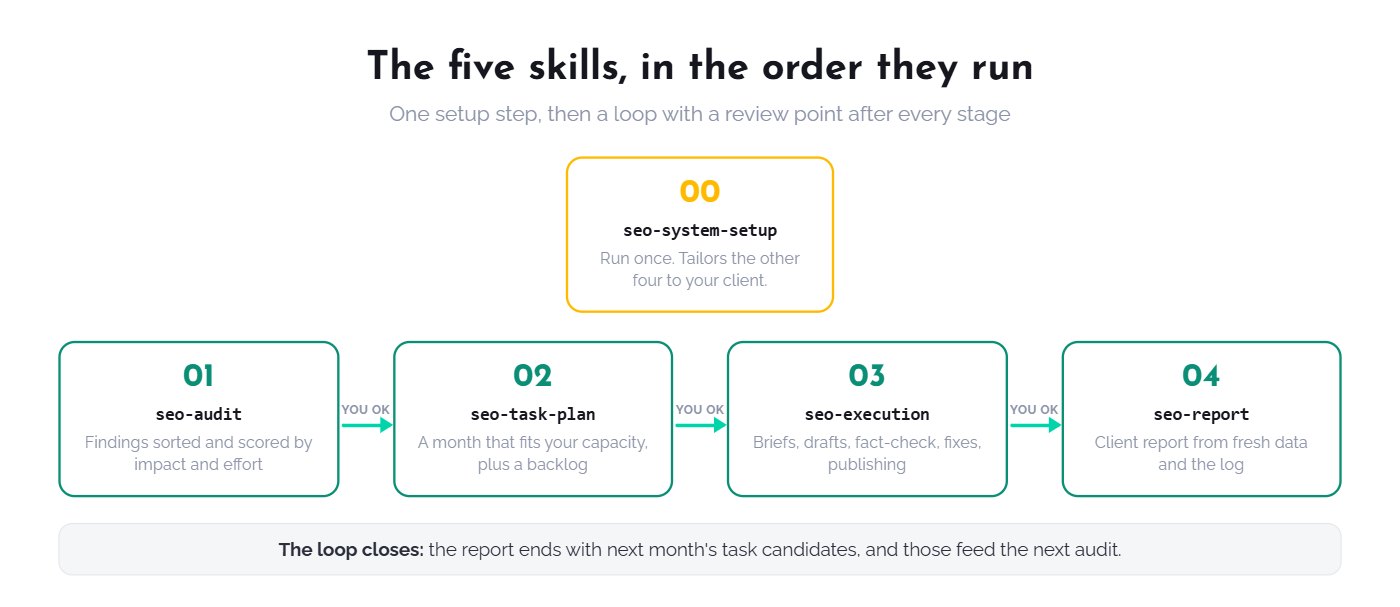
- seo-system-setup interviews you about the client, niche, services and voice, then tailors the other four skills. You run it once.
- seo-audit sorts findings into quick wins, decay, content gaps and technical issues, then scores them by impact against effort.
- seo-task-plan turns the audit into a month that fits your real capacity. Anything that does not fit goes on a visible backlog.
- seo-execution handles briefs, drafts, a separate fact-check, technical fixes and publishing, with a backup before any CMS change.
- seo-report writes the client report from fresh data and the execution log.
The pack also includes an add-on, dataforseo-keyword-research, which builds a clustered keyword map from live DataForSEO data. It sits outside the loop and needs a connected account.
To see this loop on real work, read one anonymized client month in Claude Code, including what had to be corrected.
How much does Claude SEO cost?
Claude SEO costs one Claude plan plus any data you connect. Claude Pro is $20 a month, or $17 a month billed annually, and it includes Claude Code. All six skill packs in the table above are free to download, though SE Ranking’s pack needs API access from SE Ranking (affiliate link).
Market data is the variable cost. DataForSEO has no subscription and a $50 minimum top-up. My whole account came to $34.42 for the 30 days to 26 October 2026, or $17.37 without the published research, and the pricing post has the full breakdown. I checked the Claude prices on 5 November 2026.
Can content written with Claude rank on Google?
Yes, if it adds value. Google’s guidance accepts generative AI for research and structure, but says generating many pages without adding value for users may violate its scaled content abuse policy.
Google also asks for accuracy, quality and relevance in automatically generated content. That is why seo-execution runs a separate fact-check before anything is published, and why a person approves each stage.
Where does Claude go wrong on SEO work?
Claude goes wrong on SEO work when it takes tool output at face value and then explains the wrong number convincingly. Here are three errors from one client account in October 2026:
- A real alert with the wrong fix. An audit tool flagged 653 pages for hreflang errors, the largest error on the site, and the plan called it a theme fix. A live check showed the platform generates those tags and the ones that mattered were correct. I reclassified it as noise and corrected the client report.
- A count that missed the brand. A tracker matched one exact spelling of the client’s name, while ChatGPT often wrote another. Counting every spelling moved share of voice from 9.7% to 11.2%.
- A filter that did nothing. A date filter on an AI mentions pull returned the same figure for September as for October. A month-over-month change would have looked fine in a report, so I left it out.
Each one surfaced through a check outside the first tool: loading the live page, recounting the raw answers, rerunning the query with different inputs. Plan for those checks. Treat a number as unconfirmed until a second source agrees with it.
What should stay human in Claude SEO?
Strategy, price and live-page changes, client messages and factual claims should stay human. Claude can draft all of these. You approve them.
Here is an example from the same client account. The data pointed to moving a sale price onto product listings, because the discount only appeared at checkout and the listings showed full price beside marked-down competitors. The store’s team raised concerns the data could not show, so I recommended a smaller change that left prices alone. That call needed people who know the business.
How do you start with Claude SEO?
Start with one export and one question, then add structure as the work repeats.
- Export three months of Search Console data and ask Claude which pages lost clicks and why. Check its answer against the live pages.
- Save the prompt that worked as a skill, or install a pack from the table above.
- Connect market data once your questions go beyond your own site. DataForSEO (affiliate link) gives new accounts $1 of trial credit, which covers the five test prompts in my setup guide.
- Write every correction into the skill, so the same mistake does not come back next month.
If you run SEO for clients, the free starter skill pack gives you the month as a loop, ready to tailor. More guides on this stack are in the DataForSEO + Claude hub.