You can analyze backlinks without an Ahrefs subscription by calling the DataForSEO Backlinks API from Claude. I ran a full analysis on a client site on 13 November 2026: summary, referring domains, anchors, broken links, 12 months of new and lost links, and a competitor gap. It took 9 calls and cost about $0.23 at list rates. The most useful result came from checking the numbers. The 221 “broken backlinks” in the summary came down to one page worth redirecting.
Disclosure: links to DataForSEO in this post are affiliate links. If you sign up through them, I may earn a commission on every successful sale, at no extra cost to you. The client is the same anonymized ecommerce brand from my SEO audit post, so names and markets are left out.
Which DataForSEO endpoints do you need for backlink analysis?
Six Backlinks API endpoints cover a standard backlink analysis: summary, referring domains, anchors, backlinks, new and lost, and domain intersection. Each answers one question.
| Endpoint | Question it answers | Calls in this run |
|---|---|---|
| Summary | How big is the link profile, and how much of it is broken? | 1 |
| Referring domains | Which sites link to us, and how concentrated is that? | 1 |
| Anchors | What text do those links use? | 1 |
| Backlinks, filtered to broken | Which links point at pages that fail? | 2 |
| New and lost, over time | Are we gaining or losing linking sites? | 1 |
| Domain intersection | Which sites link to competitors but not to us? | 3 |
The 9 calls returned 525 rows. DataForSEO (affiliate link) charges $0.024 per task plus $0.000036 per row at its 27 October 2026 list rates, which puts this run at about $0.23. Your usage statistics show the actual charge.
How does the cost compare with Ahrefs and Semrush?
DataForSEO charges per call, while Ahrefs and Semrush charge a monthly subscription. For occasional analysis, per-call pricing costs far less. For daily work in a dashboard, a subscription can make more sense.
| Option | Price | What you get |
|---|---|---|
| DataForSEO Backlinks API | $0.024 per task + $0.000036 per row | Raw data through the API or MCP server, no interface |
| Ahrefs Lite | $129 a month | Site Explorer and a full interface. The pricing page lists API and MCP access. |
| Semrush API | Not shown publicly | An add-on to the Business tier, bought in unit packages. Semrush lists backlink rows at 40 units each. |
I checked these pricing pages on 13 November 2026. Each company crawls the web with its own index, so their backlink counts for the same site will differ. Compare trends within one tool, not totals across tools.
What did the client’s backlink profile look like?
The client had 2,043 backlinks from 568 referring domains, or 437 main domains once subdomains were merged. A few sites held a large share of the total.
- Concentration. The top 10 referring domains held 47% of all backlinks, so a handful of sites shape the profile.
- Link type. 89 of the top 100 referring domains had at least one dofollow link.
- Anchors. Among the top 50 anchors, 29% used the brand name, 23% used a bare URL and 24% described the product. Empty anchors made up 8%, and they carried a large share of the broken links.
- Site types. General blogs made up the largest group in the top 100. Niche sites in the client’s category, deal sites and directories made up smaller groups, and there was no press coverage among them.
The endpoints also disagreed with each other. The summary reported 568 referring domains, while the referring domains endpoint returned a total of 437, matching the main domain count. Check which definition each number uses before putting it in a report.
Were the broken backlinks worth fixing?
Almost none were. The summary flagged 221 broken backlinks, and checking them left one page that needed a redirect.
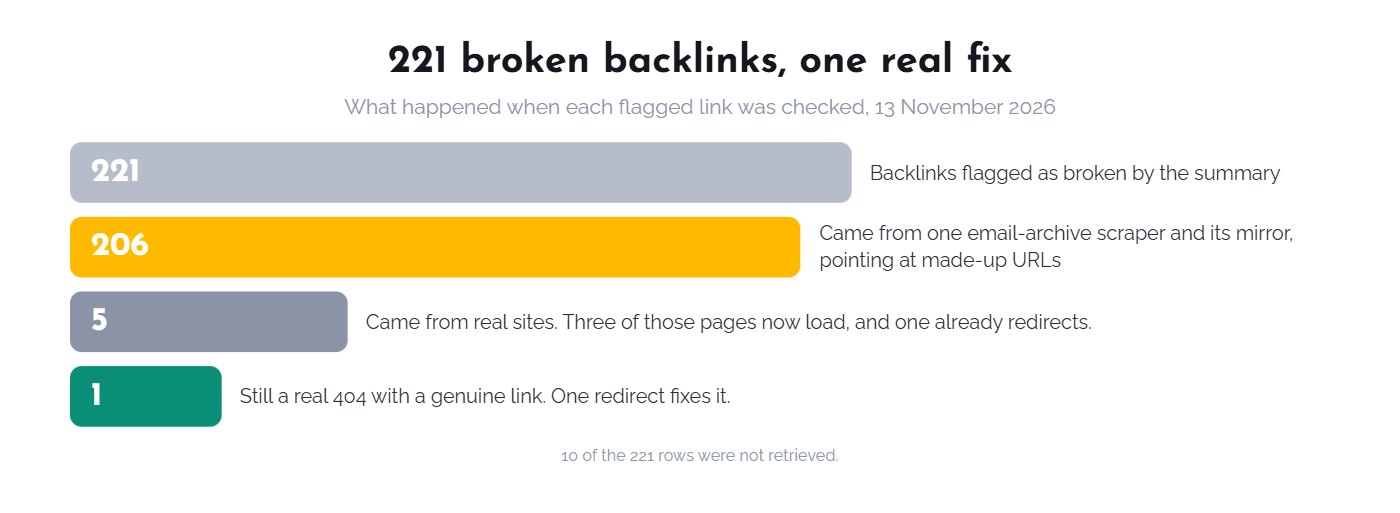
Of the 211 rows retrieved, 206 came from one email-archive scraper and a copy of it on an IP address. It adds digits to the end of real URLs, so it links to pages that never existed, such as a product URL with a “0” on the end. Some of those links were also logged as broken because the site sent the crawler a rate-limit reply. Only five broken links came from real sites. Three of those pages now load, one already redirects, and one blog post still returns a 404. That one gets a redirect.
I had already listed “221 broken backlinks” as a finding in my SEO audit post, and I have corrected it there. A broken link count is a reason to look, not a task list.
What can new and lost links tell you?
New and lost links show whether a profile is growing, but only if you count sites, not subdomains. Counted by referring domain, this client grew. Counted by site, it shrank.
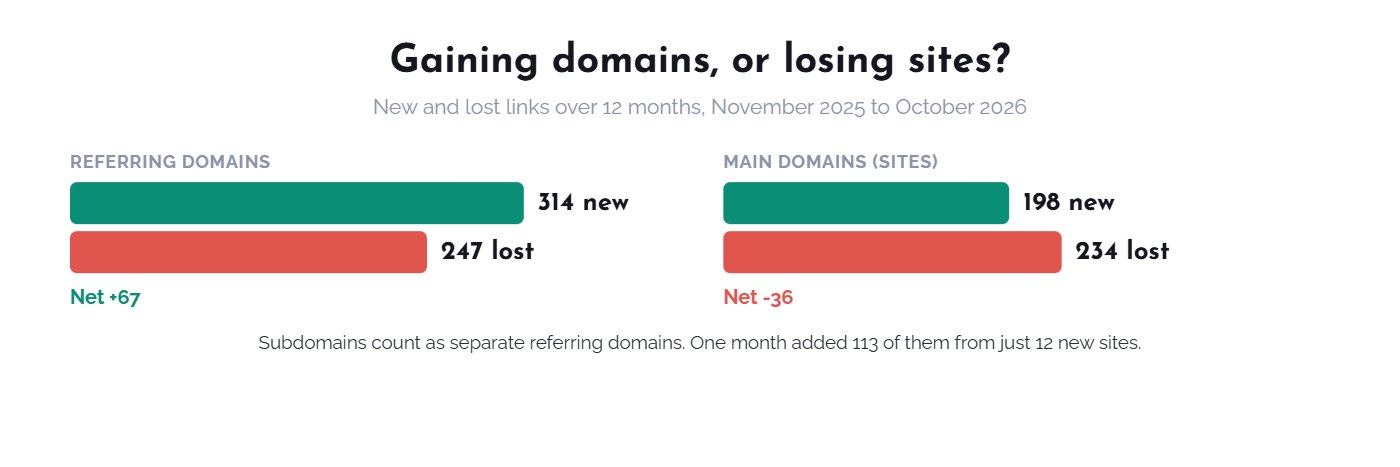
From November 2025 to October 2026, the client gained 314 referring domains and lost 247, a net gain of 67. Counted by main domain, it gained 198 sites and lost 234, a net loss of 36. Lost links outnumbered new ones in 7 of the 12 months. The best-looking month added 113 referring domains but only 12 new sites, because subdomains count separately.
How do you find link prospects from competitors?
Domain intersection lists sites that link to your competitors but not to you. Expect to discard most of the list, because automated directories make up a large part of it.
The endpoint returns only sites linking to every target in a call, so I ran three pairs of competitors. That gave 101 unique sites, and 33 of them linked to all three competitors. Reading the names, 64 looked like auto-generated directories or spam. About 17 were blogs, news or review sites worth a closer look. That shorter list is the real outreach pool, and each site still needs a visit before anyone writes an email.
Should you disavow toxic backlinks?
Most sites should not. Google says “most sites will not need to use this tool” in its disavow guidance, because it can usually judge which links to trust on its own.
DataForSEO reports a spam score, and this client’s backlink spam score was 13. I treat it as a prompt to read the linking sites, not as a list to disavow. If you built paid or manipulative links yourself, or received a manual action, that changes the decision.
How do you run a backlink analysis in Claude?
Connect DataForSEO, ask for the six pulls, then make Claude verify the findings before acting on them. The checks take longer than the pulls, and they are where the value is.
- Connect the data. Follow my DataForSEO MCP setup guide.
- Pull the profile. Try: “Get the backlinks summary, top 100 referring domains and top 50 anchors for [domain]. Count sites as main domains.”
- Check the broken links. Try: “List backlinks to broken pages, grouped by target URL and linking site. Check each target’s current status and tell me which links come from real sites.”
- Read the trend. Try: “Show new and lost referring domains and main domains by month for the last 12 months.”
- Build a prospect list. Try: “Find sites linking to [competitor A] and [competitor B] but not to [domain]. Drop directories and spam, and list the rest by site type.”
My free Claude SEO skill pack uses domain intersection for outreach tasks inside a client month, with a manual review before any site is used. If you need the data, open a DataForSEO account (affiliate link). More guides are in the DataForSEO + Claude hub, including what 30 days of real use cost.