
Category: Blogging

Blogging is a crucial part of an online business’s success. To target the right audience to your products and services, you need to attract them with content that answers to their needs and concerns.

If you want to receive the best and exclusive content straight to your inbox, do your online business a favor by signing up to my newsletter.

  • How to Write a Good Blog Post that Search Engines and Your Audience Loves

    How to Write a Good Blog Post that Search Engines and Your Audience Loves

    Writing blog posts is never just about the writing process. Quote me on that!

    They are other things you must do before and after writing it to ensure that your audience gets to read it, if you targeted the right audience, that is!

    By I’m getting way ahead of myself. Let’s start from the very beginning, which is what this post will be about:

    • Learn how to research article topics for your new blog.
    • Prepare how you plan to write the blog post.
    • Write the most successful blog post possible (wild that it’s the third topic about how to write a blog post, but there’s a reason for this—read on to find out why)
    • Edit your post before publishing it on your own blog.
    • Promoting your blog post to maximize reach

    These points are simple enough to understand but tricky to execute. Let’s begin with the first:

    Blog Research

    Knowing where to write your blog post enables you to produce the best content.

    And since not all blogs are the same, you need to profile each first to help you better understand the blog. This is important if you’re juggling different blogs you own or work for clients.

    Below are steps you must include in your blog research process.

    Determine the Blog’s Niche

    We can categorize niches into two categories: blogs targeting customers (B2C) and those targeting businesses (B2B).

    You’ll most likely be working on B2B blogs for clients. Examples of these blogs target big companies looking for enterprise solutions.

    Unlike B2B blogs, B2C blogs are geared toward individuals that meet the company’s buyer persona. Niche sites promoting Amazon products are perfect examples of this blog type.

    However, what truly matters is the niche of the blog you’re working on.

    A niche requires specific knowledge from a writer to produce content guaranteed to satisfy their audience. Some niches like finance and medicine have a higher barrier to entry to create good content.

    While they may pay more for their content, they are much more demanding concerning their quality

    Other niches are much easier to write about due to their practical nature.

    For example, while having accreditation as a fitness instructor helps with blogging, you don’t need one. You can draw from your experience as a fitness enthusiast to produce valuable content that resonates with readers.

    If you’re unfamiliar with your client’s blog or site’s niche, you need to brush up on your knowledge of who the brand caters to.

    To do this, use a tool like Ubersuggest that identifies the top-ranking pages of a domain.

    From the site, enter the domain URL and see the other information about the site, such as traffic estimates, keyword opportunities, and others.
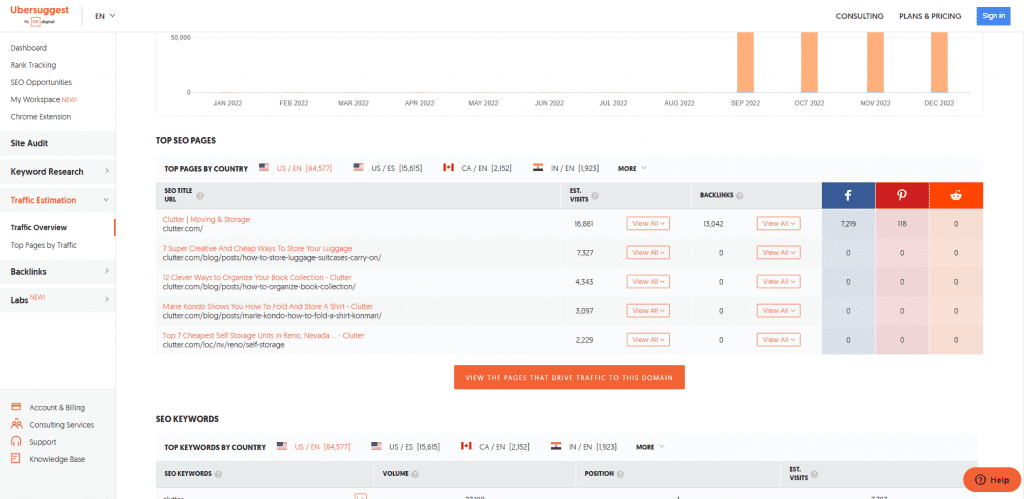
    In the example above, the pages driving the most organic website traffic target informational keywords. They are helping customers in the B2C space by covering moving and storage topics.

    From here, you must orient yourself to writing for the B2C space about similar topics as its top-ranking pages.

    At the same time, you’ll know your style and approach when writing your blog post.

    While there are arguably better tools than Ubersuggest, its free account lets you get a snapshot of a website faster than any tool out there.

    Know Its Goals

    A blog is a marketing tool that eases your audience down your marketing funnel using your published content. Whether you use it to inform your audience about a topic or for guest blogging (yes, it still works), writing has a place in your marketing strategy.

    It is part of effective content marketing that leverages content across various platforms (including social media, email, and others) to get them to commit to your call to action.

    Since a sales funnel has various stages, you must produce quality blog posts that align with the stage in the sales funnel the blog is in.

    For some businesses, blogging is in the ToFu (top of the funnel). That means people in this stage aren’t aware that the business exists. Using your blog posts, you educate them about the business by writing helpful information designed to build trust with people.

    Examples of blog post topics in the ToFU are those that ask questions.

    You can find examples of these topics on the Google search engine results pages (SERPs). If you enter a query a generic query (“making coffee,” in this example), you can find a section on the page that lists questions people ask about it:
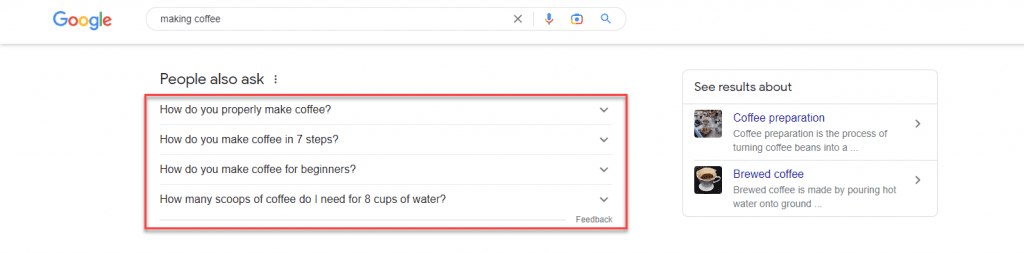
    google paa

    If you click on one of the questions in this section ( the “People Also Ask” section), it shows you the answer snippet to the question AND two additional questions related to the one you clicked.
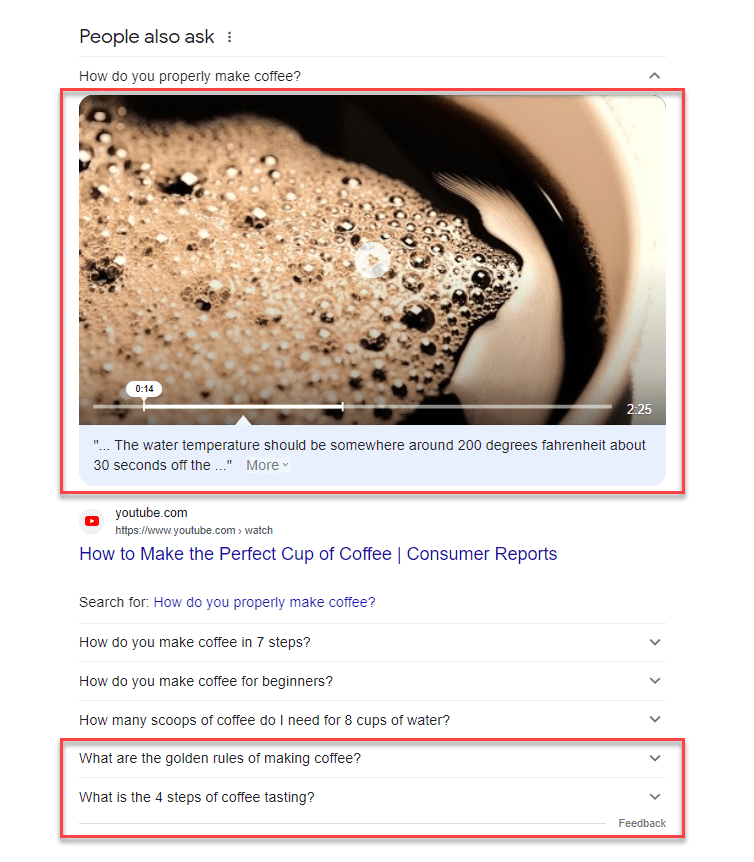
    You can use the questions here as topics for your next blog post and for the other articles you’ll be writing!

    Others use blogging at the BoFU (bottom of the funnel). People in this stage know about your products and services but are still deciding whether to purchase them from you. In this case, your blog posts must showcase your products to help them make informed purchasing choices.

    BoFu blog post content teaches its audience how to use the product or service correctly.

    Most businesses utilize blogs to cover both stages in the sales funnel. By creating blog posts that help establish their authority to your client’s audience and inform them how to use your products, you guide them to become blog visitors and, ultimately, customers.

    Hubspot is a brand that has its content marketing funnel down to a tee.

    If you’ve searched for anything related to digital marketing, there’s a big chance you’ve seen one of Hubspot’s posts ranking on top of SERPs.

    While these are ToFu posts ranking on Google, Hubspot has covered the digital marketing topic with posts on search engines.

    And once you’ve clicked on one of their pages, you will see a content upgrade dangling in front of you like a carrot tied to a fishing pole.

    In the example below, the post about target personas features a template that users can download.

    But before you can download the resource, readers must first give Hubspot their names and email addresses.

    While Hubspot uses the information to send you the template securely, it also sends you marketing emails about its products and services.

    While this sophisticated marketing approach may be above your pay grade, for now, it’s essential to understand that the content you’ll write for clients or your blog isn’t just limited to blog posts.

    In some instances, you may be assigned to create these written templates yourself.

    As a blogger, your client may assign you to write blog posts covering different topics. But if clients ask you to brainstorm for topic ideas, knowing the blog’s primary goal as a marketing tool makes determining whether to target ToFu or BoFu topics much easier for you.

    But we’ll cross the bridge when we get there. We’ll discuss the topic and keyword research later once you start writing the blog post.

    Find Its Audience

    We’ve already discussed writing for an audience to get more people to engage with your blog post. And you can only achieve this by knowing them to the fullest extent.

    To do this, you must create a buyer persona, a fictional persona based on your ideal customer. You should be able to develop a persona based on market research and the data you have on your existing customer base.

    Your personal should include the following:

    • Demographics
    • Behavioral patterns
    • Motivations
    • Goals

    You can write a blog with detailed buyer personas that cater directly to their needs.

    For example, take a look at Sharable for Hire’s blog. As a company specializing in employee background checks, they know their customers are businesses looking for a more direct recruitment and hiring process.

    Their blog covers topics from finding the best candidates to retaining them.

    Knowing your audience’s demographics helps you determine how to present your content.

    If you have access to the blog’s Google Analytics, you can access your audience’s demographics. Check where most of your visitors are coming from, what devices and browsers they use, and other information to help build your buyer persona.
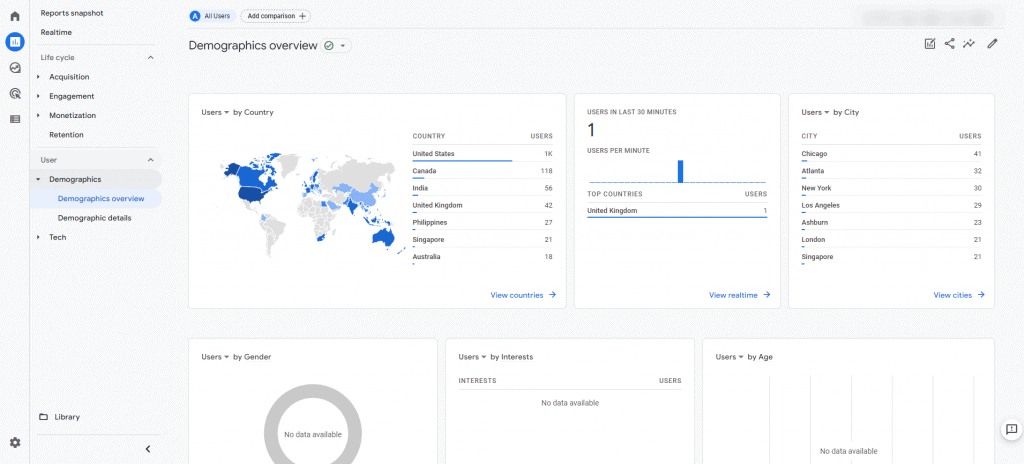
    For those using Google Analytics 4, you can click on Reports > Users > Demographics > Demographics overview. It shows you a snapshot of your visitor’s demographics based on location, interests, devices used, and more.

    From here, you can use this information to help you write your posts moving forward. If most of your visitors are from the US, you need to brush up on your knowledge of US culture and language. This way, you can develop a writing style that resonates with them.

    If the blog is new, it probably doesn’t have enough visitors for you to see its demographics. In this case, it’s best to ask the blog owner who they want to target with their blog.

    Find Your Voice

    Your buyer persona will impact your brand voice, the tone, and the style in which you write the blogs that allow you to appeal to your audience.

    You do this in your everyday life when talking to different people. For example, when talking to your grandma, you have a different voice than your friends. Based on the information in your buyer persona, you’ll need to determine whether your voice is:

    • Formal
    • Funny
    • Casual
    • Authoritative

    Essentially, you’ll need to determine if you want to sound like a knowledgeable and helpful friend or an authority.

    However, you should never take on a voice that might seem false. For example, you shouldn’t be formal like another brand. Instead, you can be a standard version of your existing brand. 

    One of the better examples of writers who has a good grasp of their writing skills is Neville Medhora.

    He’s a former copywriter for Appsumo and owns the Copywriting Course.

    Even if you aren’t a member of his course yet, his blog posts give you a taste of his distinct writing voice.

    Case in point, his “How To Become A Life Coach” LinkedIn post:

    The post is quite obnoxious-It could even rub off people the wrong way,

    However, he uses these qualities in his writing to great effect. He’s able to communicate his ideas more effectively to his audience by harnessing his humor and writing voice.

    Overall, the audience wants the blog to be authentic and unique rather than something generic.

    You don’t want to sound just like any other writer out there. So, by drawing from your wealth of experience intertwined with your personality and sincerity, you can cut through the noise and produce content the way you’re meant to.

    Blog Content Research and Planning

    The easiest way to waste time and hard work are to commit to writing a post before you know how valuable it will be.

    Brainstorm for Topics

    If your client provides you with blog topics to write, feel free to skip this post.

    However, I suggest you at least browse through it—you’ll never know if the client wants input on which topics to write about.

    Knowing your blog’s niche lets you narrow the scope of topics to suggest. But the goal here is to provide topics the blog hasn’t covered.

    There are many ways to brainstorm for topics, but below is what I find the most effective.

    To see what these topics are, head on to Google search and type the following:

    site:[blog URL]

    Replace [blog URL] with the blog’s address.

    This search operator will show you published blog posts on the blog indexed by Google.
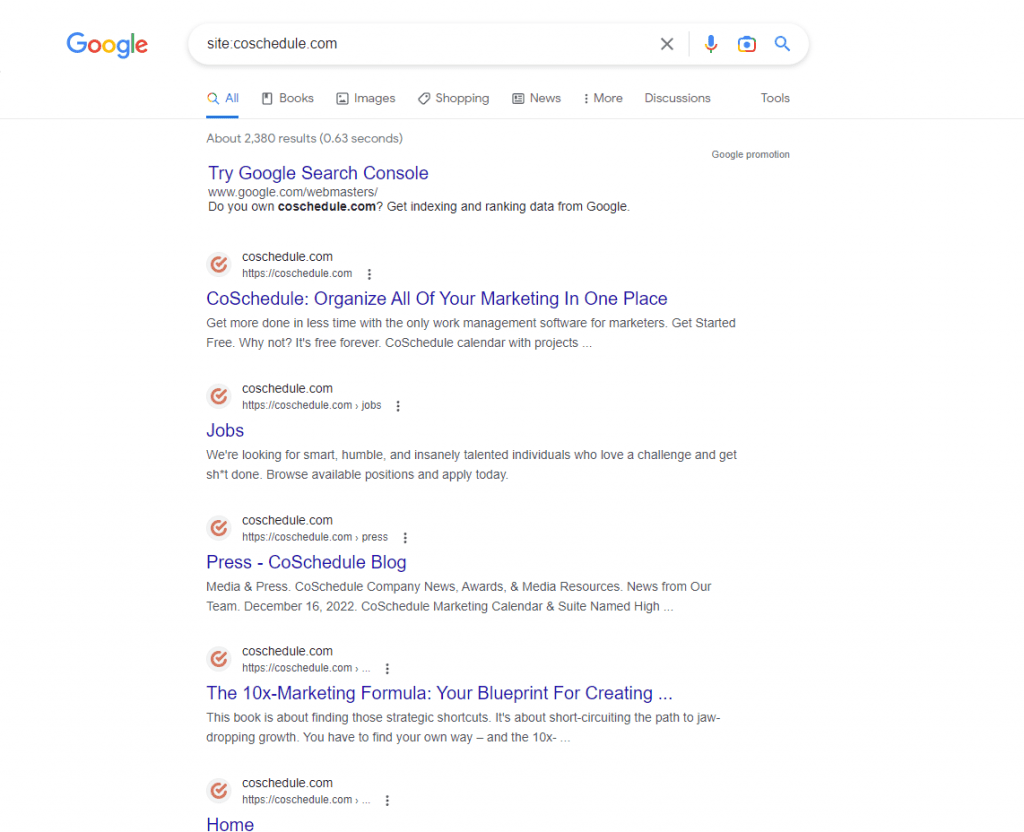
    From here, visit each page and look for external or outbound links, i.e., links that point away from the site.

    If there are external links on the blog posts, it’s probably because the blog doesn’t have a published article about that topic yet.

    That’s already a potential topic you can suggest to your client!

    You can do this on all the blog’s indexed posts to unearth more blog post ideas.

    The logic of suggesting these topics is that the blog owner can link to this post instead of from a third-party site. This way, the blog gets to keep its link equity, which is what search engines use to determine a site’s authority.

    The more outbound links your blog has, the more “authority” escapes from it, and the less likely it’ll rank for its target keywords.

    Creating content for these topics incentivizes the blog to sustain its link equity for higher rankings on Google.

    Do Keyword Research

    Once you have a batch of topics o write about, you must perform keyword research for every potential post you brainstorm.

    The goal is to maximize your blog post’s visibility on search results. You want to target keywords that most of your audience searches for and have the least competition.

    For this, you’d need a tool to show you a search term’s estimated monthly search volume.

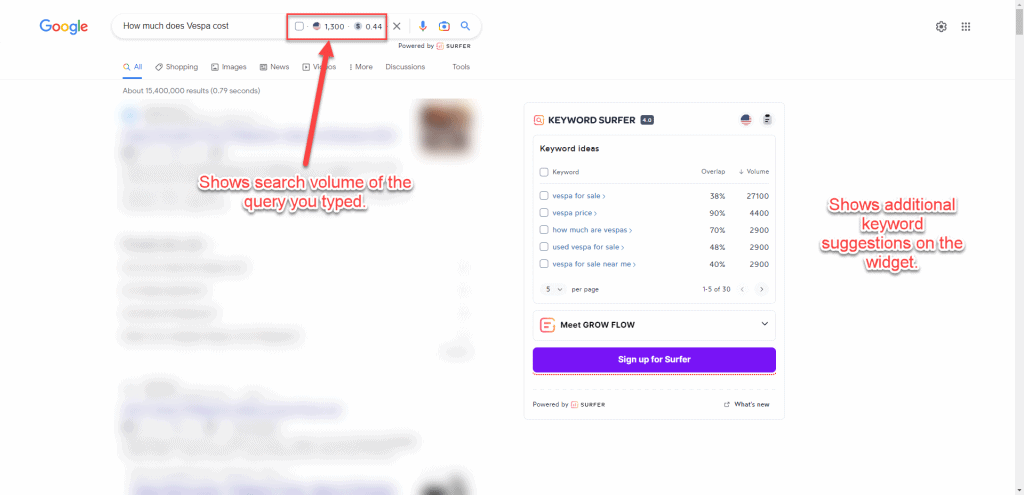
    Personally, the most accessible keyword tool to use for free is Keyword Surfer.

    It’s a Chrome extension created by Surfer SEO to help you identify the search volume of each term on SERP.

    After installing and activating the extension, type the topic on the Google search bar.

    On the search engine results page (SERPs), a sidebar will appear showing you keyword suggestions related to the topic, the search volume of each, and its relevancy.
    From the results, you can also see the estimated volume of traffic the blog domain receives, the number of words on the page, and the number of times the search query was mentioned.
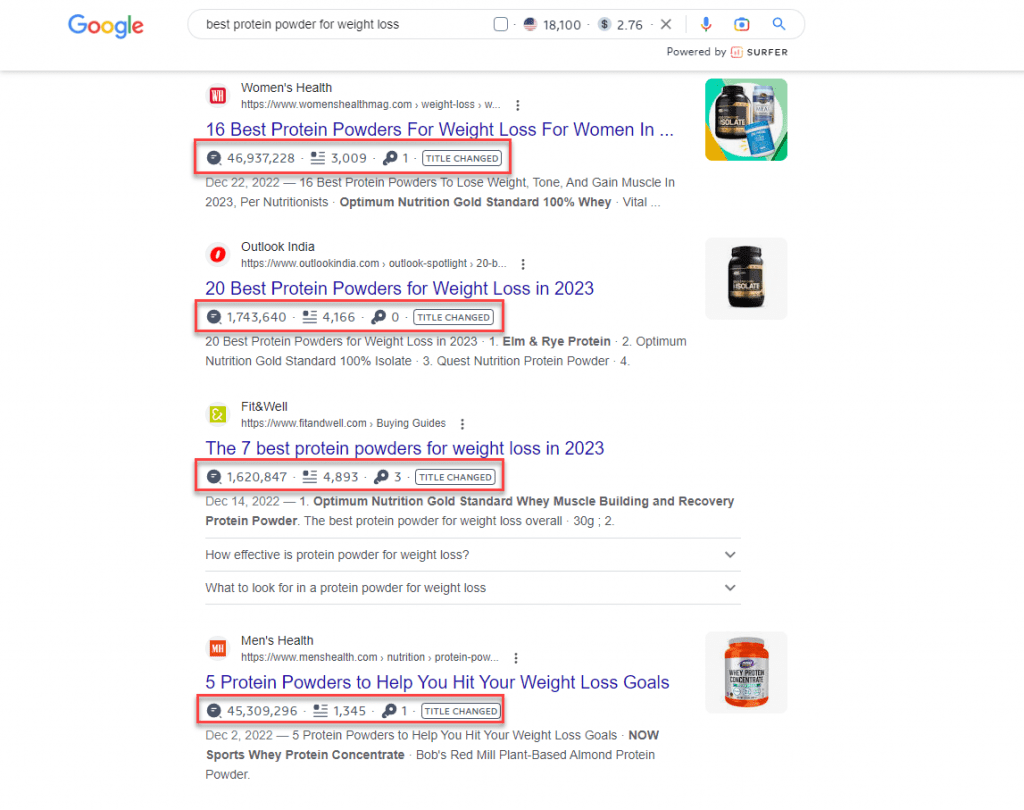
    Based on these factors, you can choose the appropriate keyword to target for your blog content.

    However, you shouldn’t always target keywords with the highest search volume for your content. You also must take into consideration the difficulty of ranking for them.

    Keyword difficulty is a score assigned by premium keyword tools to determine the likelihood of ranking your content on top of search results.

    The lower the score (on a scale of 0-100, 0 being the lowest), the higher your post’s chances of ranking for it.
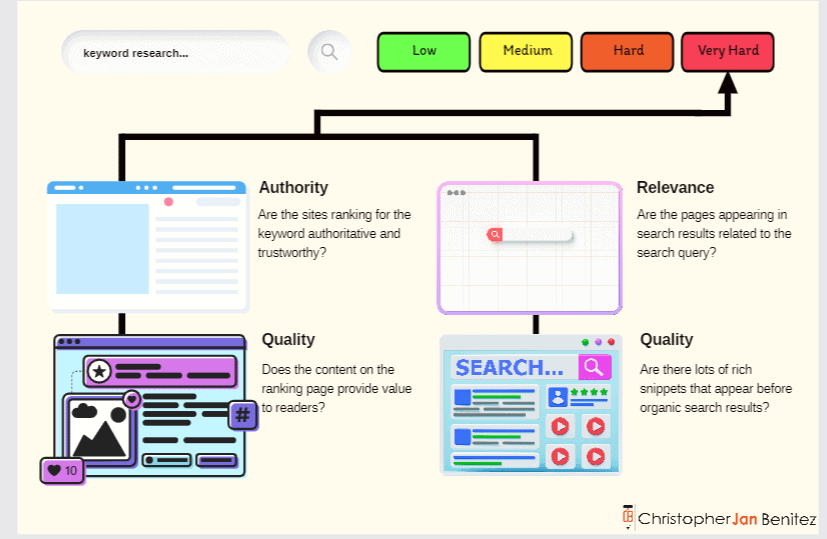
    This metric isn’t available on free keyword research tools, and those that do offer it have limitations or don’t provide accurate data. So you’ll have to resort to using a paid tool like KWFinder.

    It has a reliable keyword difficulty score that you can factor in when deciding which keyword to target for your blog post’s topic.
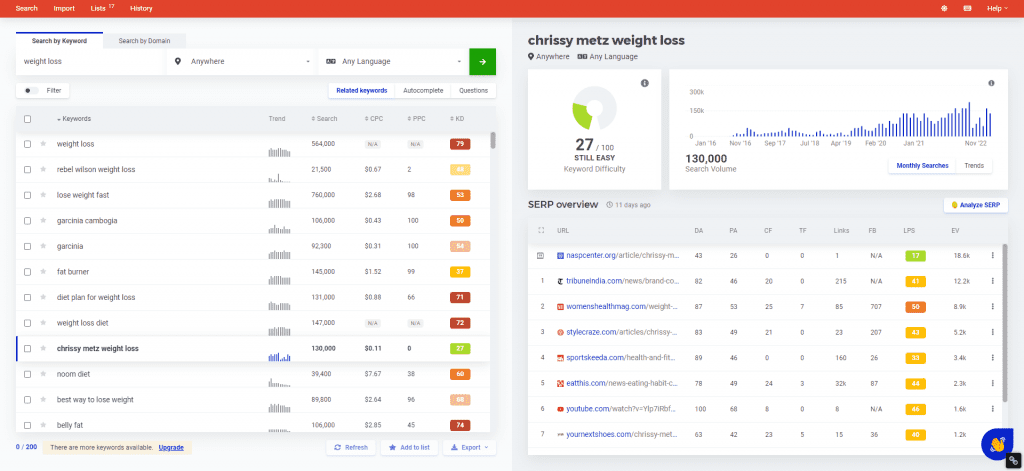
    You can also conduct competitive keyword research using the tool. Enter the domain URL of a competitor or a site that covers the same topics as your blog. KWFinder will show you keywords the site is ranking for, which you can use as topics for your upcoming posts.
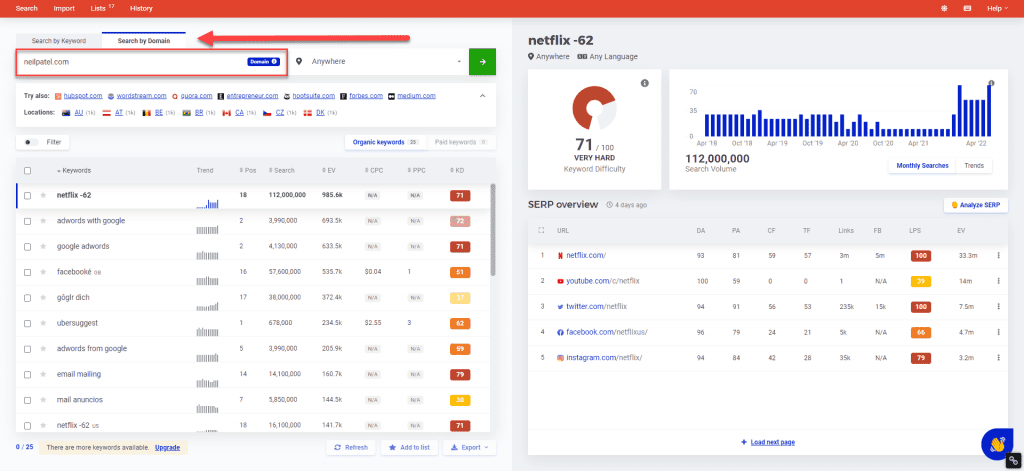
    But before using these keywords, ensure that your blog hasn’t covered them yet.

    Determine Intent

    Now that you’ve determined the keywords for your blog posts, it’s time to figure out the intent for each.

    Back then, when Brian Dean’s “Skyscraper Technique” was in full force, publishers were writing exhaustive pieces about the topic. They cover the full spectrum of a topic and reach at least 4,000 words each.

    This is what worked then because Google ranked these pages like crazy.

    However, the search engine’s algorithm constantly changes, and it’s decided that intent is more important.

    For example, if people search for “social media tactics,” the assumption here is they want to know the best social media techniques for building an audience on various channels.

    They don’t want to know the history of social media, its different channels, or who the best people to follow on social media are. It’s because these topics are not implicit in the keyword’s intent.

    So, by determining why the user typed in their search query, you can figure out what to write in your blog post to provide them with the necessary information.

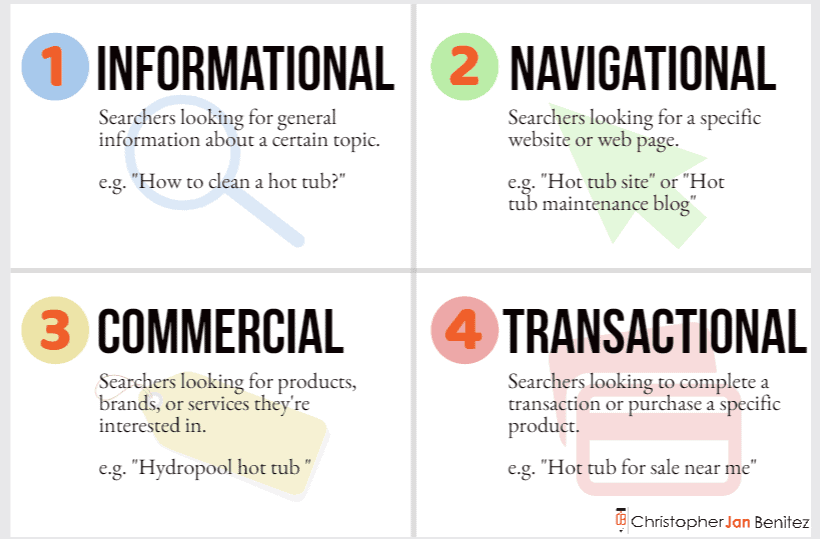
    There are three user intents you must know:

    • Navigational – Looking for a specific company or brand website page.
    • Informational – Looking for answers to questions about a site’s topic or niche.
    • Commercial/Transactional – Looking to make a purchase or information that will help them make a purchasing decision.
    keyword intent - how to write a good blog post

    In some cases, the intent is evident in the keyword.

    If the search query begins with any of the four W’s (what, why, when, where) or 1 H (how), its intent is informational.

    But a question query can have a commercial intent if it involves pricing, ex. How much is x, and what is the price of x. Since users want to know the price of a product, there’s a good chance they’re interested in making a purchase.

    So, instead of guessing, you must determine for sure what intent your topic has.

    To help you find the intent of a keyword, go to Google and type the keyword on the search bar. Then see the top pages appearing on search results.

    If most pages answer a question or problem, then the keyword likely has an informational intent.

    But if the results are reviews, alternatives, or comparisons to other products and services (all of which are helping users make a purchasing decision), the keyword has a commercial intent.

    Doing the above process takes time, however. So, a faster way to determine user intent is to use a tool like SEMrush that shows you the intent of a keyword and its related terms.
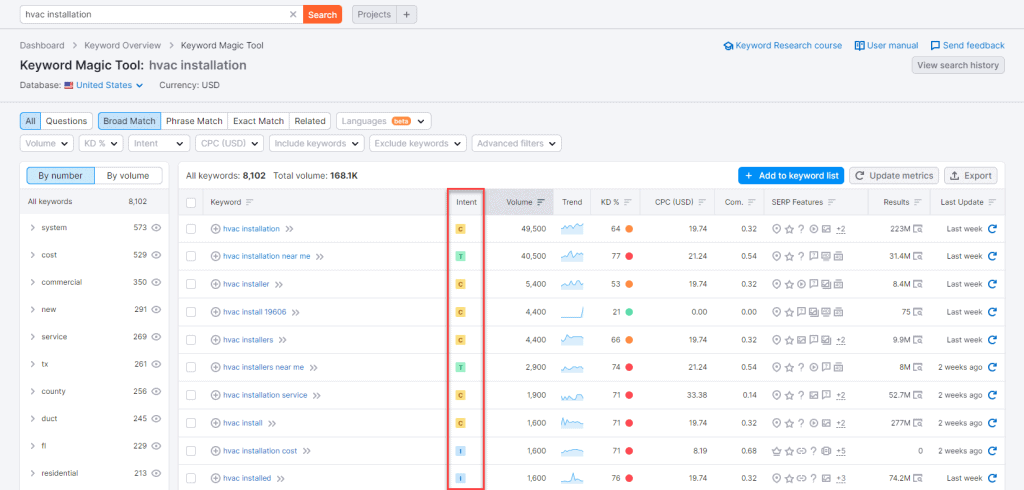
    While it’s best to manually check for the posts to determine intent, using tools helps expedite the process and improve your writing workflow.

    Write Your Outline

    Outlining is one of the unsung heroes of content writing. You can’t create good content if you don’t have a structure before writing it.

    You’ll find yourself going back and forth between writing and researching and back, which makes the process much longer for you.

    To hasten the process, you must write outlines before creating the content.

    The article should contain the talking points and research materials you must mention. This way, you have everything you need to write the article so you can focus all your energies on it.

    You can do this manually by taking the top-ranking pages and analyzing their h2s. We want to take the most relevant and standard h2 these posts have and include it in ours.

    To help you with this process, use the Detailed SEO Chrome extension. Click on it from your extensions when you’re on the page you want to analyze.

    Do this on all your top-ranking competitors and compare which headers they share the most.

    The goal is to incorporate these headers in your content to make it familiar enough for search engines to rank your page higher than before.

    Pick which h2 and other subheadings work best with your writing piece. Include bullet points for each subheading that you’ll flesh out once you start writing.

    Aside from doing this manually, you can use Contentpace to help you drag and drop subheadings that you want to add to your article.

    It’s a content writing research tool that helps you pull out headers (H1, H2, etc.) of each ranking page.

    From here, you can drag and drop the headlines you wish to include in your article.
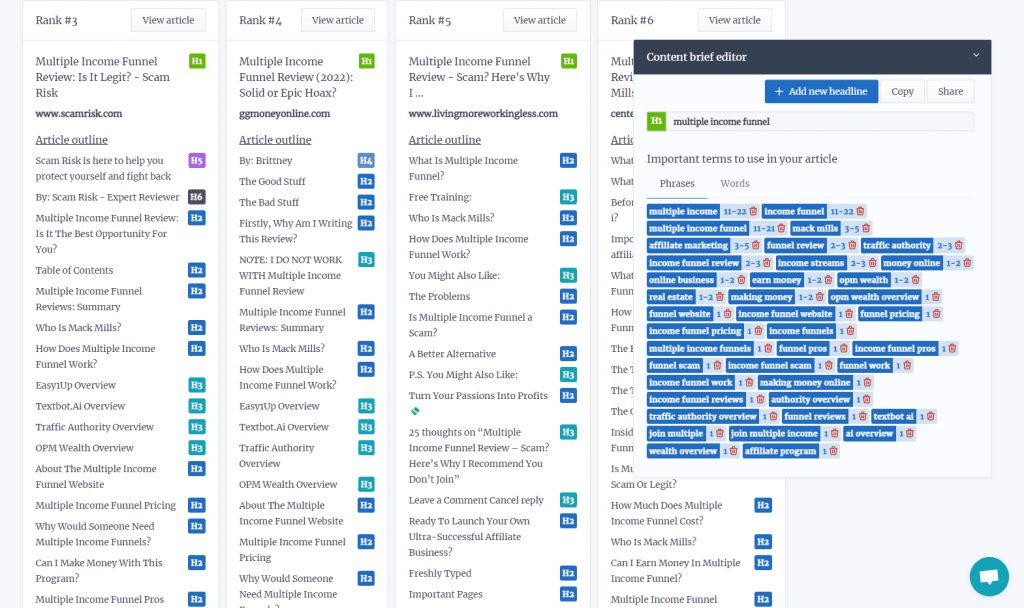
    Then add notes on the outline to help you keep tabs on what you’ll write once you start with the article.

    Contentpace also shows you averages of the top-ranking pages for your keyword.
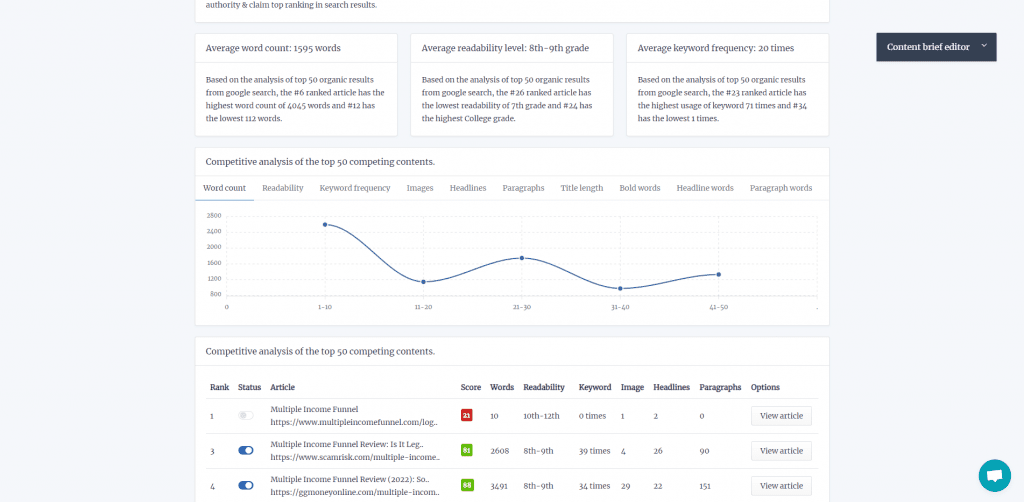
    This helps you write a certain number of words in your article, readability score, and keyword frequency to match those appearing on SERPs’ first page.

    Split your post over three days

    After conducting blog research, you can break down the following tasks into these steps:

    • Research
    • Writing
    • Editing

    You can split these tasks into three days across all the articles you need to write in a period. This is a method I learned about on Buffer’s blog, and it’s served me well ever since.

    Considering that all posts will take at least three days, make up for it by working on three daily posts.

    • Day 1 – research information for the first article, edit the second article and begin writing the third article.
    • Day 2 – Write the first article, research information for the fourth article, and edit the third article.
    • Day 3 – edit the first article, begin writing the fourth article, and research information for the fifth article.

    Writing articles this way allows you to compartmentalize articles into digestible tasks that you can complete in increments.

    Writing takes a different mindset to research; anything you learn will need to sit in your head for a while to be processed to make any decent points.

    That’s why you must research first and get all the information you need to write the content much faster and more efficiently using your skills or various tools.

    I’m not saying that you shouldn’t write anything during research—make notes and record valuable sources you can link back to or quote.

    But don’t attempt to write any of the actual text. If you do, you’ll find yourself flip-flopping between researching and writing, and those three hours will be up before you finish the first draft.

    Similarly, never edit a post while you write it. Again, doing so shatters any flow to your writing to the point where you’ll lose focus and inevitably struggle to keep up the pace.

    By splitting up your writing flow this way, you’re allowing your mind to all three processes to write better and get some distance to edit effectively.

    Predict How Long You’ll Complete Each Task

    Knowing how long to spend on the various parts of writing a great blog post was difficult at first. It’s different for everyone and from post to post.

    In general, however, you want to limit yourself to spending an hour each researching and editing your content.

    This puts more of a concrete limit on how much time you have for a given task, which helps you to focus and make every second count.

    If you know that you only have one hour to research everything you need to know to make your blog post as good as it can be, you’re inherently less likely to stray off on tangents on the off chance that you’ll find an interesting tidbit.

    Writing a blog post varies depending on the topic’s word count and complexity. I see myself spending more than two hours writing a 1,000-word blog post.

    Remember, the goal here isn’t to be as fast as possible. Spending more than two hours (or even less) writing the post is okay.

    It’s to produce good content in short bursts consistently. Having concrete deadlines for each part of the writing process allows you to do that.

    Blog Content Writing

    Now we’re into the writing tips themselves.

    At this point, writing should now be a breeze—you have researched everything to ensure that your piece will have all the information it needs to provide value to readers.

    It’s just a matter of putting everything together in a cohesive, well-thought-out, and well-written piece.

    Here’s an infographic of the things you must keep in mind when writing your blog post:
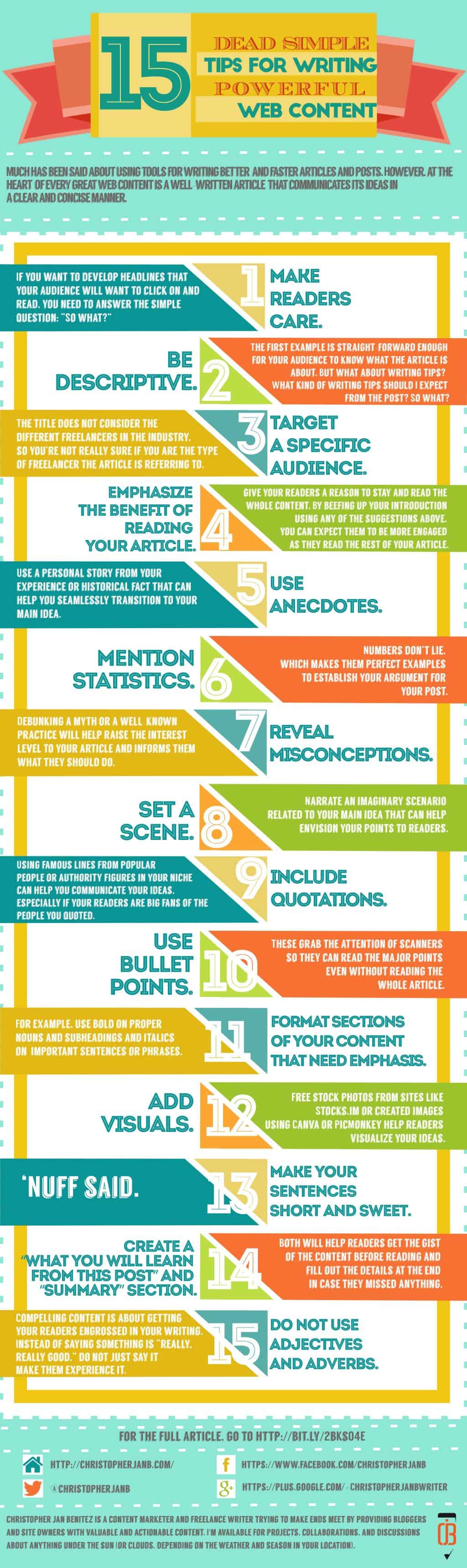
    15 Dead Simple Tips for Writing Powerful Web Content 1

    Now, let’s discuss each one below:

    Compelling headlines

    The headline is the first thing your audience will see in your post, whether it’s shared on social media or appears on search results.

    Regardless, you want your headlines to be solid and robust enough so that people will be compelled to click on them.

    Below are ways you can do this:

    Make readers interested

    If you want to develop a post title that your audience will want to click on and read, you need to answer the simple question:

    “So what?”

    Consider the following examples as blog titles:

    • Writing Tips for Freelancers
    • 8 Easy Writing Tips that Freelance Ought to Follow
    • 8 Easy Freelance Writing Tips That Will Keep Your Clients Happy

    Which one is the most effective among the three listed above?

    Be descriptive

    The first example is straightforward enough for your audience to know the article.

    But what about writing tips?  What kind of writing tips should I expect from the post? So what?

    If you’re having problems fleshing out details in your content, there are blogging tools that can help you get the job done.

    Emphasize the benefit of reading your article

    The third example is not only descriptive, but it also tells what kind of freelancers the article is for. If you are having trouble retaining your clients, the tips will help you solve this problem.

    You can read the article by clicking here!

    Use intro sections as hook, line, and sinker

    15 Dead Simple Tips for Writing Powerful Web Content 4
    Just like fishing for sport, you need to prepare your best writing techniques to draw readers’ attention to your content.

    Your introductory paragraph is a way to draw your readers to your article. Writing a weak one will force them to stop reading. Therefore, give your readers a reason to stay and read the whole content.

    By beefing up your introduction using any of the suggestions above, you can expect them to be more engaged as they read the rest of your article.

    Use Intro Frameworks

    Taking a cue from this post at Bid4papers, below are ways that you can write an exciting introduction to your article:

    Tip # 5: Use anecdotes. Use a personal story from your experience or historical fact that can help you seamlessly transition to your main idea.

    Tip # 6: Mention statistics. Numbers don’t lie, which makes them perfect examples to establish your argument for your post.

    Tip # 7: Reveal misconceptions. Debunking a myth or a well-known practice will help raise your article’s interest level and inform them what they should do.

    Tip # 8: Set a scene.  Narrate an imaginary scenario related to your main idea that can help envision your points to readers.

    Tip # 9: Include quotations. Using famous lines from popular people or authority figures in your niche can help you communicate your ideas, especially if your readers are big fans of the people you quoted.

    Make it easy to understand your point

    15 Dead Simple Tips for Writing Powerful Web Content 5
    To honestly write effective and powerful web content, take the chore out of reading.

    The Nielsen Norman Group reported that users don’t read content on the web. Instead, they scan for keywords and phrases that grab their attention.

    Instead of bloating your article with more words, you need to…

    Simplify your content so readers will quickly scan the words they are looking for in your articles.

    “How,” you ask? Simple:

    Tip # 10: Use bullet points. These grab the attention of scanners, so they can read the major points even without reading the whole article.

    Tip # 11: Format sections of your content that need emphasis. For example, use bold on proper nouns, subheadings, and italics on basic sentences or phrases.

    Tip # 12: Add visuals. Free stock photos from sites like Pixabay, Pexels, or creating images using Canva or PicMonkey help readers visualize your ideas. Depending on your audience, you may want to add visuals to your blog that enhance and make it more appealing. For example, if your blog is about how to crochet, adding images of each step can add value by showing them how it’s done instead of telling them. 

    Tip # 13: Make your sentences short and sweet. ‘Nuff said.

    Tip # 14: Create a “What You Will Learn from This Post” and “Summary” section. Both will help readers get the gist of the content before reading and fill out the details at the end in case they missed anything.

    Tip # 15: Do not use adjectives and adverbs. Compelling content is about getting your readers engrossed in your writing. Instead of saying something is “really, really good,” do not just say it – make them experience it. Describe the feeling of goodness so readers can relate to it more personally.

    Optimize, Optimize, Optimize!

    We would be remiss if we didn’t discuss search engine optimization (SEO) in content writing.

    In a nutshell, SEO is the process of getting your blog post to rank for its target keyword on organic search.

    The higher the post ranks on search engines, the more clicks it’ll get from search results.

    In the latest data from Advanced Web Ranking’s Google Organic CTR History as of November 2022, the first place receives almost 40% of clicks, while the second and third places receive 15% and 9%, respectively.

    Let’s say that the keyword you’re trying to rank for has an estimated 1,000 search volume, here’s the number of monthly clicks you’ll receive from ranking at the first three spots:

    • #1 – 400 clicks (1,000 * 0.4)
    • #2 – 150 clicks (1,000 * 0.15)
    • #3 – 90 clicks (1,000 * 0.09)

    So, to write content that ranks at the top of SERPs, you must observe the best on-page SEO tactics.

    The two things you can do as a content writer to achieve this are the following:

    • Mention your keyword on the page’s H1, SEO title, and meta description (also known as the three kings of on-page SEO)
    • Use SEO content writing tools to help you understand how optimized your content is based on various factors.

    Regarding the latter, I highly recommend Surfer SEO as your SEO content tool of choice.

    It has a very robust Content Editor that lets you optimize content for multiple keywords (up to 20). It then pulls up natural language processing (NLP) keywords you must mention in your content.

    The goal is to make the score as high as it can be. Anything above 66 shows green, which means it’s optimized enough but feel free to go beyond that number, especially if it makes your content read better.
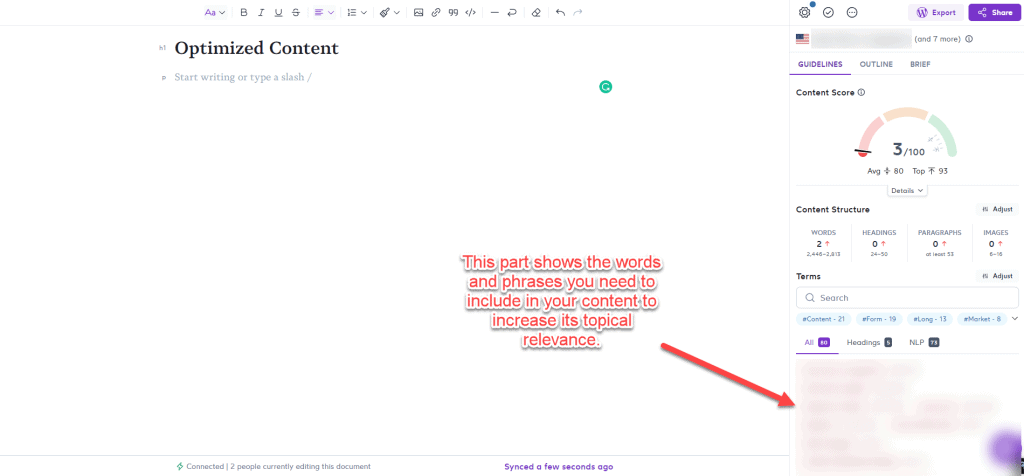
    Doing so allows you to create blog posts topically relevant to their respective keyword.

    This makes Google’s job of understanding what your content is about much easier, thus increasing your chances of ranking higher for your target queries.

    Another tool you can use is Semrush. It’s not just a content optimization tool–the platform’s an all-encompassing SEO software that can audit your site for technical issues, identify sites to build links on, and more. But for now, Surfer SEO is a good choice if you’re focusing on just your content.

    Blog Post Editing

    It doesn’t matter if you make a spelling mistake. Nobody’s pressuring you to perfect your sentences and structure on your first try. The main thing you need to do once you’ve finished researching is to sit down and write the thing from start to finish.

    Editing an entire document at once can be daunting, especially if you’re on a strict time limit and the post is hefty or about a complex topic. So, instead, split up the editing tasks and take things one chunk at a time.

    Spend five minutes going through the post and checking your spelling, then spend the following checking grammar, and so on.

    Tasks such as improving the structure of the post will take longer, but as long as you keep this editing runs to a single task each, you’ll find them much less daunting, which means you’re less likely to procrastinate.

    However, editing becomes a chore, especially if you don’t know what mistakes you’re making in your content.

    The thing about you being the editor is that even if you checked your content multiple times, you wouldn’t detect the mistakes you’ve made.

    This is because you don’t know they are mistakes in the first place!

    This is why tools like Grammarly are heaven-sent.

    It detects your content for potential errors that you must correct.

    The tool has a Chrome extension, which is perfect if you’re writing straight to the site editor, such as WordPress. It underlines the mistakes you’re making in the article as you write.

    This way, you’re writing and editing the content simultaneously. This makes your manual editing once you’re done writing much more effortless.

    It also has a Google add-on so you can check your other blog posts before sending them over to clients for uploading.

    As an added tip, I’ve also found that using a trackable editing checklist is a fantastic way to boost your efficiency in this part of the writing process.

    Blog Promotions

    After you’ve completed and proofread the blog post, it’s time to promote it to get more traffic to your website.

    After all, the post won’t promote itself!

    Also, you can establish credibility and authority if you successfully promote your content to your target audience.

    Of course, this would depend on how well-written your content is. If you shared unique and insightful ideas in the post that would establish you as an expert in your field, you could position yourself as an industry expert.

    From here, your blog post might generate comments, likes, and shares on social media. This can help you build a community of followers around your blog and increase the chances they will return to it.

    Finally, promoting your blog post can also help improve your search engine rankings, as it can generate backlinks to your blog and increase the number of people who link to your content.

    Again, you can only reap the benefits of your blog promotions strategy if you possess the writing skills for creating an authoritative and well-written piece, all of which we’ve covered above.

    That said, below are ways to help you get started with your content promotions campaign:

    content promotions

    There are also great places where you can share your post online, so try getting your bearings there first.

    How to Write a Good Blog Post: Final Words

    Writing the perfect blog post takes A LOT of work.

    It’s never about simply typing a bunch of words and making them sound good.

    At the heart of writing a great post is understanding what your readers want and optimizing it to make the page appear on top of search results for your target keywords.

    Whether you’re writing for clients or your blog, this how-to post hopefully helps you create better content for your first blog post or even your future posts. This way, you can get more clients, and attract more traffic.
  • 130+ Blogs That Accept Guest Posts in 2026 (Verified List)

    130+ Blogs That Accept Guest Posts in 2026 (Verified List)

    Looking for blogs that accept guest posts? You’re in the right place.

    I’ve compiled and manually verified 132 websites across 19 industries that actively accept guest post submissions. Every site on this list has a working “Write for Us” page with clear submission guidelines. Unlike other lists filled with dead links, this one is regularly maintained.

    New to guest posting? Start with my guest posting tutorial to learn the fundamentals before diving into this list.

    Last Updated: December 2025

    If you want to find even more opportunities beyond this list, check out my guide on how to find guest post websites the right way.

    Marketing and Digital Marketing

    Site NameGuidelines URLRequirements
    ContentWork.netWrite for UseCommerce and content strategy focus. No AI content. 1 backlink in author bio.
    StoryChiefWrite for UsContent marketing, SEO topics. 20K+ monthly readers. Submit via application form.
    Growth FolksWrite for UsMarketing, SEO, growth strategies. Email info@growthfolks.io with 2-3 topic ideas.
    Chatter Buzz MediaWrite for UsDigital marketing thought leadership pieces.
    Jose Angelo StudiosWrite for UsNo AI content. Propose 3 topic ideas before writing.
    That CompanyWrite for UsSEO, PPC, digital marketing. Detailed author bio required.
    Waseem BashirWrite for UsSaaS, B2B marketing topics. Minimum 1500 words.
    Digital Success DallasGuest Blogging1000+ words. Must pass Copyscape.

    Business and Entrepreneurship

    Site NameGuidelines URLRequirements
    Business Setup WorldwideGuest Blog SubmissionOriginal content only. Maximum 5 outbound links.
    SEO SandwitchWrite for UsSME, marketing focus. Minimum 1200 words.
    WP SwingsWrite for UsWordPress, WooCommerce, eCommerce topics.
    3vetaWrite for UsRemote work, SaaS topics. 1000+ words. 1 backlink allowed.
    Make a Living WritingGuest Post GuidelinesPAID: $150-$230 per post. Members-only submissions.
    RightPatientContent Submission GuidelinesBusiness, healthcare, IT topics accepted.

    Technology and Software

    Site NameGuidelines URLRequirements
    KatalonGuest Post GuidelinesSoftware testing, QA focus. Submit proposal first.
    FlexipleGuest Post GuidelinesSoftware dev, design, remote work. 2-7 day review time.
    RikkeisoftWrite for UsSoftware, mobile, cloud topics. 2 backlinks allowed.
    InstatusWrite for UsSaaS, DevOps, status pages. Email write@instatus.com.
    TechDogsWrite for UsTechnology news, IT industry coverage.
    Technocrats HorizonsWrite for UsWeb/app development, AI topics. 1200-2500 words.
    GeekCodeLabWrite for UsWordPress, plugins, themes. Email sales@geekcodelab.com.
    OutRight StoreWrite for UsCRM, AI, machine learning. 800+ words minimum.

    Travel

    Site NameGuidelines URLRequirements
    EvBeingTravel Write for Us1200+ words. Original images preferred.
    Nomads WorldWrite for Us200K+ monthly views. Australia/New Zealand focus.
    Trip TraditionWrite for Us1200+ words. 1 dofollow link in author bio.
    The Culinary Travel GuideGuest PostsFood travel focus. 1500+ words.
    Travel is LifeGuest Blog Guidelines5+ original images required. No republishing allowed.
    TrotterItWrite for Us800+ words. No AI-generated content.
    Know About DestinationsWrite for Us1000+ words. 2 dofollow links included.
    Travels GyaanTravel Write for UsSocial media promotion included with publication.

    Health and Wellness

    Site NameGuidelines URLRequirements
    Clinic SpotsWrite for UsHealthcare, wellness topics. 1 dofollow in author bio.
    Your Health MagazineWrite for Us1000+ words. Email content@yourhealthmedia.net.
    Healthy Jeena SikhoWrite for Us700-1500 words. 1 dofollow link.
    Healthy WritesWrite for Us1000+ words. 24-hour review time.
    TreatwiserWrite for UsHolistic health focus. 800-1500 words.
    The Wellness CornerWrite for Us1000+ words. Submit 3-5 topic ideas first.
    DocIndiaWrite for UsHealthcare, nutrition topics. Email cs@docindia.org.

    Finance and Personal Finance

    Site NameGuidelines URLRequirements
    Elite Personal FinanceWrite for UsPAID: $300 per post. 1000-3000 words.
    FangWalletWrite for UsEducational content. Max 2 links. Topic approval required.
    Finance Care GuideSubmit Guest PostMax 3 backlinks. Email peter@financecareguide.com.
    Money MentorWrite for UsPersonal finance topics. Google Docs format preferred.
    Money Journey TodayWrite for Us700-800+ words. Non-commercial content only.
    Finance Care OnlineGuest PostFinance, law topics. 1 dofollow link.

    Home Improvement and Interior Design

    Site NameGuidelines URLRequirements
    KS Realty AgentHome Improvement Write for UsHome improvement, DIY topics. Dofollow link included.
    Kyuhyung ChoWrite for Us500-1500 words. 2-5 photos required.
    Use Home TipsWrite for Us1000-10000 words. Original content only.
    Estimate Florida ConsultingWrite for Us1200+ words. 1 dofollow link.
    Hudson FarmhouseHome Improvement Write for Us600-1000 words. Email Hi@hudsonfarmhouse.com.
    SnoozyeHome Improvement Write for Us1000+ words. Must be plagiarism-free.
    Home InsideWrite for Us700+ words. Dofollow links provided.
    Shine Your Light BlogGuest PostDIY, home decor. 800-3000 words. 2-3 links allowed.

    Education and eLearning

    Site NameGuidelines URLRequirements
    ProProfs (Education)Submit Education ArticleOnline education, L&D topics. 7-day review period.
    ProProfs (eLearning)Submit eLearning ArticleeLearning, LMS, course creation.
    ProProfs (Training)Submit Training ArticleOnline training, corporate learning.
    SpheroGuest Post GuidelinesK-12 STEM education. No grammar errors tolerated.
    CYPHER LearningWrite for UseLearning industry. Email blog@cypherlearning.com.
    EmpowerlyGuest Post Program1500+ words. Google Doc format required.
    Digital Engine LandWrite for Us Education800+ words. Email info@digitalengineland.com.
    CCube AcademyWrite for UsLanguage learning focus. Submit 2-3 writing samples first.

    Career and HR

    Site NameGuidelines URLRequirements
    HR CloudBlog Guidelines1200-1500 words. No AI-generated content.
    Career ReloadWrite for Us1 link allowed in body. Must cite sources.
    HR HUBWrite for UsHR management topics. Maximum 3 links.
    iSmartRecruitWrite for UsHR, recruiting focus. 1500+ words. UK English.
    CareerBandsSubmit Guest PostEmail info@careerbands.com with pitch.
    FangWallet (HR)Write for Us HR1500+ words. 3 writing samples required.
    Jobs in SportsWrite for UsSports industry careers. SME only.

    Fitness

    Site NameGuidelines URLRequirements
    O Coach AppWrite for Us2 dofollow links. Submit via publishhub.ocoach.app.
    YR FitnessWrite for UsGym equipment focus. 100% original content.
    FitnessBWrite for Us800-1500 words. Conversational writing style.
    Anax FitnessWrite for UsWeight loss, gym wear topics. No AI content.
    Protein PackageBlog Guest PostingEmail media@proteinpackage.co.uk.
    Trainer EssentialsFitness Guest Post700-1200 words. Evidence-based content preferred.
    Fitness With NidhiWrite for UsWorkouts, nutrition, wellness topics.

    Design (Web, Graphic, UI/UX)

    Site NameGuidelines URLRequirements
    DesignModoWrite for UsWeb design tutorials. 2000+ words. High-quality visuals.
    CodevertiserWrite for UsDesign, development topics.
    Digital JeevaWrite for UsDesign, digital marketing.
    Starter StoryWrite for UsBusiness, design, entrepreneurship.
    Graphix JeevaWrite for UsGraphic design focus. 1000+ words.
    Starter JeevaWrite for UsStartup design, branding.
    Design JeevaWrite for UsInterior, graphic design.
    Super Dev ResourcesWrite for UsWeb development, design resources.
    D Tech DailyWrite for UsDesign trends, tutorials.

    Food and Recipes

    Site NameGuidelines URLRequirements
    All Group Names (Food)Write for Us800+ words. Email allgroupnames08@gmail.com.
    Sassy Townhouse LivingWrite for UsRecipes, food lifestyle. Include high-quality photos.
    Baking Like a ChefWrite for UsBaking focus. Original recipes only.
    Simple Holiday RecipesWrite for UsSeasonal, holiday recipes.
    Budget DeliciousWrite for UsBudget-friendly recipes.
    Simple JoyWrite for UsFamily recipes, simple cooking.
    Whole Food MomWrite for UsWhole foods, healthy recipes.
    Olive and ArtisanWrite for UsMediterranean, artisan food.

    Parenting and Family

    Site NameGuidelines URLRequirements
    Amy and RoseWrite for UsParenting, pregnancy topics. 800+ words. Original content.
    Proactive BabyWrite for UsBaby and parenting. Email support@proactivebaby.com.
    A Fine ParentWrite for UsPersonal anecdotes required. 5.9M pageviews. Paid opportunity.
    Liahona AcademyWrite for UsParenting teens focus. 750+ words. Pitch idea first.
    TWL Working MomsWrite for UsWorking moms, military spouses. 1000+ words. 30-40 day queue.
    Paper PineconeWrite for UsChildcare, parenting. 1000-1500 words.
    Mom News DailySubmit Guest PostParenting tips. Pitch idea first. Email editor@momnewsdaily.com.

    Lifestyle

    Site NameGuidelines URLRequirements
    Lifestyle Web BlogsWrite for UsHealth, wellness, fashion. 7-10 day review.
    The ProthotsWrite for Us800+ words. Email theprothots@gmail.com.
    The Daily MeditationWrite for UsMindfulness, wellness. 1000+ words. No AI.
    Jay GaulardWrite for UsLifestyle, writing topics. 1000+ words. 1 link in bio.
    Life OutsightWrite for UsLifestyle, travel, fashion. 1500+ words. Max 2 backlinks.
    ThotslifeWrite for UsWellness, self-care. 500-2000 words.
    Hacks LifestyleWrite for UsLife hacks, productivity. 800+ words. Paid opportunity.
    HotscopeWrite for UsBeauty, skincare, self-care. 800+ words.

    Fashion and Beauty

    Site NameGuidelines URLRequirements
    A Class BlogsWrite for UsMen/women fashion. 500+ words. Email aclassblogs@gmail.com.
    Creators MagazineWrite for UsFashion, beauty, lifestyle. 350-700 words. 450K+ social reach.
    I Love AussieWrite for Us Fashion1000-1500 words. 20K contact database reach.
    TashiaraSubmit Guest Post950+ words. No AI. 2 internal links required.
    Pinktown USAGuest PostWholesale fashion. 1000+ words. DR 36+ sites preferred.
    Hula GlobalWrite for UsFashion B2B. Company email required (no Gmail/Yahoo).
    All Group Names (Fashion)Write for Us800+ words.
    Insider Healthy TacticsMediumFashion, beauty. 1000+ words. Paid compensation.

    Pets and Animals

    Site NameGuidelines URLRequirements
    SnoutersWrite for Us800-1000 words. Pitch first to support@snouters.com.
    Little Dog TipsGuest PostsDog-related content. Email lindsay@littledogtips.com.
    CKC USAWrite for CKCDog topics. 500-2000 words. No AI. 12-month exclusivity.
    The Global Hues (Pets)Write for Us PetsPets, animals. Nominal publishing fee applies.
    PetPlaceWrite for Us650-2000 words. 1M monthly visitors. Dofollow link included.
    PetMeDailyWrite for UsDogs, cats. Pet care tutorials.
    PawrulzWrite for UsPets. Original content. Contact email on site.

    Real Estate and Property

    Site NameGuidelines URLRequirements
    DALTX Real EstateGuest Post700-3000 words. No AI. Dofollow backlinks. 2-day turnaround.
    Ron ParparaGuest Post GuidelinesVancouver real estate focus. Contextual links preferred.
    SEAINTWrite for Us Real Estate750-1500 words. Email editor@seaint.org. 5-day review.
    Estate MateWrite for UsEmail hassan@haashes.com. 5-7 day review.
    KS Realty Agent (Real Estate)Write for UsReal estate professionals. Form submission.
    All Around MovingWrite for UsMoving, real estate. 1.5M monthly visitors.
    PropauraWrite for UsReal estate, home decor, finance. 24-hour approval.
    Estate SkylineWrite for UsReal estate tips. Email hello@estateskyline.co.

    Automotive and Cars

    Site NameGuidelines URLRequirements
    Bell EngineeringSubmit Guest Post800+ words. 20K+ monthly visitors. Dofollow link.
    AutoMotorblogWrite for Us100% original. Cars, trucks, bikes, motorcycles.
    Motor CrazWrite for Us1000+ words. Email contact@motorcraz.com. 48-hour response.
    CarzTuningWrite for Us600-1200 words. Email admin@carztuning.com.
    XMudder WheelWrite for Us800-1500 words. Author bio required.
    BMW CoopWrite for Us1000+ words. Email admin@bmwcoop.com.
    MotorGloWrite for UsHuman-written only. 1 dofollow link.
    Motor AxleWrite for UsCars, bikes, trucks. Plagiarism-free screenshots required.

    Sports

    Site NameGuidelines URLRequirements
    Jobs in Sports BlogWrite for UsSports careers. Subject matter expertise required.
    Mega Sports NetWrite for Us800+ words. Human-written only.
    Sports Star UKWrite for UsSports news, analysis. Email info@sports-star.co.uk.
    The Global Hues (Sports)Write for Us SportsSports content. Nominal publishing fee applies.
    Business Firms (Sports)Write for Us Sports1000-1500 words. 1 dofollow backlink.
    All Sports PortalWrite for Us600+ words. Unique content only.

    How to Get Your Guest Post Accepted

    1. Read their existing content first. Understand the site’s tone, formatting, and what topics they’ve already covered. Don’t pitch something they published last month.

    2. Follow guidelines exactly. If they say 1500 words minimum, don’t submit 1200. Editors reject submissions that ignore basic instructions.

    3. Pitch before writing. Most sites prefer 2-3 topic ideas before you write the full article.

    4. Write original content. Every site requires 100% original content. Don’t repurpose existing posts or submit AI-generated content.

    5. Include quality images if the guidelines require them. Use original photos or properly licensed stock images.

    6. Focus on value, not promotion. Guest posts are not advertisements. Keep promotional mentions to your author bio.

    7. Respond quickly. If an editor responds with revision requests, reply within 24-48 hours.

    Building relationships with blog editors is key to long-term guest posting success. Learn more in my blogger outreach basics guide.

    Frequently Asked Questions

    How do I know if a site is worth guest posting on?

    Look for active publication schedules (posts within the last 1-2 months), engaged comments, and clear submission guidelines. Avoid sites that haven’t published in 6+ months. For a deeper dive, read my guide on how to evaluate website quality for guest blogging.

    Should I pay to guest post?

    Legitimate sites typically don’t charge for guest posts since you’re providing free content. Some high-authority sites charge processing fees. Evaluate the site’s reputation before paying.

    How many backlinks can I include?

    Most sites allow 1-2 links: one in your author bio and sometimes one contextual link in the body. Check individual guidelines.

    How long does it take to hear back?

    Response times vary from 24 hours to several weeks. Send a polite follow-up if you haven’t heard back in 2-3 weeks.

    Can I republish my guest post on my own blog?

    Usually no. Most sites require exclusive content. You can link to your published guest post, but not republish it in full.

    What if my guest post gets rejected?

    Ask for feedback if possible, revise your approach, and try a different site. Rejection is normal.

    Does guest posting still work for SEO?

    Yes, when done correctly. Quality matters more than quantity. Read my full analysis on whether guest posting still works.

    Sites Removed This Update

    SiteReason RemovedDate
    None yetFirst version of updated listDecember 2025

    Want to suggest a site for this list? Contact me with the details.

    Last Updated: December 2025 | Total Sites: 132 | Next Review: March 2026

  • 14 Ways To Get More Comments on Your Blog Posts

    14 Ways To Get More Comments on Your Blog Posts

    If you ever felt jealous of blogs receiving huge numbers of comments, then this post is for you.

    It hurts to get hundreds, maybe even thousands of visitors to your blog without them leaving comments. Besides that, comments are also beneficially for your blog’s SEO, especially when comments contain keywords you want to rank for. It is time for you to get more blog post comments.

    Here are fourteen tips to help you get more comments on your blog posts.

    1. Respond to blog comments

    Although you may currently not get as many comments as you would like, don’t make the mistake of not responding to the genuine, useful comments you do already get. If you reward value-adding commenters with a respond, next time they will probably leave a comment again, which will trigger current non-commenters to leave a comment too.

    An example of someone who always to responds to all his blog post comments is Neil Patel. Just go to any post on his Quick Sprout blog, and you will see that Neil genuinely responds to every comment he gets.

    neil patel - how to get more comments on your blog

    2. Ask your blog readers questions

    Asking a question (or multiple questions) at the end of your blog posts results in much more blog comments than if you would not have asked a question. People are far more likely to respond to blog posts with questions than blog posts without questions. A good question is similar to a call-to-action.

    image2

    3. Let your blog readers contribute

    Trust me; your blog readers will love opportunities to contribute to your blog, such as asking them for their opinions about a particular dilemma or asking them to fill out a (feedback) survey. You can create surveys for free on SurveyMonkey.com, and there are also a lot of survey WordPress plugins out there. Depending on the size and topic of your blog, you may even want to think about accepting guest authors to write on your blog.

    4. Write blog posts on request

    If you have a relatively large blog, chances are you get blog post requests on a daily basis. If not, you should think about putting a unique contact form on your blog so that people can request blog posts.

    Like the example below, you can also add a question to your main contact form. If you pick out and fulfill the best blog post requests, you can be assured to get at least one comment from the person who asked for that particular blog post. Besides that, this tip is also worth implementing because you might receive some amazing blog ideas you would not have thought of yourself.

    image3

    5. Would you leave a comment on this blog post?

    Ask yourself this question every time you are about to publish a new blog post.

    If your answer is “yes,” great, publish your post!

    If you answered “no” to the above question, you would probably have to change or add something. If you would not even comment on your post, then why would anyone else? You can use the other tips and tactics covered in this post to make it more attractive for people to leave a comment.

    6. Touch feelings with your blog posts

    Whether this tactic will work depends on the type of blog you have. I would not highly recommend trying this method if you maintain a business blog, but if you have a personal blog, however, this tactic can work amazing. Most personal bloggers already write about personal and emotional topics such as death, life, your fears, your dreams, failures, inspirations, and desires. If you have not ever tried writing about that kind of comment-catching topics, this post is a great example of model.

    image4

    7. Publish new blog posts less often

    This may seem like weird advice to give, and of course, it is true that your blog posts make your blog unique and worth following for your blog readers. However, if you publish very often, your new posts will be pushed off your blog’s homepage in no time. Bloggers who have a high publication frequency (for example, once a day) may want to try publishing less often (for example, once a week). This will likely result in more comments, on average of course.

    8. Make it easy for people to comment

    If you permit comments on your blog (and why wouldn’t you?), make sure the commenting process is as easy and straightforward as possible. Some people may not like a particular login system or don’t have a WordPress-account, so it is best to have a login system that almost anyone can and will use. In my opinion, Facebook-comments is an example of a great commenting system. Another option is to have multiple login systems so that blog commenters can choose which one to use.

    image5

    9. Write short articles

    Not only will writing short articles save you much time, but it will also very probably result in more comments because people will read your complete blog posts. People prefer reading a blog post that is around 300 words instead of the usual 1,200 words you may use. The only disadvantage of this method is that some people may find it hard at first to describe their thoughts in just a few sentences, but believe me, practice makes perfect. Numerous small, personal and informative blogs successfully apply the tactic of writing shorter articles. A good example of such a blog is Joe Bunting’s The Write Practice who has a 275-word blog post that received 320 comments. Another person who is known for his short blog posts is Seth Godin whose shortest post only measures 57 words.

    10. Comment on other blogs

    To help people find your blog posts, without spending much time on SEO, it can be a great option to comment on other blogs and connect with other bloggers and their audiences.

    If your comments add value and are genuine and helpful, people generally won’t mind if you include a link to a related post on your blog. They may even really like your blog posts and decide to comment on your posts, share your blog on social media, or even better; link to you from their blogs.

    Please don’t ever leave comments like this one.
    Please don’t ever leave comments like this one.

    11. Join or start a comment exchange network

    This one certainly isn’t my favorite tactic because it is nonpassive; it requires you to keep putting in time and efforts. A comment exchange group can be as simple as a Facebook group of other bloggers who also want more comments on their blog posts. The idea behind a comment exchange group (also known as a “comment cluster”) is to, as the name suggests, trade comments. Once one blogger published a new post on their blog, other members of the comment cluster are expected to leave a comment on that particular post. Therefore, comment exchange groups only work if all team members have the same blog post publication frequency.

    12. Use CommentLuv

    I recently stumbled upon CommentLuv, a plugin that can help to get more blog post comments. Having CommentLuv installed on your blog stimulates people to leave a genuine, value-adding comment because commenters get the option to have a link to their latest blog post shown below their comment on your blog post.

    CommentLuv seems to be nothing else than a win-win solution.

    The commenter gets a link to one of their blog posts, and you get more comments. Although it can certainly work fantastic, please be aware of the fact that CommentLuv can attract meaningless and non-value-adding comments such as “great post” or “very helpful advice.” However, please don’t worry about this because you can quickly delete links or even complete comments.

    image7

    13. Make sure your website is mobile-friendly

    Mobile-friendly websites are becoming more and more important. Without a responsive theme or template installed on your blog, chances are it is keeping people from commenting on your blog posts. If you do not already have a mobile-friendly blog, it is more than time to find a responsive theme, for example at ThemeForest.

    14. “Buy” comments like it’s your last hope

    If you are getting hopeless because no method seems to work, you always have the option to resort to the tactic of “buying” comments.

    Come up with great competitions and incentives, or tell your blog readers that they can win stuff if they comment on a post. Give away the newest gadgets or say that you are going to pick out the most terrific commenters who will earn a free eBook, consultation, course, or whatever you want. It may cost you some money, but it is a fail-safe way to get more comments on your blog posts finally.

    Do you now know how to get more comments on your blog?

    I would love to hear what you think about the tactics and methods covered in this post. Would you be more likely to leave a comment if a blogger follows these tips, or did I forget to mention a great technique for getting more blog post comments? I hope this post has been helpful to you. Thanks for reading!

    P.S.: If you have a blog post that you believe deserves to have more comments, just leave the URL in the comments below, and I (and others hopefully too) will gladly comment on that particular post.

  • How to Write a Great Blog Title that People Will Click on

    How to Write a Great Blog Title that People Will Click on

    Learning how to write blog titles is an art.

    Bloggers worldwide are vying for the short attention spans of their target audience.

    As a publisher, your priority is to grab the reader’s attention y getting them to at least land on your site pages to read your content.

    To achieve this, you need to learn how to write effective blog post titles, particularly click-worthy ones.

    Why “click-worthy” blog post titles?

    Why not the “best” or “the most awesome” headlines?

    This is a great question.

    To be honest, in the online world, having the most click-worthy headline is the best headline.

    Clicks serve as your currency in blogging. The more clicks you get, the more chances you can convert visitors into customers, if not loyal readers.

    This is particularly the case regarding search engines and social media shares.

    Both are neck and neck as the top channels for referral traffic online.

    As you compete for eyeballs, you need to make the most out of what is shown on search engines and social media with your headline. Coming up with the most compelling headline will get them to click on your page.

    Just a quick note: what you will not learn in this post are Viralnova and Upworthy types of headline that excite readers’ curiosity to get a click and end up under-delivering on the content side. While this is an efficient business model for all intents and purposes, there are two reasons why you shouldn’t approach writing headlines this way.

    • Your blog is not dependent on ads for income – What you, as a blogger and freelance writer, should be aiming for is a headline that delivers the promise in the content.
    • You are producing evergreen, sustainable content – Click-bait headlines work best on trending topics. Informative content does not have to resort to tabloid- and gossip-like headlines to receive clicks.

    Besides, there are excellent guides that discuss headline strategies using the click-bait approach, such as this post at Buffer.

    Types of click-worthy headlines

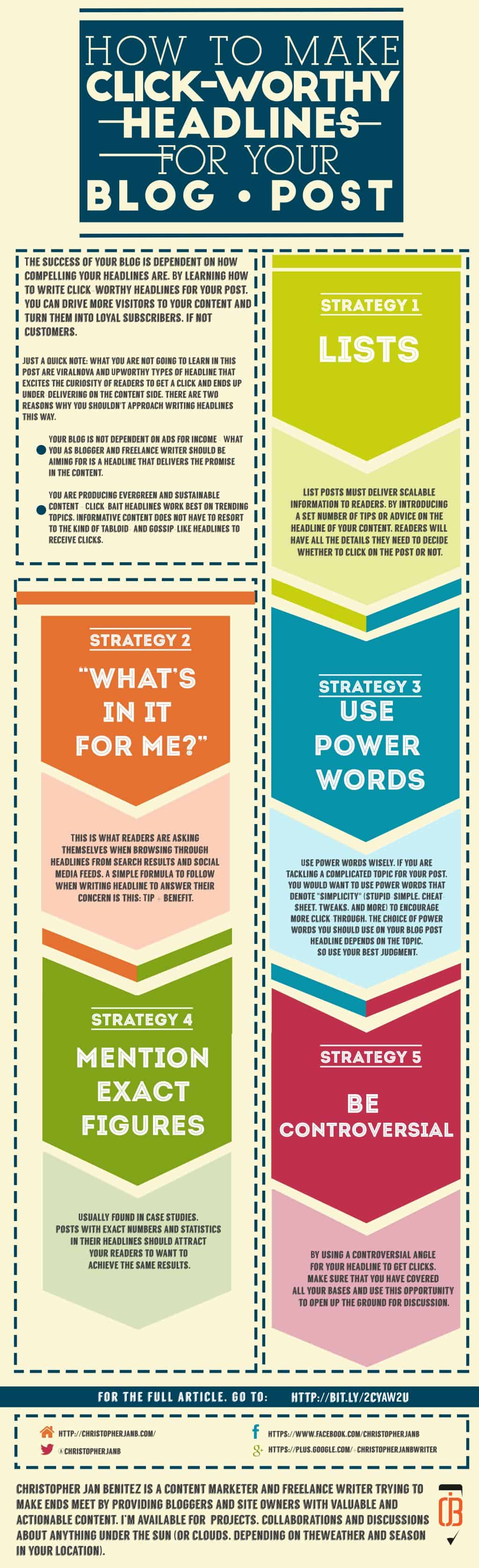
    How to Make Click-Worthy Headlines for Your Blog Posts

    There are many types of click-worthy headlines that you can utilize for your blog. However, I will distill all the types into five simple yet effective strategies you can apply to your posts.

    1. Enumerate them!

    There is a good reason why Listverse and, to a lesser extent, Buzzfeed use list posts as a headline strategy.

    What makes list posts effective is how they set reader expectations.

    For example, in the post “10 Games That Will Make You Nostalgic For The ’90s,” you are only familiar with six video games that make you yearn for the good old days. The post then serves to fill you in on the other four you are unaware of.

    (On a side note, I am not sure why Super Mario 3 is not included in the list. Blasphemy!)

    Now, suppose we take away the “10” from the title:

    “Games That Will Make You Nostalgic For The ’90s”

    …would the headline compel you to click on it? For all you know, the post only features the six games you already know. Thus, you will be just wasting your time clicking on the article.

    Another example: the post “12 Best Social Media Monitoring Tools Compared (2022)” I wrote is meant for businesses looking for tools to help them monitor their brand mentions on social media.

    More importantly, I compare these tools and give my opinion on what I feel are the best tools to help you accomplish this goal.

    From the examples above, great blog titles must deliver scalable information to readers. By introducing a set number of tips or advice in the headline of your content, readers will have all the details they need to decide whether to click on the post or not.

    Additional tips for writing list headlines:

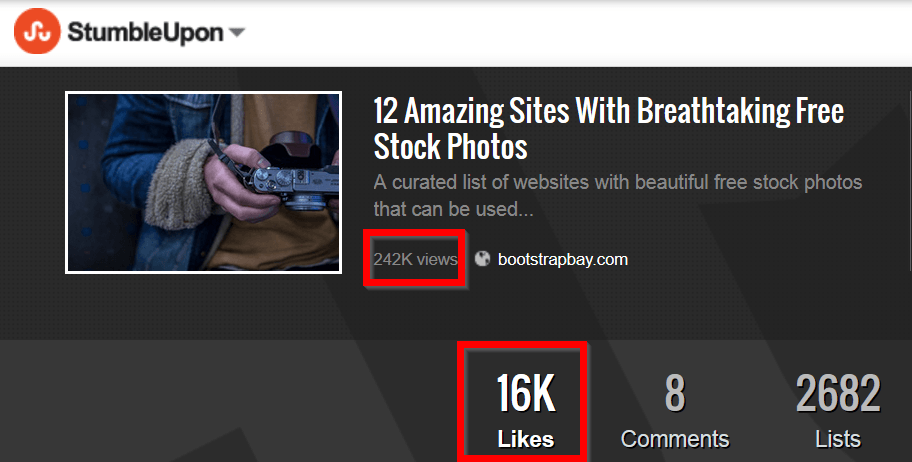
    • Make the list as big as possible – The bigger the list, the better! Aim for lists bigger and better than your competitors. If they are publishing lists in the 20+, make yours at least 30+.
    • Settle for odd numbers in your list – A study suggests that odd-numbered lists outperform even-numbered ones. While this is not a rule of thumb, you should check if this applies to your blog.

    2. “What’s in it for me?”

    Readers are asking themselves this when browsing through headlines from search results and social media feeds.

    A simple formula to follow when writing a headline to answer their concern is this:

    Tip + benefit.

    I used this to create a nice title for my GetResponse post.

    7 Authority Hacking Tools To Quickly Grow Your Online Influence

    Whereas:

    Tip = 7 Authority Hacking Tools
    Benefit = Quickly Grow Your Online Influence

    When my target readers see the headline, the benefit of boosting their influence online should attract them to click on the link and learn more about the tools.

    Therefore, when coming up with an effective headline, you need to put yourself in your readers’ shoes.

    In fact, think of your readers like they are hostile, grumpy old men.

    "What's in it for me?" ~ How to Make Click-Worthy Headlines for Your Blog Post

    “Why should I care to read on click on your post?”

    “What exactly will I get from reading it??”

    “Who the hell are you???”

    I am exaggerating at this point, but you need to understand the importance of stating the benefit of reading your post to your audience.

    You want to write catchy blog titles that will encourage curmudgeons to give your article a chance by clicking on it.

    Additional tips for writing benefits in your headline:

    • Narrow down your target audience for your post – You need to zero in on the type of readers you want to attract. The GetResponse Blog covers topics from marketing, productivity, and automation. For my post on their blog, I focused on online marketers.
    • Provide solutions to a specific problem – As a marketer, I know how difficult it is to rise above other equally talented marketers. Therefore, the post was meant to help marketers increase their influence through the tools I featured. Always know the different problems your readers may be going through to make a click-worthy headline that addresses their needs.

    3. Use POWER words

    POWER of words ~ How to Make Click-Worthy Headlines for Your Blog Post
    “Words are free. It’s how you use them that may cost you.” -KushandWizdom (Click Here To Tweet!)

    I won’t indulge in this section of the post because there is an excellent resource that features a comprehensive list of power words that you can use to boost your headlines.

    If you have not read “Turbo-Charge Your Marketing With These 355+ Power Words” by Sumo, then it is high time you should.

    The post contains different words you want to use to invoke a certain response from readers. Knowing these words will help you frame your headline a certain way for maximum effect.

    Also, a list of 355+ power words is hard to top. But, again, this goes back to how much more effective your list post is if you have many items to feature in your content.

    Additional tips on how to use power words:

    Use these emotional words wisely. If you are tackling a complicated topic for your post, you would want to use powerful words that denote “simplicity” (stupid-simple, cheat-sheet, tweaks, and more) to encourage more click-through. The choice of power words on your blog post title depends on the topic, so use your best judgment.

    4. Mention exact figures

    Usually found in case studies, posts with exact numbers and statistics in their headlines should attract your readers to want to achieve the same results.

    Let us take a look at Brian Dean’s post “Viral Marketing Case Study: How a Brand New Blog Generated 17,584 Visitors In One Day.”

    Let me start by saying that 17,584 visitors in a day is an incredible number.

    It is a figure that most bloggers would dream of having in a month.

    Hell, I don’t think I ever had that many visitors.

    This is exactly why the figure is effective as part of the headline.

    It makes me want to know how he did it.

    So I click on the link to find out.

    Simple, right?

    Now that I have clicked on the article, I should expect that there is a step-by-step guide on how he did it.

    True enough, there is.

    The post runs through the entire process of how he achieved that number of website visitors, complete with screenshots of data and analytics.

    Viral Marketing Case Study post at Backlinko ~ How to Make Click-Worthy Headlines for Your Blog Post
    The post shares social proof that attests to the effectiveness of the applied viral marketing techniques.

    It is the kind of post that bloggers and site owners will read repeatedly so they can replicate the process on their own. Some will even share the post, link to it on the blog, and mention it in their newsletters.

    This would not have been possible without “17,584 visitors” in the headline.

    Additional tips on how to use data and statistics in your headline:

    • Deliver on your promise – When mentioning figures in your headlines, you can either share the process of how you came up with them or link to the post that says the figures. Make sure to touch upon the statistics in your blog post so readers will not be left hanging.
    • More extensive stats draw a better emotional response – Just like the example above, your headline should feature a huge number that will leave your readers breathless and encourage them to click on the post.

    5. Be controversial

    Controversial headlines are, well, controversial in and of themselves.

    A perfect example of this is when Neil Patel used the word “douchebag” in his headline and got some flack for it.

    neil patel article about successful people being douchebags

    It did get him a positive response from others, but you may not afford to lose readers or subscribers because of a controversial headline.

    However, when done correctly, controversy can skyrocket your traffic and ignite discussion.

    Returning to Brian Dean, who is known for developing The Skyscraper Technique, the same technique he used for the viral marketing case study featured above.

    It is a beloved technique because it works, plain and simple.

    Except for some cases.

    Ross Hudgens of Siege Media wrote “When the Skyscraper Technique Comes Up Short,” which details why the Skyscraper Technique doesn’t work.

    In a nutshell, the piece argues that the technique is ineffective because it’s a be-all-end-all approach to SEO. Not all websites need to produce Skyscraper content just for the sake of creating one.

    Even so, there are many things people get wrong throughout the process, i.e., content doesn’t match with keyword intent, bigger doesn’t always mean better, etc.

    However, the post ends by saying that the Skyscraper Technique remains an effective tactic when used correctly. So, the post doesn’t come off as controversial when all’s said and done.

    If anything, the controversial piece ushers intelligent discussion among marketers on how to use to technique to great effect.

    By using a controversial angle for your headline to get clicks, make sure that you have covered all your bases and use this opportunity to open up the ground for discussion.

    Additional tips on how to use controversy in your headline:

    • How much risk are you taking? No matter how careful you may be with your controversial headline, there is a risk that some of your readers would react negatively. Make sure you are prepared for the worst and know how to manage it properly.
    • Be respectful – From the post to the comment section, always conduct yourself professionally. If you are willing to write a controversial headline and post, make sure you can roll with the punches.

    6. Brainstorm with Tools

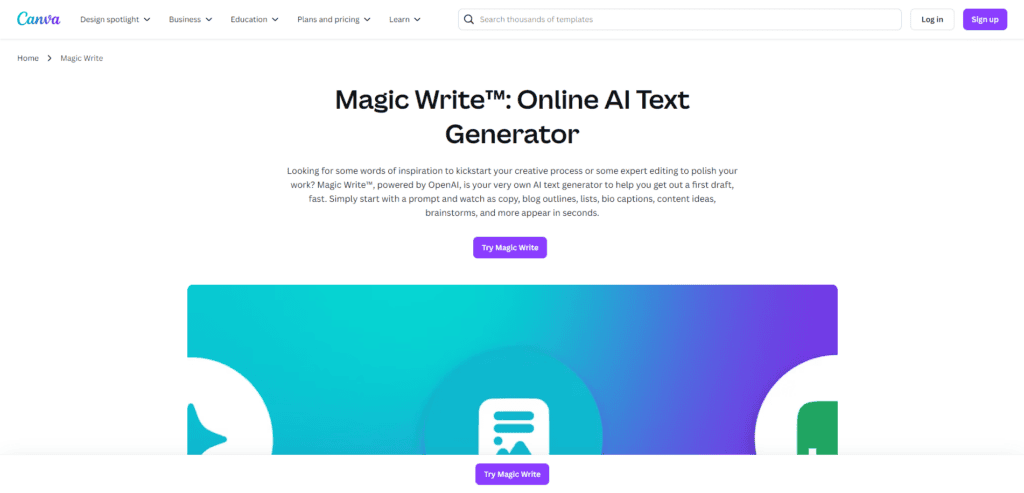
    In today’s digital age, coming up with catchy blog titles doesn’t have to be a hair-pulling experience. AI-powered tools can significantly streamline your brainstorming process, helping you generate creative and click-worthy headlines in seconds. One such powerful tool is Canva’s Magic Write™.

    Leveraging Canva’s Magic Write™ for Blog Titles

    Magic Write™, powered by OpenAI, is an AI text generator integrated into Canva’s platform. It’s designed to help you quickly draft various types of content, including blog titles. Here’s how you can use it to your advantage:

    1. Quick Idea Generation: Input a brief description of your blog post topic, and Magic Write™ will generate multiple title options. This can kickstart your creative process and provide ideas you might not have considered.
    2. Customizable Output: While Magic Write™ generates titles based on your prompt, you can still refine and personalize the results. This ensures that the final title aligns with your brand voice and style.
    3. Time-Saving: Instead of spending hours brainstorming, you can generate dozens of title ideas in minutes. This leaves you more time to focus on writing your actual content.
    4. Keyword Integration: When using Magic Write™, include your target keywords in your prompt. This will help generate titles that are not only catchy but also SEO-friendly.
    5. Diverse Styles: Magic Write™ can generate titles in various styles – from listicles to how-to guides, questions, and more. This variety can help you experiment with different title formats for your blog.
    6. Overcome Writer’s Block: When you’re stuck, Magic Write™ can inspire you to move forward with your content creation.

    How to Use Magic Write™ for Blog Titles

    1. Open Canva and start a new design or document.
    2. Click the Canva Assistant button or “/” to open the shortcut.
    3. Enter a prompt describing your blog post, such as “5 tips for effective time management for entrepreneurs.”
    4. Hit Enter and watch as Magic Write™ generates title suggestions.
    5. Review the generated titles, select the ones you like, and refine them to fit your content perfectly.

    While AI tools like Magic Write™ are beneficial, they should be used as a starting point. Continually review and edit the generated titles to ensure they accurately represent your content and align with your brand voice. Combine the power of AI with your creativity and knowledge of your audience for the best results.

    More tips to help you write good blog titles

    • Write multiple blog titles – Don’t be satisfied with writing just one article title for your post, no matter how good it may be. Instead, you need title brainstorming using different headline-generating tools to develop the best blog titles possible. From here, choose one that suits your piece the most.
    • Include your target keyword – Writing catchy blog titles is a balancing act of getting people to click on them and optimizing them to rank on Google so you can receive even more clicks. Regarding the latter, you must first conduct keyword research and find the best search query to include in the blog title. Then ensure that the keyword included doesn’t detract you from writing a good headline for your post.
    • Test which among the catchy headlines works the best – If you can’t decide on a title from the blog headlines you’ve brainstormed, it’s best to run an A/B test on them. Use a plugin like Nelio A/B Testing to run tests and measure the results once they conclude. You should then see which title generated the most clicks from users. Use the winning variant for your blog moving forward, or pit it against another title.

    Do you now know how to make a good blog title?

    Writing blog titles that drive clicks is a skill you need to develop over time. This post has provided ample information on why and how you should write your headlines.

    You must apply the strategies shared here to drive more click-throughs to your site from search results and social media.

  • How to Evaluate Website Quality for Guest Blogging

    How to Evaluate Website Quality for Guest Blogging

    We discussed finding guest blogging opportunities in our previous post.

    At the end the article, I left a hanging question about how you can determine the quality of sites you’ve found.

    “Quality,” in this case, is a very vague term. In the case of finding out the value of a website, quality is determined by different metrics that I will discuss in this post.

    Why is it important to determine the quality of sites for guest blogging?

    To increase your reach to your audience and build relationships with influencers, you need to post on a site that is visited by people interested in your niche. 

    In other words:

    Guest blogging is a social activity, not for the purpose of acquiring a backlink.

    This is achieved with a high SEO score.

    A site that optimized by following the best on-page and link building practices will have better chances of getting on top of search results for their keyword.

    As a guest blogger, you want a site that is easily found in search results so you can reap the benefits of high readership.

    Aside from site traffic, the site needs to have a strong social influence.

    This is determined by the number of followers and interactions they have on their social media accounts.

    Unfortunately, some of these factors are not made public to users, site traffic most especially.

    This is why we need to rely on site metrics to help us get a better idea of how a website is performing.

    The higher the metrics of a site is, the more you should pursue guest blogging on said site!

    The site parameters that will be discussed here are made up of different algorithms to help you figure out the quality of the site.

    Since not all metrics are created equal, all of them will provide different results and data about the target site for your guest post.

    This is a good thing – the more data you will use to compute the site’s value, the more accurate your returns will be.

    How to evaluate website quality using these metrics

    Below are the different factors you need to use in determining the site’s quality.

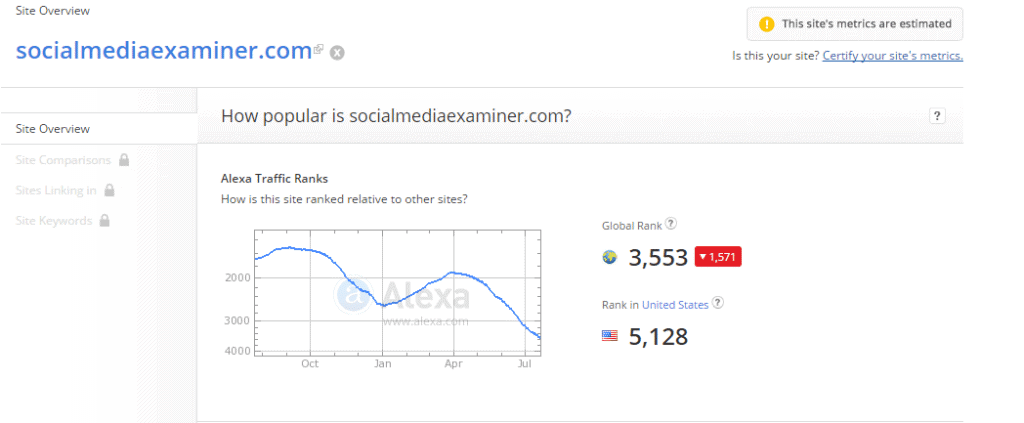
    Alexa Ranking

    screenshot-www.alexa.com 2015-07-24 10-58-25

    Alexa is a popular analytics tool that ranks websites on a global and local scale.

    The figures shown on Alexa results are far from accurate, but it nonetheless provides you an idea of how a site or blog is viewed.

    Not to mention, it is the only tool that provides public rankings for all web pages.

    Go to the site and type the URL of the blog to show its ranking.

    For this exercise, I will be using Social Media Examiner as an example.

    Moz’s Page and Domain Authority

    screenshot-www.alexa.com 2015-07-24 10-58-25

    Moz is a digital marketing agency led by Rand Fishkin.

    It has developed an algorithm that uses aggregated ranking factors to come up with metrics to determine the value of a site.

    These are called Page Authority and Domain Authority.

    Page Authority refers to the value of a particular page in a domain, while Domain Authority relates to the value of the domain as a whole (including subdomains).

    The higher both metrics are (on the scale of 100), the more chances that the page and domain will rank in search results.

    Go to the Open Site Explorer (also a property of Moz) and enter the URL to see both metrics in the results.

    Social Proof

    screenshot-www.socialmediaexaminer.com 2015-07-24 10-12-36
    screenshot-www.socialmediaexaminer.com 2015-07-24 10-07-08
    screenshot-linktally.com 2015-07-24 10-15-33

    This refers to the number of shares each post on the blog receives and the number of followers the blog has.

    You’d want to write for blogs with lots of fans and shares so you can increase your reach by having tens and hundreds of users tweeting and posting your articles on their social accounts.

    Most blogs feature the number of followers they have on the sidebar.

    Same goes with the social shares for each post in the blog.

    If the shares are not shown, go to LinkTally.com and enter the URL of the blog post to demonstrate the number of tweets and likes.

    Blog Comments

    You don’t have to use a tool to find out if the blog has lots of comment.

    Just visit the blog and choose a random article from the pile.

    Scroll down the comments and see how many users have chimed in the article.

    Do this on multiple posts to gauge the participation of readers on each.

    You would want at least one comment on each post so that you can expect at least one person to share their opinion on yours.

    Netpeak Checker: An easier way to find blog factors!

    Netpeak Checker

    To find the Alexa Ranking, Moz PA and DA, and social proof much faster, I suggest you download the Netpeak Checker.

    It’s a free tool that finds these metrics for you.

    To use this tool, enter the site when you plan on submitting your guest posts and uncheck the parameters not mentioned above to filter the results to the relevant factors.

    Once the tool is done finding the metrics for you, download the sheet and save it for future reference.

    Order the sites from highest to lowest based on the factors so you can start with the best-performing sites and filter out the bad ones.

    Now that you have the data in hand, you can find out which sites to target for your guest blogging campaign.

    The next problem we are going to tackle on my next post is crafting your guest blogging pitch to compel site owners to publish your content.

    Until then, organize your list of sites to send your guest posts by referring to the metrics featured above and using Netpeak Checker.

    Learn More about Netpeak Checker

    Simplify batch analyses of websites so you know which sites to prioritize. Find out how to use Netpeak Checker the right way.

  • Developing a Guest Posting Strategy: A Beginner’s Guide

    Developing a Guest Posting Strategy: A Beginner’s Guide

    A guest posting strategy is crucial to the success of your online brand.

    As mentioned in my previous post, guest blogging is an effective tactic to build trust to your brand and increase site traffic, as well as indirectly hike up your SEO score.

    If this tactic is new to you and is interested in trying it out to reap its benefits, then you need to understand how a well-planned guest blogging strategy work to help maximize your campaign of writing for different online publications to build your online brand.

    How important is a strategy for your guest posting?

    The process of writing and sending your blog posts to a list of guest posting sites for review seems simple enough.

    However:

    Guest blogging as a marketing strategy is never a one-and-done thing.

    To fully receive the benefits that guest blogging can provide for your online business, you need to form a sustainable plan that allows you to reach out to an endless stream of sites to submit your posts.

    By developing a guest blogging strategy that does exactly this, you will be able to continuously reach out to different sites related to your niche and tap its target audience through the high-quality content you have written.

    This way, you can further build your online reputation as a prolific and trustworthy blogger and drive more interests to the products and services offered in your sites! Ready to create your guest blogging strategy?

    Let’s first lay down the framework on how this strategy is implemented and set out:

    Steps to Launching a Successful Guest Posting Strategy

    • Find websites related to your niche where you can send out guest posts
    • Send out your topic proposal
    • Once your plan is approved, write your blog post like a BOSS
    • Once post is published, promote to different online channels
    • Repeat process!

    Let’s drill down each point into how you can implement these about your blog.

    Much has been said about this tactic from Backlinko’s Brian Dean to QuickSprout’s Kristi Hines about finding sites where to focus on sending out your guest posts.

    In fact, both resources are so good that I won’t have to add my two cents regarding this step! Instead, I’ll synthesize all the suggestions they mentioned into a list.

    • For your preliminary list of sites to send your guest posts, go to Alltop.com and search for blogs under the category of your niche.
    • Use Google search queries to filter the search results to the sites where you can send your posts to.
    Screen caps from Backlinko's awesome post, "The Definitive Guide to Guest Blogging." (5 Steps to Launching a Successful Guest Blogging Strategy)
    Screen caps from Backlinko’s excellent post, “The Definitive Guide to Guest Blogging.”
    • Search Twitter for the latest and most recent sites where you can perform your guest blogging strategy on.

    Collect the sites you’ve found in your research and place them in a spreadsheet for easy reference.

    Edit them according to different metrics you’re using (Moz’s Domain Authority, Page Authority, social proof, etc.) as you wish.

    Sending out your topic proposal

    Once you have sifted through your list of websites to guest post on, you need to send an email pitch about your intention of sending a guest post to their site.

    As much as I’m tempted to send over a template so you can just fill out the blanks with your details, I’ll take a different route and write down the elements that you should include in the email instead.

    • Compelling email headline – Write a headline encouraging the site owner to open your email. One way to approach writing your headline is to stroke the site owner’s ego, i.e., “Thanks for posting that awesome article in your blog.” Writing about how much their site is helping you is something that you would want to hear, so there’s a high chance that they’ll open the email to read more about what you have to say.
    • Break down your article topic/s – Don’t just send over a title proposal for your blog post. List down the headings that you will mention on the posts (should they be accepted for review). This way, you’re not just sending them content based on a topic proposal. Also, providing an outline gives the site owners insight into how much they know about the topic.
    • Give an incentive – Site owners are much likelier to accept your guest post if it’s guaranteed to bring more traffic to your site. In this case, say that you will promote the content to your social media followers, email list, and other channels to maximize the post’s exposure to new visitors. This tactic will be effective, especially if you have thousands of followers on social media.

    Write your blog post like a BOSS

    How-to-Write-Blog-Content-Like-a-Boss - 5 Steps to Launching a Successful Guest Blogging Strategy

    Writing blog content takes a long time to finish.

    In fact, an excellent job takes days, if not weeks, to get done and submit for review.

    The devil is in the detail – bloggers will have to brainstorm for topics, resources to include in the post, and the actual process of writing the words to communicate your ideas effectively.

    When running a guest blogging strategy, time is of the essence.

    Therefore, if there’s anything that could make the writing process much faster, then the better your life will be.

    While there are no shortcuts to writing great content, there is a simple step-by-step guide to writing like a boss, something that Will Blunt of Blogger Sidekick has developed over time.

    Reading his post will give you insight on how to maximize your time in writing much more useful blog posts to submit to different publications.

    Follow the tips in the post and download the checklist to supercharge your writing process of your guest blogging strategy.

    Promote to different online channels

    Promote to Different Online Channels - guest posting strategy

    To gain traction with your guest post, you need to promote it to your online network.

    Doing this will help you tap into a different segment of online users who aren’t readers of the blog, to begin with.

    Also, take this as an opportunity to promote yourself as an authoritative and trustworthy blogger about your topic of expertise.

    Aside from promoting your posts on Facebook, Twitter, and other social media sites, you can gain referral traffic and comments from social bookmarking sites like Inbound.org, BizSugar, Blog Engage, and Kingged.com, to name a few.

    Submitting your post to these sites will bring more eyeballs to the site or blog and drive more traffic this way.

    Related: 18 Sites Where You Can Promote Your Blog Post

    Other ways of promoting your post include submitting them to different online groups and communities (Facebook Groups, LinkedIn Groups, Google Communities) and sending an email blast to people mentioned in the post (to get them to tweet or link back to your newly written post).

    Repeat! (and Final Words)

    Once you have gotten your content published on your target site, you need to move on to the next one in your list and do the same procedure.

    If you have exhausted the list of sites to write guest posts for, conduct the same process of researching for websites using Google search queries and other techniques to find new sources.

    You can’t go wrong with a guest blogging strategy if you follow the tips and advice mentioned above.

/* ============================================================================= WebMCP tool registration for christopherjanb.com ----------------------------------------------------------------------------- Deploy: WPCode -> + Add Snippet -> Add Your Custom Code (HTML Snippet) Insert Location: Site Wide Footer Conditional Logic: NONE (this script self-gates on the URL path) Prereq: upload webmcp.js to the site root first, so it loads at https://christopherjanb.com/webmcp.js (download from https://github.com/jasonjmcghee/WebMCP) The blue widget only appears on https://christopherjanb.com/mcp/ ============================================================================= */