

Category: Content Writing

  • How to Write a Great Blog Title that People Will Click on

    How to Write a Great Blog Title that People Will Click on

    Learning how to write blog titles is an art.

    Bloggers worldwide are vying for the short attention spans of their target audience.

    As a publisher, your priority is to grab the reader’s attention y getting them to at least land on your site pages to read your content.

    To achieve this, you need to learn how to write effective blog post titles, particularly click-worthy ones.

    Why “click-worthy” blog post titles?

    Why not the “best” or “the most awesome” headlines?

    This is a great question.

    To be honest, in the online world, having the most click-worthy headline is the best headline.

    Clicks serve as your currency in blogging. The more clicks you get, the more chances you can convert visitors into customers, if not loyal readers.

    This is particularly the case regarding search engines and social media shares.

    Both are neck and neck as the top channels for referral traffic online.

    As you compete for eyeballs, you need to make the most out of what is shown on search engines and social media with your headline. Coming up with the most compelling headline will get them to click on your page.

    Just a quick note: what you will not learn in this post are Viralnova and Upworthy types of headline that excite readers’ curiosity to get a click and end up under-delivering on the content side. While this is an efficient business model for all intents and purposes, there are two reasons why you shouldn’t approach writing headlines this way.

    • Your blog is not dependent on ads for income – What you, as a blogger and freelance writer, should be aiming for is a headline that delivers the promise in the content.
    • You are producing evergreen, sustainable content – Click-bait headlines work best on trending topics. Informative content does not have to resort to tabloid- and gossip-like headlines to receive clicks.

    Besides, there are excellent guides that discuss headline strategies using the click-bait approach, such as this post at Buffer.

    Types of click-worthy headlines
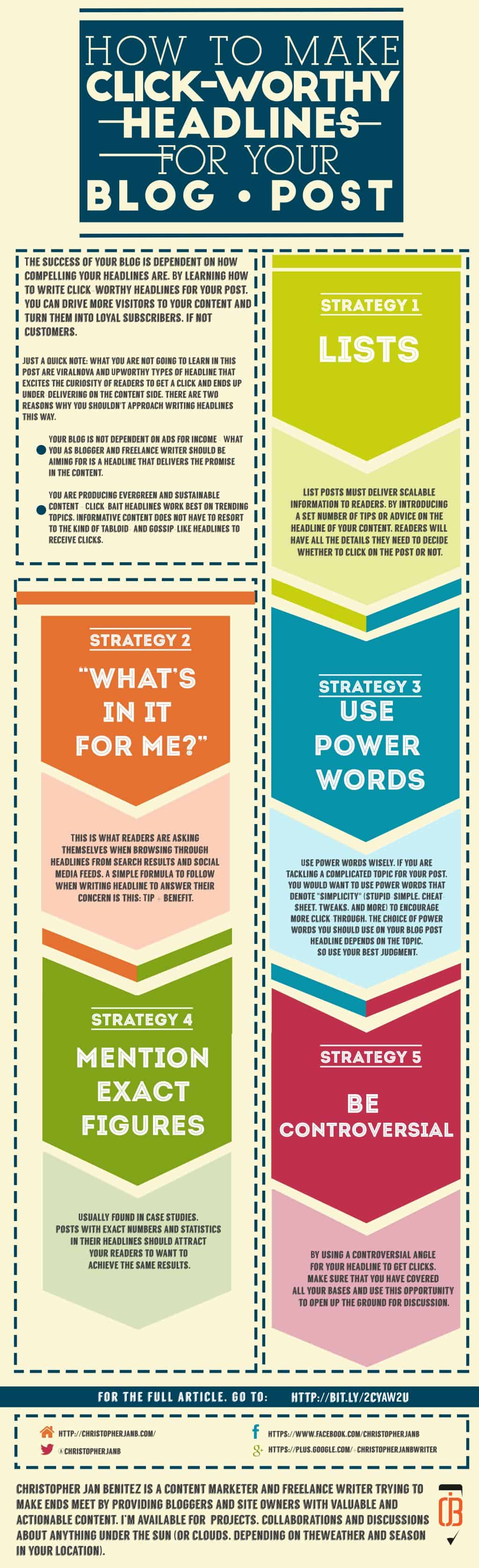
    How to Make Click-Worthy Headlines for Your Blog Posts

    There are many types of click-worthy headlines that you can utilize for your blog. However, I will distill all the types into five simple yet effective strategies you can apply to your posts.

    1. Enumerate them!

    There is a good reason why Listverse and, to a lesser extent, Buzzfeed use list posts as a headline strategy.

    What makes list posts effective is how they set reader expectations.

    For example, in the post “10 Games That Will Make You Nostalgic For The ’90s,” you are only familiar with six video games that make you yearn for the good old days. The post then serves to fill you in on the other four you are unaware of.

    (On a side note, I am not sure why Super Mario 3 is not included in the list. Blasphemy!)

    Now, suppose we take away the “10” from the title:

    “Games That Will Make You Nostalgic For The ’90s”

    …would the headline compel you to click on it? For all you know, the post only features the six games you already know. Thus, you will be just wasting your time clicking on the article.

    Another example: the post “12 Best Social Media Monitoring Tools Compared (2022)” I wrote is meant for businesses looking for tools to help them monitor their brand mentions on social media.

    More importantly, I compare these tools and give my opinion on what I feel are the best tools to help you accomplish this goal.

    From the examples above, great blog titles must deliver scalable information to readers. By introducing a set number of tips or advice in the headline of your content, readers will have all the details they need to decide whether to click on the post or not.

    Additional tips for writing list headlines:

    • Make the list as big as possible – The bigger the list, the better! Aim for lists bigger and better than your competitors. If they are publishing lists in the 20+, make yours at least 30+.
    • Settle for odd numbers in your list – A study suggests that odd-numbered lists outperform even-numbered ones. While this is not a rule of thumb, you should check if this applies to your blog.

    2. “What’s in it for me?”

    Readers are asking themselves this when browsing through headlines from search results and social media feeds.

    A simple formula to follow when writing a headline to answer their concern is this:

    Tip + benefit.

    I used this to create a nice title for my GetResponse post.

    7 Authority Hacking Tools To Quickly Grow Your Online Influence

    Whereas:

    Tip = 7 Authority Hacking Tools
    Benefit = Quickly Grow Your Online Influence

    When my target readers see the headline, the benefit of boosting their influence online should attract them to click on the link and learn more about the tools.

    Therefore, when coming up with an effective headline, you need to put yourself in your readers’ shoes.

    In fact, think of your readers like they are hostile, grumpy old men.

    "What's in it for me?" ~ How to Make Click-Worthy Headlines for Your Blog Post

    “Why should I care to read on click on your post?”

    “What exactly will I get from reading it??”

    “Who the hell are you???”

    I am exaggerating at this point, but you need to understand the importance of stating the benefit of reading your post to your audience.

    You want to write catchy blog titles that will encourage curmudgeons to give your article a chance by clicking on it.

    Additional tips for writing benefits in your headline:

    • Narrow down your target audience for your post – You need to zero in on the type of readers you want to attract. The GetResponse Blog covers topics from marketing, productivity, and automation. For my post on their blog, I focused on online marketers.
    • Provide solutions to a specific problem – As a marketer, I know how difficult it is to rise above other equally talented marketers. Therefore, the post was meant to help marketers increase their influence through the tools I featured. Always know the different problems your readers may be going through to make a click-worthy headline that addresses their needs.

    3. Use POWER words

    POWER of words ~ How to Make Click-Worthy Headlines for Your Blog Post
    “Words are free. It’s how you use them that may cost you.” -KushandWizdom (Click Here To Tweet!)

    I won’t indulge in this section of the post because there is an excellent resource that features a comprehensive list of power words that you can use to boost your headlines.

    If you have not read “Turbo-Charge Your Marketing With These 355+ Power Words” by Sumo, then it is high time you should.

    The post contains different words you want to use to invoke a certain response from readers. Knowing these words will help you frame your headline a certain way for maximum effect.

    Also, a list of 355+ power words is hard to top. But, again, this goes back to how much more effective your list post is if you have many items to feature in your content.

    Additional tips on how to use power words:

    Use these emotional words wisely. If you are tackling a complicated topic for your post, you would want to use powerful words that denote “simplicity” (stupid-simple, cheat-sheet, tweaks, and more) to encourage more click-through. The choice of power words on your blog post title depends on the topic, so use your best judgment.

    4. Mention exact figures

    Usually found in case studies, posts with exact numbers and statistics in their headlines should attract your readers to want to achieve the same results.

    Let us take a look at Brian Dean’s post “Viral Marketing Case Study: How a Brand New Blog Generated 17,584 Visitors In One Day.”

    Let me start by saying that 17,584 visitors in a day is an incredible number.

    It is a figure that most bloggers would dream of having in a month.

    Hell, I don’t think I ever had that many visitors.

    This is exactly why the figure is effective as part of the headline.

    It makes me want to know how he did it.

    So I click on the link to find out.

    Simple, right?

    Now that I have clicked on the article, I should expect that there is a step-by-step guide on how he did it.

    True enough, there is.

    The post runs through the entire process of how he achieved that number of website visitors, complete with screenshots of data and analytics.
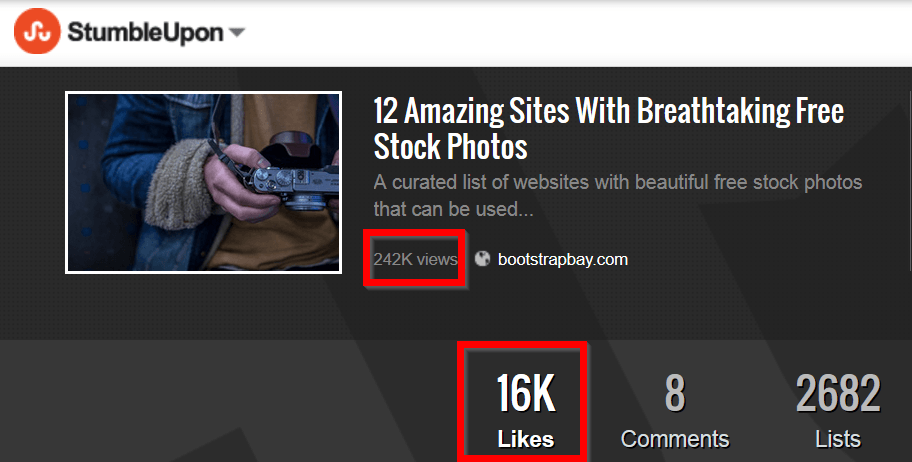
    Viral Marketing Case Study post at Backlinko ~ How to Make Click-Worthy Headlines for Your Blog Post
    The post shares social proof that attests to the effectiveness of the applied viral marketing techniques.

    It is the kind of post that bloggers and site owners will read repeatedly so they can replicate the process on their own. Some will even share the post, link to it on the blog, and mention it in their newsletters.

    This would not have been possible without “17,584 visitors” in the headline.

    Additional tips on how to use data and statistics in your headline:

    • Deliver on your promise – When mentioning figures in your headlines, you can either share the process of how you came up with them or link to the post that says the figures. Make sure to touch upon the statistics in your blog post so readers will not be left hanging.
    • More extensive stats draw a better emotional response – Just like the example above, your headline should feature a huge number that will leave your readers breathless and encourage them to click on the post.

    5. Be controversial

    Controversial headlines are, well, controversial in and of themselves.

    A perfect example of this is when Neil Patel used the word “douchebag” in his headline and got some flack for it.
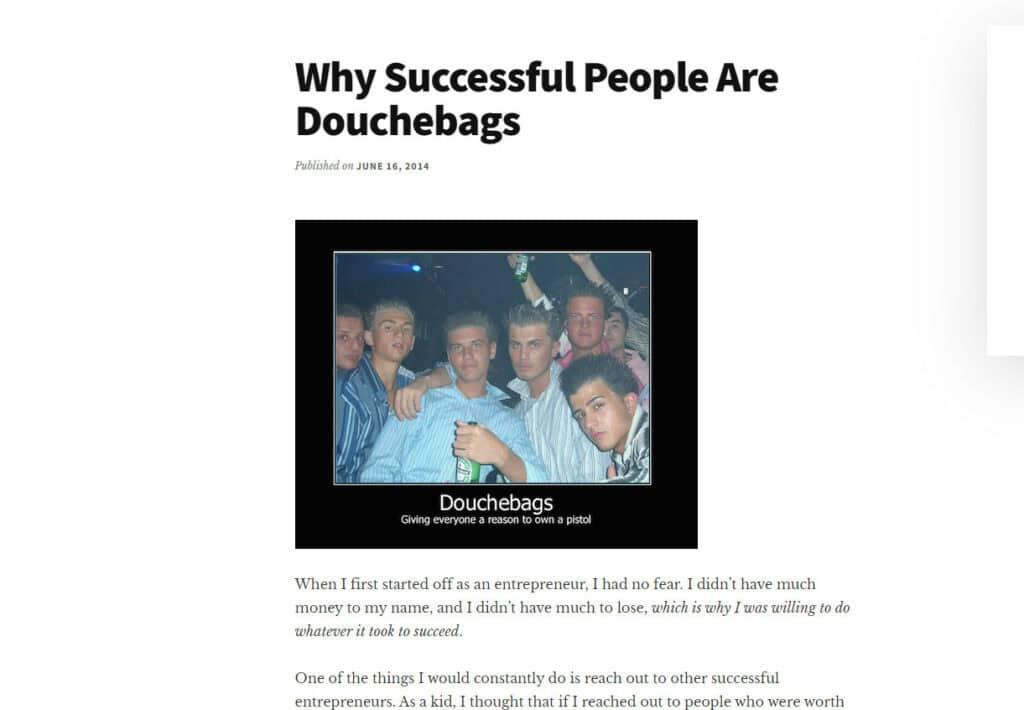
    neil patel article about successful people being douchebags

    It did get him a positive response from others, but you may not afford to lose readers or subscribers because of a controversial headline.

    However, when done correctly, controversy can skyrocket your traffic and ignite discussion.

    Returning to Brian Dean, who is known for developing The Skyscraper Technique, the same technique he used for the viral marketing case study featured above.

    It is a beloved technique because it works, plain and simple.

    Except for some cases.

    Ross Hudgens of Siege Media wrote “When the Skyscraper Technique Comes Up Short,” which details why the Skyscraper Technique doesn’t work.

    In a nutshell, the piece argues that the technique is ineffective because it’s a be-all-end-all approach to SEO. Not all websites need to produce Skyscraper content just for the sake of creating one.

    Even so, there are many things people get wrong throughout the process, i.e., content doesn’t match with keyword intent, bigger doesn’t always mean better, etc.

    However, the post ends by saying that the Skyscraper Technique remains an effective tactic when used correctly. So, the post doesn’t come off as controversial when all’s said and done.

    If anything, the controversial piece ushers intelligent discussion among marketers on how to use to technique to great effect.

    By using a controversial angle for your headline to get clicks, make sure that you have covered all your bases and use this opportunity to open up the ground for discussion.

    Additional tips on how to use controversy in your headline:

    • How much risk are you taking? No matter how careful you may be with your controversial headline, there is a risk that some of your readers would react negatively. Make sure you are prepared for the worst and know how to manage it properly.
    • Be respectful – From the post to the comment section, always conduct yourself professionally. If you are willing to write a controversial headline and post, make sure you can roll with the punches.

    6. Brainstorm with Tools

    In today’s digital age, coming up with catchy blog titles doesn’t have to be a hair-pulling experience. AI-powered tools can significantly streamline your brainstorming process, helping you generate creative and click-worthy headlines in seconds. One such powerful tool is Canva’s Magic Write™.

    Leveraging Canva’s Magic Write™ for Blog Titles
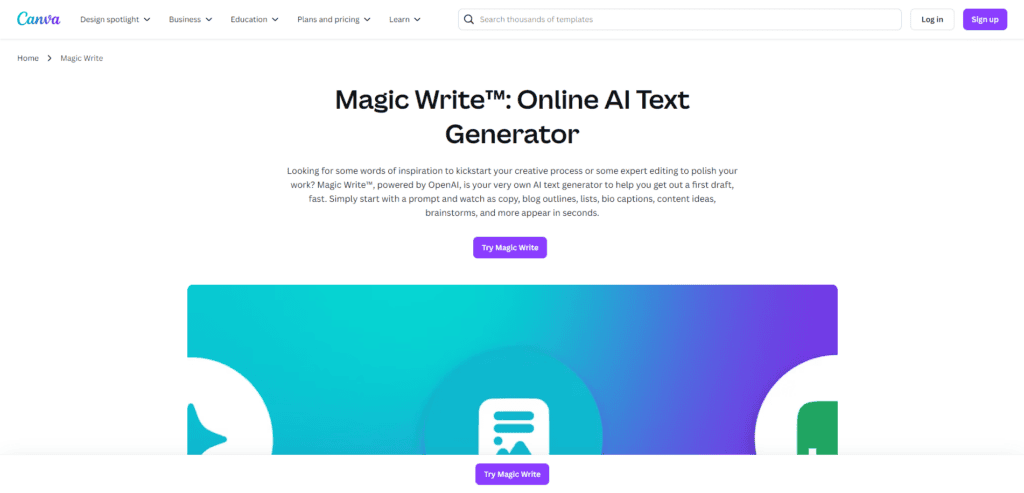
    Magic Write™, powered by OpenAI, is an AI text generator integrated into Canva’s platform. It’s designed to help you quickly draft various types of content, including blog titles. Here’s how you can use it to your advantage:

    1. Quick Idea Generation: Input a brief description of your blog post topic, and Magic Write™ will generate multiple title options. This can kickstart your creative process and provide ideas you might not have considered.
    2. Customizable Output: While Magic Write™ generates titles based on your prompt, you can still refine and personalize the results. This ensures that the final title aligns with your brand voice and style.
    3. Time-Saving: Instead of spending hours brainstorming, you can generate dozens of title ideas in minutes. This leaves you more time to focus on writing your actual content.
    4. Keyword Integration: When using Magic Write™, include your target keywords in your prompt. This will help generate titles that are not only catchy but also SEO-friendly.
    5. Diverse Styles: Magic Write™ can generate titles in various styles – from listicles to how-to guides, questions, and more. This variety can help you experiment with different title formats for your blog.
    6. Overcome Writer’s Block: When you’re stuck, Magic Write™ can inspire you to move forward with your content creation.

    How to Use Magic Write™ for Blog Titles

    1. Open Canva and start a new design or document.
    2. Click the Canva Assistant button or “/” to open the shortcut.
    3. Enter a prompt describing your blog post, such as “5 tips for effective time management for entrepreneurs.”
    4. Hit Enter and watch as Magic Write™ generates title suggestions.
    5. Review the generated titles, select the ones you like, and refine them to fit your content perfectly.

    While AI tools like Magic Write™ are beneficial, they should be used as a starting point. Continually review and edit the generated titles to ensure they accurately represent your content and align with your brand voice. Combine the power of AI with your creativity and knowledge of your audience for the best results.

    More tips to help you write good blog titles

    • Write multiple blog titles – Don’t be satisfied with writing just one article title for your post, no matter how good it may be. Instead, you need title brainstorming using different headline-generating tools to develop the best blog titles possible. From here, choose one that suits your piece the most.
    • Include your target keyword – Writing catchy blog titles is a balancing act of getting people to click on them and optimizing them to rank on Google so you can receive even more clicks. Regarding the latter, you must first conduct keyword research and find the best search query to include in the blog title. Then ensure that the keyword included doesn’t detract you from writing a good headline for your post.
    • Test which among the catchy headlines works the best – If you can’t decide on a title from the blog headlines you’ve brainstormed, it’s best to run an A/B test on them. Use a plugin like Nelio A/B Testing to run tests and measure the results once they conclude. You should then see which title generated the most clicks from users. Use the winning variant for your blog moving forward, or pit it against another title.

    Do you now know how to make a good blog title?

    Writing blog titles that drive clicks is a skill you need to develop over time. This post has provided ample information on why and how you should write your headlines.

    You must apply the strategies shared here to drive more click-throughs to your site from search results and social media.
  • The Only Blog Writing Tools You Need for Creating Content

    The Only Blog Writing Tools You Need for Creating Content

    So you are finally living your dream as a professional writer – how is everything so far?

    Most people fail to realize that the writing career path is one of the most stressful professions today, particularly if you are involved in the digital marketing industry.

    This is because you will be exposed to projects in niches that you are unfamiliar with.

    On top of that, you will be pressured by deadlines, constant requests, and unexpected revisions that could ruin your schedule and affect the quality of your work.

    That makes writing good content for websites much more difficult because you’ll have to consistently produce with minimal error.

    Therefore, to help you in your quest to make a living as a writer, use the tools featured in this post:

    Wunderlist

    Note from the editor: Wunderlist is shutting down (or has shut down, depending on when you’re reading this). But don’t fret – there are Wunderlist alternatives for you to choose from and help you remain productive in and out of work,

    If you want to be a successful and productive blogger, you need to take small steps towards that goal.

    wunderlist-to-do-list-reminders-errands-app-of-the-year

    Wunderlist is a great app that helps you track all tasks you have in mind. It is really motivational since it sends reminders for upcoming activities.

    Include research, writing, and marketing in your daily routine! This task should be in your Wunderlist every single day.

    Organize a daily plan that will help you make blogging a part of your life. If for example, you plan to publish a new post in six days, today’s plan can include part of the research process. Tomorrow, you will create the outline, and you will start writing the day after that. You will tackle some marketing every day. That is how blogging will become a daily routine, and you will not perceive it as a burden.

    To help you get started with Wunderlist, here is a detailed video explanation from Chris’ Tutorials:

    Toggl

    This tool will show whether or not you have been smart with the way you use the Internet. Are you wasting huge chunks of your day on Facebook and Twitter? Use Toggl to get a real impression of how committed you are to the blog.

    All you need to do is push the Start button, and you will get detailed information on the time you spent on different activities.

    You can also access a report of all the hours you logged in using the tool.

    The data should serve as a wake-up call to how productive you have been with work. You think you are spending only 10 minutes on Reddit, but 10 minutes in various parts of the day may add up to 2 hours. Locate the websites that distract you the most. Try to reduce the time you spend on them, day by day. So how do you use all that time you save? On blogging, duh!

    Trello

    There is hardly a better tool you can use for organizing your ideas. Trello enables you to collect information and organize it in a flexible and visual way.

    When you discover an inspirational blog post or online article, only add it to your Trello board, and you will see it as a card.

    MJ Trello

    You can drag and drop the cards to make the board more organized, so you will get a better idea for the development of your next projects.

    Create a different Trello board for each idea you get. When you are about to start writing a new blog post, and you are not sure what topic to tackle, go through the boards, and you will surely find something interesting.

    You can make your Trello board private, but you can also share it with collaborators.

    Editor’s note: I consider Trello to be my tool of choice for helping me write faster. I can organize the different writing projects I am managing at the moment so I can prioritize the tasks that need my attention. More importantly, Trello helps me build outlines for each of my posts so I can jut focus on writing the content later on.

    Hubspot’s Blog Topic Generator

    Hubspot’s Blog Topic Generator is a much more straightforward solution for coming up with content titles and ideas.

    Hubspot 's Blog Topic Generator - Writing Tools for Success

    It automatically creates topic suggestions using three different terms. A total of five topic ideas will be generated, which is good for a week in a blogger’s editorial calendar.

    However, there is a slight chance that a subject idea may have grammatical mistakes. These are usually minor and can be edited fairly easily. For the most part, the topic ideas are far from generic and may contain creative wordings. This is why Hubspot’s Blog Topic Generator is an excellent tool for writers who want to produce highly engaging posts.

    ProWritingAid

    One of the easiest and most straightforward writing tools for success in improving your written works is ProWritingAid*. It is a free editing platform that can check an entire document for errors and possible improvements.

    ProWritingAid - Writing Tools for Success

    Using ProWritingAid is simple and can be done in two ways. First, you can go to their website, sign up for an account, and paste your work into the main text field found on their homepage. The tool will automatically detect spelling and grammatical errors that can otherwise be difficult to spot.

    Also, remember that even if your work is free from such errors, you could also be overly tedious or using repetitive sentence structures. ProWritingAid also offers suggestions that can help eliminate these issues to polish your work. It is perfect for bloggers, freelance writers, and students who care about the readability, accuracy, and overall quality of their writing.

    You can download and install an add-on that integrates with document editing software such as Microsoft Word, Google Docs, and Scrivener. This will automatically add a ProWritingAid section that can be accessed from within the word editing application.

    Another similar tool to ProWritingAid, Grammarly Premium, can help you do the things above. You can read my comparison post between the two to help you decide which one’s for you.

    READ MY PROWRITINGAID REVIEW

    PlagiarismCheck.org

    Plagiarism is one of the worst mistakes you can make as a professional writer. It can stain your reputation, terminate your current employment, and waste your time on writing a piece that will most likely be rejected. It will also put you in serious trouble if you are caught plagiarizing for your academic papers.

    For most writing projects, you often need valid resources to provide factual information and form topic ideas. This means it is highly likely to write articles that have similarities with existing sources. Although it could be unintentional, plagiarism checkers detects sentences that correctly matches an online source. To avoid this, you can use PlagiarismCheck.org to check your work for possible red flags so you can always submit with confidence.

    PlagiarismCheck.org - Writing Tools for Success

    To get started with PlagiarismCheck.org, just create an account and upload documents to check for plagiarism. After upload, the system will automatically scan your paper thoroughly. This will display the percentage of stolen text for the entire document as well as a list of identified resources that match some of your content.

    Keep in mind that plagiarised content has a grave impact on SEO and reader experience. This is why PlagiarismCheck.org is an excellent tool for bloggers and freelance writers who are currently engaged in search engine marketing.

    READ MY PLAGIARISMCHECK.ORG REVIEW

    Assignment Masters

    It is important to keep up with your schedule and deliver content on trending topics. You already have Google Calendar as a tool that supports that process. However, sometimes you cannot complete a brilliant post on the right topic at the right time, so you need assistance if you want to meet the expectations of the readers.

    Assignment Masters enables you to collaborate with professional researchers, writers and editors, who will help you boost the overall quality of your blog.

    get-professionally-written-assignment-assignmentmasters-co-uk

    When you get stuck, fill in the form at the site and ask for personalized assistance. You will get to work with an author who holds a degree in your niche.

    Collaborate with the writer to get exactly what you need.

    Death to Stock

    Why would you pay for images when you can get the visual content of similar quality for free? Dead to Stock is an excellent service that provides free pictures of good quality.

    home-death-to-the-stock-photo

    Subscribe to this service, and you will get regular email messages that inform you about the new additions to the collection. You will mostly find lifestyle photos, so this service is awesome if your niche fits in that category.

    Quora

    You have to become aware of the problems your target audience faces if you want to develop a successful blog. Instead of writing on random topics, you can get inspired by real questions that will undoubtedly attract a great number of readers.

    Quora is getting more popular than ever. It is the best destination for people who want to get their questions answered by experts.

    Your Quora feed is full of questions in categories you are interested in. Get inspired by these dilemmas and respond to some of them through insightful blog posts.

    Don’t limit yourself only on finding inspiration, however. Here is how you can start developing a successful presence on Quora:

    Complete your profile on Quora and add a link to your site in the description. Here’s an example of a description:

    rand-fishkin-quora

    Short but sweet, Rand’s bio allows him to put emphasis on the Moz, which links to the homepage.

    Start answering questions. You are an expert in your niche, so you have much knowledge to share.

    which-is-best-for-search-engine-optimization-a-blog-subdomain-or-blogging-at-a-blog-quora

    These people have questions you can answer, and that is how you become part of the community. Insightful answers on Quora will lead to long-term traffic to your blog.

    Lumen5

    Lumen5, an online video maker, turns text into stunning social media videos in minutes. It does this automatically by analyzing the text through AI and putting the best music, video, and images together accordingly.

    Honorable Mention

    Are you using any of these blog writing tools?

    Today, there are plenty of blog writing tools that will help further your writing career. Just remember that the tools featured above should help cut time in writing your content.

    More importantly, they can help you implement the best SEO content writing tips to help create content that will rank on search engines!

    So, make sure to choose the best blogging tools that will help you reach your goals. Don’t get too caught up with the tools – choosing just a tool or two should be good enough for you!

  • Should Writers Hire a Ghostwriter to Write for Them?

    Should Writers Hire a Ghostwriter to Write for Them?

    Should Writers Hire a Ghostwriter to Write for Them

    Why hire a ghostwriter in the first place?

    The reason why people hire a ghostwriter is to publish something on their blog or social media.

    By publishing and taking ownership of the content that they did not write, they can exert their influence within their industry.

    There is nothing wrong with this practice as long as the site owners are in agreement with the ghostwriter. That is how these writers operate anyway.

    Besides, people who hire a ghostwriter are non-writers or are too busy to do the writing themselves.

    Instead of learning how to write or squeeze in time in their busy schedule to write, it is much more convenient to hire a ghostwriter to achieve the purpose of gaining influence.

    However…

    [clickToTweet tweet=”If you are a writer, should you hire a ghostwriter of your own?” quote=”If you are a writer, should you hire a ghostwriter of your own?”]

    The answer to this possibly complicated question is…YES, IT’S OKAY.

    For years, I have worked my way up by writing for different clients.

    I am far from being a publishing empire, but I have built a decent business with my content writing services.

    I busted my ass writing content ranging from different topics for hours. I even had to work during the weekends to finish my projects!

    Along the way, I got writer fatigue. I just do not feel writing on some days because of the volume of written content I have churned out the past weeks.

    Worn out tires - Should Writers Hire Ghostwriters to Help Them Write?
    Like a worn out tire, I just needed to take a break that, unfortunately, I cannot afford.

    Part of it was my fault — I took on jobs more than I could handle. The load was manageable the first few days, but it became too burdensome as the days went by.

    As writers, it is inexcusable if you cannot produce quality articles for your clients. You cannot delay the order you promised to deliver on a certain date.

    Your performance is your reputation.

    The kind of content that you deliver on time is your calling card as a writer.

    As a writer who has amassed lots of orders throughout the years, I found myself missing out on those deadlines. I continue to struggle getting out from my slump, which only delays the time for me to finish the article orders.

    Finally, I have decided to contemplate on hiring a ghostwriter to solve my problem.

    It took me quite a while to hire a ghostwriter. Mostly because I was afraid of them.

    Part of my concern is the possibility of the ghostwriter to get the orders wrong. They might not approach the topic in such a way that I would approach it.

    However, the time lost in delaying the orders has proven too much for me. I do not want to further disappoint the clients, so to hire a ghostwriter was a drastic measure that I had to take.

    After working with a ghostwriter, I really wished I could have done this sooner!

    Much of the weight has been lifted from me. I was able to learn how to delegate and manage the content on the fly without typing a word.

    Without knowing it, I was able to carry on my other projects and start writing again.

    Takeaways

    First, you should never take writing jobs that you can finish.

    You need to know your limits and learn what you can and can’t do.

    My reason for taking the writing jobs that I did was due to financial reasons, but that is no excuse for taking more jobs as humanly possible, which meant compromising my current projects.

    The second and most important thing, it is definitely okay for writers to hire ghostwriters.

    As mentioned, it is how ghostwriters operate. They are perfectly fine with giving away their content and have someone else own it.

    More importantly, it is for your own piece of mind.

    Writers are human, too. While we pride ourselves in producing grammatically correct, SEO friendly, and actionable content on a consistent basis, there will be times when we won’t be able to meet those standards, no matter how great we are.

    Having a ghostwriter at your disposal eases the stress that comes in with having different clients. You can delegate the tasks so you can get more things done.

    Best of all, you can collaborate with the articles that you have to send over to your clients.

    Just to clarify, ghostwriting is not necessarily getting them to write for you and just sending the content to the clients. As writers, you cannot afford to cede the writing duties solely to the ghostwriter.

    To ensure that you still have an imprint to the content written by the ghostwriter, you need to review and revise the content as you see fit.

    Katherine McCoun says it best in her post about writers hiring a ghostwriter:

    Quote from Katherine McCoun - Should Writers Hire a Ghostwriter to Write for Them?

    Click Here to Tweet!

    Therefore, by establishing a more collaborative environment between you and ghostwriter, you can still take ownership of the articles you will send to clients.

    Now, I turn the tables to you:

    What are your thoughts about writers hiring ghostwriting to help write for your projects?

    Do you feel dirty when you as a writer publish content that you did not write?

    If you have ghostwriters help you out, what are the best practices that you observe when working with them?

    Type in your comments below so we can forward the discussion!

/* ============================================================================= WebMCP tool registration for christopherjanb.com ----------------------------------------------------------------------------- Deploy: WPCode -> + Add Snippet -> Add Your Custom Code (HTML Snippet) Insert Location: Site Wide Footer Conditional Logic: NONE (this script self-gates on the URL path) Prereq: upload webmcp.js to the site root first, so it loads at https://christopherjanb.com/webmcp.js (download from https://github.com/jasonjmcghee/WebMCP) The blue widget only appears on https://christopherjanb.com/mcp/ ============================================================================= */