
Category: SEO

  • How to Increase Your SEO Score in 2026 (Step-by-Step Guide)

    How to Increase Your SEO Score in 2026 (Step-by-Step Guide)

    Your SEO score is a snapshot of how well your website is optimized across four areas: technical performance, content quality, on-page signals, and authority. To increase it, you need to fix crawlability issues, strengthen your content for both humans and AI systems, pass Core Web Vitals, and build topical authority over time. This guide walks you through exactly how to do each one, in order of impact.

    I’ve been doing SEO for over a decade. I’ve seen the game shift from keyword stuffing to helpful content to AI-generated answers. What I’m sharing here reflects what actually moves the needle in 2026, not what worked three years ago.

    What Is an SEO Score (and Why You Should Take It With a Grain of Salt)

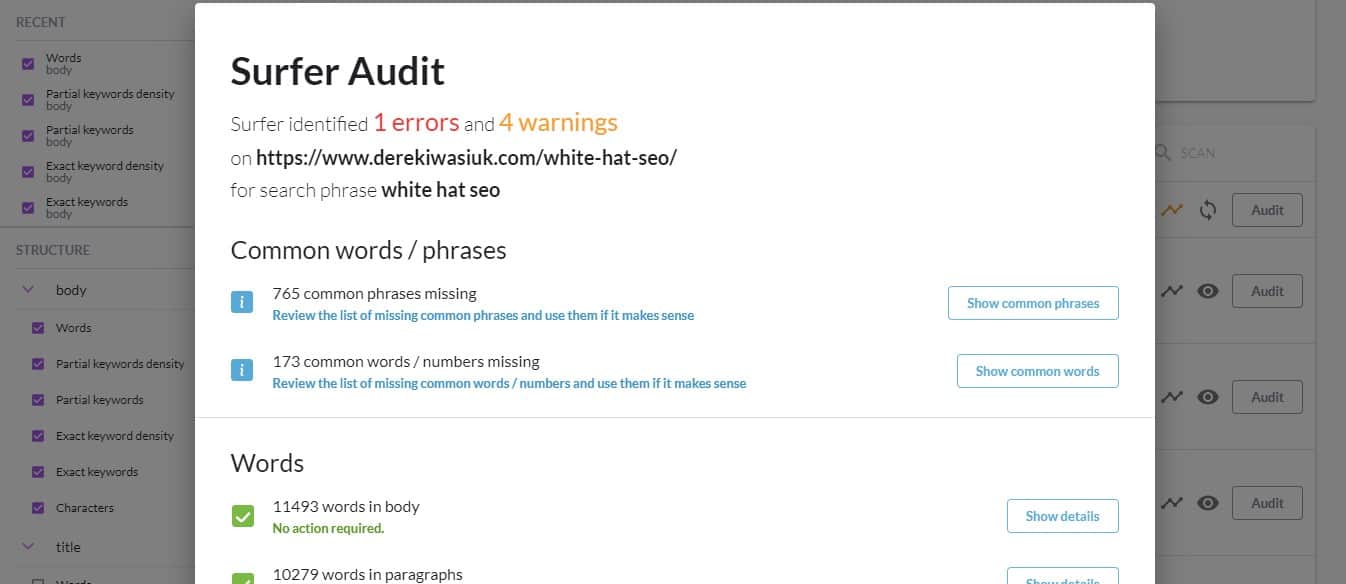
    An SEO score is an aggregate metric that tools like Semrush, Ahrefs, SE Ranking, and SEOptimer use to grade your site’s overall health. These tools crawl your pages and assign a score based on factors like broken links, missing meta tags, page speed, and on-page optimization.

    Here’s the thing though: your SEO score from a third-party tool and your actual Google rankings are two different things.

    I’ve seen sites with a 95/100 tool score sitting on page 4. And I’ve seen sites with a 62/100 generating thousands of organic visits a month. The score is useful as a starting diagnostic, but it does not directly tell Google where to rank you.

    What does matter is fixing the underlying issues those tools are flagging. The score goes up when the site improves, and the rankings follow when the improvements are meaningful. That’s how I use it.

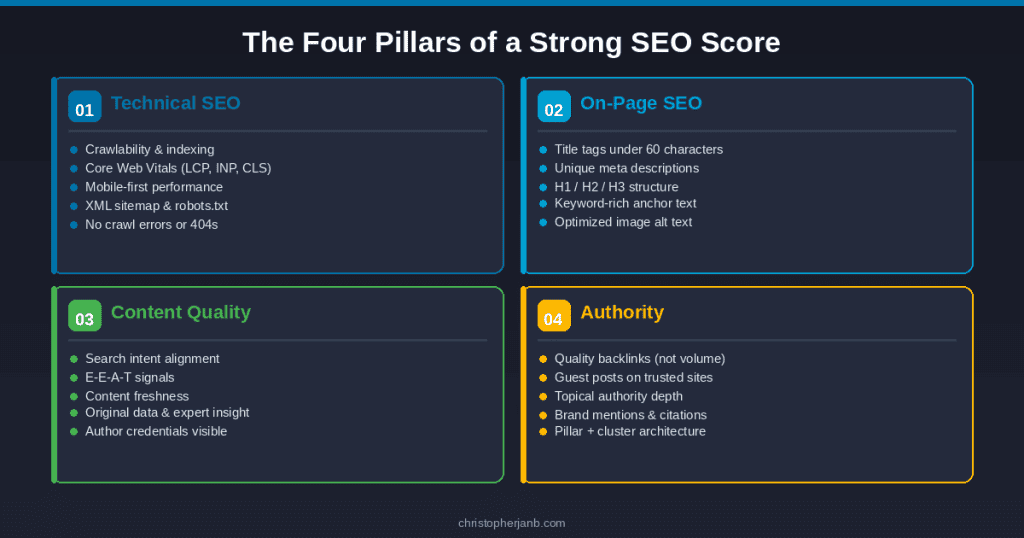
    The Four Pillars of a Strong SEO Score

    4 SEO pillars

    Before diving into fixes, it helps to understand what actually drives the number. Every legitimate SEO audit tool measures some combination of these four areas:

    Technical SEO covers crawlability, indexing, site speed, mobile usability, and Core Web Vitals. If Google can’t access and understand your pages, nothing else matters.

    On-page SEO covers title tags, meta descriptions, header structure, internal links, and keyword optimization. This is where most beginners start and where most basic issues live.

    Content quality covers search intent alignment, depth, freshness, and E-E-A-T signals. Google’s Helpful Content updates made this the most important factor on the list.

    Authority covers backlinks, brand mentions, and how well your site is recognized as a trusted source in your niche. This is the hardest to build and the slowest to move.

    Let’s go through each one.

    Step 1: Fix Technical SEO First

    Technical issues are the easiest to identify and the most urgent to fix. A single crawl error on an important page can wipe out months of content work. I’ve put together a detailed technical SEO site audit guide if you want to run through the full process step by step.

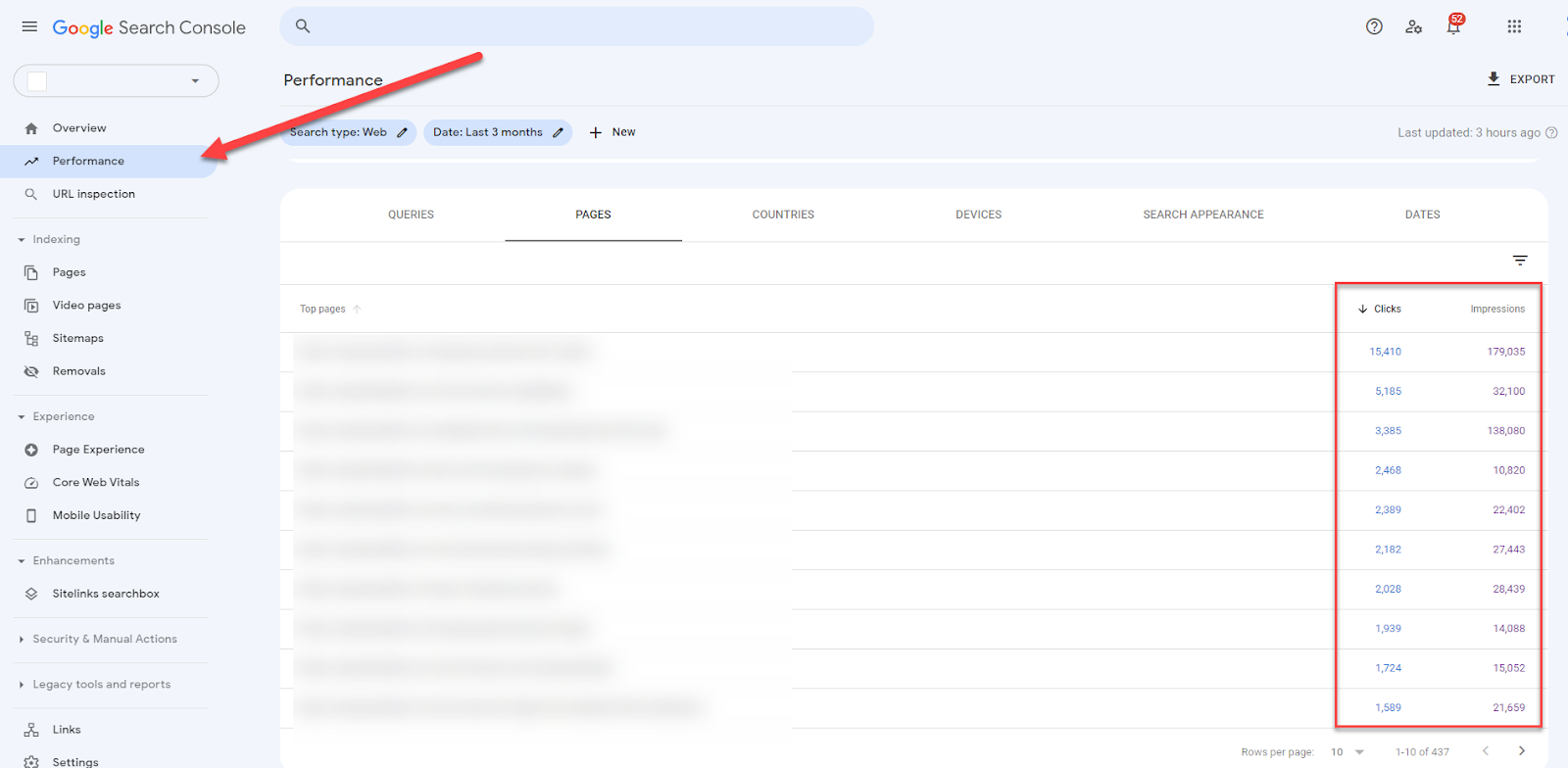
    Run a Google Search Console Audit

    If you have not connected your site to Google Search Console yet, do that today. It is free and it is the only tool that shows you exactly what Google sees when it crawls your site.

    Once you are inside, check three things immediately:

    Go to Pages under Indexing. Look for pages marked “Crawled, currently not indexed” or “Discovered, currently not indexed.” These are pages Google found but is not ranking. Common causes are thin content, duplicate content, or a noindex tag you forgot about.

    Go to Core Web Vitals. This report shows your LCP, INP, and CLS scores based on real user data. Any pages flagged as “Poor” need attention before anything else.

    Go to Manual Actions. If Google has penalized your site for any reason, this is where it will tell you. Most sites have nothing here, but it is worth checking.

    Fix Your Core Web Vitals

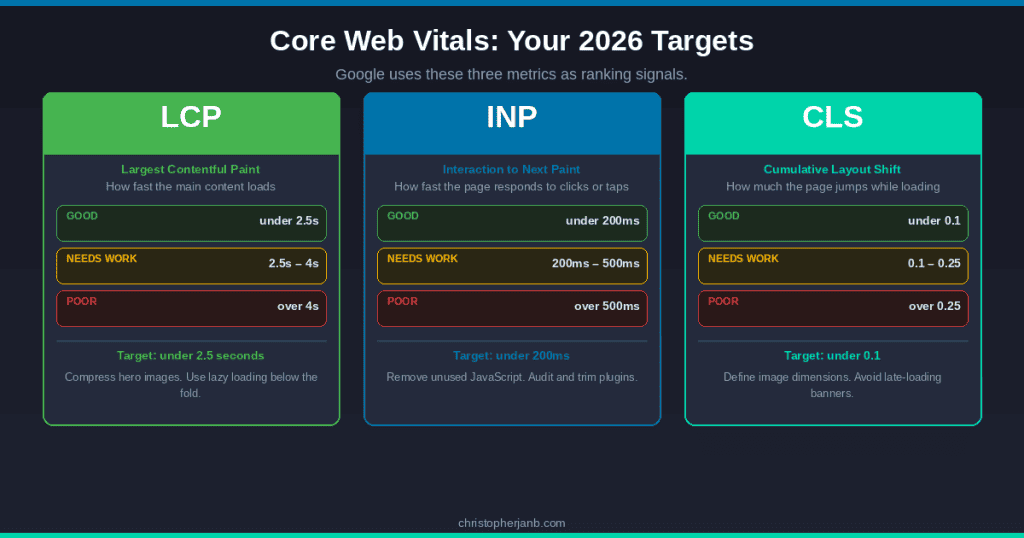
    Core Web Vitals

    Core Web Vitals are three metrics Google uses as ranking signals. As of 2026, the three are:

    LCP (Largest Contentful Paint) measures how fast the main content of a page loads. Your target is under 2.5 seconds. The most common culprit on WordPress sites is unoptimized hero images. Compress your images with a tool like ShortPixel and implement lazy loading on anything below the fold.

    INP (Interaction to Next Paint) replaced FID in 2024 and measures how quickly your page responds to user interaction like clicks or taps. Your target is under 200ms. Bloated JavaScript and too many third-party scripts are usually the problem here. Audit your plugins and remove anything you are not actively using.

    CLS (Cumulative Layout Shift) measures how much your page visually jumps around while loading. Your target is under 0.1. Always define dimensions for your images and avoid inserting ads or banners that push content down as the page loads.

    Run your pages through Google PageSpeed Insights to get specific recommendations per URL. It is free and gives you both mobile and desktop scores.

    Check Crawlability and Indexing

    A few quick things to verify:

    Make sure your XML sitemap is submitted in Search Console and does not include pages you have marked noindex. Contradictory signals confuse crawlers.

    Check your robots.txt file. I have seen sites accidentally block Googlebot from crawling entire sections of their site. Visit yourdomain.com/robots.txt and confirm nothing important is blocked.

    Fix broken internal links. A tool like Screaming Frog (free up to 500 URLs) will crawl your entire site and flag any 404 errors. Each broken internal link wastes crawl budget and kills user experience.

    Step 2: Sharpen Your On-Page SEO

    Once your technical foundation is solid, on-page optimization is where you can move fast.

    Title Tags and Meta Descriptions

    Your title tag is the single most important on-page SEO element. Every page should have a unique title that includes the primary keyword close to the front and stays under 60 characters.

    Do not write your title for Google alone. Write it for the person deciding whether to click your result over the ten others on the page. Ask yourself: would I click this?

    Meta descriptions do not directly affect rankings, but they absolutely affect CTR. A compelling meta description at position 12 can outperform a lazy one at position 8. Keep it under 155 characters, include your keyword, and end with something that makes the reader feel like they need to click.

    Header Structure

    Every page should have one H1 that matches the intent of the target keyword. Your H2s should cover the main sub-topics of the page. H3s go under H2s for more specific points.

    I see a lot of writers using bold text or random caps for subheadings instead of proper header tags. Google cannot parse those as structure. Use actual H2 and H3 tags in your CMS.

    Internal Linking

    Internal links are how you pass authority from one page to another within your site. They are one of the most underused levers in SEO.

    Every time you publish a new piece of content, go back through your existing posts and add contextual links to it from relevant pages. Use keyword-rich anchor text, not “click here” or “read more.”

    Your most important pages, pillar guides, service pages, and high-converting posts should have the most internal links pointing to them. This tells Google which pages matter most.

    Image Optimization

    Every image on your site should have a descriptive alt text that includes a relevant keyword where natural. File names matter too. “how-to-increase-seo-score-google-search-console.jpg” beats “image1.jpg” every time.

    Compress everything before upload. A 3MB hero image is one of the fastest ways to tank your LCP score.

    Step 3: Create Content That Actually Ranks

    This is where most SEO advice from 2020 falls apart. Google has fundamentally changed how it evaluates content since the Helpful Content Update rolled out in 2022 and continued through 2024 and 2025.

    Match Search Intent Precisely

    Before you write anything, search your target keyword and look at the top five results. What format are they using? What questions are they answering? What angle are they taking?

    If the top results are all step-by-step guides and you write a listicle, you are fighting the SERP instead of working with it. Google has already told you what it thinks searchers want. Give them that. My SEO content writing guide goes deep on how to read and match search intent for any keyword.

    Build E-E-A-T Into Your Content

    E-E-A-T stands for Experience, Expertise, Authoritativeness, and Trustworthiness. It is the framework Google uses to evaluate content quality, and it is now more important than any keyword tactic.

    Experience means showing that you have actually done the thing you are writing about. I do not just write about SEO in theory. I have been doing it for clients since 2013. When I mention that, and back it up with specific results or examples, it signals real-world experience to both readers and Google’s quality evaluators.

    Expertise means demonstrating deep subject knowledge. Go beyond the surface. Explain the why behind your recommendations, not just the what.

    Authoritativeness comes from external recognition. Being published on Search Engine Journal, Niche Pursuits, and Blogging Wizard builds this over time. Every byline you earn on a recognized publication reinforces your authority in the eyes of Google.

    Trustworthiness comes from accurate information, transparent sourcing, clear authorship, and a site that does not make people feel like they are about to get scammed. Author bios, testimonials, and privacy policies all contribute here.

    Keep Content Fresh

    Google rewards freshness, especially in competitive niches. If you have posts that have not been updated in two or more years, they are probably losing ground to newer content that covers the same topic.

    Refreshing content does not mean rewriting from scratch every time. Sometimes all it takes is updating statistics, removing dead links, adding a new section that covers something competitors have started covering, and changing the publish date.

    I check my top-performing posts at least once a quarter and update anything that has aged badly.

    Step 4: Build Authority the Right Way

    Authority is the slowest part of SEO to build but one of the highest-leverage. A single link from a high-DR publication in your niche can move a page more than dozens of on-page tweaks.

    Focus on Quality Over Volume

    The era of building hundreds of low-quality backlinks to rank is over. Google is significantly better at detecting and discounting manipulative link patterns. One link from Search Engine Journal carries more weight than a hundred links from random blog networks.

    The most reliable ways to build quality links in 2026 are guest posting on industry publications, creating original research or data studies that others want to cite, and digital PR that gets you mentioned in news articles and roundups.

    Reclaim Unlinked Brand Mentions

    This is one of the easiest wins most sites leave on the table. Search for your name and your site’s name on Google. Find any mentions that do not include a hyperlink. Reach out to the site owner and ask them to add one.
    These are warm outreach targets because they already know who you are. Conversion rates on unlinked mention outreach are typically 20 to 30 percent.
    Build Topical Authority

    In 2026, Google rewards sites that comprehensively cover a topic over sites that have one great post surrounded by unrelated content. This is the whole argument for pillar content and content clusters.

    If your site covers SEO and content writing, every supporting post should connect back to your pillar guides through internal links. The cluster of related content tells Google that your site is a serious resource on the topic, not just a collection of random posts.

    Step 5: Optimize for AI Search (GEO)

    Generative Engine Optimization is not replacing SEO. It is extending it into a new channel. AI Overviews appear in a significant portion of Google searches. ChatGPT and Perplexity are now referral traffic sources for many sites. Getting cited in these systems requires a slightly different approach to content structure.

    Lead With Direct Answers

    AI systems pull content from the opening section of your page when generating answers. If your first paragraph is a story or a hook, you miss the citation window. Put a concise, direct answer to your target question in the first 60 to 80 words of every post.

    Add FAQ Schema

    FAQ schema markup tells Google exactly what questions your page answers and in what format. AI systems use structured data to identify authoritative answers. Add five to eight Q&A pairs to your most important posts using FAQ schema.

    Every FAQ question should mirror the conversational phrasing people use when asking AI assistants. “What is an SEO score?” gets you further than “SEO score definition.”

    Include Citation-Worthy Data

    Research shows that AI systems preferentially cite content that includes statistics from credible sources, expert quotes, and original data. Include at least one cited statistic per major section of your content. Link to the primary source, not an intermediary article.

    Tools to Measure Your SEO Score

    You do not need to pay for six tools to track your SEO health. Here is what I actually use:

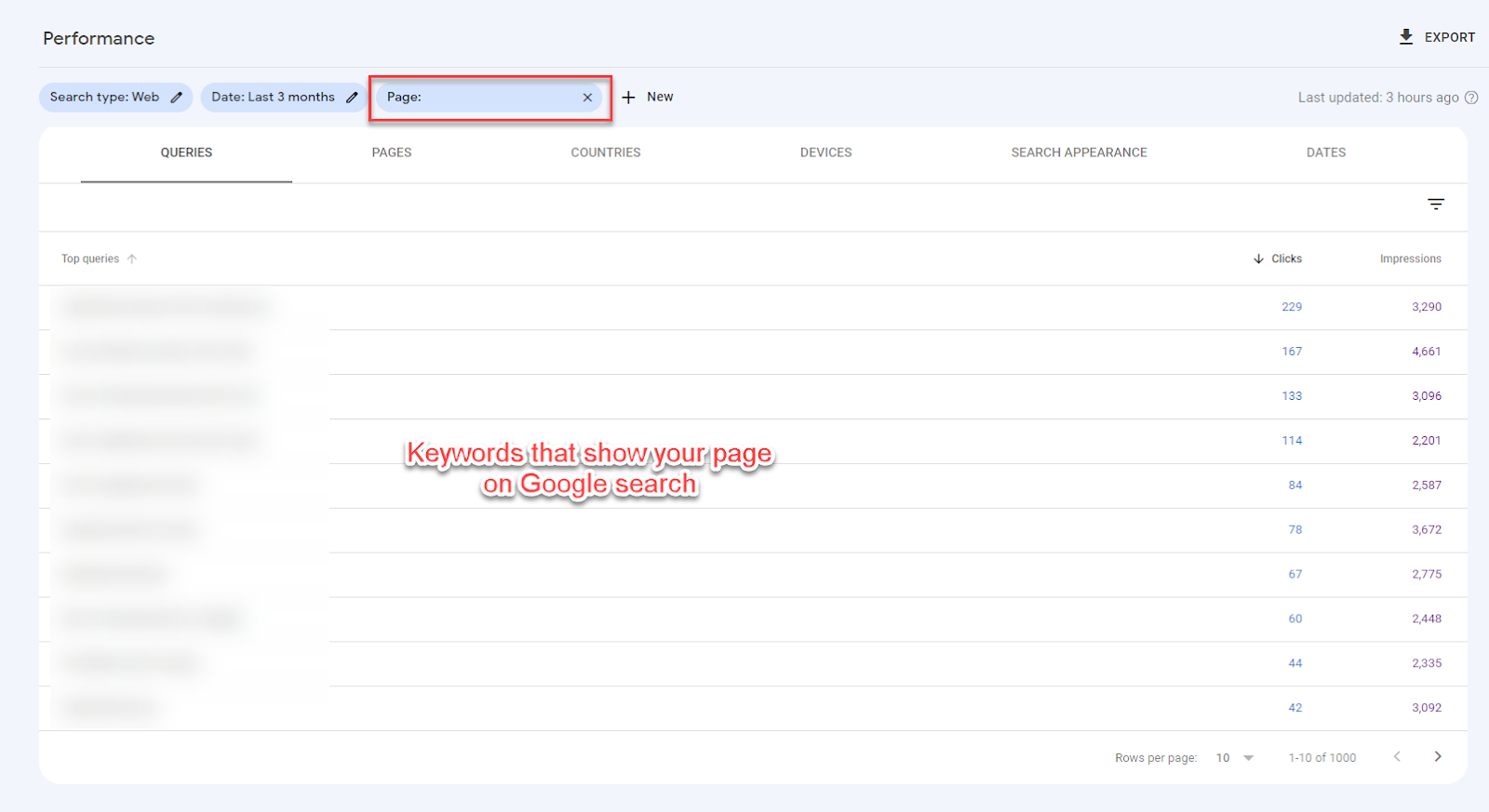
    Google Search Console is free and the most accurate source of truth for how Google sees your site. Use it to track impressions, clicks, CTR, average position, Core Web Vitals, and indexing issues.

    Google PageSpeed Insights is free and gives you Core Web Vitals data per URL with specific improvement recommendations.

    Semrush or Ahrefs for a comprehensive site audit score, backlink tracking, and keyword rank monitoring. Either one is worth the investment if SEO is central to your business.

    Screaming Frog (free up to 500 URLs) for crawling your site to find broken links, missing meta tags, duplicate content, and redirect chains.

    You do not need all of these on day one. Start with Search Console and PageSpeed Insights. Add a paid tool when you are ready to go deeper on backlinks and keyword tracking.

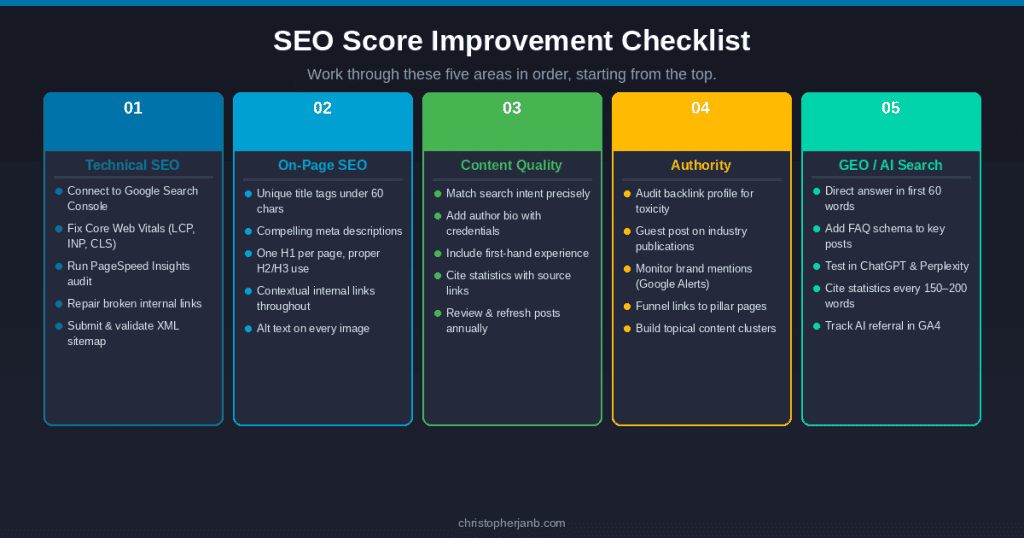
    SEO Score Improvement Checklist

    SEO Score Checklist

    Use this to work through your site systematically. Start from the top and move down.

    Technical SEO

    • Connect site to Google Search Console and review index coverage
    • Check Core Web Vitals report and fix any “Poor” pages
    • Run site through PageSpeed Insights for mobile and desktop scores
    • Fix broken internal links with Screaming Frog or a similar crawler
    • Verify XML sitemap is submitted and does not include noindex pages
    • Confirm robots.txt is not blocking important pages

    On-page SEO

    • Every page has a unique title tag under 60 characters with primary keyword
    • Every page has a unique meta description under 155 characters
    • One H1 per page that matches the target keyword intent
    • H2 and H3 tags used for all subheadings (no bold text substituting for headers)
    • Internal links added from related posts to each new piece of content
    • All images have descriptive alt text and compressed file sizes

    Content quality

    • Each post directly matches the search intent of its target keyword
    • Author bio is present with credentials and experience
    • Content includes first-hand examples, personal experience, or original data
    • Statistics are cited with links to primary sources
    • Posts reviewed and refreshed at least once a year

    Authority

    • Backlink profile checked for any toxic or spammy links
    • Guest post strategy in place targeting industry publications
    • Brand mentions monitored with Google Alerts
    • Internal links funnel authority to pillar pages and key service pages

    GEO

    • First paragraph of each post includes a direct, extractable answer
    • FAQ schema added to pillar guides and high-traffic posts
    • Content tested manually in ChatGPT, Perplexity, and Google AI Overviews
    • AI referral traffic tracked in Google Analytics 4

    Improving your SEO score is not a one-time project. It is a system you build and maintain. Fix the technical issues first because those are the foundation. Then sharpen your content to match what searchers and AI systems are actually looking for. Then build authority through links and brand recognition that compounds over time.

    I have been doing this for clients and for my own site for over a decade. The fundamentals have not changed that much. What has changed is the bar. The sites winning in 2026 are the ones that do all of it well, not just one part of it.

    If you want help with any of this for your own site, my SEO audit and content reoptimization services are a good place to start.

  • What Is Keyword Grouping And How To Do It The Right Way

    What Is Keyword Grouping And How To Do It The Right Way

    By now, you should know that you can rank for more than one keyword for your blog post or web page.

    The problem is, most of the time, people optimize their content using a focus keyword.

    This is not wrong by any means. However, you don’t get to maximize the organic traffic potential of your page if you don’t optimize it for related terms.

    This is where keyword grouping, or keyword clustering, comes to the rescue.

    In this post, I will discuss keyword grouping and its benefits. Also, I will show you how you can group your search queries in different ways.

    In the end, you should be able to do keyword grouping to help your blog post rank for multiple keywords on SERPs.

    What is keyword grouping?

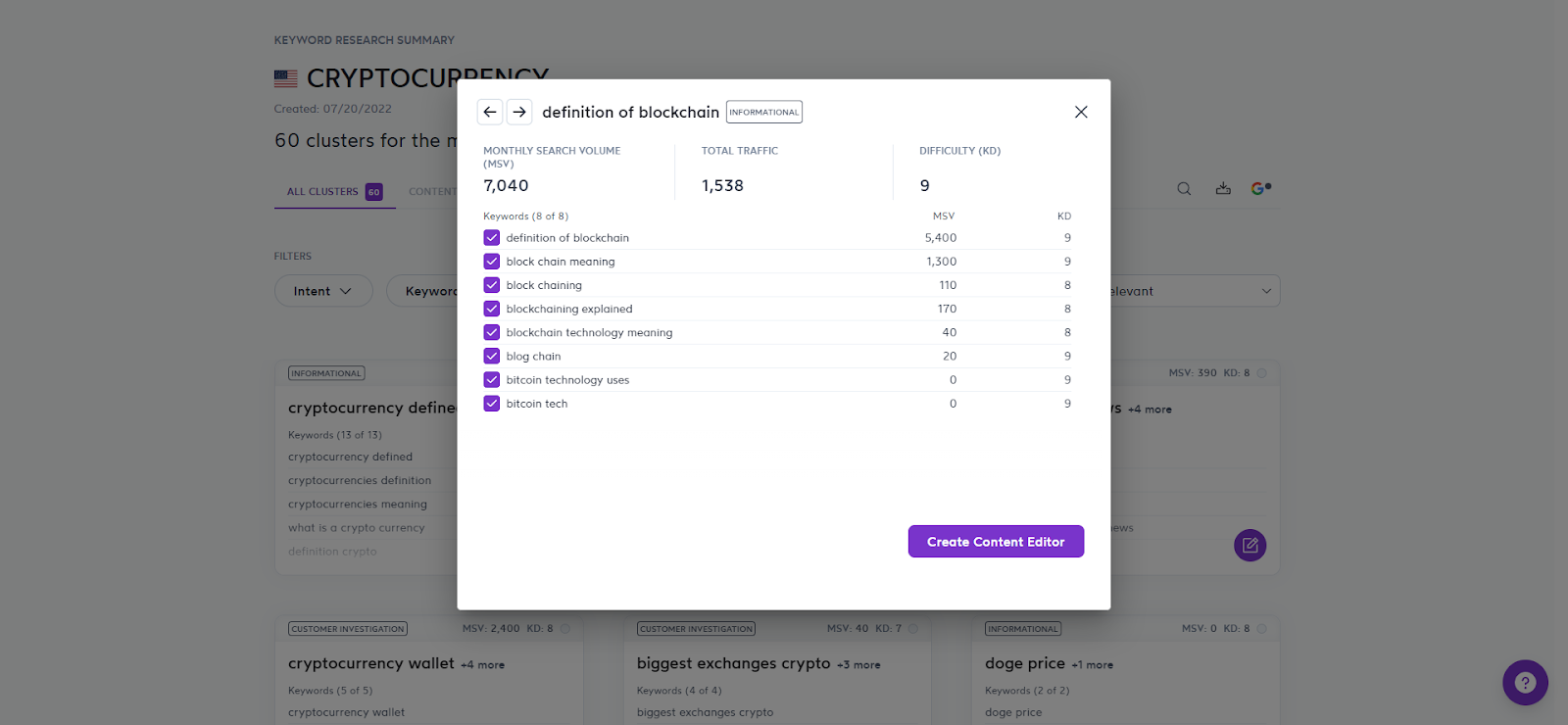
    The keyword grouper method is the process of researching a list of keywords and grouping search terms closely related to one another. They help you build a silo that covers different user intent for each search term in the cluster.

    Most conduct keyword research by finding a search term with a high search volume that they will use to optimize the content. There are different tools you can use for this.

    With keyword grouping, you can unearth thousands of keywords and organize them into keyword groups.

    Benefits of a keyword group

    So, what’s the big deal with coming up with keyword clusters?

    Below are its advantages:

    Increase organic traffic

    By coming up with clusters of keywords, you can optimize for them in your content.

    Since they are related to your target keyword, you shouldn’t have any problem mentioning them in the post. Simply use them as synonyms to your main keyword to mix things up.

    By doing so, you increase your chances of ranking for your target keyword on search results and closely related keywords on search results.

    And by ranking on top of search engine results for all those keywords in a single page, you can increase traffic coming from search engines!

    Organize your content structure

    Aside from using a keyword group for a single page, you can use the keywords to create a silo in your website.

    A silo is a structure where a category or a folder in a website contains pages related to the topic of the category.

    For example, if the category is “running shoes,” then the pages in it can optimize for the following keywords:

    • Running shoes for men
    • Best running shoes in 2020
    • Nike running shoes

    Basically, keyword groups can help you come up with relevant content ideas for categories in your site.

    By doing so, you create semantically relevant content about a topic, which plays a big role in your content marketing strategy.

    Focus on topics, not keywords

    In relation to the benefit above, keyword grouping allows you to approach your site as a source of information about a topic.

    Again, if your website is about running shoes, creating content about woodworking for it doesn’t make sense.

    Even if the search terms for woodworking have generally higher quality scores (high search volume and low difficulty), it adds nothing to the topic of your website.

    So, if your visitors see content optimized for irrelevant keywords, expect them to leave right away.

    It’s about time webmasters create topically relevant content instead of chasing profitable keywords left and right. 

    This way, they create authority and credibility for your website about their topic.

    Start keyword grouping with SE Ranking!

    If you want to make the most out of keyword grouping, use SE Ranking. It’s an all-in-one SEO platform that lets you conduct keyword research, competitor analysis, monitor website changes, and more. Below, you will see how you can effectively use SE Ranking to cluster keywords. But if you want to learn more about the tool, check out the SE Ranking review I wrote to shows how powerful the tool is.

    How to use Keyword Planner for creating keyword groups

    You can use tools like Long Tail Pro if you want a paid tool to help you find keyword ideas. But Google Keyword Planner is a free keyword tool mainly used for Google Ads and PPC.

    For SEO, however, you can use it to find keyword suggestions for building your keyword strategy.

    But for the purpose of this post, you can use Keyword Planner as a keyword grouping tool to help you cluster related keywords together.

    If you have a Google account, login from Google Adwords to access the tool.

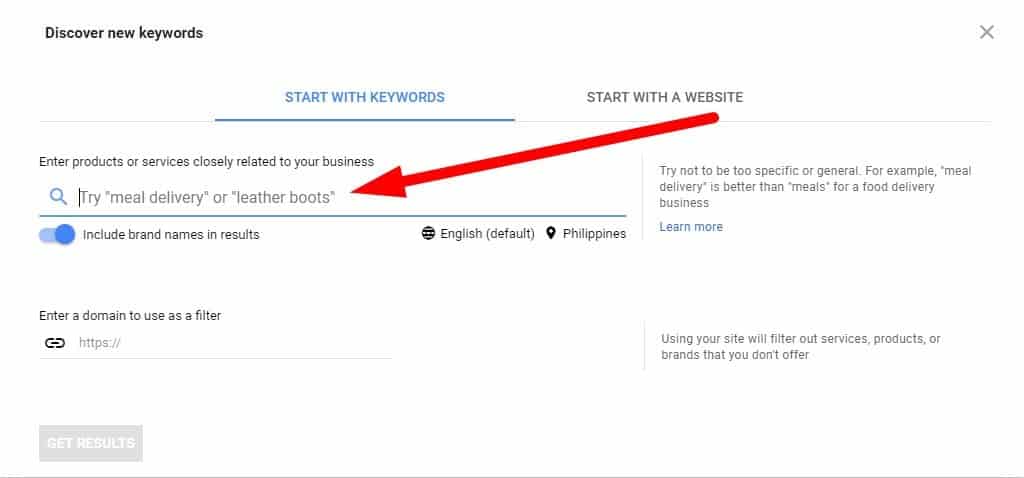
    Once in, type in your topic on the text bar.

    keyword planner - discover new keywords

    The tool will then generate keyword ideas that you can include in your campaign.

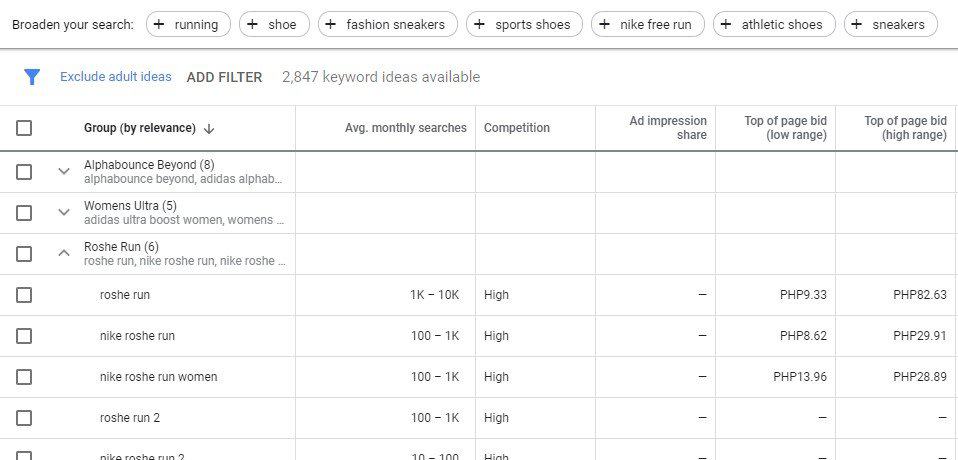
    From the Keyword ideas page, click on Grouped ideas on the sidebar.

    keyword planner - grouped ideas

    It will show you the keywords organized into groups.

    keyword planner - grouped ideas results

    To view the keywords for each group, click on the arrow button to show them.

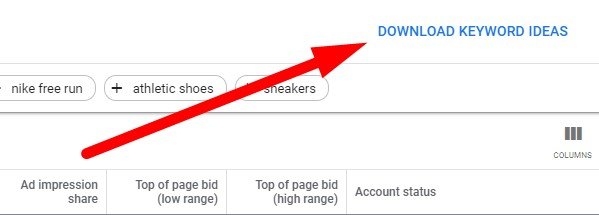
    From here, you can download the keywords ideas and organize them further manually onto a spreadsheet.

    keyword planner - download keyword ideas

    Now, using the Keyword Planner is the easiest and simplest way to group your keywords. It also doesn’t provide you with the most value.

    For one, the tool doesn’t tell you how it grouped the keywords together (more on this later).

    It also lacks features to help you analyze the clusters properly.

    So while Keyword Planner is good enough to help you group keywords together, it’s not useful enough.

    SE Ranking is an all-inclusive SEO tool that helps you rank your websites higher on organic search. You can use its features like link building, competitor analysis, PPC keyword research, and more to formulate your SEO strategy.

    But its keyword grouper feature lets you come up with keyword lists for optimizing your websites with topically relevant keywords.

    SE Ranking is a paid search marketing tool but you can sign up for a 14-day free trial to test its features.

    But before you can use its keyword grouper feature, you must upload a number of keywords manually to the tool.

    You can use the keywords you downloaded from the Google Adwords tool.

    While they are already clustered together, it doesn’t hurt to run them again using SE Ranking. You could get different and possibly better results in the process.

    Or you can also use SE Ranking’s keyword tool to find ideas and suggestions for your topic. I personally feel it’s one of the better keyword research tools in the market.

    To begin, go to Tools > Keyword Suggestions from the menu.

    Then enter your topic on the text bar. Change the source and country database if necessary before hitting “Start search.”

    what is keyword grouping - se ranking - keyword suggestions

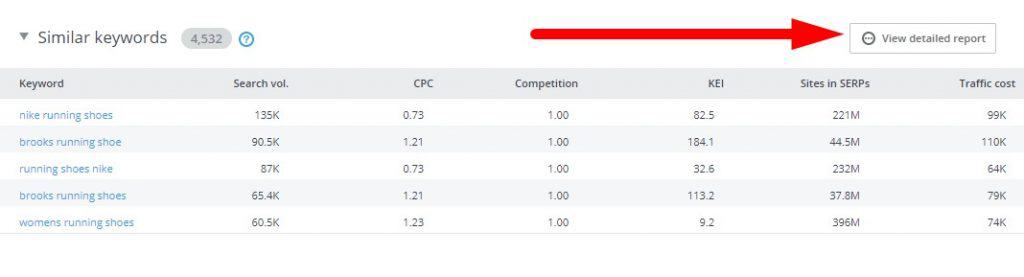
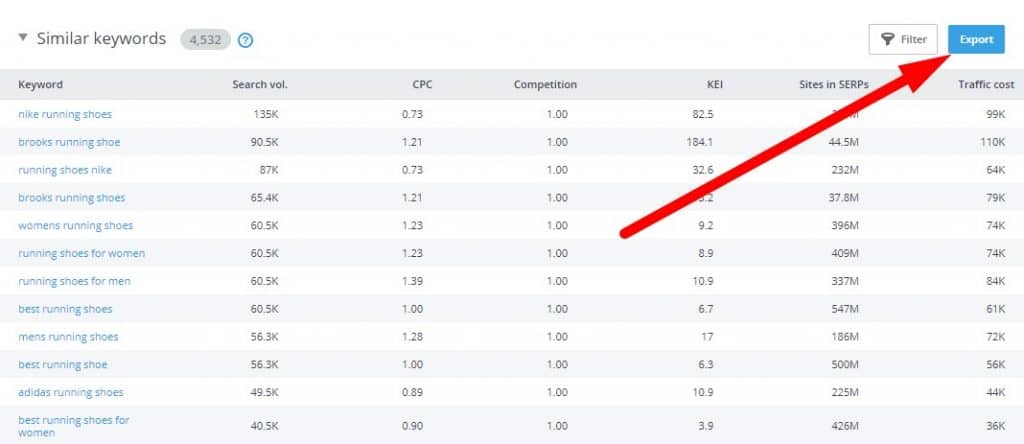
    On the overview page, scroll down until you reach the Similar keywords section. Click on View detailed results to see the entire list of keywords.

    se ranking - similar keywords

    From here, click on the Export button and choose .csv or .xlsx format to download the list.

    export similar keywords from se ranking

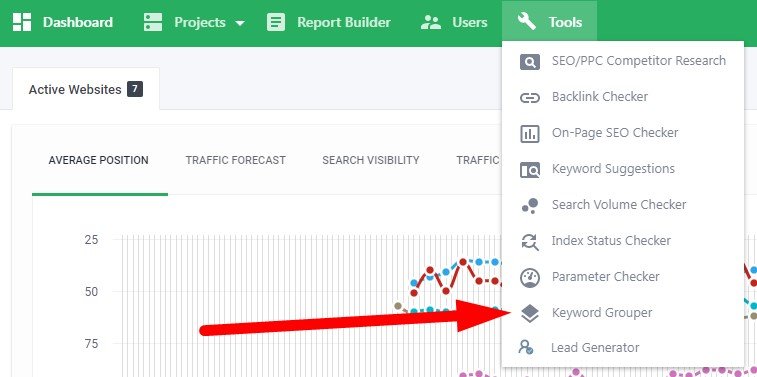
    Once you have downloaded the file, go back to the dashboard and go to Tools > Keyword Grouper.

    keyword grouper se ranking

    Next, enter the title of the keyword group and change the settings as you see fit.

    keyword grouper search engine settings

    Next, and perhaps its best feature, is the ability to organize the keywords according to accuracy and method.

    keyword grouping accuracy and method

    If you want to create accurate keyword groups, you need to set it at a higher setting.

    What happens is the tool will be stricter regarding clustering keywords. 

    Therefore, the higher the accuracy is, the fewer search queries there will be in each group.

    Regarding the method of grouping, choose between soft and hard.

    In a nutshell, the soft method groups together a much larger set of keywords. However, there’s a chance that each group will have irrelevant keywords in there.

    The hard method clusters fewer keywords compared to the soft method. But there’s a low chance you will see unrelated search queries in each group.

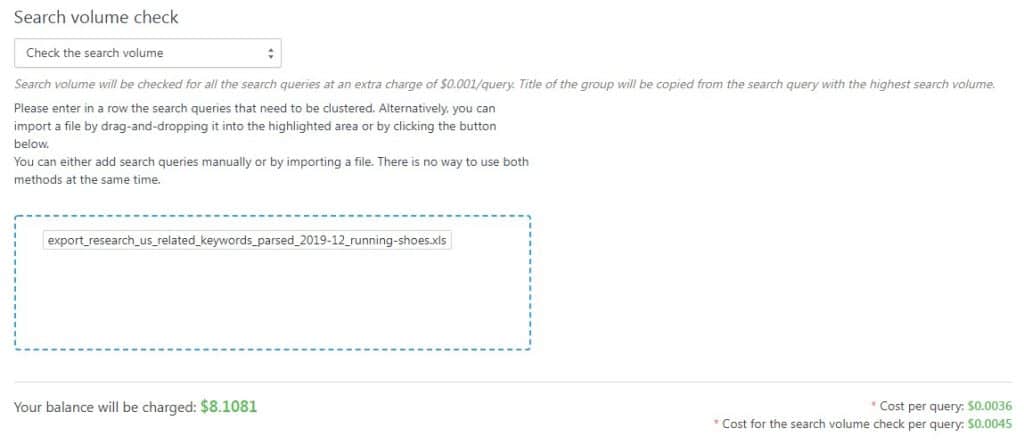
    keyword grouper search volume checker upload

    After choosing the settings, confirm if you want to include the search volume of each keyword. Then upload the file where your keywords are.

    Also, you must understand that keyword grouping is an on-demand SE Ranking service. This means it’s not part of your subscription of the tool.

    Each keyword query check costs $0.004, while the search volume check is at $0.005.

    Once you start grouping the keywords, wait for a couple of minutes. The length of time clustering your keywords depends on how many you uploaded.

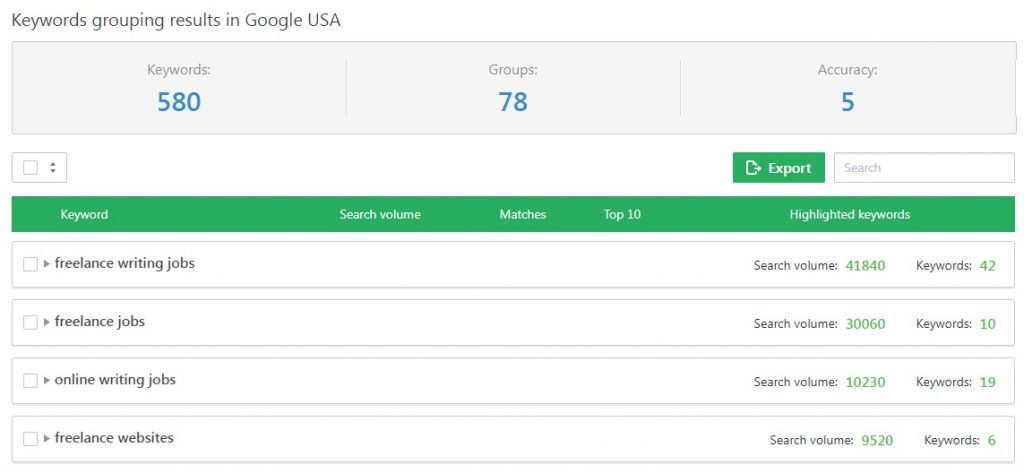
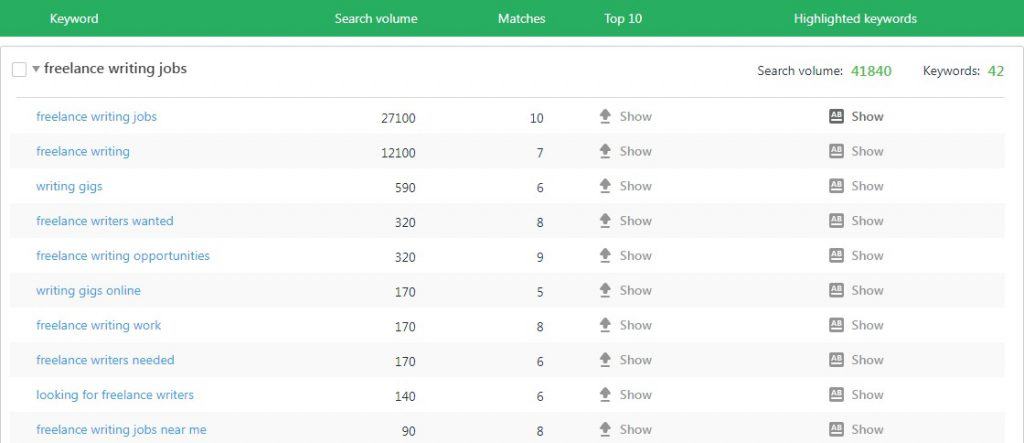
    The keyword group on SE Ranking should look like this:

    keywords grouping results in Google USA

    If you expand the group, you will see the keywords included, their search volume, the Top 10 matching URLs, and the highlighted keywords on the top 10 results.

    keyword group details

    You can export the groups and explore each of them more in detail from a spreadsheet.

    Frequently Asked Questions

    What is keyword grouping in SEO?

    Keyword grouping is an effective method for optimizing content. The process involves making clusters of related keywords and using those groups to create posts or pages optimized with several terms from a particular keyword group.

    What is keyword with example?

    In SEO, a keyword is the term that people use to search for products and services online. For example, if I want to search for Nike basketball shoes, I type in “adidas basketball shoes” or “best Nike basketball shoes for guards.” Keywords are part of an optimization strategy called on-page SEO.

    How do you organize keywords?

    You can organize content according to their intent. Some people use keywords to learn more about a specific topic (informational), while others type in keywords with the intent of purchasing something (commercial and transactional). Organizing keywords according to these categories allows you to create topically relevant content for each group.

    How do you do keyword clustering?

    It would be best if you researched for keywords that are closely related to your niche or topic. From here, you can group them together according to their respective variants, subtopics, and others.

    Conclusion

    Grouping keywords is not really reinventing the wheel. However, the best SEO strategies happen to be the simplest.

    In this case, clustering your keywords is one of the easiest ways to organize your content according to topic. 

    This way, you can rank your pages for multiple keywords at the same time. You also create semantically relevant content based on keywords.

    Google Keyword Planner is a great place to start keyword grouping. But if you want a leg up on the competition, try out SE Ranking.

  • 5 Reasons Why You Need a Marketing Plan for Better SEO

    5 Reasons Why You Need a Marketing Plan for Better SEO

    Every business needs a plan to succeed.

    And when it comes to maximizing your online reach, you will need a marketing plan.

    But you have to be even more specific than that as there are different ways to promote your business.

    Therefore, if you want to rank higher on organic search for your keywords, an SEO marketing plan is the ticket!

    In this post, you will learn:

    • What a marketing plan is all about
    • The different goals of a marketing plan
    • Reasons you need one for your small business

    What is a marketing plan?

    A marketing plan is a road map on how you propose to promote your products or services to your target market.

    There are many types of plans for different small businesses. With SEO, a great example is found in SE Ranking.

    se ranking - small business marketing plan

    Alt text: SE Ranking business marketing plan

    Its marketing plan covers the following SEO factors:

    • Keyword research – Identify keywords related to your business that you should optimize for your website
    • On-page optimization – Set up tracking codes to analyze and measure your site’s traffic and conversions. Also fix your site structure to help search spiders crawl your pages much easier.
    • Mobile optimization – Ensure that visitors can properly view your website on mobile devices. That means your site must have a responsive design to adjust to the size of the device’s screen size.
    • Content strategy – Learn how to create content that search engines and your target audience will love. Includes developing a content marketing strategy using your blog.
    • Off-page optimization – Increase off-page signals such as building backlinks and citations. These help the search engine to index your pages faster and better
    • Social media strategy – Leverage social signals to your site that could help increase your organic search rankings

    These factors help you gain a better understanding about your site’s SEO.

    From here, you can develop a marketing campaign based on what you’ve accomplished in the checklist.

    SE Ranking is more than just an SEO marketing plan!

    Find out how this software can improve your site’s SEO performance from top to bottom. Check out my SE Ranking review by clicking on the link.

    Purpose of the marketing plan

    The goal of a marketing plan is to increase your visibility in your market. If done right, you can see an uptick in engagement with your brand, if not an increase in sales and revenue.

    Unlike others, the great thing about an SEO marketing plan is the ability to scale and measure the fruits of your labor. We will talk about this in a bit.

    Why you need a marketing plan

    I already touched upon some of the reasons why you need a marketing plan for your business. But it’s best to list them down here so you know the benefits of a successful marketing strategy.

    Leverage online assets

    If SEO isn’t part of your marketing mix yet, then now’s the time to integrate it.

    Almost everybody uses their mobile devices and laptops to find solutions for their problems.

    And if your site is what they’re looking for, then they can visit your site and become your clients.

    But that won’t happen unless you don’t optimize your website for organic search!

    By creating a marketing plan geared towards improving your SEO (if not your digital marketing campaign), your website can shoot on top of Google search.

    As a result, more people will see your site on search engine results pages (SERPs), leading to more clicks to your site.

    Fortify your site’s foundations

    For starters, you want your site to have a clear hierarchical structure and pages optimized for low-hanging fruit keywords.

    However, doing that without a step-by-step process to guide you is tough.

    An SEO marketing plan will lay out the details for you so you don’t have to scramble for information.

    The marketing plan should also be easy enough to understand and follow even if you have zero experience in SEO.

    Because setting up an optimized site is hard enough.

    Plus, you don’t want to conflicting information about SEO in your research. Best to have the details in your marketing plan so you can simply worry about improving your site.

    Using SE Ranking, you can click on the “How to” button to show the exact process of doing a task.

    why you need a marketing plan using SE Ranking

    Establish clear business goals

    But before you develop your website, you need to have a goal in mind.

    Answer this question:

    What do you want visitors to do once they’re on your website?

    As you know, visitors don’t amount to anything if you don’t have a call to action.

    So, if they’re not on your site to subscribe to your email marketing list or buy a product or service, then what’s the point?

    You want to assign a dollar value on your SEO campaign.

    Therefore, a marketing plan helps you determine measurable goals to make sense of your small business marketing.

    From here, you can use the data gathered by your analytics tools to track your process.

    See in the results if you are hitting your goals. If not, tweak your campaign to make sure it is going according to plan.

    Develop marketing strategies

    By breaking down the factors in your SEO marketing plan, you can scale your business using different strategies.

    Bulk of your marketing strategy will deal with off-page optimization.

    Backlinks are the most crucial ranking factor for your site. The more high-quality links you can generate for your site, the better your site will rank.

    However, links from authoritative sites take time to acquire. You’ll have to jump through several hoops to earn that link.

    While link building presents certain challenges, your marketing plan should help make things easier.

    It provides you a full view of your site’s current progress in SEO. Therefore, having access to your plan gives you ideas on how to approach your upcoming strategies.

    For example, you can compare your existing link profile with your competitors and see links they have that you don’t yet.

    You can then plot up a campaign where you try and acquire missing backlinks to boost your link profile.

    Ensure the success of your business

    Simply put, your marketing plan helps you achieve your goals and grow your business faster.

    Without a plan, you don’t have marketing objectives laid out for you.

    Therefore, you do not know which factors to prioritize and strategies to run for your site.

    Not to mention, an SEO marketing plan allows you to track and measure the organic traffic you’re generating.

    Use the data available at your fingertips to determine which campaigns to launch and maximize your growth.

    Turn your marketing plan for SEO into action with SE Ranking

    Now you know the value that a small business marketing plan brings to the table. But you should also know a plan isn’t the same as a marketing campaign for your site’s SEO.

    The plan only gives you an idea of what you need to do to attract more organic visitors to your website. So, if you want to put your plan into action, you need a strategy or campaign.

    As business owners, however, developing an SEO marketing campaign requires you to have access to data about your website.

    You must know how much traffic you are generating, where you’re getting them, and how you can get even more.

    From here, you will have all the information you need to help you achieve business growth online.

    Aside from giving you access to an SEO marketing plan, SE Ranking also does:

    Track your rankings

    se ranking rank tracking

    See how high you’re ranking for your target keywords over time based on your current SEO campaign

    Monitor your backlinks

    Identify the most valuable backlinks your site has and keep track of their status. If you lose the link, avoid losing your site rankings by asking the site owner to restore it.

    Analyze your competitors

    Check out how your competitors are faring, which keywords they are ranking for, and how strong their link profiles are. You can also spy on their strategy and figure out why they are so successful so you can emulate it on your site.

    Research for keywords

    Find low-hanging fruit keywords that your site should optimize for to rank for them and increase your organic traffic.

    Run an on-site audit

    se ranking site audit

    Let the tool analyze your site for errors and areas of improvement. This ensures that your site is in tip-top shape and is optimized to rank for SERPs.

    The audit also paves way for the tool to monitor the changes on your website. Doing so lets you keep track of all the changes in a period and revert back to the old version if necessary to restore a page’s ranking.

    se ranking site audit

    SIGN UP FOR A 14-DAY FREE TRIAL OF SE RANKING

    Optimize your website and develop your SEO campaign in one place! Click on the link below to get started.

  • How to Use SEMrush to Boost Your Blog Content’s SEO

    How to Use SEMrush to Boost Your Blog Content’s SEO

    SEO is not for the weak of heart.

    The process of optimizing for organic search involves research, critical thinking, and a bit of elbow grease all rolled into one. Only people who have the patience to analyze hard data and put them into concrete actions will succeed in getting their sites ranked at the top of Google search results.

    However, it’s one thing that you know the process. It’s another to actually do it.

    Ideally, an effective SEO strategy runs for years in order to keep your site on the first page of search results at the very least. That includes mining organic search for relevant information to help you develop the tactics that will comprise your strategy.

    Manually combing through search results is not recommended because it will take too much of your time just to collect the data. Even then, some of the information you will have collected may change over time due to the changes in the Google algorithm.

    Therefore, you need all the help you can get regarding developing and implementing an SEO campaign. The help usually comes in the form of an SEO tool that will:

    • help you determine the best target keywords to optimize for each of your pages
    • crafting content based on the keyword you’ve chosen
    • acquiring backlinks for your content through competitor research

    All these things can be done effectively using SEMrush*.

    semrush logo - How to Use SEMrush to Boost Your Blog Content's SEO

    In this post, I will discuss how to use SEMrush to help you choose target keywords for your content, develop the best content possible for your post, and build relevant and contextual links to your post based on your competition.

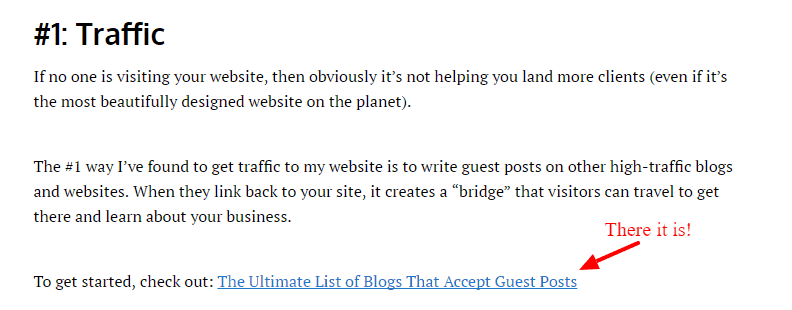
    For the sake of example, I will be using the post “MASSIVE LIST: 1,343 Blogs that Accept Guest Posts” and share with you how I developed the post from the ground up using SEMrush and some examples on how to run a link building strategy for it.

    Let’s jump right to it, shall we?

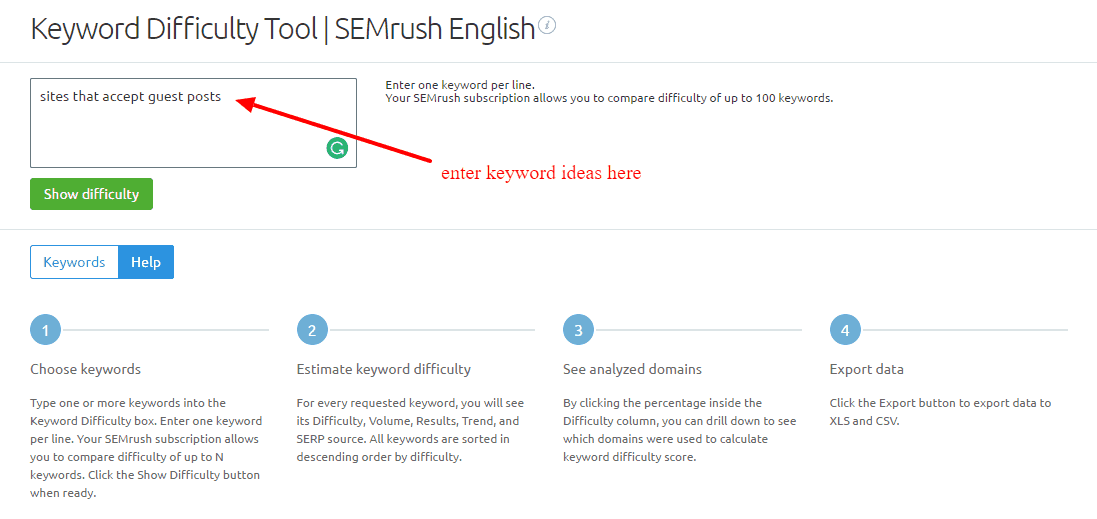
    Keyword Difficulty Tool

    For keyword ideas before writing your post, go to the Keyword Difficulty Tool page under the Keywords Analytics category.

    On this page, you should already have a keyword phrase in mind that you want to optimize for. The purpose of the Keyword Overview is to validate whether the keyword has lots of search volume and is not difficult to rank for relative to other related search phrases.

    At the same time, you want to look for better-related keywords to optimize for.

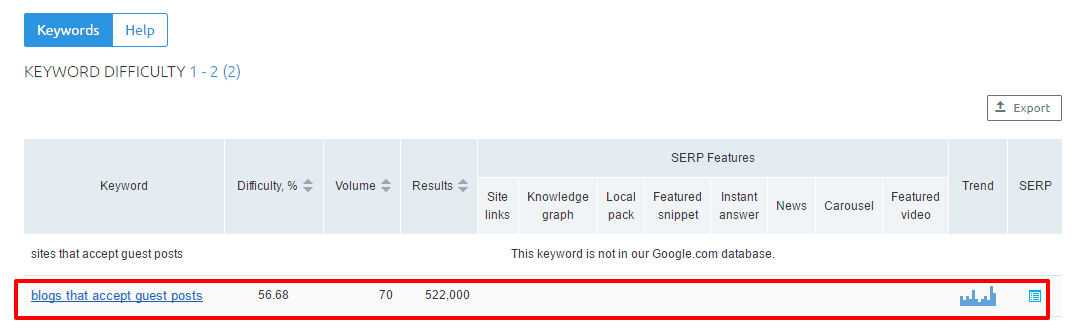
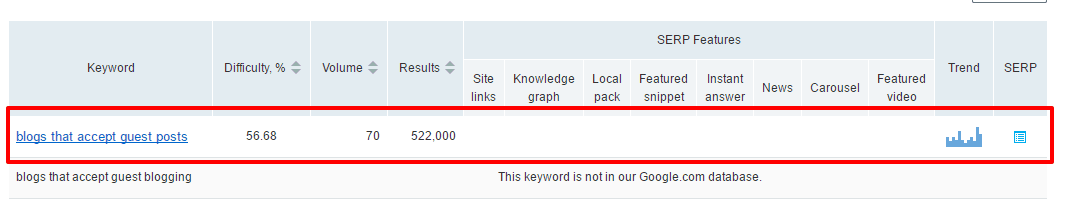
    Initially, I was torn between “sites that accept guest posts” and “blogs that accept guest posts” as my keyword. Using this tool, let’s see which between the two is better.

    From the screenshot above, “blogs that accept guest posts” returns with data and the other keyword doesn’t. This means that the former keyword phrase is search more often than the other one, so It’s best to optimize for the keyword with better performance based on the data.

    Keyword Overview

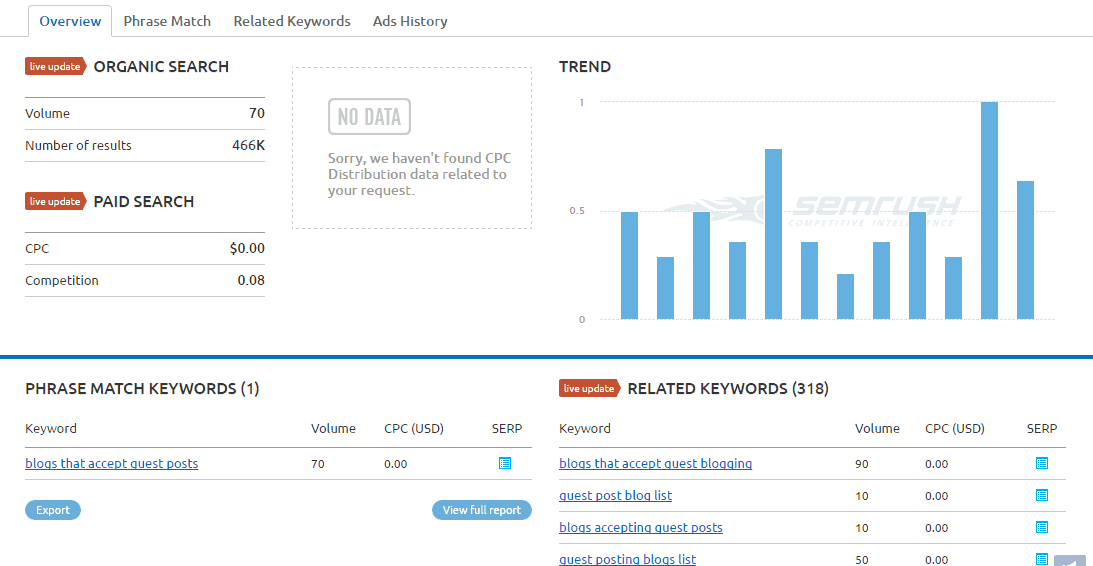
    I clicked on the “blogs that accept guest posts,” which brought me to the Keyword Overview page of that keyword.

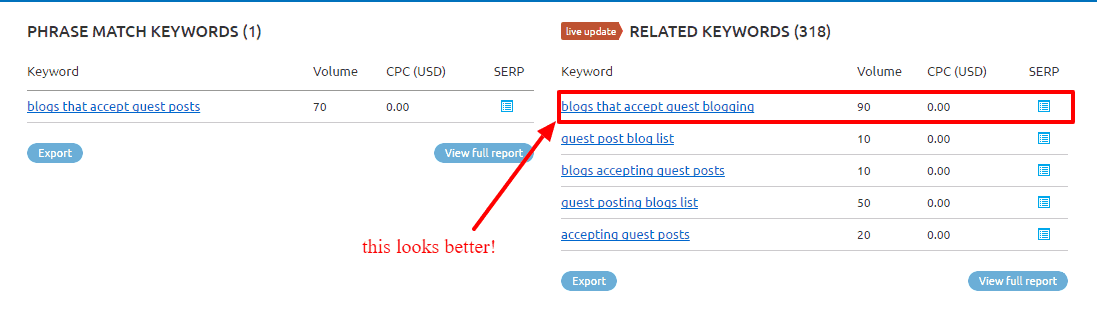
    What you want to look for in this section are the related keywords. You may see better-performing keywords based on volume.

    Looking at the screenshot above, it seems like there is.

    To make sure that “blogs that accept guest blogging” is the best option among related keywords, click on it and look for related keywords again. If you can’t find a keyword phrase with higher search volume, then I may have unearthed the keyword to use for my blog post.

    However, search volume is just one of the many factors to consider when choosing keywords. You also need to factor in the difficulty of ranking on top of search results for that keyword.

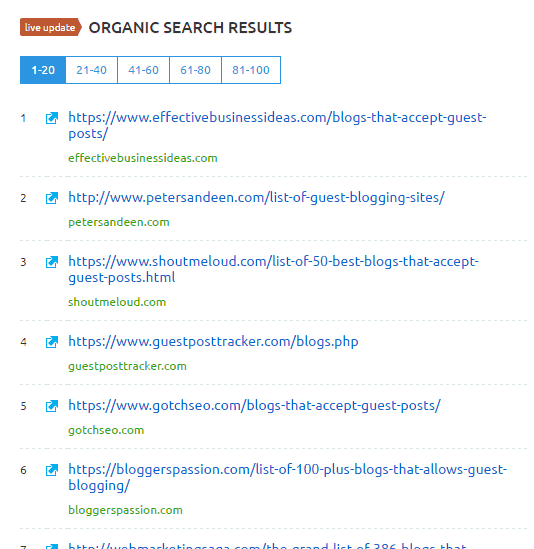
    Initially, you should look for the SERP that is displayed at the bottom of the Keyword Overview page.

    SEMrush will show you the top 100 site pages ranking for the keyword that is clustered into 20s.

    From here, you need to analyze each page and manually identify the strengths and weaknesses of each. Once you’ve gathered data from at least the top 10 results for your keyword, you can take actions on your findings and develop the necessary content that is better than the ones appearing on the first page.

    While this process remains the best way to analyze each page, it takes a lot of times to open all the pages and see them for yourself. If you want to hasten the process of finding the difficulty of your chosen keyword, SEMrush has features that suit your needs.

    SEMrush

    Keyword Analytics

    Semrush has a pretty solid keyword research tool for finding the best search terms to optimize your site pages with. It is arguably much better than the data provided by the free keyword tools.

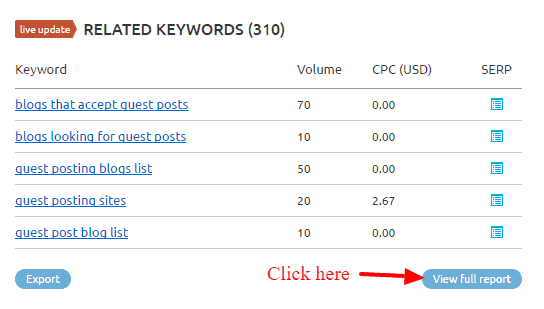
    It is best practice to gather as many viable keywords that you can find. While search volume is important, you also need to look at other factors like keyword relevance and difficult (more on this later). Therefore, I took the opportunity to look into other related keywords by viewing the full report.

    You will be redirected to a page with the complete list of related keywords.

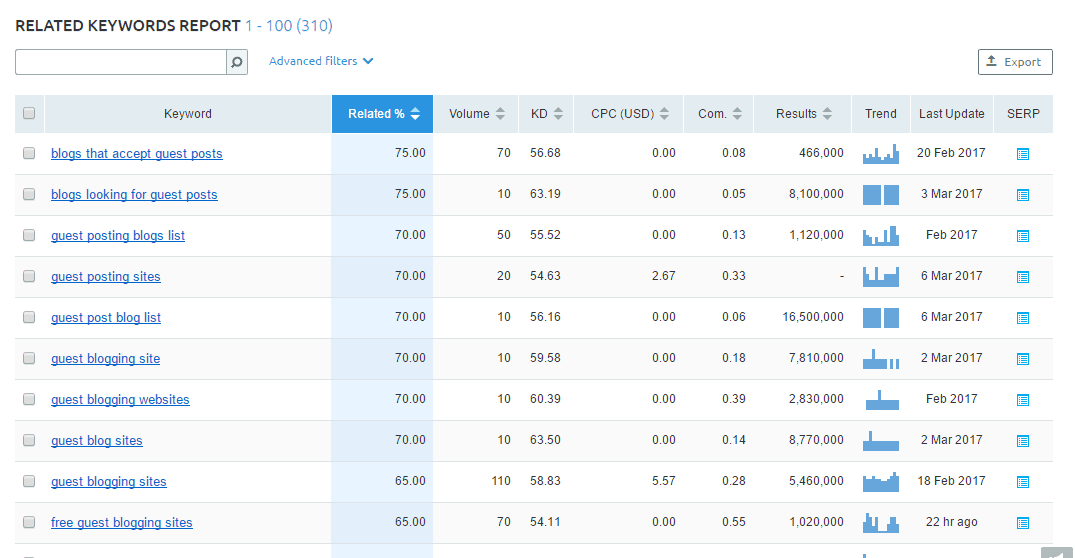
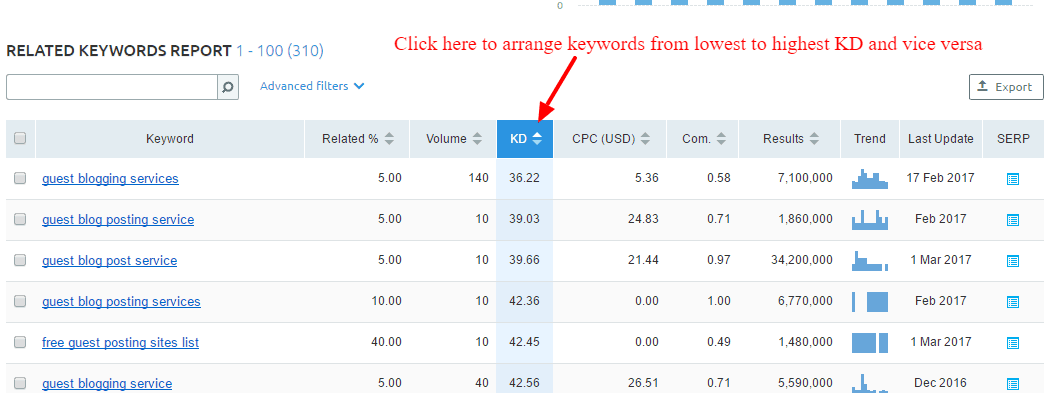
    Among the data featured on the table, you need to look into keyword difficulty. This metric factors into the pages from the SERP and aggregates the data into a figure with 100 as the highest score, which means that it is next to impossible to rank for the keyword. Therefore, the lower the KD, the better your chances of ranking for that page on the first page of search results.

    You can arrange the list according to KD.

    However, doing this showed me keywords will little relevance to the initial keyword I entered.You need to factor in the Related % column of the list so you can choose from highly similar and related keywords.

    Upon further inspection, I have narrowed down the keywords to two:

    • blogs that accept guest posts
    • blogs looking for guest posts

    In the end, I decided to go with “blogs that accept guest posts” for the following reasons:

    • Higher relevance – Both keywords have 75%, which is the highest relevance score from the list
    • (Relatively) competitive search volume – My chosen keyword has 70 search volume compared to 10 with the other one.
    • Low KD – It has a relatively low keyword difficulty with 56.6, which ranks the 59th out of the 310 related keywords.

    Verifying the keywords one more time

    Since the related keywords are derived from the original chosen keyword “blogs that accept guest blogging,” I would like to pit it with the chosen phrase from the Related Keyword page to settle on which KW to use for the content.

    After running both using the Keyword Difficulty page, it appears that there is a clear winner.

    Sine “blogs that accept guest blogging” does not have available data, it makes “blogs that accept guest posts” as the de facto winner!

    SEO Content Template

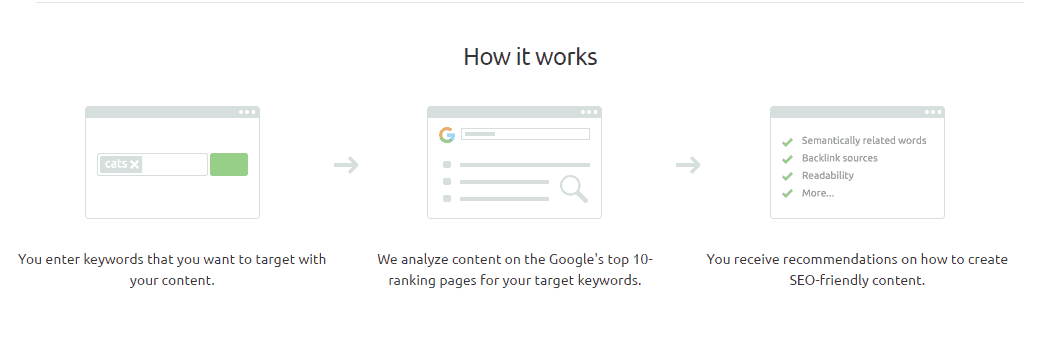
    Now that I have chosen the keyword for my content, it’s time for me to use tool’s SEO Content Template feature. This feature allows you to create content that people want to link out to and site owners would want to publish as a guest post (yep, this tactic still works).

    As mentioned earlier, manually analyzing each page from search results for my keyword is a time-consuming process. Therefore, I can just bank this feature from SEMrush so I can simply focus on the data and use the suggestions in crafting my post.

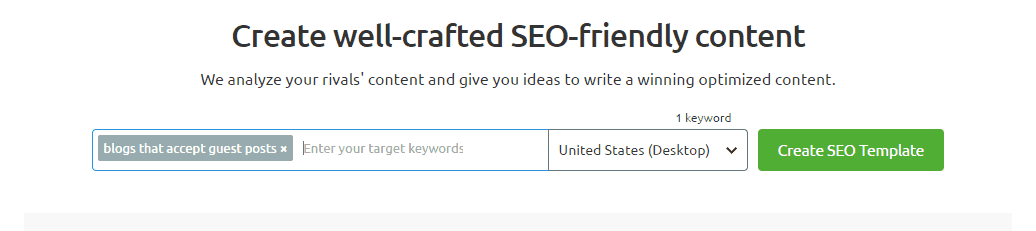
    Enter the keyword on the search bar to create the SEO template.

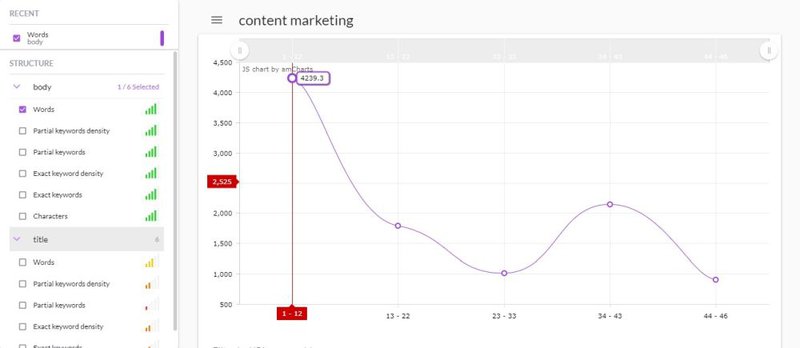
    The screenshot above shows actionable information I can use with the content I will develop for my chosen keyword. Personally, I find the readability score and word count recommendation to be the most helpful.

    Their purpose is to help you create better content than the ones appearing on search results. However, these are just suggestions so you can decide on whether to do them or not for your content. For example,3,978 words for a post may be too much for my liking. After all, more words don’t necessarily mean better content in most cases.

    Aside from the key recommendations (based on your Google top 10 rivals), the template also shows the general SEO recommendations regarding the H1, meta description, page title, and text.

    As part of SEO’s best practices, you need to build links for your site pages to increase your site’s SEO performance. Once the post has been published, marketers look for link building opportunities in the hopes of getting that all-valuable backlink from high-authority sites.

    However, in my experience, it is best that you find the opportunities before writing the post. I have detailed the process in depth in this post I wrote for SEMrush which still holds up.

    In a nutshell, by identifying opportunities, you can design your content that caters to the page or domain you want to acquire a link from.

    This process will require me to do the following:

    • Uncover the backlinks of the 10 top-ranking pages for my keyword
    • Identify how I can link back to those pages
    • Use the findings to create content that will increase the chances of getting a link from that page

    The method of link building requires you to consider all pages ranking on SERP to be your competitors. Your purpose is to try and hijack their position by analyzing the backlink profile of the ranking page so you can find a way to link to those pages as well.

    Go to the Keyword Analysis and check the SERP of the first page. Click on the first result to show the Domain Analytics overview of the page.


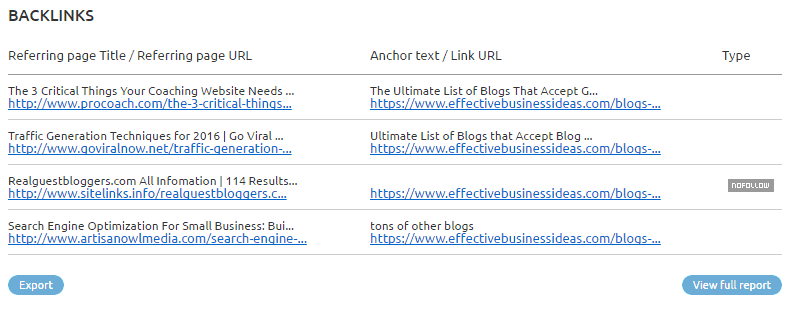
    The top-ranking page (EffectiveBusinessIdeas.com) has only four backlinks.

    To analyze the kind of links the top-ranking page has, I need to click on all the pages with its backlink in it. In this case, I need to check the ProCoach.com page myself.

    Before we check out the page, you need to understand the three types of backlinks that you can acquire from a page:

    • Within content – Author features the link in the article.
    • Comment – A blogger leaves a link to the page in his/her comment or enters the URL of the page which then is linked to his/her name.
    • List of links – The resource page is littered with links from relevant articles and content about its topic.

    Now that we have that covered, let’s check one of the pages with the backlink of your competitor:


    As you can see, the link is found within the content. A possible reason for this is that the author found the content on search results or s/he is connected with the owner of EffectiveBusinessIdeas.com. I’m leaning towards the former since it ranks at the very top of the keyword I’m also trying to rank for.

    There are two ways that you can get a link from this page with the content you’re developing:

    • Comment with a link to your relevant post – Really simple and straightforward, but only if commenting is enabled on the page. However, it depends on whether the site owner is stingy when it comes to comments. If you’re not sure on how to proceed with crafting your blog comments, you need to read this excellent post at Smart Blogger.
    • Blogger outreach – Build a relationship with the site owner by sending him/her an email and mentioning your latest post that you want him/her to link to. Of course, you need to approach this strategy with a lighter hand to not turn off the site owner. Read this post I wrote about blogger outreach before you consider implementing this tactic.

    Once you have identified the process on how you plan on acquiring the link, you need to find an angle on how you can pitch your post to the site in order to get a backlink.

    Looking at the EffectiveBusinessIndeas.com page, while there are a lot of things going for it, there are holes in the post that you can take advantage of, namely:

    • The limited number of sites to write for – At the beginning of the article, the author mentions that there are over 20 sites listed per category, which isn’t a lot. When developing my content, I can list down more than 20 – or even 3x – a number of sites that accept guest posts.
    • Find more niches – The post features 24 categories as of writing, which is exhaustive in itself. However, maybe there are other niches I can uncover that I could include in my post.
    • Content formatting – The post doesn’t have any images and doesn’t have social sharing buttons to make it easier for readers to like or tweet the post.

    These are some initial factors that I can capitalize on when developing link building opportunities for my content. Now, the challenge is replicating the process on all backlinks of your competitors. I’m not gonna lie – this is a very time-consuming process, albeit a necessary one if you want to jumpstart the acquisition of link for your content. You could probably outsource someone or delegate this task to someone else so you can focus on developing the content.

    You can even potential unearth more backlinks, you can try using Buzzsumo. Read this post I wrote about how to use Buzzsumo to create killer content. The process I shared in the post goes together well with creating content using SEO’s content template.

    SEMrush

    Wrapping it up

    SEMrush is an excellent SEO and content tool to help you supercharge your blog’s SEO performance. Applying the process religiously on all your posts will help you reach your audience by ranking high up on Google organic search and increase your traffic in the process.

    SEMrush costs $99/month but you can sign up for a free account and get limited access to some of the data. Doing so gives you an idea on how to use SEMrush and whether or not it’s the SEO tool for you. Click here to sign up for an account.

    How to Use SEMrush to Boost Your Blog Contents SEO