Keyword grouping (also called keyword clustering) is the process of sorting a keyword list into groups of terms that can rank on the same page, so you target each group with one piece of content instead of writing a thin page per keyword. You can do it manually in a spreadsheet, semi-manually with Google Keyword Planner, or automatically with a keyword grouper tool like SE Ranking, Keyword Insights, or KeyClusters.
By now, you should know that you can rank for more than one keyword for your blog post or web page.
The problem is, most of the time, people optimize their content using a focus keyword.
This is not wrong by any means. However, you don’t get to maximize the organic traffic potential of your page if you don’t optimize it for related terms.
This is where keyword grouping, or keyword clustering, comes to the rescue.
In this post, I will discuss keyword grouping and its benefits. Also, I will show you how you can group your search queries in different ways.
In the end, you should be able to do keyword grouping to help your blog post rank for multiple keywords on SERPs.
What is keyword grouping?
The keyword grouper method is the process of researching a list of keywords and grouping search terms closely related to one another. They help you build a silo that covers different user intent for each search term in the cluster.
Most conduct keyword research by finding a search term with a high search volume that they will use to optimize the content. There are different tools you can use for this.
With keyword grouping, you can unearth thousands of keywords and organize them into keyword groups.
Benefits of a keyword group
So, what’s the big deal with coming up with keyword clusters?
Below are its advantages:
Increase organic traffic
By coming up with clusters of keywords, you can optimize for them in your content.
Since they are related to your target keyword, you shouldn’t have any problem mentioning them in the post. Simply use them as synonyms to your main keyword to mix things up.
By doing so, you increase your chances of ranking for your target keyword on search results and closely related keywords on search results.
And by ranking on top of search engine results for all those keywords in a single page, you can increase traffic coming from search engines!
Organize your content structure
Aside from using a keyword group for a single page, you can use the keywords to create a silo in your website.
A silo is a structure where a category or a folder in a website contains pages related to the topic of the category.
For example, if the category is “running shoes,” then the pages in it can optimize for the following keywords:
- Running shoes for men
- Best running shoes in 2026
- Nike running shoes
Basically, keyword groups can help you come up with relevant content ideas for categories in your site.
By doing so, you create semantically relevant content about a topic, which plays a big role in your content marketing strategy.
Focus on topics, not keywords
In relation to the benefit above, keyword grouping allows you to approach your site as a source of information about a topic.
This is how I plan every client site. For one ecommerce store, I mapped clusters around what buyers research before they purchase, then wrote into them. Organic clicks went from 187,665 to 399,283 in a year. The full breakdown is in this ecommerce SEO case study.
Clusters matter for AI answers too. AI Overviews are built from pages Google already ranks, so a page that covers its whole group has more chances to be picked up. My AI search optimization guide covers the rest of what earns those citations.
Again, if your website is about running shoes, creating content about woodworking for it doesn’t make sense.
Even if the search terms for woodworking have generally higher quality scores (high search volume and low difficulty), it adds nothing to the topic of your website.
So, if your visitors see content optimized for irrelevant keywords, expect them to leave right away.
It’s about time webmasters create topically relevant content instead of chasing profitable keywords left and right.
This way, they create authority and credibility for your website about their topic.
Start keyword grouping with SE Ranking!
If you want to make the most out of keyword grouping, use SE Ranking. It’s an all-in-one SEO platform that lets you conduct keyword research, competitor analysis, monitor website changes, and more. Below, you will see how you can effectively use SE Ranking to cluster keywords. But if you want to learn more about the tool, check out the SE Ranking review I wrote to shows how powerful the tool is.
The Best Keyword Grouper Tools in 2026
Grouper tools split into two camps. Semantic tools group keywords by how similar the words are. SERP-based tools group them by checking whether the same pages already rank for both terms, which mirrors how Google actually treats intent, so their groups are more reliable for deciding what deserves its own page. Here are the tools worth your time, with prices checked on November 4, 2026:
| Tool | Clustering method | Price | Best for |
|---|---|---|---|
| SE Ranking | SERP-based, 1 to 9 shared URLs | Paid plan (from $103.20/mo) plus $0.004 per keyword | Grouping inside a full SEO platform you already use for rank tracking |
| Keyword Insights | SERP-based + AI intent labels | From $58/mo, or a $1 seven-day trial | Large lists that also need intent tags and content briefs |
| KeyClusters | SERP-based, 3+ shared pages | $19 for 2,500 keywords, no subscription | Pay-as-you-go clustering without a subscription |
| Keyword Cupid | SERP-based | From $9.99/mo for 500 keyword credits | Visual mind-map output for planning site structure |
| LowFruits | SERP-based | From $20.75/mo billed yearly, or $25 for 2,000 credits | Clustering plus spotting weak-competition SERPs at the same time |
| Ahrefs Keywords Explorer | Semantic (terms/parent topic) | Needs an Ahrefs subscription | Fast, rough grouping of huge lists if you already pay for Ahrefs |
| PEMAVOR | Word-based (TF-IDF + DBSCAN) | Free, no signup | A quick first pass; its tool page says you can paste up to 10,000 keywords |
| Keyword Grouper Pro | Not stated by the vendor | Free, runs in the browser | PPC-style lists when you want themed groups without an install |
| Google Keyword Planner | Manual | Free with a Google Ads account | Free grouping when your list is small (walkthrough below) |
If you only take one thing from that table: when accuracy matters, pick a SERP-based grouper. Semantic grouping happily puts “best crm for realtors” and “best crm for real estate agents” in separate groups or merges terms Google treats as different intents. The SERP data settles the argument, because it shows what Google already decided.
How to group keywords by SERP overlap
To group keywords by SERP overlap, pull the top results for every keyword, count how many pages each pair shares, and group the pairs that share at least three. You can do this by hand for a short list or with any SERP API. Three shared pages is also the rule KeyClusters publishes for its tool.
I ran this on November 4, 2026, on 16 keywords this page gets impressions for, using live US results from DataForSEO. At the list rate of $0.002 per SERP, the pulls come to about $0.03.
Disclosure: the DataForSEO link above is an affiliate link. If you sign up through it, I may earn a commission on every successful sale, at no extra cost to you.
- Pull the organic results for each keyword. Use one country and one language, or the groups mean nothing.
- Decide how to match pages. Exact URLs are the obvious choice, and they failed on my run: 99 of the 134 results came back as google.com redirect links, so URL matching found no overlap at all. Matching on site plus page title fixed it.
- Count the shared pages for every pair of keywords. Sixteen keywords make 120 pairs, so use a spreadsheet or a script.
- Group the pairs that meet your threshold, then run the control described below before you trust any group.
Here is what the 16 keywords did at each threshold:
| Shared pages required | Groups of 2+ | Keywords left alone |
|---|---|---|
| 2 | 1 group of 10 keywords | 6 |
| 3 | 2 pairs | 12 |
| 4 | 1 pair | 14 |
Only two pairs cleared three shared pages: “keyword grouper tool” with “keyword grouping software” (5 shared), and “keyword grouping” with “group keywords” (3 shared).
The group of 10 at the loosest setting is not one topic. Eighteen pairs inside it share no pages at all, and they only connect through other keywords. That is chaining, and it is why I would not build one page from that group on the numbers alone.
“Keyword clustering” and “how to do keyword clustering” stayed alone at every threshold. The words mean the same thing as “keyword grouping”, but Google returned different pages for them that day.
Then I tested the test. I pulled three keywords a second time, all within about half an hour, and compared each one with its own first pull:
| Keyword | Pages in common with its own first pull |
|---|---|
| ai visibility tools | 3 of 9 |
| keyword grouping tool | 2 (8 and 9 results) |
| geo audit | 0 of 9 |
A keyword that cannot match itself cannot tell you much about other keywords. So do not read the first table as proof that these terms need separate pages. It mostly shows how much single live pulls varied that day. I do not know yet whether that variation comes from Google or from how the results were collected.
Run this control before you trust any grouping built on one pull: re-pull a few keywords and compare them with themselves. If they cannot clear your threshold, decide by intent instead, and ask any tool you use how it handles the same problem. I have not tested the tools in the table above this way.
Can you group keywords in Excel?
Yes, by shared words, which suits PPC ad groups and a first pass on a long list. Add a column with =IF(ISNUMBER(SEARCH("free",A2)),"free","other"), fill it down, change the word for each theme, and summarize with a pivot table. Excel cannot tell you when two differently worded keywords want the same page, so use SERP overlap for that decision.
How to use Keyword Planner for creating keyword groups
You can use tools like Long Tail Pro if you want a paid tool to help you find keyword ideas. But Google Keyword Planner is a free keyword tool mainly used for Google Ads and PPC.
For SEO, however, you can use it to find keyword suggestions for building your keyword strategy.
But for the purpose of this post, you can use Keyword Planner as a keyword grouping tool to help you cluster related keywords together.
If you have a Google account, log in from Google Ads to access the tool.
Once in, type in your topic on the text bar.
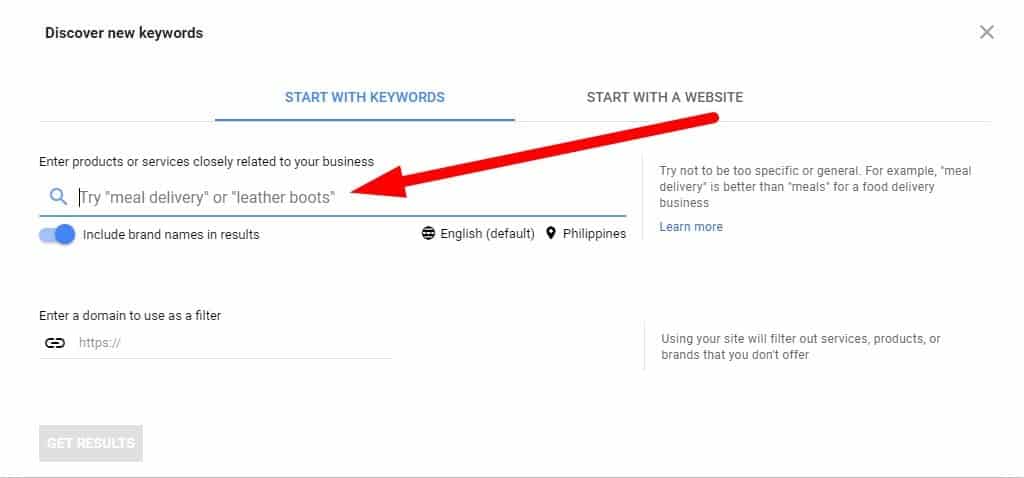
The tool will then generate keyword ideas that you can include in your campaign.
From the Keyword ideas page, click on Grouped ideas on the sidebar.

It will show you the keywords organized into groups.
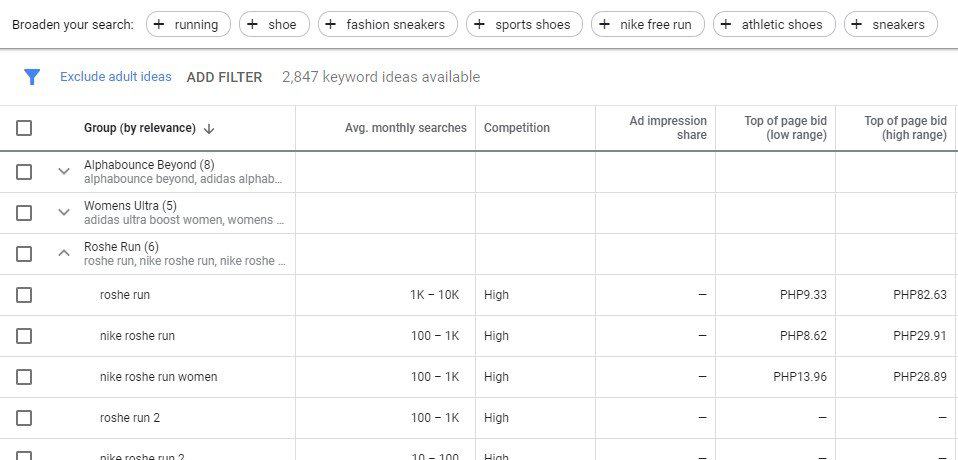
To view the keywords for each group, click on the arrow button to show them.
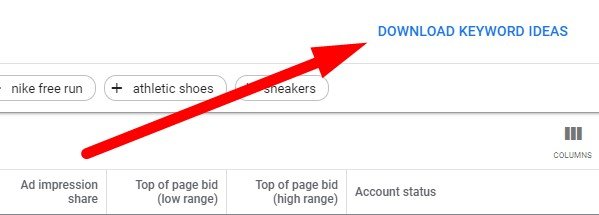
From here, you can download the keywords ideas and organize them further manually onto a spreadsheet.
Now, using the Keyword Planner is the easiest and simplest way to group your keywords. It also doesn’t provide you with the most value.
For one, the tool doesn’t tell you how it grouped the keywords together (more on this later).
It also lacks features to help you analyze the clusters properly.
So while Keyword Planner is good enough to help you group keywords together, it’s not useful enough.
Cluster related keywords using SE Ranking
SE Ranking is an all-inclusive SEO tool that helps you rank your websites higher on organic search. You can use its features like link building, competitor analysis, PPC keyword research, and more to formulate your SEO strategy.
But its keyword grouper feature lets you come up with keyword lists for optimizing your websites with topically relevant keywords.
SE Ranking is a paid search marketing tool but you can sign up for a 14-day free trial to test its features.
But before you can use its keyword grouper feature, you must upload a number of keywords manually to the tool.
You can use the keywords you downloaded from Keyword Planner.
While they are already clustered together, it doesn’t hurt to run them again using SE Ranking. You could get different and possibly better results in the process.
Or you can also use SE Ranking’s keyword tool to find ideas and suggestions for your topic. I personally feel it’s one of the better keyword research tools in the market.
To begin, go to Tools > Keyword Suggestions from the menu.
Then enter your topic on the text bar. Change the source and country database if necessary before hitting “Start search.”

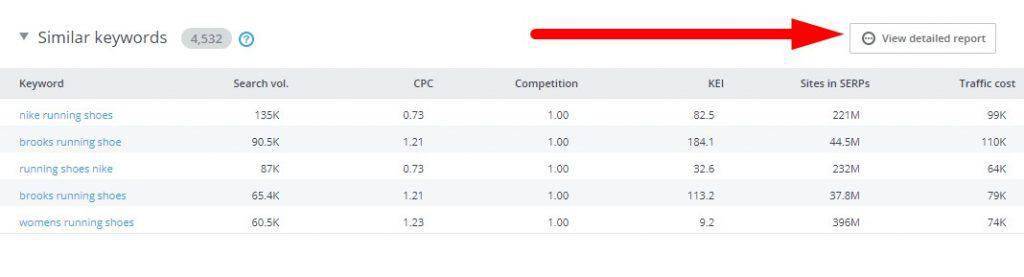
On the overview page, scroll down until you reach the Similar keywords section. Click on View detailed results to see the entire list of keywords.
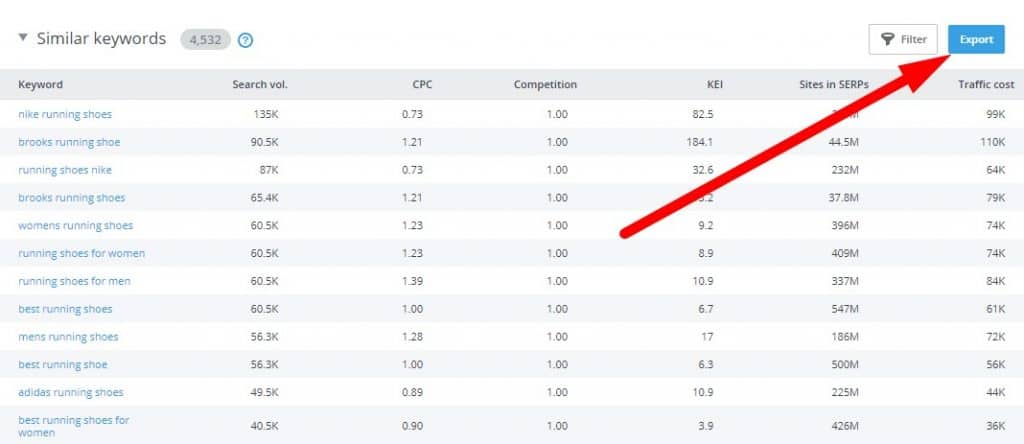
From here, click on the Export button and choose .csv or .xlsx format to download the list.
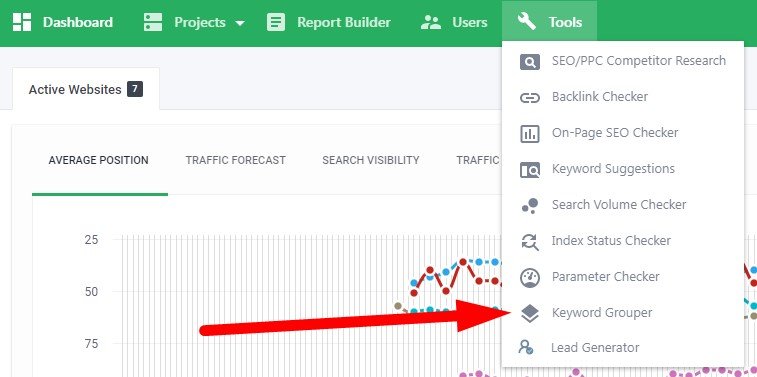
Once you have downloaded the file, go back to the dashboard and go to Tools > Keyword Grouper.
Next, enter the title of the keyword group and change the settings as you see fit.

Next, and perhaps its best feature, is the ability to organize the keywords according to accuracy and method.

If you want to create accurate keyword groups, you need to set it at a higher setting.
What happens is the tool will be stricter regarding clustering keywords.
Therefore, the higher the accuracy is, the fewer search queries there will be in each group.
Regarding the method of grouping, choose between soft and hard.
The soft method compares every keyword to the highest-volume term, so it groups a much larger set of keywords. However, there’s a chance that each group will have irrelevant keywords in there.
The hard method compares all keywords with each other, so it clusters fewer of them. But there’s a low chance you will see unrelated search queries in each group.
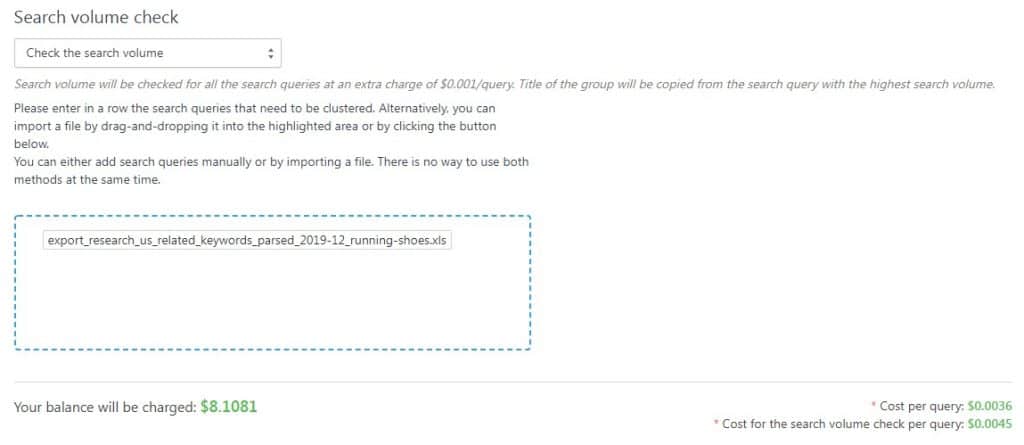
After choosing the settings, confirm if you want to include the search volume of each keyword. Then upload the file where your keywords are.
Also, you must understand that keyword grouping is an on-demand SE Ranking service. This means it’s not part of your subscription of the tool.
Each keyword query check costs $0.004, while the search volume check is at $0.005.
Once you start grouping the keywords, wait for a couple of minutes. The length of time clustering your keywords depends on how many you uploaded.
The keyword group on SE Ranking should look like this:
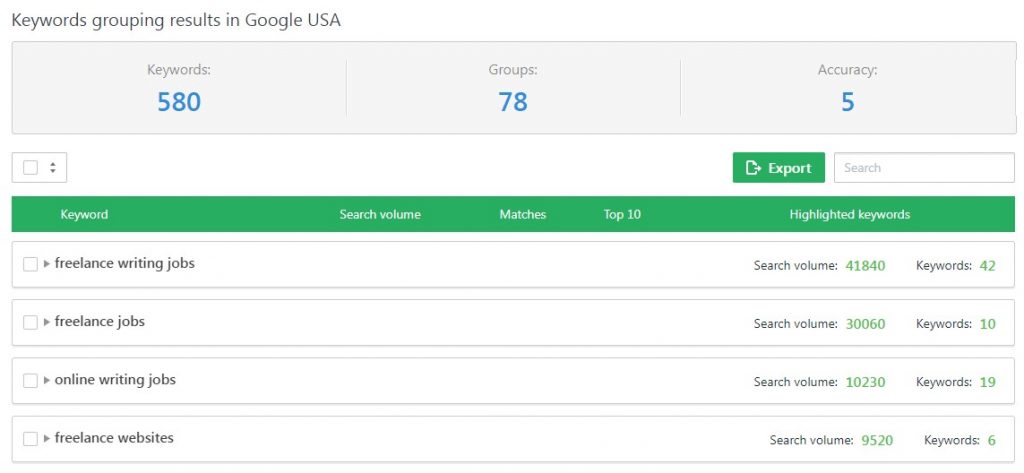
If you expand the group, you will see the keywords included, their search volume, the Top 10 matching URLs, and the highlighted keywords on the top 10 results.
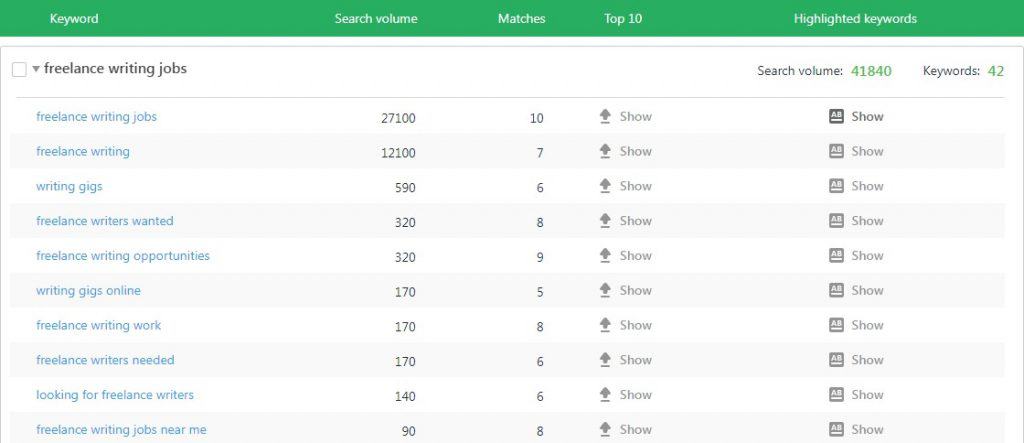
You can export the groups and explore each of them more in detail from a spreadsheet.
Frequently Asked Questions
What is keyword grouping in SEO?
Keyword grouping is an effective method for optimizing content. The process involves making clusters of related keywords and using those groups to create posts or pages optimized with several terms from a particular keyword group.
What is keyword with example?
In SEO, a keyword is the term that people use to search for products and services online. For example, if I want to search for Nike basketball shoes, I type in “Nike basketball shoes” or “best Nike basketball shoes for guards.” Keywords are part of an optimization strategy called on-page SEO.
How do you organize keywords?
You can organize content according to their intent. Some people use keywords to learn more about a specific topic (informational), while others type in keywords with the intent of purchasing something (commercial and transactional). Organizing keywords according to these categories allows you to create topically relevant content for each group.
How do you do keyword clustering?
It would be best if you researched for keywords that are closely related to your niche or topic. From here, you can group them together according to their respective variants, subtopics, and others.
Conclusion
Grouping keywords is not really reinventing the wheel. However, the best SEO strategies happen to be the simplest.
In this case, clustering your keywords is one of the easiest ways to organize your content according to topic.
This way, you can rank your pages for multiple keywords at the same time. You also create semantically relevant content based on keywords.
For a free first pass, start with Keyword Planner or PEMAVOR. When the groups decide which pages you build, use SERP overlap, either through a tool like SE Ranking or KeyClusters or with your own check.