
Most content fails for one reason. There was never a plan behind it.
A content strategy template fixes that. It turns a vague goal into a clear plan of what to create, who it is for, and why.
Below is the exact template I use with clients. You can copy it straight from this page, download it as a PDF, or generate a filled version with the free Claude skill further down. No email, no signup, no gate.
- What Is a Content Strategy Template?
- Content Strategy vs. Content Plan vs. Editorial Calendar
- Why You Need a Content Strategy Template
- The Content Strategy Template
- Grab the Template (PDF and Claude Skill, No Email)
- How to Fill Out Each Section
- Start with one business goal
- Define the metrics that prove it
- Get specific about your audience
- Choose 3 to 5 content pillars
- Do the keyword research
- Audit what you already have
- Match formats to intent
- Set a realistic cadence
- Plan distribution from the start
- Write down your brand voice
- Decide who reviews it, and when
- The SEO Layer: Keyword Research and Content Gaps
- A Filled-In Example
- Using AI to Speed Up Each Section
- Turn Your Strategy Into a Monthly Content Calendar
- Common Content Strategy Mistakes to Avoid
- How Often Should You Update Your Content Strategy?
- Content Strategy Template FAQ
- Want Help Building Your Strategy?
What Is a Content Strategy Template?
A content strategy template is a simple framework that connects your business goal to the content you publish.
It answers a handful of questions before you write a single word. Who is this for? What will it cover? How will it get found and shared? How will you know it worked?
Answer those once, and every piece of content after that has a job to do.
Content Strategy vs. Content Plan vs. Editorial Calendar
These three get mixed up constantly, so here is the difference in one line each.
- Content strategy: what you create and why.
- Content plan: the specific topics you will produce.
- Editorial calendar: when each piece publishes.
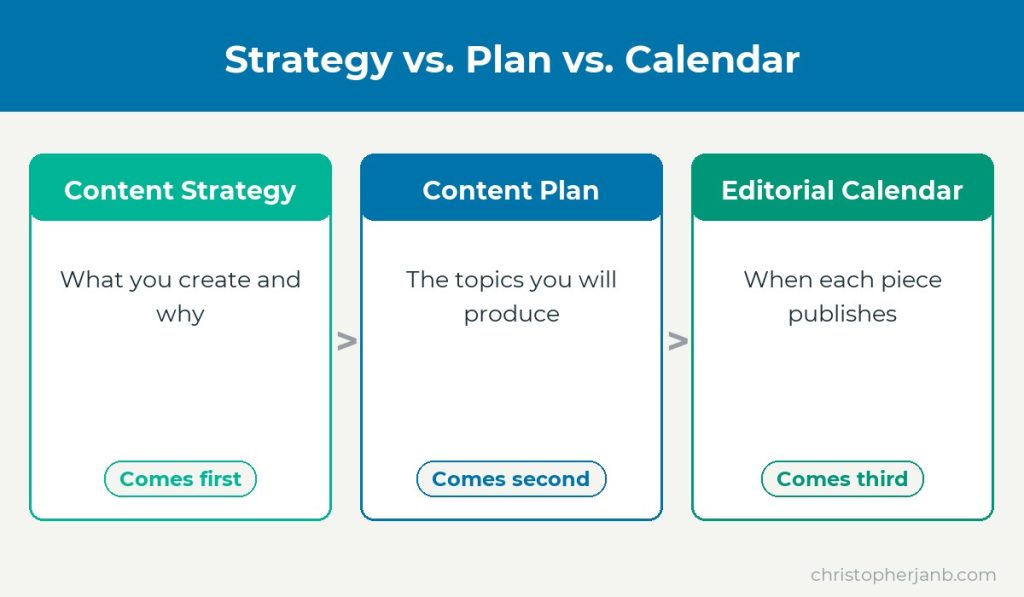
The strategy comes first. The plan and calendar flow out of it. Skip the strategy and you are just publishing and hoping.
Why You Need a Content Strategy Template
A template does three things a blank page cannot.
It forces the hard decisions up front, so you are not making them post by post.
It keeps everyone pointed at the same goal, which matters the moment more than one person touches your content.
And it makes your content measurable, because you decided what success looks like before you started.
The difference shows up fast. A team with a strategy knows why the next article exists. A team without one publishes, waits, and wonders why nothing moves.
The Content Strategy Template
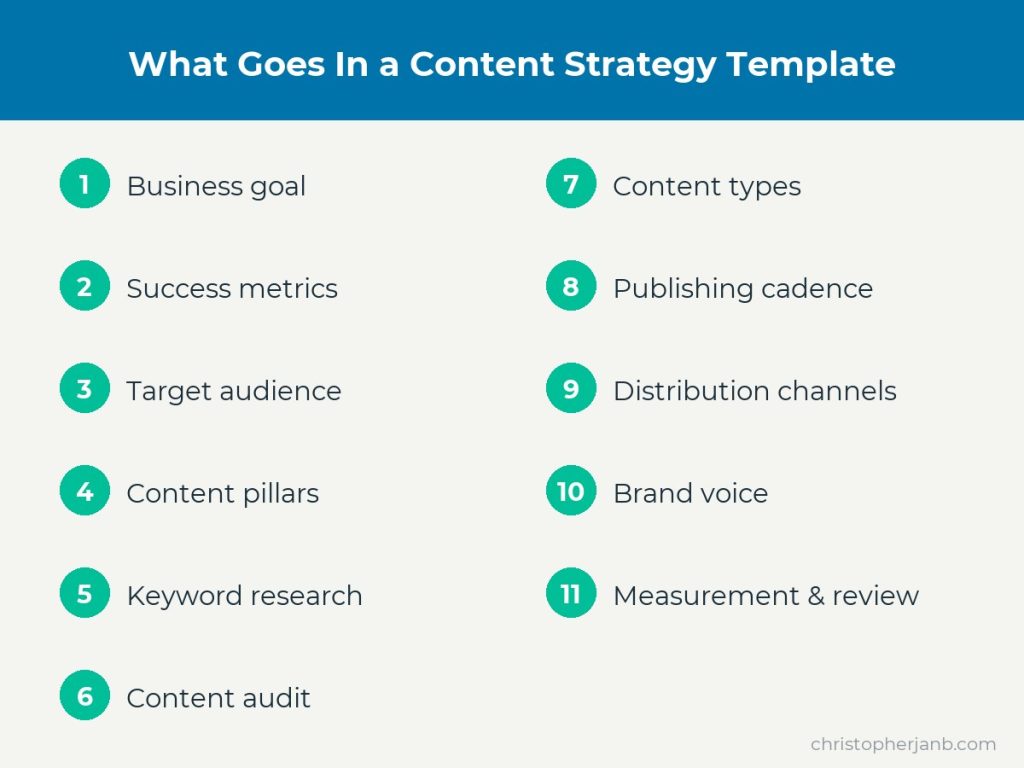
The template has eleven sections that take you from a business goal to a measurable plan. Copy this table into a Google Doc or spreadsheet and fill in the right column.
| Section | What to define |
|---|---|
| Business goal | The one outcome this content serves: leads, sales, traffic, or authority. |
| Success metrics | How you will measure the goal: organic traffic, signups, rankings, or revenue. |
| Target audience | Who you are writing for and the specific problem they have. |
| Content pillars | The 3 to 5 core topics you want to own. |
| Keyword and topic research | The terms your audience searches, with volume and difficulty. |
| Content audit | What you already have, sorted into keep, improve, or remove. |
| Content types | The formats you will use: guides, comparisons, tutorials, videos. |
| Publishing cadence | How often you publish and on what schedule. |
| Distribution channels | Where you promote each piece: email, social, outreach. |
| Brand voice and guidelines | How your content should sound and the rules writers follow. |
| Measurement and review | When you check results and update the plan. |
Grab the Template (PDF and Claude Skill, No Email)
You have three ways to use this template. Pick whichever fits how you work.
- Copy it. Grab the table above straight into a doc or a sheet.
- Download the PDF. A printable, fill-in version you can keep and reuse. Download the PDF template.
- Generate it with AI. Download the free Claude skill, drop it into Claude, and it will interview you and draft a filled strategy in minutes. Download the Claude skill.
None of them ask for your email. The PDF is the same template you see here. The Claude skill turns it into a guided, done-with-you draft.
How to Fill Out Each Section
Start with one business goal
Pick one primary goal, not five.
Content that tries to drive traffic, leads, sales, and brand awareness at once usually does none of them well. Choose the outcome that matters most this quarter and let it lead.
A good goal is specific. “Get more leads” is vague. “Generate 50 demo requests a month from organic search” tells you exactly what the content has to do.
Define the metrics that prove it
A goal you cannot measure is a wish.
Tie each goal to a number. Match the metric to the goal:
- Traffic goal: organic sessions and keyword rankings.
- Lead goal: signups, demo requests, or downloads.
- Sales goal: revenue and conversion rate from content.
- Authority goal: backlinks and branded search.
Write the metric down so you know what success looks like before you start.
Get specific about your audience
Do not write for everyone. Write for one person with one problem.
Name who they are, what they are trying to do, and what gets in their way.
Here is the difference. “A freelance designer who wants steady clients but hates selling” points you at dozens of article ideas. “Small business owners” points you at nothing.
Choose 3 to 5 content pillars
Pillars are the core topics you want to be known for.
They keep you from publishing random posts that go nowhere. Pick a handful of themes tied to your goal and audience, and let most of your content live under them.
That freelance designer’s pillars might be finding clients, pricing work, and running the business. Every post fits one of the three.
Do the keyword research
This is where strategy meets search.
For each pillar, find the terms your audience actually types into Google, along with their search volume and difficulty. My guide to keyword research walks through the full process.
Audit what you already have
You probably have more content than you think.
List your existing pages and sort each one:
- Keep: pages that rank and still fit your goal. Leave them alone.
- Improve: pages with potential that are thin, dated, or stuck on page two. Update these first, because they are the fastest wins.
- Remove: off-topic or dead pages that drag your site down. Redirect or delete them.
Fixing what you already have often beats writing something new.
Match formats to intent
The format should fit what the reader wants.
Someone comparing tools wants a comparison. Someone stuck wants a tutorial. Someone deciding wants a guide. Map a format to each topic so you are not defaulting to the same blog post every time.
Set a realistic cadence
Consistency beats volume.
One strong post a week you can sustain is worth more than five in a burst and then silence. Set a cadence you can actually keep, and put it on a calendar.
Plan distribution from the start
A great post no one sees is wasted work.
Decide up front how each piece gets in front of people. Email, social, and content promotion should be part of the plan, not an afterthought.
Write down your brand voice
If more than one person writes for you, the voice will drift without rules.
Note how your content should sound, the words you use and avoid, and any formatting standards. A short guide here keeps everything consistent.
Decide who reviews it, and when
Content marketing compounds, so the plan should evolve.
Name who checks the numbers so the review actually happens instead of quietly slipping. The right cadence for that review is covered further down.
The SEO Layer: Keyword Research and Content Gaps
This is the part most content strategy templates treat as an afterthought. It is the part that decides whether anyone finds your content.
For each pillar, build a small table before you plan a single article.
| Keyword | Volume | Difficulty | Intent | Do you have a page? |
|---|---|---|---|---|
| Your target term | Monthly searches | How hard to rank | Informational, commercial, etc. | Yes / no / ranks poorly |
The rows where you have no page, or a page stuck on page two, are your content gaps. Those are the articles to write first, because the demand is already proven.
Start with the terms that have real volume and a difficulty you can realistically win. Chasing the biggest keyword on day one is how new sites stall.
A Filled-In Example
Here is the same template filled in for an example: a small project management software company that wants more free-trial signups.
| Section | Example |
|---|---|
| Business goal | More free-trial signups from organic search. |
| Success metrics | Trial signups from blog traffic, plus rankings for target terms. |
| Target audience | Team leads at small agencies who are drowning in spreadsheets. |
| Content pillars | Project management, team productivity, agency operations, tool comparisons. |
| Keyword and topic research | “project management for agencies,” “asana alternatives,” “how to manage client projects.” |
| Content audit | Keep the strong how-to posts, improve two thin comparisons, remove three off-topic pieces. |
| Content types | How-to guides, tool comparisons, and templates. |
| Publishing cadence | Two posts per week, planned a month ahead. |
| Distribution channels | Weekly newsletter, LinkedIn, and outreach to agency blogs. |
| Brand voice and guidelines | Practical and plain-spoken. Short sentences, real examples, no jargon. |
| Measurement and review | Monthly review of signups, traffic, and rankings. |
Notice how every choice traces back to the goal. That is what a strategy does. It makes the next decision obvious.
Using AI to Speed Up Each Section
AI will not build your strategy for you, but it can do the grunt work in each section faster.
Use it as a first-draft engine, then apply your own judgment. A few prompts that help:
- Audience: “List the top five problems a [role] at a [type of business] faces when trying to [goal].”
- Pillars: “Suggest five content pillars for a brand that helps [audience] achieve [goal].”
- Topics: “Give me 15 article ideas under the pillar [pillar] for [audience], grouped by search intent.”
- Audit: “Here is a list of my existing posts. Group them by topic and flag likely overlaps.”
Or skip the prompts entirely and use the free Claude skill from the download section above. It runs this whole process and hands you a filled strategy.
Either way, check the output against real keyword data. AI is good at ideas and bad at knowing what actually gets searched.
Turn Your Strategy Into a Monthly Content Calendar
A filled-in template is a starting point, not the finish line.
Once you have it, do three things.
- Turn pillars into a topic list. Brainstorm 10 to 20 article ideas under your pillars, guided by your keyword research.
- Load them into a calendar. Assign topics to your cadence so you always know what is next.
- Review and adjust. Keep what works and drop what does not.
Do that, and the template stops being a document and starts being a system.
Common Content Strategy Mistakes to Avoid
A template only helps if you avoid the traps that sink most strategies.
- Chasing too many goals at once. One clear goal beats five vague ones.
- Skipping keyword research. Publishing without it is guessing what people want.
- Writing for everyone. Content for everyone connects with no one.
- Ignoring distribution. A post with no promotion plan rarely gets seen.
- Never reviewing. A strategy you set and forget is out of date within months.
How Often Should You Update Your Content Strategy?
Review it monthly and rework it quarterly.
A monthly check keeps you honest about what is working. A deeper quarterly review lets you shift pillars, drop dead topics, and set new targets as your goals and rankings change.
Content Strategy Template FAQ
What should a content strategy template include?
The eleven sections in the template above: business goal, success metrics, audience, content pillars, keyword research, a content audit, formats, cadence, distribution, brand voice, and a review schedule.
Is this content strategy template free?
Yes. Copy it from this page, download the PDF, or use the Claude skill. No signup, no email.
What is the difference between a content strategy and a content calendar?
The strategy decides what to create and why. The calendar decides when to publish it. Build the strategy first.
Is this good for an SEO content strategy?
Yes. The keyword research and content audit sections are built for SEO. They point you at the terms you can rank for and the pages worth improving first.
Want Help Building Your Strategy?
A template gets you started. A real strategy tied to your goals gets you results.
If you would rather have an experienced hand build and run it, that is what my content marketing consulting is for.