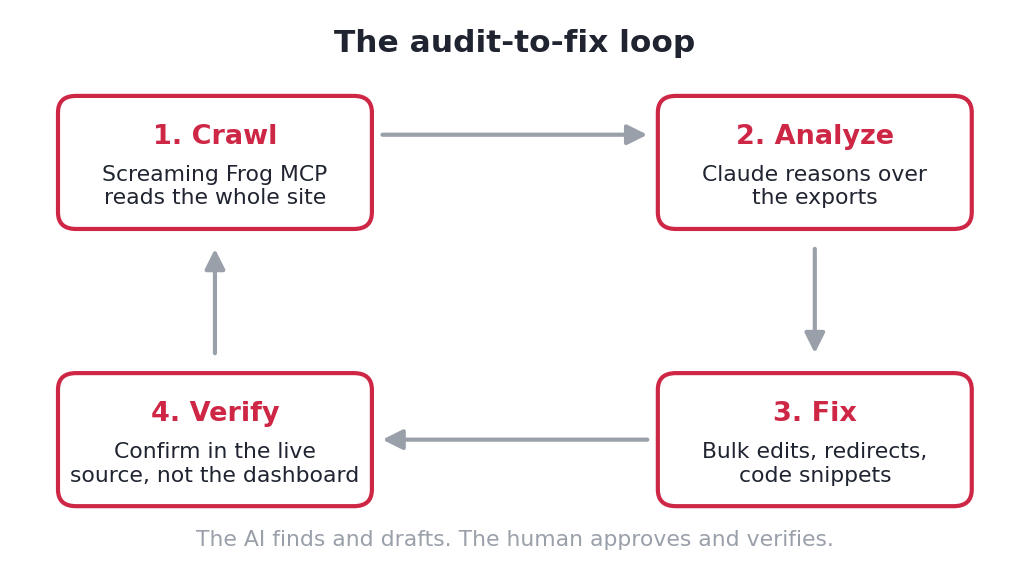
Screaming Frog’s MCP server lets Claude operate the crawler directly, read every export, and propose fixes, which turns a one-off crawl into an audit-and-fix loop. I pointed that loop at my own site, christopherjanb.com, and shipped real fixes the same day.
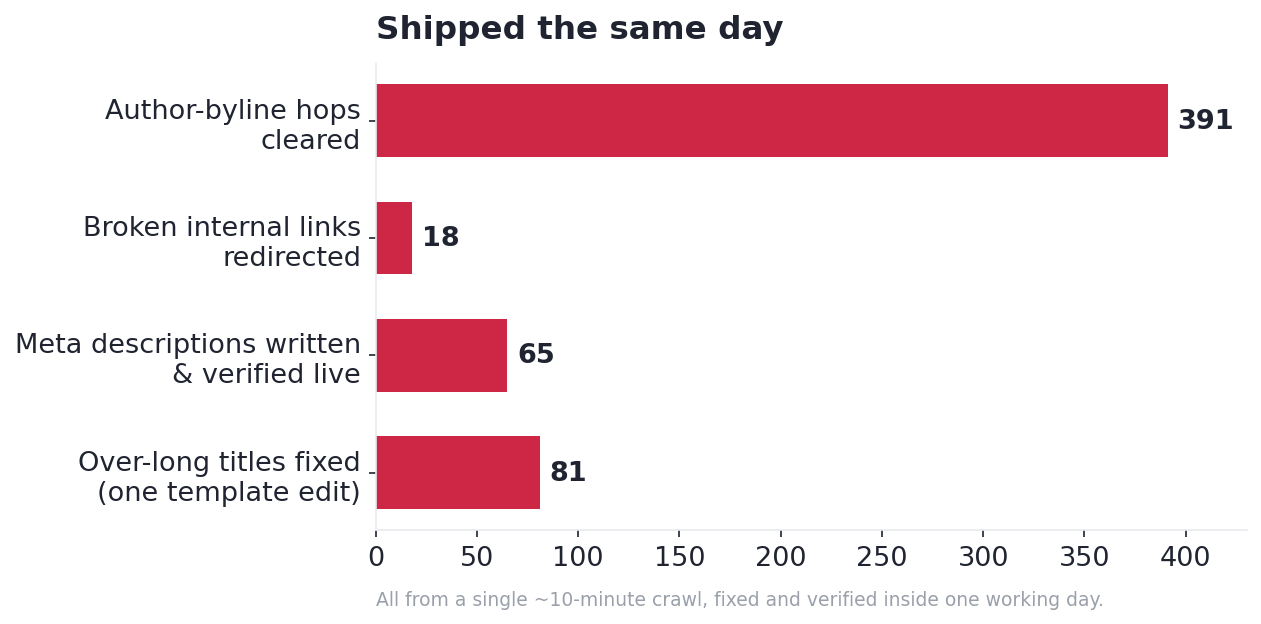
The crawl covered 2,676 URLs in about ten minutes. From there I corrected 81 over-long page titles with a single change, wrote and published 65 missing meta descriptions, repaired 18 broken internal links, and cleared hundreds of redirect hops.
Search Console added the context that mattered: the site drew roughly 409,000 impressions against only 638 clicks, so the real prize was fixing pages already being seen rather than publishing new ones.
One finding mattered for a different reason. The audit reported zero structured data, and that was wrong. Catching that false alarm is the real lesson here: the AI is fast hands, but a human still owns verification.
What Screaming Frog MCP Actually Is
Screaming Frog is the crawler most people doing technical SEO already use. The new part is the MCP server, a bridge that lets an AI assistant like Claude start the crawl, pull the exports, and reason over the results without you clicking through a single tab.
That sounds small. It isn’t. A normal crawl hands you a pile of CSVs to interpret. The MCP turns the crawl into a conversation: Claude runs it, reads the response codes, the titles, the redirects, the link graph, and comes back with a prioritized problem list.
The mental model that matters: the AI finds and drafts, you approve and verify. Hold onto that, because it’s the whole point of the “one thing the AI got wrong” section below.
The Crawl: 2,676 URLs in About Ten Minutes
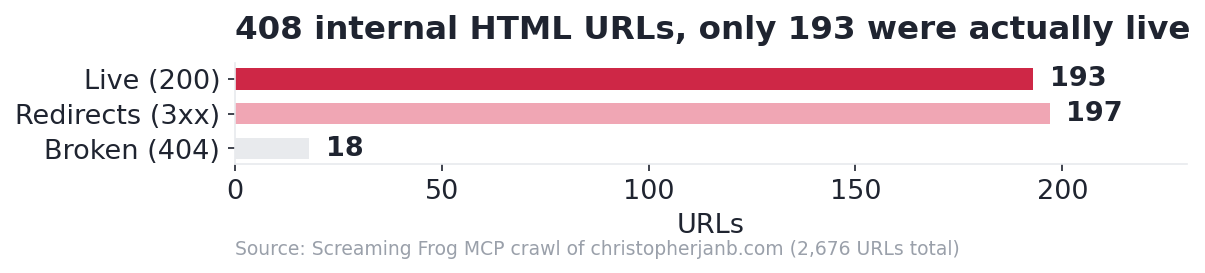
I kicked off the crawl from my own domain and let it run. About ten minutes later it had seen 2,676 URLs. The headline number isn’t the total, though. It’s the breakdown of what those URLs actually were.
Of 408 internal HTML pages, only 193 returned a clean 200. The rest were noise a visitor never thinks about: 197 redirects and 18 hard 404s. Figure 2 shows the split.
A crawl on its own tells you what’s broken. It doesn’t tell you what the breakage costs. So I layered in my Search Console export.
Adding Search Console for the Reality Check
The GSC data reframed everything. Over three months the site pulled roughly 409,000 impressions but only about 638 clicks, an average position near 37 and a sitewide click-through rate of 0.16%.
Translation: plenty of content was being seen and almost none of it was being clicked. The crawl found the plumbing problems. Search Console found the money problems, and the fix was optimizing the pages already getting seen, not writing more.
What the Audit Surfaced
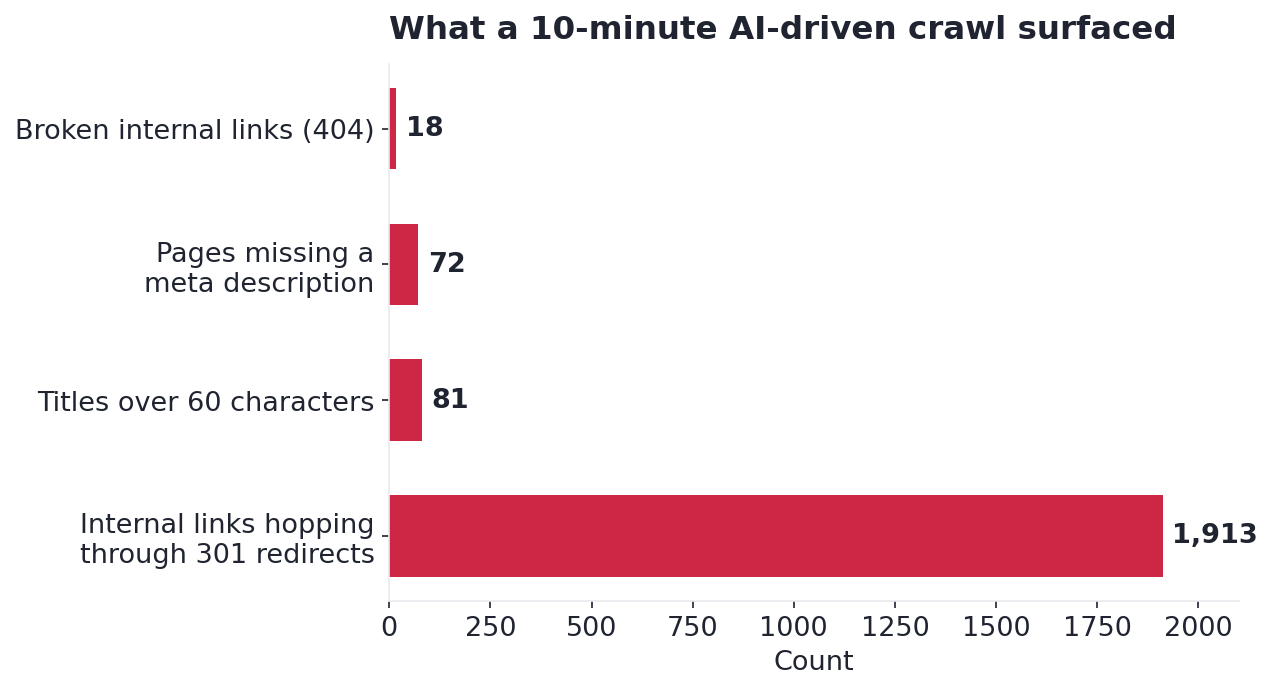
With both datasets in hand, Claude assembled the problem list in Figure 3. These are the issues, with real counts from my own site, not a generic checklist.
The standouts:
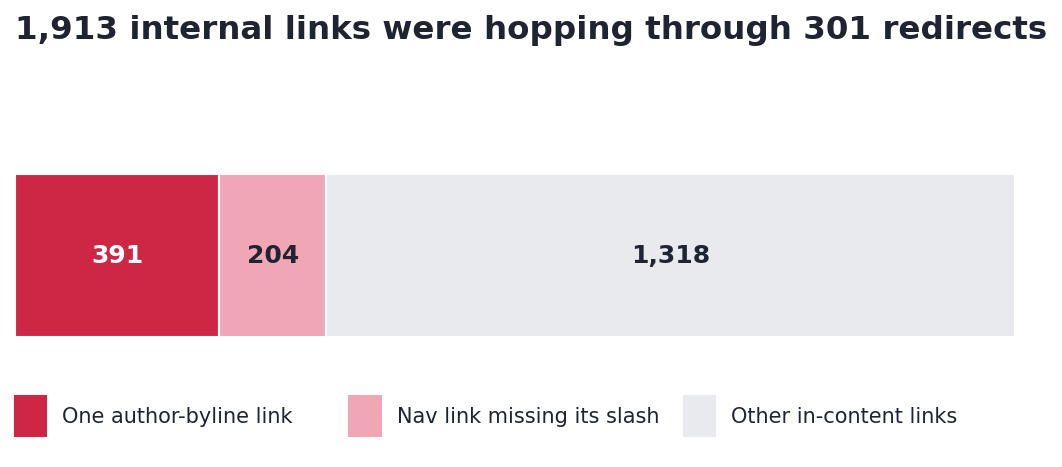
- 1,913 internal links were hopping through 301 redirects. One single link, an author byline, appeared 391 times pointing at a redirected archive. A navigation link missing its trailing slash accounted for another 204. Figure 4 shows where the hops concentrated.
- 18 internal links were broken outright. A newsletter signup page that no longer existed still had 17 live links aimed at it.
- 72 pages had no meta description, and 81 titles ran past 60 characters, both traced to template defaults rather than anything written by hand.
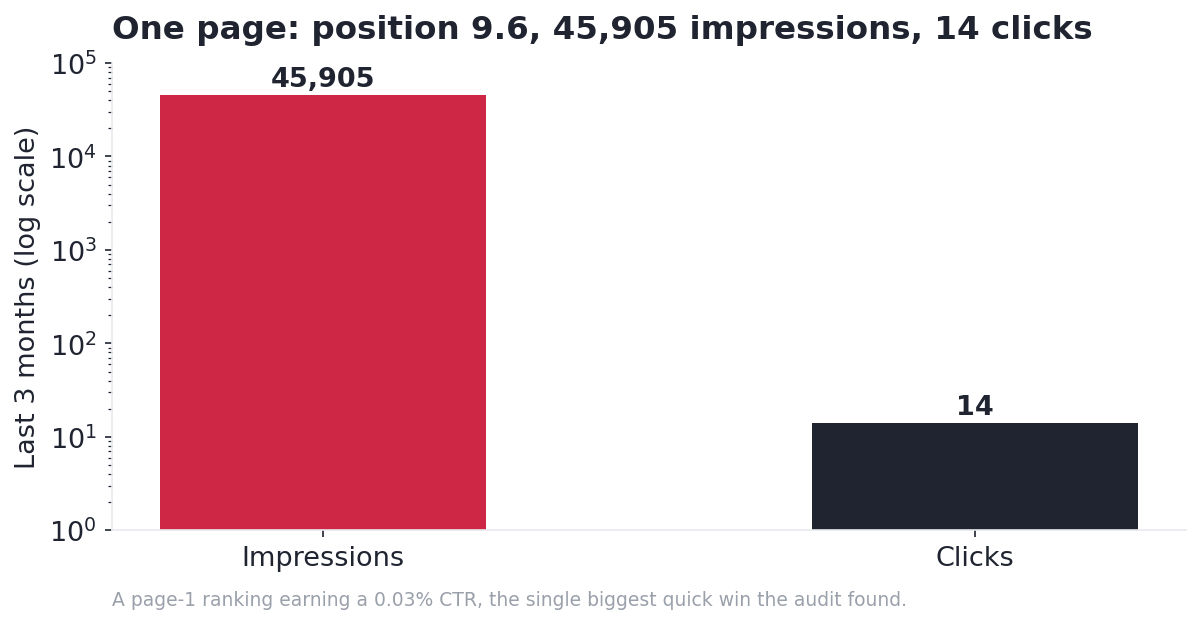
The biggest opportunity was a click-through problem, not a ranking problem. One page sat at position 9.6 on 45,905 impressions and earned 14 clicks. Figure 5 shows that gap.
The crawl even flagged a possible security issue: a broken image loading from a non-WordPress path that looked like injected spam. Worth a five-minute check on any site you inherit.
The One Thing the AI Got Wrong
Here is the part no tutorial includes. The crawl reported zero structured data across the entire site, and Claude surfaced it as a critical gap. On a site competing for AI Overview citations, that would be a real problem.
Except it wasn’t true. My Yoast schema framework had been switched on the whole time.
The tell was hiding in the report itself. It showed “Contains structured data: 0” and “Missing: 0” at the same time. If schema were genuinely absent, the “missing” count would have been high. Both reading zero means one thing: the crawler’s structured-data extraction was simply turned off, not that the schema was absent. A quick pass through Google’s Rich Results Test confirmed Article and Person schema were present all along.
So here’s the line worth tattooing on the workflow: a crawl gives you leads, not verdicts. Confirm anything alarming in the live source before you act on it. The AI moved fast and was confident. It was also wrong, and only a human check caught it. (This is the part most “AI will do your SEO” takes quietly skip.)
Fixing It in a Day
Finding problems is the easy half. The reason this fit inside a day is that most of the fixes were bulk operations, and bulk is exactly what AI plus the right tooling is good at.
Titles: One Change Fixed 81
The 81 over-long titles all came from one place: a Yoast title template appending my brand name to every page. Editing that single template to drop the suffix cleared all 81 at once. I then loaded a few pages and confirmed the suffix was actually gone, rather than trusting the settings screen.
Meta Descriptions: 72 Written, and a Gotcha That Cost an Hour
Claude wrote all 72 missing descriptions, keyword-forward and within length. Publishing them is where it got interesting.
A bulk-import plugin stalled, so I switched to a one-time code snippet. It “ran successfully,” yet the descriptions still didn’t appear on the live pages. The cause is a trap worth knowing: Yoast serves descriptions from its own “indexables” cache, and a raw database write doesn’t refresh that cache. Adding an indexable refresh plus a cache purge fixed it. A REST API check then confirmed 65 of 65 live (the other seven were thin pages I deliberately left alone).
Broken Links and Redirect Hops
For the broken pages I imported a set of redirects through a redirect plugin, formatted to match its CSV import.
The 391-hop author byline had an elegant fix. Rather than surgery on theme templates, I simply re-enabled author archives in Yoast so the links resolved to a real page instead of bouncing through a redirect. The in-content link swaps went through another code snippet, after a search-replace plugin insisted there were “0 cells” to change. That mystery gets its own row in the table below, because the answer is genuinely useful.
The Gotchas No Tutorial Mentions
Every one of these cost me real time, and none of them shows up in a “how to crawl your site” post. The pattern across all five: the tool is confident, and confidence is not correctness.
| The gotcha | What actually happened | What to do |
|---|---|---|
| Trusting the dashboard | The WordPress admin shows values the live, cached page does not | Verify in the source: REST API plus cache-busted page fetches |
| Yoast indexables | A raw meta write does not refresh Yoast’s indexable cache, so edits do not display | Force an indexable refresh and purge the cache |
| Dynamic block links | Page-builder blocks generate links live, so a search-replace finds “0 cells” | Fix at the block, template, or post status, not with find-and-replace |
| External redirects | A redirect pointing to a subdomain silently failed the CSV import | Re-add external-target redirects by hand |
| Block theme, classic menu | The nav link “fixed” in the Site Editor was not the one being rendered | Check which menu the header actually outputs |
Where the Day Actually Went
The crawl was the fast part, roughly ten minutes. Claude’s analysis took a few more. The fixes themselves, mostly the meta-description and redirect verification loops, ate a few hours. Final checks were minutes.
The split that made it work: I handed the AI the bulk generation, the data crunching, and the first drafts of every fix. I kept the judgment calls and the verification. That division is the actual skill, not the crawling.
When This Workflow Works (and When It Doesn’t)
This loop shines on established sites carrying migration debt, on bulk on-page cleanup, and on fast SEO audits where you need a prioritized list in minutes instead of an afternoon. It is just as strong for a content audit, where the job is deciding what to keep, cut, and merge.
It will not write your strategy, choose your topics, or replace your judgment. The AI is the fast hands. You are the brain that catches the “zero schema” false alarm. Treat it that way and a day’s work genuinely fits in a day. Treat its output as gospel and you will ship its mistakes faster than you would have made them yourself.
Frequently Asked Questions
Do I need to know how to code to use Screaming Frog MCP with Claude?
No. The crawl and analysis need no code at all. A few of my fixes used short snippets, but those were optional shortcuts, and Claude wrote them. You direct and verify; the assistant handles the mechanics.
Can Claude fix the issues automatically, or only find them?
Both, with a human in the loop. Claude found the problems, drafted the fixes (redirect files, meta descriptions, code snippets), and I applied and verified them. It is a co-pilot, not autopilot.
How is this different from running Screaming Frog normally?
A normal crawl ends with exports you interpret yourself. The MCP lets the AI run the crawl, read those exports, and return a prioritized, plain-language problem list, which collapses hours of manual analysis into minutes.
What did the AI get wrong, and how do I avoid the same trap?
It reported zero structured data when the site had schema all along, because the crawl’s extraction setting was off. Avoid it by confirming any critical finding in the live source, Google’s Rich Results Test, the REST API, a cache-busted fetch, before you act.
The Takeaway
The audit-to-fix loop, an AI driving the crawler and drafting the fixes while you verify, is where lean SEO operations are heading. The natural next step is pairing it with a topical map of what to build next. The edge was never the tool. It’s the judgment to know which findings to trust, and which to check twice.