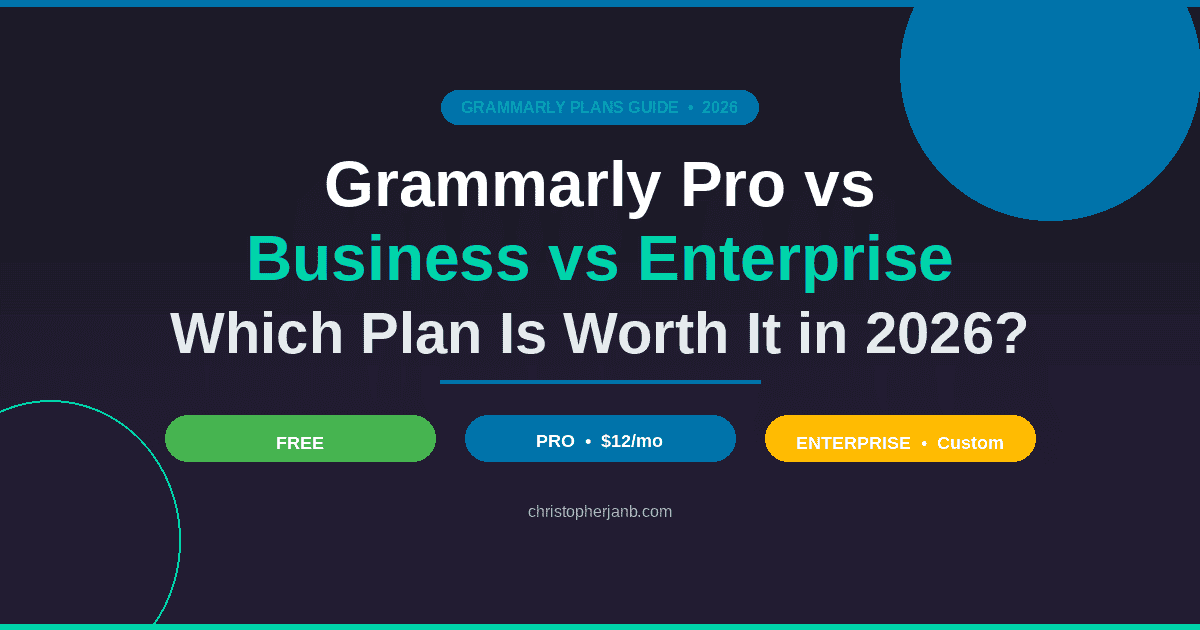
Grammarly now has three plans: Free, Pro, and Enterprise. Free gives you basic checks and 100 AI prompts a month. Pro is the right pick for most individual writers and small teams at $12 per member per month on the annual plan. Enterprise is for large organizations that need custom security and no cap on AI usage.
If you landed here searching for the old Grammarly Premium vs Business comparison, you are in the right place. Grammarly overhauled their pricing structure in late 2024. Premium got rebranded to Pro. Business got absorbed into the Pro plan. I completely rewrote this guide to reflect how the plans actually look in 2026.
- How Grammarly’s Plans Have Changed
- What Is Included in Grammarly Free?
- What Is Included in Grammarly Pro?
- What Is Included in Grammarly Enterprise?
- Grammarly Pricing in 2026
- AI Features Comparison
- Which Grammarly Plan Should You Choose?
- Can You Get Grammarly Pro for Free?
- Grammarly vs. Alternatives
- Conclusion
- Frequently Asked Questions
How Grammarly’s Plans Have Changed
For those of you who remember the old system, here is what happened:
| Old Plan Name | New Plan Name |
|---|---|
| Free | Free (now with 100 AI prompts/month) |
| Premium | Pro |
| Business (3+ users) | Pro (now supports 1-149 seats) |
| Enterprise | Enterprise (150+ users) |
Same basic idea, different packaging. The real change is that AI features now come standard across every tier, including the free plan.
What Is Included in Grammarly Free?
The free version used to be pretty bare bones. Grammar checks, spelling corrections, and not much else.
Now? Grammarly threw in 100 AI prompts per month. That means you can actually use their generative features without paying anything.
What you get:
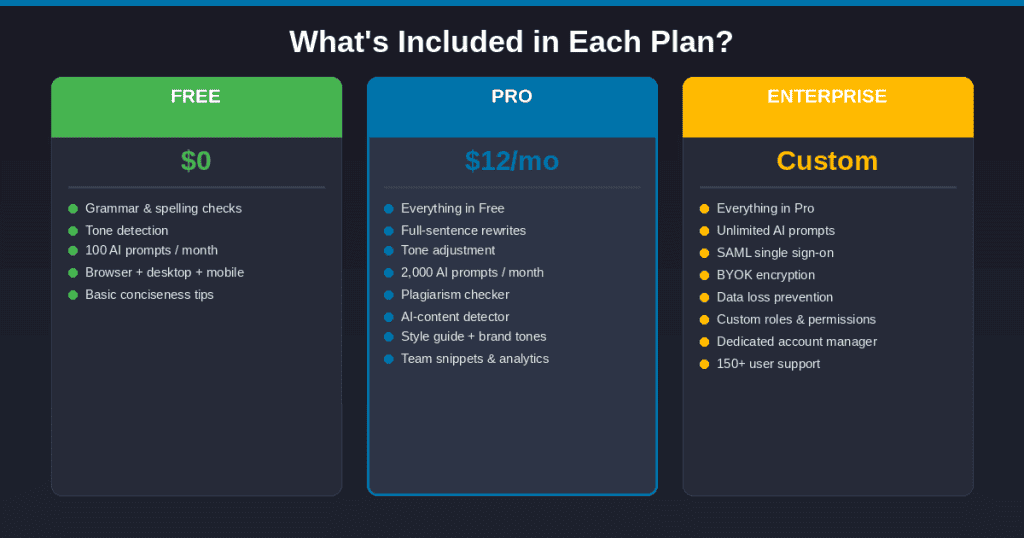
- Grammar, spelling, and punctuation fixes
- Tone detection
- 100 generative AI prompts monthly
- Browser extension, desktop app, mobile keyboard
- Basic conciseness suggestions
Is 100 prompts enough? Depends. If you are just fixing the occasional email, sure. But I burned through my free prompts in about a week when I was testing it. Writers who rely on AI assistance daily will hit that wall fast.
What Is Included in Grammarly Pro?
This is where most people should start. Grammarly Pro replaced both the old Premium plan for individuals and the Business plan for teams. Whether you are a solo writer or managing a content team of up to 149 people, you are on the same Pro plan.
Writing tools:
- Advanced grammar corrections with explanations for why something is wrong
- Full-sentence rewrites
- Vocabulary suggestions
- Tone shifting (formal to casual, confident to friendly, and more)
- Fluency help for non-native speakers
AI features:
- 2,000 prompts per month
- Compose: give it a prompt, get a draft
- Rewrite: highlight text, get alternatives
- Ideate: stuck on structure? It will brainstorm with you
- Reply: auto-generates email responses
- My Voice: the AI learns how you write over time
Detection tools:
- Plagiarism checker
- AI-generated text detection
Team and brand features:
- Style guide (1 per account)
- Brand tones (1 per account)
- Snippets for reusable text blocks
- Knowledge Share
- Team analytics dashboard
That 2,000 prompt limit matters. I have been using Pro for a few months now and I have never come close to hitting it. For solo writers, it is plenty.
The style guide feature is what sells this for agencies. I have worked with clients who had ten writers producing content that sounded like it came from ten different companies. With Grammarly’s style guides, you define the rules once. Product names get capitalized correctly. Banned phrases get flagged. Everyone writes like they are part of the same team.
It is not perfect. Sometimes the suggestions get annoying. But it beats manually reviewing every piece for brand consistency.
What Is Included in Grammarly Enterprise?
Enterprise is for large organizations. We are talking 150 or more users, serious security requirements, and IT departments that need control.
Everything from Pro, plus:
- Unlimited AI prompts
- SAML single sign-on
- Advanced user roles and access controls
- Data loss prevention
- BYOK (bring your own encryption key)
- Confidential mode
- Dedicated account manager
- Priority support
- Team and individual analytics
- Cost center visibility
Pricing is not public. You have to talk to their sales team, which usually means negotiating based on company size and which features you need.
If you are in healthcare, finance, legal, or any industry where data security matters, the Enterprise compliance features are not optional. They are required.
Grammarly Pricing in 2026
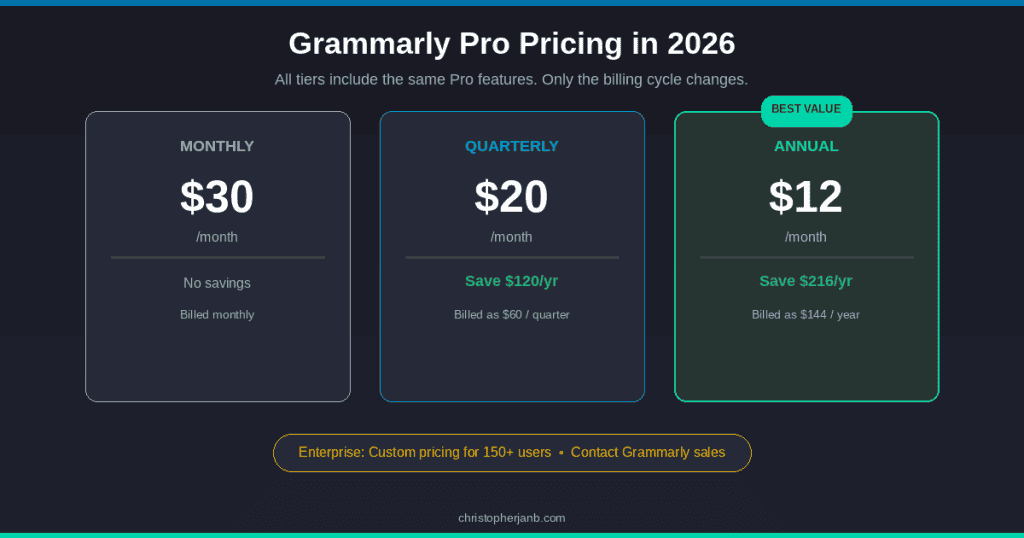
Here are the current numbers.
Grammarly Pro
| Billing Cycle | Price |
|---|---|
| Monthly | $30/month per member |
| Quarterly | $20/month per member (billed as $60) |
| Annual | $12/month per member (billed as $144) |
Pro supports 1 to 149 seats. Monthly pricing is brutal. If you know you will stick with Grammarly, go annual. On the individual plan, that saves you $216 over the year. Not nothing.
Grammarly Enterprise
Custom quotes only. Contact their sales team.
AI Features Comparison
Since everyone is asking about AI these days, here is the breakdown:
| Feature | Free | Pro | Enterprise |
|---|---|---|---|
| AI prompts per month | 100 | 2,000 | Unlimited |
| Compose (draft from prompt) | Yes | Yes | Yes |
| Rewrite | Yes | Yes | Yes |
| Ideate | Yes | Yes | Yes |
| Reply | Yes | Yes | Yes |
| My Voice personalization | Limited | Yes | Yes |
| Style guide | No | 1 | Unlimited |
| Brand tones | No | 1 | Unlimited |
| AI detector | Yes | Yes | Yes |
| Plagiarism checker | No | Yes | Yes |
Those 100 free prompts disappear faster than you would expect. Every compose, every rewrite, every “make this sound more professional” request counts against your limit. I watched mine drain in about four working days during heavy editing.
2,000 prompts on Pro is comfortable for most people working alone. But if you have a whole team hammering the AI features, Enterprise removes the cap entirely.
Which Grammarly Plan Should You Choose?
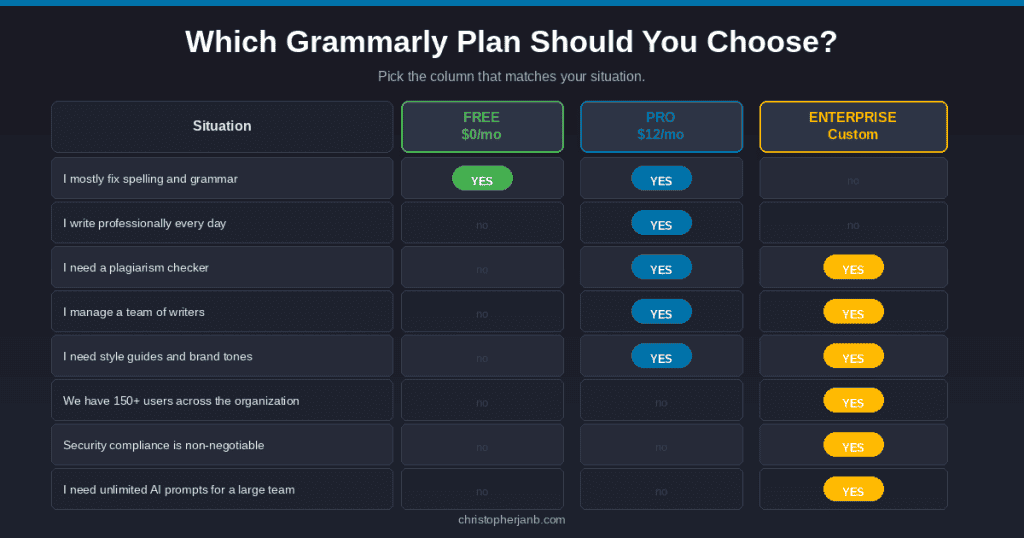
I cannot tell you exactly what to pick without knowing your situation. But here is how I would think about it.
Go with Free if:
- Writing is not a major part of your job
- You mostly need spell check and basic grammar fixes
- You want to test Grammarly before spending money
- Budget is tight right now
Go with Pro if:
- You write professionally (blogs, client work, reports, whatever)
- Clarity and tone matter for your work
- You need plagiarism checking or AI detection
- You are a student writing papers regularly
- You manage a content team and need style guides and brand consistency
Go with Enterprise if:
- Your organization has 150 or more people using Grammarly
- Security and compliance are non-negotiable
- You need SSO, BYOK encryption, or data loss prevention
- You want unlimited AI prompts across the whole team
- A dedicated account manager would actually help you
Can You Get Grammarly Pro for Free?
Short answer: not reliably.
Grammarly does offer a 7-day free trial for Pro right now. You get full access and they send you an email reminder two days before it ends. No payment today, but you will need to add a card to start the trial.
What you can do beyond the trial:
- Use the free tier first. It is genuinely useful for basic stuff. Spend a few weeks with it and see if you actually need more.
- Pay for one month. Yes, $30 hurts compared to the annual rate. But it is cheaper than committing to a year and realizing you do not use it.
- Ask your employer or school. Lots of universities and companies have Grammarly licenses through education or enterprise agreements. I have met people who had access for years without knowing it.
- Wait for Black Friday. Grammarly usually does 50 to 55 percent off around late November. If you can hold out, that is the best time to grab an annual plan.
Grammarly vs. Alternatives
Grammarly is not your only choice. Here is a quick look at the competitive landscape:
| Tool | Annual Price | Best For |
|---|---|---|
| Grammarly Pro | $12/month | All-around writing assistance with strong AI |
| ProWritingAid | ~$10/month | Writers who want detailed style reports |
| QuillBot | ~$8/month | Paraphrasing and summarizing |
| Wordtune | ~$10/month | Sentence-level rewriting |
| Microsoft Editor | Free with Microsoft 365 | Basic corrections for Office users |
| LanguageTool | Free or ~$5/month | Privacy-focused, open-source option |
I have tried most of these. ProWritingAid gives you more detailed style reports but feels clunkier to use day-to-day. QuillBot is great for paraphrasing but does not do much else. Microsoft Editor is fine if you live in Office anyway.
Grammarly wins on integration. It works in Chrome, on the desktop app, in the phone keyboard, and inside Google Docs. That everywhere-ness is hard to beat for professional writers who jump between tools constantly.
Note: competitor prices are approximate and subject to change. Check each tool’s pricing page before making a decision.
Conclusion
Grammarly looks different than it did a few years ago. Premium and Business are gone. The whole thing is now Free, Pro, and Enterprise.
Quick recap:
Free handles casual writing and gives you 100 AI prompts a month to test the generative features.
Pro is the right call for most professional writers, students, and content teams. At $12 per member per month on the annual plan, you get 2,000 AI prompts, plagiarism detection, full-sentence rewrites, and team features like style guides and brand tones.
Enterprise is for organizations with 150 or more users that need serious security controls, unlimited AI, and dedicated support.
If writing matters to your work, the annual Pro subscription is probably worth it. I have saved enough time on editing alone to justify the cost several times over.
Questions about which tier fits your situation? Leave a comment below. I actually read these.
Frequently Asked Questions
What happened to Grammarly Premium?
Rebranded to Pro in late 2024. Same features, same pricing. They also bumped the AI prompts from 1,000 to 2,000 per month.
What happened to Grammarly Business?
Folded into the Pro plan. Pro now supports 1 to 149 seats, covering everything the old Business plan handled. If you had a Business subscription, Grammarly should have contacted you about the transition.
How many AI prompts do I get with each plan?
Free gets 100 per month. Pro gets 2,000 per month. Enterprise gets unlimited.
Is Grammarly worth it in 2026?
If you write daily, probably yes. The AI features genuinely speed up drafting and editing. If you write once a week, the free tier might be enough to start.
Does Grammarly offer student discounts?
No dedicated student pricing on the main plans. But check if your school has an institutional license through Grammarly for Education. Many do, and access would be free for you.
Can I use Grammarly on my phone?
Yes. They have a keyboard app for iOS and Android that works across all your mobile apps.
How many people can use Grammarly Pro?
Pro supports up to 149 seats. For 150 or more users, you move to Enterprise.