
Author: Christopher Jan Benitez

  • How to Be a Successful Freelancer and Build a Profitable Career

    How to Be a Successful Freelancer and Build a Profitable Career

    There are lots of concerns on how to be a successful freelancer.

    “How secure is freelancing? I don’t want to leave my full-time job because it provides stable, steady work.”

    “How can I pay for my government contributions when I become a freelancer? I prefer having the company’s HR handle that for me.”

    These questions are more are valid points that prevent skeptics from embracing the freelance lifestyle.

    However, and whether they like it or not, freelancing is becoming more and more popular by the year. From 2008 to 2016, the number of people turning to freelance work had risen to 43%.

    The answer is really simple: working from wherever you like, whenever you like, and for whomever you like!

    Granted, freelancing is not the perfect solution for your professional career with the concerns I raised earlier. However, the freelancing world is full of new opportunities, and pretty much any trade can now be turned into a freelancing opportunity.

    As a freelance writer for over five years and counting, I have no regrets about leaving the corporate world. Freelancing indeed presents different challenges for me as a professional. I need to save for rainy days especially when clients drop you without rhyme or reason. I also need to develop a client acquisition strategy to help me replenish my customer list and keep the money rolling my way.

    At the same time, I’ve really felt fully alive as a professional freelance writer. It allows me to push myself to the limit and make the most out of the opportunities presented to me. It forces me to go outside my comfort zones and network with like-minded people. More importantly, it stimulates me mentally to do my best and provide the life my family deserves.

    I wouldn’t say that I know how to be a successful freelancer and writer. However, I do know what it takes in getting started as a freelance writer or as a freelancer in general. Building your career on solid foundations will help you carve a profitable career as a freelance from the start.

    In this post, you will learn how to:

    • build the mindset necessary to succeed as a freelancer
    • set up shop with the help of a virtual address
    • find the right tools for your freelance career
    • network and find like-minded people to partner with to jumpstart your career
    • find and secure the best clients and projects in the market

    Building the right mindset

    One of the characteristics you’ll need to do as a freelancer is taking the initiative with tasks that you are given by clients. While some clients will have detailed specifications on what they want doing, others won’t give you much guidance. If you’re able to find inspiration and be creative with what you’re doing, you’ll go far in the freelancing world.

    However, you can’t carry out this attitude consistently if you don’t have the right mindset in place.

    Once you start your freelancing career, you need to curb your expectation. Not of your clients will be “home runs.” Some pay well and on time but don’t throw you a lot of work consistently. Others have lots of projects lined up for you, but you’ll have to keep chasing and reminding them to send the payment.tou

    I had this experience before when working at online job marketplaces like Upwork. Since you bid with the “best” offer (i.e. lowest), it’s difficult to build a profitable career especially if you’re just starting out your freelancing career. This reason is I decided to ditch Upwork and took full control of my freelance writing business.

    But let’s be real here – Upwork or not, a perfect client doesn’t exist. There will always be quirks with your clients that you don’t like. However, you have to take in the bad with the good. This experience rings true for freelancers without a body of work to show for. They will have to work their way up the totem pole before they can get better clients. Working and hustling your way to the top is an arduous but rewarding task.

    Therefore, your mindset as a freelancer should be geared towards self-improvement and sustainability. You always need to find ways to innovate yourself as a freelancer and put yourself to the test.

    As a writer, I always sought ways to improve not only my writing but also how I approach writing. It’s no longer enough to provide clients with well-written content that they can publish online. To get better jobs, I have to create additional value for the content I make. I made sure that all the articles I wrote are optimized for the best possible target keyword to increase its chances to rank on Google search. I also shared the published content on social media to amplify their reach.

    Once I did all these things and more, I saw an increase in the quality of clients that provide better work and pay more!

    Therefore, if you stay the same as a freelancer, then the quality of the clients you will get remains the same.

    A virtual address

    Virtual address

    While it’s likely that you will be spending a lot of time working from home, you don’t want to use your home address on your website and social media – for obvious reasons. Using a virtual address allows you to keep your privacy and also immediately make your freelancing career look more professional.

    You will even get mail box forwarding with online access so that you can eliminate the need to store lots of paperwork around your home. It might be an idea to upgrade your storage online so that you don’t lose any important documents.

    Another way to avoid using your home address for work is by working at a co-working space. Instead of frequenting coffee shops or staying at home where it’s difficult to separate your work from your personal life, a co-working space is like your office. You can go there are go about with your business. Most co-working spaces also offer free coffee and amenities to make you feel at home without being at home. You can also meet new people, some of whom are freelancers like yourself.

    Speed

    Something you’ll be expected to do is work with speed. At the beginning of your journey as a freelancer, you may feel rushed by how quickly your clients are expecting you to work. However, with a little experience and a few close calls, you will soon find that you’re able to complete tasks faster than ever, and with the same quality of work too.

    First, you need to learn how to organize your projects and prioritize the most important ones. As a writer, I rely on my ability to develop outlines for each of the posts I have to write soon. Having the skeleton of the post makes it easier for me to fill out the meat in all the parts as opposed to having no outline for the post before starting.

    I’ve actually detailed my process of writing outlines in this post if you’re interested.

    Also, if you want to excel at the beginning of your career, why not take a touch typing course so that you’re ahead of the game before you’ve even started?

    The right tools

    This might seem like we’re teaching you to suck eggs, but in the world of freelancing, there are no cutting corners. Before you even consider going down that route, make sure that you’ve got the right equipment so that you’re not left disappointed when clients turn you down.

    As a freelance writer, I’m obsessed with tools. The goal is to find apps and tools that will help me unburden writing quality content for and clients. Granted, there aren’t a lot of tools that writers can sink their teeth into, but the ones I use are responsible for my success (or what resembles success) as a freelance writer.

    Below are some of the tools that I use as a freelance writer and that I highly recommend:

    • Grammarly Premium (affiliate link) – My favorite writing tool. It helps clean up errors in my writing that I didn’t get to check post-edit. It also helps improve my language to eliminate repetitive words and diversify the content. It has a free Chrome extension to help you check fundamental errors. However, I use the Premium version that corrects the article for 250 grammatical and contextual errors.  I reviewed why you should purchase a copy of Grammarly Premium if you’re serious with your freelance writing career. Click here to read it.
    • Webtexttool – Since I strive to provide clients with SEO-friendly content, I make sure to write all of my articles on Webtexttool. It’s like a web-based Yoast SEO that tracks content based on different SEO factors. The tool computes how optimized your content is for your target keywords using an aggregated score. It also measures the content score based on its readability and for its intended audience.
    • Keyword Revealer  (affiliate link)- Finding the right keyword for your content is made easy using Keyword Revealer. Enter the seed keyword to brainstorm keyword ideas. Filter the results according to the monthly search volume, the minimum number of words, and more. You can also analyze each keyword’s difficulty to help you find low-hanging fruit keywords to rank for with your content.
    • Trello – Organizing your projects and progress can be a pain without the right tool. With Trello, you can separate projects according to boards and break each into tasks using cards. You can collaborate with other writers or virtual assistants to help process the projects accordingly.
    • Serpstat  (affiliate link) – While this tool is primarily a full-suite SEO software in the vein of SEMrush, Serpstat helps me analyze the website’s competitors I will be writing for. It helps me find missing keywords that competitors are ranking for and the site isn’t. From here, I field the potential keywords I can write about and choose one to help the website rank for it. For my full review about Serpstat, click here.
    • CoSchedule Headline Analyzer – Come up with the best possible title for the post I plan to write. The tool measures the title’s effectiveness based on different factors and provides an aggregate score. The higher the score, the better the headline.
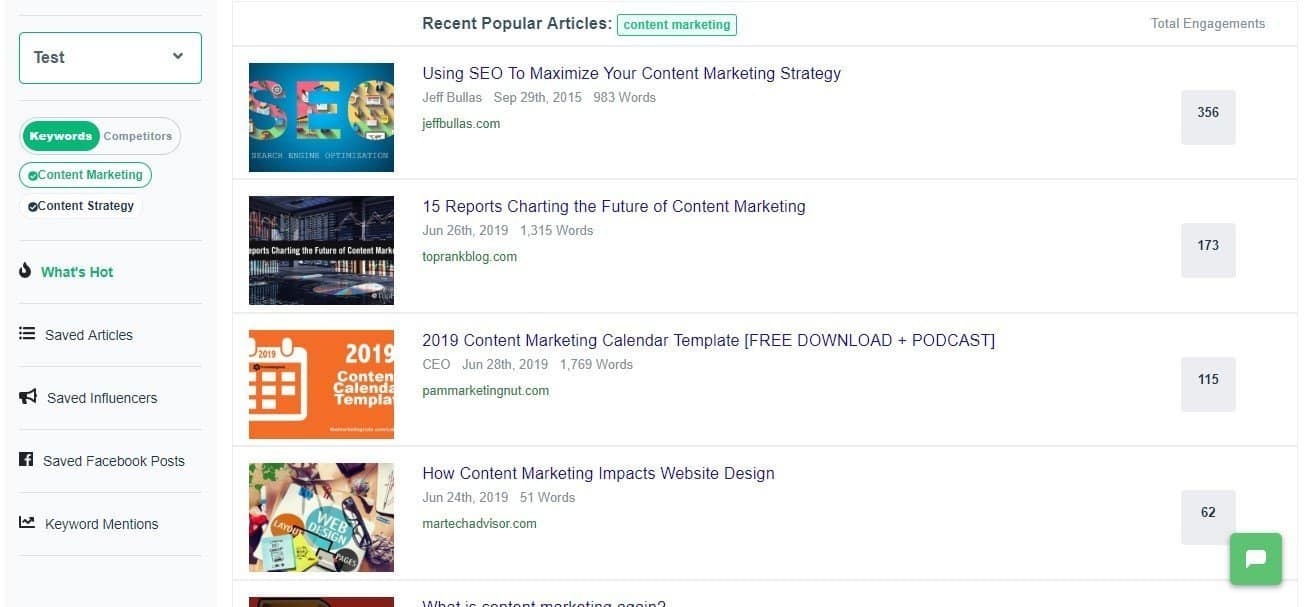
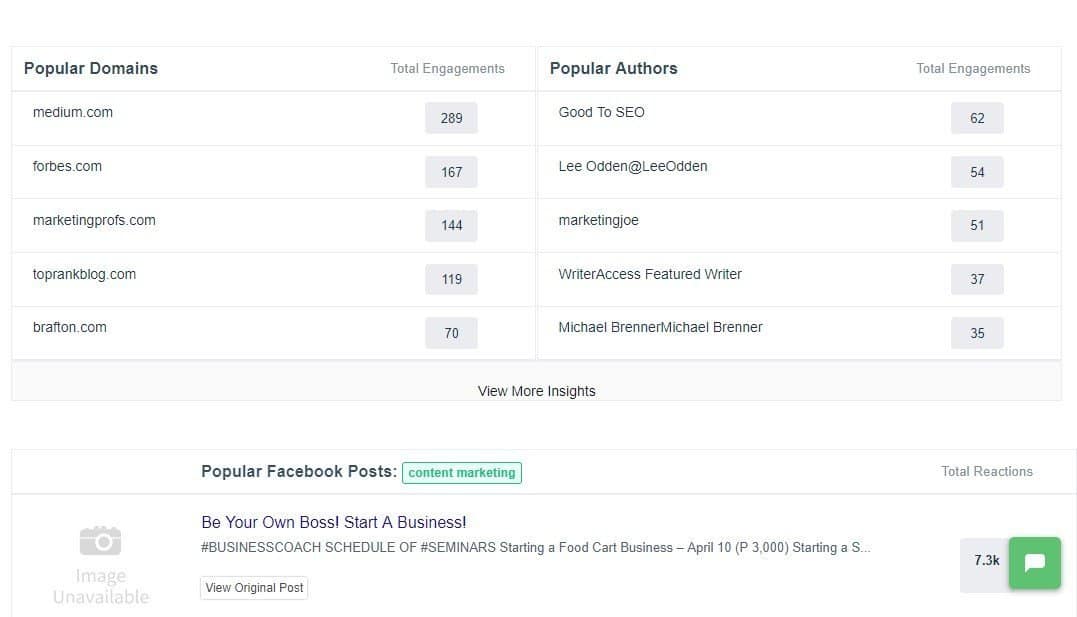
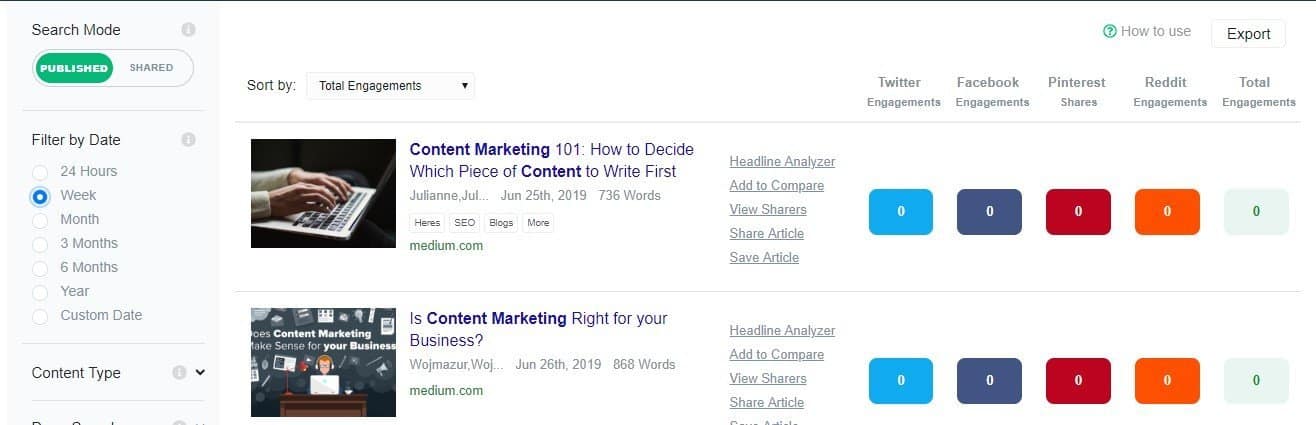
    • Buzzsumo – This tool lets you search content with the most shares for your chosen keyword. You can then leverage the most shared content by creating a better version of all posts combined. If you want to learn how to use Buzzsumo to its fullest effect (social media outreach, link building, keyword monitoring), click here to read the guide on how I use Buzzsumo.

    Network, network, network!

    Finally, the one thing you will need before launching as a freelancer is some contacts to help you out with connecting you to the right clients. Many freelancers have often started out as bloggers and obtained contacts that way. Consider going down a route such as this to build up your clientele so that you’re not stuck without work when you’ve launched.

    In the digital age, nothing beats having to meet people in the flesh, eye to eye, and make connections from there. You’d think online chat and messenger apps would supplant the power of personal touch. However, the latter remains the best way to build relationships that can help you grow your freelancing career.

    If you want to meet people in your area, head on to Meetup and find groups related to freelance writing or whichever your niche is.

    Meetup

    Find the ones that are active and holds meetups on a regular basis. Find time to attend the events and go out of your way to strike a conversation with people and learn more about it.

    If you’re not very sociable, then you might feel intimidated by attending these meetups. And I agree – as a person who’d rather keep to himself, I’d rather not attend meetups, if I were to be totally honest. However, you have to understand the value of networking with people. Not only can you find people whom to strike new freelancing projects with but you’ll also potentially find partners in your freelance journey.

    I’ll be straight with you – freelancing can be a very lonely world. You just sit in front of your desktop working your ass off for clients day in and out. There will come a time when you simply want to relax and unwind with people who understand what you’re going through.  Therefore, the people you connect and network in these meetups might be the people who will stick out with you ’til the bitter end.

    Acquire leads

    There are people whom you want to connect with but is impossible at the moment because they are from the other side of the world. However, this is where digital tools flourish to help you get in touch with them.

    For bloggers, you may want to approach these people with a little bit of discretion. You can’t just hit that person up on Facebook and expect a reply in a matter of minutes. You need to give him or her a reason to talk to you, especially online, where anonymity rules supreme.

    To help ease your way into a conversation and eventually a professional relationship with these people, you need to learn how to do blogger outreach.

    Blogger Outreach Basics: How to Grow Your Readership 1

    This method is used to tap into influencers and break bread with them even if you are a nobody in your industry. It helps you hack your growth by leveraging the power of influencers to help you increase your site traffic, grow your followers, and others.

    However, for the purpose of growing your freelance writing career, you may want to use blogger outreach to find leads and potential clients for your business!

    A tool that can help you find the best prospects and send them an email is Ninja Outreach (affiliate link).

    Upon signing up for an account, go to Search > Find Leads and type the industry or niche you want to write for. For example, if you’re comfortable writing about real estate, then enter “real estate” on the search bar.

    Ninja Outreach find leads

    Click on each of the leads and check their blog section. If they publish posts regularly, then you may want to skip them for now. Target sites that don’t publish blog posts often enough because you can propose your writing services and provide content to them on a regular basis.

    To add a lead in a list, click on the profile with a plus sign button on the upper right part to add to your list. If you haven’t created one yet, you can do so once the slide in window appears.

    Ninja Outreach add leads to list

    Once you’re done with your list of leads (ideally at least 100 sites – the more sites to send emails to, the more chances of winning!), go to Outreach > Templates to type one out that you can send to people.

    At this point, you are essentially sending out cold emails to your leads. You don’t have any established relationships with them yet, so there’s a huge chance that your email will be ignored. However, you need to pull out all the stops so your leads will take notice of your email.

    Below are the keys to an effective cold email template:

    • Short – not more than five sentences
    • Straight to the point – mention your offer and why they should take it
    • End the email with a question – encourages lead to take action
    • Create a signature – aside from your name, social media handles, and website URL, showcase links to your best works
    ninja outreach template

    The screenshot above is just an example of how your cold email should read. You can write a better one that speaks about the issues in your industry to help you make a more compelling case for your leads.

    Once you’ve developed your template, it’s time to send them to your list. Ninja Outreach spaces out how you send them so you don’t send all emails at once.

    This blogger outreach method is one of many ways that you can grow your freelance business. You don’t even have to be a writer to use this tool – as long as you’re in need of clients, then Ninja Outreach can help you find potential clients to help build your career.

    BONUS: Build a kick-ass website

    I’m a big proponent of establishing a freelance career outside of online job marketplaces like Upwork. This is not a knock against the platform since I am aware that there are hundreds of freelancers making a living from these sites. However, if you want to take home 100% of the salary without a commission to the middlemen, then you need to take full ownership of your freelancing career.

    If you downloaded the e-book above, I listed down building a blog as a top priority. My blog and website is the biggest reason why I was able to learn my first $1,000 in 2014 as a freelance writer. It is also the reason why I am able to sustain a steady income despite the peril of freelancing clients that come and go at a moment’s notice.

    The best thing about having a blog or a website for your freelance services is that everything your clients need to know about your business is on your site. All your potential clients need to do is visit your site for details about your services and sample works they can browse. You don’t have to create individual proposals for each lead every time!

    Also, your website is searchable on Google if you correctly optimize your site pages for your target keywords. In my website, I have created individual pages for each of my writing services with their corresponding target keywords. Doing so makes it easier for me to target search phrases related to my writing services that people are searching for. This process has helped me acquire leads and clients without actively searching for and reaching out to them!

    If you want to learn how to create a website or blog to take your freelancing career to the next level, below is an infographic that breaks down the process of creating a blog for your site.

    Your Guide to Building a Winning Blog in 2017 (1)

    To help you create a winning website or blog, click here.

    Do you now know what it takes on how to be a successful freelancer?

    Whew, that was a lengthy post!

    I think I’ve covered all the bases when it comes to launching a freelance writing career or a freelancing career in general.

    However, as long as the post is, I think there are still tips and advice that you will have to learn yourself.

    That said, freelancing never gets easier. As you undergo different clients and rake in the income you truly deserve, the pressure increases for you to perform at optimum levels. You will also experience hardships that will make you doubt your decision of going the freelance route instead of the safe one.

    However, if there’s one thing that you should remember from this post, it’s that you have to remain steadfast in your journey and never go astray. It’s easy to lose your way after a streak of terrible clients or having to wait for your payment for months, but the harder road to take always offers the most glory. Freelancing is not for everyone – it’s only for people who want the best out of their careers and lives.

    Therefore, are you built to succeed as a freelancer?

  • How to Write a Good Blog Post that Search Engines and Your Audience Loves

    How to Write a Good Blog Post that Search Engines and Your Audience Loves

    Writing blog posts is never just about the writing process. Quote me on that!

    They are other things you must do before and after writing it to ensure that your audience gets to read it, if you targeted the right audience, that is!

    By I’m getting way ahead of myself. Let’s start from the very beginning, which is what this post will be about:

    • Learn how to research article topics for your new blog.
    • Prepare how you plan to write the blog post.
    • Write the most successful blog post possible (wild that it’s the third topic about how to write a blog post, but there’s a reason for this—read on to find out why)
    • Edit your post before publishing it on your own blog.
    • Promoting your blog post to maximize reach

    These points are simple enough to understand but tricky to execute. Let’s begin with the first:

    Blog Research

    Knowing where to write your blog post enables you to produce the best content.

    And since not all blogs are the same, you need to profile each first to help you better understand the blog. This is important if you’re juggling different blogs you own or work for clients.

    Below are steps you must include in your blog research process.

    Determine the Blog’s Niche

    We can categorize niches into two categories: blogs targeting customers (B2C) and those targeting businesses (B2B).

    You’ll most likely be working on B2B blogs for clients. Examples of these blogs target big companies looking for enterprise solutions.

    Unlike B2B blogs, B2C blogs are geared toward individuals that meet the company’s buyer persona. Niche sites promoting Amazon products are perfect examples of this blog type.

    However, what truly matters is the niche of the blog you’re working on.

    A niche requires specific knowledge from a writer to produce content guaranteed to satisfy their audience. Some niches like finance and medicine have a higher barrier to entry to create good content.

    While they may pay more for their content, they are much more demanding concerning their quality

    Other niches are much easier to write about due to their practical nature.

    For example, while having accreditation as a fitness instructor helps with blogging, you don’t need one. You can draw from your experience as a fitness enthusiast to produce valuable content that resonates with readers.

    If you’re unfamiliar with your client’s blog or site’s niche, you need to brush up on your knowledge of who the brand caters to.

    To do this, use a tool like Ubersuggest that identifies the top-ranking pages of a domain.

    From the site, enter the domain URL and see the other information about the site, such as traffic estimates, keyword opportunities, and others.

    In the example above, the pages driving the most organic website traffic target informational keywords. They are helping customers in the B2C space by covering moving and storage topics.

    From here, you must orient yourself to writing for the B2C space about similar topics as its top-ranking pages.

    At the same time, you’ll know your style and approach when writing your blog post.

    While there are arguably better tools than Ubersuggest, its free account lets you get a snapshot of a website faster than any tool out there.

    Know Its Goals

    A blog is a marketing tool that eases your audience down your marketing funnel using your published content. Whether you use it to inform your audience about a topic or for guest blogging (yes, it still works), writing has a place in your marketing strategy.

    It is part of effective content marketing that leverages content across various platforms (including social media, email, and others) to get them to commit to your call to action.

    Since a sales funnel has various stages, you must produce quality blog posts that align with the stage in the sales funnel the blog is in.

    For some businesses, blogging is in the ToFu (top of the funnel). That means people in this stage aren’t aware that the business exists. Using your blog posts, you educate them about the business by writing helpful information designed to build trust with people.

    Examples of blog post topics in the ToFU are those that ask questions.

    You can find examples of these topics on the Google search engine results pages (SERPs). If you enter a query a generic query (“making coffee,” in this example), you can find a section on the page that lists questions people ask about it:

    google paa

    If you click on one of the questions in this section ( the “People Also Ask” section), it shows you the answer snippet to the question AND two additional questions related to the one you clicked.

    You can use the questions here as topics for your next blog post and for the other articles you’ll be writing!

    Others use blogging at the BoFU (bottom of the funnel). People in this stage know about your products and services but are still deciding whether to purchase them from you. In this case, your blog posts must showcase your products to help them make informed purchasing choices.

    BoFu blog post content teaches its audience how to use the product or service correctly.

    Most businesses utilize blogs to cover both stages in the sales funnel. By creating blog posts that help establish their authority to your client’s audience and inform them how to use your products, you guide them to become blog visitors and, ultimately, customers.

    Hubspot is a brand that has its content marketing funnel down to a tee.

    If you’ve searched for anything related to digital marketing, there’s a big chance you’ve seen one of Hubspot’s posts ranking on top of SERPs.

    While these are ToFu posts ranking on Google, Hubspot has covered the digital marketing topic with posts on search engines.

    And once you’ve clicked on one of their pages, you will see a content upgrade dangling in front of you like a carrot tied to a fishing pole.

    In the example below, the post about target personas features a template that users can download.

    But before you can download the resource, readers must first give Hubspot their names and email addresses.

    While Hubspot uses the information to send you the template securely, it also sends you marketing emails about its products and services.

    While this sophisticated marketing approach may be above your pay grade, for now, it’s essential to understand that the content you’ll write for clients or your blog isn’t just limited to blog posts.

    In some instances, you may be assigned to create these written templates yourself.

    As a blogger, your client may assign you to write blog posts covering different topics. But if clients ask you to brainstorm for topic ideas, knowing the blog’s primary goal as a marketing tool makes determining whether to target ToFu or BoFu topics much easier for you.

    But we’ll cross the bridge when we get there. We’ll discuss the topic and keyword research later once you start writing the blog post.

    Find Its Audience

    We’ve already discussed writing for an audience to get more people to engage with your blog post. And you can only achieve this by knowing them to the fullest extent.

    To do this, you must create a buyer persona, a fictional persona based on your ideal customer. You should be able to develop a persona based on market research and the data you have on your existing customer base.

    Your personal should include the following:

    • Demographics
    • Behavioral patterns
    • Motivations
    • Goals

    You can write a blog with detailed buyer personas that cater directly to their needs.

    For example, take a look at Sharable for Hire’s blog. As a company specializing in employee background checks, they know their customers are businesses looking for a more direct recruitment and hiring process.

    Their blog covers topics from finding the best candidates to retaining them.

    Knowing your audience’s demographics helps you determine how to present your content.

    If you have access to the blog’s Google Analytics, you can access your audience’s demographics. Check where most of your visitors are coming from, what devices and browsers they use, and other information to help build your buyer persona.

    For those using Google Analytics 4, you can click on Reports > Users > Demographics > Demographics overview. It shows you a snapshot of your visitor’s demographics based on location, interests, devices used, and more.

    From here, you can use this information to help you write your posts moving forward. If most of your visitors are from the US, you need to brush up on your knowledge of US culture and language. This way, you can develop a writing style that resonates with them.

    If the blog is new, it probably doesn’t have enough visitors for you to see its demographics. In this case, it’s best to ask the blog owner who they want to target with their blog.

    Find Your Voice

    Your buyer persona will impact your brand voice, the tone, and the style in which you write the blogs that allow you to appeal to your audience.

    You do this in your everyday life when talking to different people. For example, when talking to your grandma, you have a different voice than your friends. Based on the information in your buyer persona, you’ll need to determine whether your voice is:

    • Formal
    • Funny
    • Casual
    • Authoritative

    Essentially, you’ll need to determine if you want to sound like a knowledgeable and helpful friend or an authority.

    However, you should never take on a voice that might seem false. For example, you shouldn’t be formal like another brand. Instead, you can be a standard version of your existing brand. 

    One of the better examples of writers who has a good grasp of their writing skills is Neville Medhora.

    He’s a former copywriter for Appsumo and owns the Copywriting Course.

    Even if you aren’t a member of his course yet, his blog posts give you a taste of his distinct writing voice.

    Case in point, his “How To Become A Life Coach” LinkedIn post:

    The post is quite obnoxious-It could even rub off people the wrong way,

    However, he uses these qualities in his writing to great effect. He’s able to communicate his ideas more effectively to his audience by harnessing his humor and writing voice.

    Overall, the audience wants the blog to be authentic and unique rather than something generic.

    You don’t want to sound just like any other writer out there. So, by drawing from your wealth of experience intertwined with your personality and sincerity, you can cut through the noise and produce content the way you’re meant to.

    Blog Content Research and Planning

    The easiest way to waste time and hard work are to commit to writing a post before you know how valuable it will be.

    Brainstorm for Topics

    If your client provides you with blog topics to write, feel free to skip this post.

    However, I suggest you at least browse through it—you’ll never know if the client wants input on which topics to write about.

    Knowing your blog’s niche lets you narrow the scope of topics to suggest. But the goal here is to provide topics the blog hasn’t covered.

    There are many ways to brainstorm for topics, but below is what I find the most effective.

    To see what these topics are, head on to Google search and type the following:

    site:[blog URL]

    Replace [blog URL] with the blog’s address.

    This search operator will show you published blog posts on the blog indexed by Google.

    From here, visit each page and look for external or outbound links, i.e., links that point away from the site.

    If there are external links on the blog posts, it’s probably because the blog doesn’t have a published article about that topic yet.

    That’s already a potential topic you can suggest to your client!

    You can do this on all the blog’s indexed posts to unearth more blog post ideas.

    The logic of suggesting these topics is that the blog owner can link to this post instead of from a third-party site. This way, the blog gets to keep its link equity, which is what search engines use to determine a site’s authority.

    The more outbound links your blog has, the more “authority” escapes from it, and the less likely it’ll rank for its target keywords.

    Creating content for these topics incentivizes the blog to sustain its link equity for higher rankings on Google.

    Do Keyword Research

    Once you have a batch of topics o write about, you must perform keyword research for every potential post you brainstorm.

    The goal is to maximize your blog post’s visibility on search results. You want to target keywords that most of your audience searches for and have the least competition.

    For this, you’d need a tool to show you a search term’s estimated monthly search volume.

    Personally, the most accessible keyword tool to use for free is Keyword Surfer.

    It’s a Chrome extension created by Surfer SEO to help you identify the search volume of each term on SERP.

    After installing and activating the extension, type the topic on the Google search bar.

    On the search engine results page (SERPs), a sidebar will appear showing you keyword suggestions related to the topic, the search volume of each, and its relevancy.

    From the results, you can also see the estimated volume of traffic the blog domain receives, the number of words on the page, and the number of times the search query was mentioned.

    Based on these factors, you can choose the appropriate keyword to target for your blog content.

    However, you shouldn’t always target keywords with the highest search volume for your content. You also must take into consideration the difficulty of ranking for them.

    Keyword difficulty is a score assigned by premium keyword tools to determine the likelihood of ranking your content on top of search results.

    The lower the score (on a scale of 0-100, 0 being the lowest), the higher your post’s chances of ranking for it.

    This metric isn’t available on free keyword research tools, and those that do offer it have limitations or don’t provide accurate data. So you’ll have to resort to using a paid tool like KWFinder.

    It has a reliable keyword difficulty score that you can factor in when deciding which keyword to target for your blog post’s topic.

    You can also conduct competitive keyword research using the tool. Enter the domain URL of a competitor or a site that covers the same topics as your blog. KWFinder will show you keywords the site is ranking for, which you can use as topics for your upcoming posts.

    But before using these keywords, ensure that your blog hasn’t covered them yet.

    Determine Intent

    Now that you’ve determined the keywords for your blog posts, it’s time to figure out the intent for each.

    Back then, when Brian Dean’s “Skyscraper Technique” was in full force, publishers were writing exhaustive pieces about the topic. They cover the full spectrum of a topic and reach at least 4,000 words each.

    This is what worked then because Google ranked these pages like crazy.

    However, the search engine’s algorithm constantly changes, and it’s decided that intent is more important.

    For example, if people search for “social media tactics,” the assumption here is they want to know the best social media techniques for building an audience on various channels.

    They don’t want to know the history of social media, its different channels, or who the best people to follow on social media are. It’s because these topics are not implicit in the keyword’s intent.

    So, by determining why the user typed in their search query, you can figure out what to write in your blog post to provide them with the necessary information.

    There are three user intents you must know:

    • Navigational – Looking for a specific company or brand website page.
    • Informational – Looking for answers to questions about a site’s topic or niche.
    • Commercial/Transactional – Looking to make a purchase or information that will help them make a purchasing decision.
    keyword intent - how to write a good blog post

    In some cases, the intent is evident in the keyword.

    If the search query begins with any of the four W’s (what, why, when, where) or 1 H (how), its intent is informational.

    But a question query can have a commercial intent if it involves pricing, ex. How much is x, and what is the price of x. Since users want to know the price of a product, there’s a good chance they’re interested in making a purchase.

    So, instead of guessing, you must determine for sure what intent your topic has.

    To help you find the intent of a keyword, go to Google and type the keyword on the search bar. Then see the top pages appearing on search results.

    If most pages answer a question or problem, then the keyword likely has an informational intent.

    But if the results are reviews, alternatives, or comparisons to other products and services (all of which are helping users make a purchasing decision), the keyword has a commercial intent.

    Doing the above process takes time, however. So, a faster way to determine user intent is to use a tool like SEMrush that shows you the intent of a keyword and its related terms.

    While it’s best to manually check for the posts to determine intent, using tools helps expedite the process and improve your writing workflow.

    Write Your Outline

    Outlining is one of the unsung heroes of content writing. You can’t create good content if you don’t have a structure before writing it.

    You’ll find yourself going back and forth between writing and researching and back, which makes the process much longer for you.

    To hasten the process, you must write outlines before creating the content.

    The article should contain the talking points and research materials you must mention. This way, you have everything you need to write the article so you can focus all your energies on it.

    You can do this manually by taking the top-ranking pages and analyzing their h2s. We want to take the most relevant and standard h2 these posts have and include it in ours.

    To help you with this process, use the Detailed SEO Chrome extension. Click on it from your extensions when you’re on the page you want to analyze.

    Do this on all your top-ranking competitors and compare which headers they share the most.

    The goal is to incorporate these headers in your content to make it familiar enough for search engines to rank your page higher than before.

    Pick which h2 and other subheadings work best with your writing piece. Include bullet points for each subheading that you’ll flesh out once you start writing.

    Aside from doing this manually, you can use Contentpace to help you drag and drop subheadings that you want to add to your article.

    It’s a content writing research tool that helps you pull out headers (H1, H2, etc.) of each ranking page.

    From here, you can drag and drop the headlines you wish to include in your article.

    Then add notes on the outline to help you keep tabs on what you’ll write once you start with the article.

    Contentpace also shows you averages of the top-ranking pages for your keyword.

    This helps you write a certain number of words in your article, readability score, and keyword frequency to match those appearing on SERPs’ first page.

    Split your post over three days

    After conducting blog research, you can break down the following tasks into these steps:

    • Research
    • Writing
    • Editing

    You can split these tasks into three days across all the articles you need to write in a period. This is a method I learned about on Buffer’s blog, and it’s served me well ever since.

    Considering that all posts will take at least three days, make up for it by working on three daily posts.

    • Day 1 – research information for the first article, edit the second article and begin writing the third article.
    • Day 2 – Write the first article, research information for the fourth article, and edit the third article.
    • Day 3 – edit the first article, begin writing the fourth article, and research information for the fifth article.

    Writing articles this way allows you to compartmentalize articles into digestible tasks that you can complete in increments.

    Writing takes a different mindset to research; anything you learn will need to sit in your head for a while to be processed to make any decent points.

    That’s why you must research first and get all the information you need to write the content much faster and more efficiently using your skills or various tools.

    I’m not saying that you shouldn’t write anything during research—make notes and record valuable sources you can link back to or quote.

    But don’t attempt to write any of the actual text. If you do, you’ll find yourself flip-flopping between researching and writing, and those three hours will be up before you finish the first draft.

    Similarly, never edit a post while you write it. Again, doing so shatters any flow to your writing to the point where you’ll lose focus and inevitably struggle to keep up the pace.

    By splitting up your writing flow this way, you’re allowing your mind to all three processes to write better and get some distance to edit effectively.

    Predict How Long You’ll Complete Each Task

    Knowing how long to spend on the various parts of writing a great blog post was difficult at first. It’s different for everyone and from post to post.

    In general, however, you want to limit yourself to spending an hour each researching and editing your content.

    This puts more of a concrete limit on how much time you have for a given task, which helps you to focus and make every second count.

    If you know that you only have one hour to research everything you need to know to make your blog post as good as it can be, you’re inherently less likely to stray off on tangents on the off chance that you’ll find an interesting tidbit.

    Writing a blog post varies depending on the topic’s word count and complexity. I see myself spending more than two hours writing a 1,000-word blog post.

    Remember, the goal here isn’t to be as fast as possible. Spending more than two hours (or even less) writing the post is okay.

    It’s to produce good content in short bursts consistently. Having concrete deadlines for each part of the writing process allows you to do that.

    Blog Content Writing

    Now we’re into the writing tips themselves.

    At this point, writing should now be a breeze—you have researched everything to ensure that your piece will have all the information it needs to provide value to readers.

    It’s just a matter of putting everything together in a cohesive, well-thought-out, and well-written piece.

    Here’s an infographic of the things you must keep in mind when writing your blog post:

    15 Dead Simple Tips for Writing Powerful Web Content 1

    Now, let’s discuss each one below:

    Compelling headlines

    The headline is the first thing your audience will see in your post, whether it’s shared on social media or appears on search results.

    Regardless, you want your headlines to be solid and robust enough so that people will be compelled to click on them.

    Below are ways you can do this:

    Make readers interested

    If you want to develop a post title that your audience will want to click on and read, you need to answer the simple question:

    “So what?”

    Consider the following examples as blog titles:

    • Writing Tips for Freelancers
    • 8 Easy Writing Tips that Freelance Ought to Follow
    • 8 Easy Freelance Writing Tips That Will Keep Your Clients Happy

    Which one is the most effective among the three listed above?

    Be descriptive

    The first example is straightforward enough for your audience to know the article.

    But what about writing tips?  What kind of writing tips should I expect from the post? So what?

    If you’re having problems fleshing out details in your content, there are blogging tools that can help you get the job done.

    Emphasize the benefit of reading your article

    The third example is not only descriptive, but it also tells what kind of freelancers the article is for. If you are having trouble retaining your clients, the tips will help you solve this problem.

    You can read the article by clicking here!

    Use intro sections as hook, line, and sinker

    15 Dead Simple Tips for Writing Powerful Web Content 4
    Just like fishing for sport, you need to prepare your best writing techniques to draw readers’ attention to your content.

    Your introductory paragraph is a way to draw your readers to your article. Writing a weak one will force them to stop reading. Therefore, give your readers a reason to stay and read the whole content.

    By beefing up your introduction using any of the suggestions above, you can expect them to be more engaged as they read the rest of your article.

    Use Intro Frameworks

    Taking a cue from this post at Bid4papers, below are ways that you can write an exciting introduction to your article:

    Tip # 5: Use anecdotes. Use a personal story from your experience or historical fact that can help you seamlessly transition to your main idea.

    Tip # 6: Mention statistics. Numbers don’t lie, which makes them perfect examples to establish your argument for your post.

    Tip # 7: Reveal misconceptions. Debunking a myth or a well-known practice will help raise your article’s interest level and inform them what they should do.

    Tip # 8: Set a scene.  Narrate an imaginary scenario related to your main idea that can help envision your points to readers.

    Tip # 9: Include quotations. Using famous lines from popular people or authority figures in your niche can help you communicate your ideas, especially if your readers are big fans of the people you quoted.

    Make it easy to understand your point

    15 Dead Simple Tips for Writing Powerful Web Content 5
    To honestly write effective and powerful web content, take the chore out of reading.

    The Nielsen Norman Group reported that users don’t read content on the web. Instead, they scan for keywords and phrases that grab their attention.

    Instead of bloating your article with more words, you need to…

    Simplify your content so readers will quickly scan the words they are looking for in your articles.

    “How,” you ask? Simple:

    Tip # 10: Use bullet points. These grab the attention of scanners, so they can read the major points even without reading the whole article.

    Tip # 11: Format sections of your content that need emphasis. For example, use bold on proper nouns, subheadings, and italics on basic sentences or phrases.

    Tip # 12: Add visuals. Free stock photos from sites like Pixabay, Pexels, or creating images using Canva or PicMonkey help readers visualize your ideas. Depending on your audience, you may want to add visuals to your blog that enhance and make it more appealing. For example, if your blog is about how to crochet, adding images of each step can add value by showing them how it’s done instead of telling them. 

    Tip # 13: Make your sentences short and sweet. ‘Nuff said.

    Tip # 14: Create a “What You Will Learn from This Post” and “Summary” section. Both will help readers get the gist of the content before reading and fill out the details at the end in case they missed anything.

    Tip # 15: Do not use adjectives and adverbs. Compelling content is about getting your readers engrossed in your writing. Instead of saying something is “really, really good,” do not just say it – make them experience it. Describe the feeling of goodness so readers can relate to it more personally.

    Optimize, Optimize, Optimize!

    We would be remiss if we didn’t discuss search engine optimization (SEO) in content writing.

    In a nutshell, SEO is the process of getting your blog post to rank for its target keyword on organic search.

    The higher the post ranks on search engines, the more clicks it’ll get from search results.

    In the latest data from Advanced Web Ranking’s Google Organic CTR History as of November 2022, the first place receives almost 40% of clicks, while the second and third places receive 15% and 9%, respectively.

    Let’s say that the keyword you’re trying to rank for has an estimated 1,000 search volume, here’s the number of monthly clicks you’ll receive from ranking at the first three spots:

    • #1 – 400 clicks (1,000 * 0.4)
    • #2 – 150 clicks (1,000 * 0.15)
    • #3 – 90 clicks (1,000 * 0.09)

    So, to write content that ranks at the top of SERPs, you must observe the best on-page SEO tactics.

    The two things you can do as a content writer to achieve this are the following:

    • Mention your keyword on the page’s H1, SEO title, and meta description (also known as the three kings of on-page SEO)
    • Use SEO content writing tools to help you understand how optimized your content is based on various factors.

    Regarding the latter, I highly recommend Surfer SEO as your SEO content tool of choice.

    It has a very robust Content Editor that lets you optimize content for multiple keywords (up to 20). It then pulls up natural language processing (NLP) keywords you must mention in your content.

    The goal is to make the score as high as it can be. Anything above 66 shows green, which means it’s optimized enough but feel free to go beyond that number, especially if it makes your content read better.

    Doing so allows you to create blog posts topically relevant to their respective keyword.

    This makes Google’s job of understanding what your content is about much easier, thus increasing your chances of ranking higher for your target queries.

    Another tool you can use is Semrush. It’s not just a content optimization tool–the platform’s an all-encompassing SEO software that can audit your site for technical issues, identify sites to build links on, and more. But for now, Surfer SEO is a good choice if you’re focusing on just your content.

    Blog Post Editing

    It doesn’t matter if you make a spelling mistake. Nobody’s pressuring you to perfect your sentences and structure on your first try. The main thing you need to do once you’ve finished researching is to sit down and write the thing from start to finish.

    Editing an entire document at once can be daunting, especially if you’re on a strict time limit and the post is hefty or about a complex topic. So, instead, split up the editing tasks and take things one chunk at a time.

    Spend five minutes going through the post and checking your spelling, then spend the following checking grammar, and so on.

    Tasks such as improving the structure of the post will take longer, but as long as you keep this editing runs to a single task each, you’ll find them much less daunting, which means you’re less likely to procrastinate.

    However, editing becomes a chore, especially if you don’t know what mistakes you’re making in your content.

    The thing about you being the editor is that even if you checked your content multiple times, you wouldn’t detect the mistakes you’ve made.

    This is because you don’t know they are mistakes in the first place!

    This is why tools like Grammarly are heaven-sent.

    It detects your content for potential errors that you must correct.

    The tool has a Chrome extension, which is perfect if you’re writing straight to the site editor, such as WordPress. It underlines the mistakes you’re making in the article as you write.

    This way, you’re writing and editing the content simultaneously. This makes your manual editing once you’re done writing much more effortless.

    It also has a Google add-on so you can check your other blog posts before sending them over to clients for uploading.

    As an added tip, I’ve also found that using a trackable editing checklist is a fantastic way to boost your efficiency in this part of the writing process.

    Blog Promotions

    After you’ve completed and proofread the blog post, it’s time to promote it to get more traffic to your website.

    After all, the post won’t promote itself!

    Also, you can establish credibility and authority if you successfully promote your content to your target audience.

    Of course, this would depend on how well-written your content is. If you shared unique and insightful ideas in the post that would establish you as an expert in your field, you could position yourself as an industry expert.

    From here, your blog post might generate comments, likes, and shares on social media. This can help you build a community of followers around your blog and increase the chances they will return to it.

    Finally, promoting your blog post can also help improve your search engine rankings, as it can generate backlinks to your blog and increase the number of people who link to your content.

    Again, you can only reap the benefits of your blog promotions strategy if you possess the writing skills for creating an authoritative and well-written piece, all of which we’ve covered above.

    That said, below are ways to help you get started with your content promotions campaign:

    content promotions

    There are also great places where you can share your post online, so try getting your bearings there first.

    How to Write a Good Blog Post: Final Words

    Writing the perfect blog post takes A LOT of work.

    It’s never about simply typing a bunch of words and making them sound good.

    At the heart of writing a great post is understanding what your readers want and optimizing it to make the page appear on top of search results for your target keywords.

    Whether you’re writing for clients or your blog, this how-to post hopefully helps you create better content for your first blog post or even your future posts. This way, you can get more clients, and attract more traffic.

  • How to Hire a Writer that’s Right for Your Business

    How to Hire a Writer that’s Right for Your Business

    Everybody can write. However, everybody has a different way of expressing a thought or idea in writing.

    Some can communicate their ideas much more effectively with how they present their points in writing. Their mastery of grammar, punctuation, and the English language is much superior.

    However, the process of how to hire a freelance writer is not as easy as simply looking for a writer who writes well.

    While I don’t fancy myself as a superior freelance writer (wink wink), I have nonetheless made a living as a writer for different clients. I’m not a native English speaker and need a tool like Grammarly (the paid one or the ones for teams) to help clean up my writing before submitting it to clients. However, I make up for my shortcomings by providing immense value to my clients. The intangibles that I believe I possess are qualities that you as a client might need in your writer.

    Nonetheless, there are other writers out there who might be a much better fit for what you’re looking for in a writer. The needs of a writer depend from industry to industry. It’s a matter of checking all the boxes you want from the writer.

    Therefore, If you want to hire a freelancer and need tips on how to find the best one for you, here are a couple of tips you can follow:

    FREE E-BOOK!

    Before you begin reading the post, unlock the gated content below to learn the questions you need to ask them during the interview to make sure you hire the right person for the job!

    1. Determine your needs from your writer

    A catch-all writer isn’t enough for most businesses.

    Each niche and industry have technical terms that only insiders know. Therefore, you can’t expect every writer to write the kind of content that you want to be published on your blog.

    When you hire a freelance writer, make sure that s/he knows what to know about in your niche. You don’t need to hand-hold or spoon-feed him/her with information that s/he should already know about your industry.

    If this person is truly the writer for you, then s/he must produce with little to no guidance at all. Their ability to perform without giving clear direction and still produce stellar content is a sign that they truly know your niche inside and out.

    However, such writers are rare and can’t be found easily. If you do, expect them to cost more than usual because they specialize in a topic. They have created a market that caters to a specific need and thus command a higher price than a jack-of-all-trades writer. This is a fair trade-off compared to hiring a cheap writer who claims to know your niche but writes content not up to your standards.

    Industry professionals who are also fantastic writers do exist, but based on my experience, they are rare. So if you’re trying to scale your content program or build a brand newsroom, you should focus on looking for writers who can deliver their own type of expertise. Not cardiologists. – Brian Maehl, “Why Marketers Struggle to Hire the Best Freelance Writers

    Below are other questions that you need to be asking yourself to help refine your search in your journey to hire a freelance writer:

    • Can s/he write SEO-friendly content? A writer who observes the best on-page optimization practices will help rank your content for your target keywords and increase your site traffic.
    • What kind of other written content can s/he do? Aside from blog posts, you may want the writer to do copywriting, social media posts, technical writing, and others for your business.
    • Is s/he capable of managing bigger writing tasks? You need to look into the future prior to finding a freelance writer. You may be planning to expand your writing team to help produce more content for your site. Does the freelancer have the qualities and traits to lead your writing team if the opportunity arises?

    Once you’ve determined who your ideal writer is, you need to find one that suits your niche and fits your budget. The cost of paying for your freelance writer will be discussed at a later point in this post.

    2. Know where to find a freelance writer

    To find a freelance writer, you need to learn the places where you can find the best ones. There are lots of sources where freelancer writers are available for hire. However, not all of these places offer the best writers for your website or project. Therefore, determining the best places where to hire writers will help you cut down the time for searching them.

    Determine the best places where to hire #freelance #writers to help make sure that you hire the best one for the job.

    That said, let’s get a couple of things out of the way: “traditional” content mills are a no-no.

    Content mills like Textbroker and CopyPress have a reputation for churning web content at cheap prices. However, this is a classic case of “you get what you pay for.” Due to the low costs of the articles, you get run of the mill stuff that won’t pass your high standards.

    At the same time, there are new content mills that provide high-quality content at reasonable rates, some of which will be discussed below. Still, you must keep your guard up against content mills and always opt for alternative ways of finding freelance writers. Below are some of them:

    Google Search

    Google is a place where you ask questions and get answers. It only makes sense to use it for finding and hiring a freelance writer for your business!

    The great thing about Google Search is you can find writers that suit your niche. For example, if you want content written for your website about blockchain, all you need to do is type “blockchain freelance writer.” Below is a screenshot of the first five organic search results:

    google search blockchain freelance writer - how to hire a freelance writer

    Granted, the other four results are from Upwork, but the top is a freelance writer who specializes in blockchain topics. Scrolling down the results page would show more writers for hire about this topic.

    If you are working on another niche, you can simply replace “blockchain” from the search query to your preferred niche or industry. You can also play around with your search queries to reveal potential writers you can hire such as the ones below:

    • [niche] writer for hire
    • [niche] content writer
    • [niche] copywriter
    • [niche] blogger

    These are just some variations that you can use to help you find writers from Google Search.

    Social media

    Social media sites like LinkedIn and Facebook are excellent places to scan for writers whom you can hire for your online business.

    Facebook

    Personally, the best of the two to find freelance writers is Facebook. Search for Facebook Groups dedicated to writers with a vibrant and active community. Lurk the posts of members there.  If you like the content they’ve written and shared with the groups, you can reach out to the writer and discuss how you can work together.

    You can also field job applications from writers in a Facebook group by posting the job offer.

    facebook groups freelance writers
    Here’s a rough example of a job posting on a Facebook group. The response to your post depends on how active and vibrant the group is. Therefore, make sure to post your job offers on groups with the highest engagement among members.

    Below are quick tips on how to place your job posts on Facebook groups:

    • As permission from the moderator first – Some groups don’t just allow members to publish posts with a click of a button. If this is the case, you need to talk to the moderator or owner of the group first to post your job offer on their group. Doing so makes getting the post live on the group board easier to attract potential writers faster.
    • Be as descriptive as possible – Inform writers of what to expect from the position you’re offering. Indicate the responsibilities, benefits the writer will receive, and your proposed budget. Doing so allows you to filter people truly interested in the job.
    • Provide a clear CTA on how writers can send their proposals – Tell writers how they can contact you. Ideally, ask them to shoot you an email with special instructions. Aside from requesting sample works, require them to write a specific subject line for the email, i.e., “I’m your writer!” If they don’t follow the instructions, they don’t read your job posting carefully, and you can throw their email in the trash.

    Linkedin

    As a social networking platform for professionals, LinkedIn offers a more streamlined approach to searching for candidates for your writing job.

    Type the kind of writer you are looking for in the search bar to show potential writers for hire.

    Linkedin filters
    For more accurate results, you can filter the search according to the company name, location, industries, and others.

    Once you have the best results, connect with them and offer them the job.

    Since there is no mediator on social media for job offers, you need to develop a system to screen the candidates appropriately for your job. We will discuss the exact process you need to take later in this post.

    New content mills

    As mentioned, there are brand-new sites that offer good pay to writers in exchange for good content. They take the concept of content mills but offer better value for the content. Granted, you will have to pay more, but if you’re aiming for quality content, then you shouldn’t skimp on the costs.

    Sites like Contently and Skyword are great places to start looking for writers for your projects. Create a client account on these sites and follow the directions on hiring freelance writers from these platforms. Each has specific onboarding processes, so it’s best to sign up for these sites to find out yourself.

    I can’t personally vouch for either site above since I don’t have an account there. However, one of the best sites where you can get quality content, and which I’m happily part of as a writer, is ClearVoice.

    clearvoice for hiring freelance writer

    Once you’ve signed up as a client on the site, you must send a brief of your project. The site will send handpick writers from the platform who can express their interest in the project. The client will be able to choose from many writers who they think are perfect for the project. From there, the platform will connect the writer and client for the project. The writer will finish the article from the site’s text editor, and the client will review the content afterward. If approved, the client will pay the proposed amount to the writer.

    Based on the process above, Clearvoice offers a painless way to get high-quality content from more than capable writers. It’s a great platform that changes the way to look at content mills.

    Job marketplaces

    Upwork, Hubstaff, and others provide an easy way for people like you to connect with writers looking for work. Sites like these require users to bid for your jobs. There’s nothing wrong with job marketplaces except that you need to filter out a lot of bids to get to the good stuff. Expect a lot of crappy bids thrown your way after posting a job. However, if you’re eyeing a writer from these job marketplaces, you can personally invite him/her to submit a bid for your project.

    Before posting a job, it’s best if you can search for potential people with whom you can work on your project. Choose “Freelancer” on the search bar and type the kind of writer you’re looking for.

    upwork grant writers
    Below are the first three results for the search query “grant writers.” You can look for specific writers by refining your keywords or clicking the Filter button beside the search icon.

    If you want to organize the results according to your preferences, click on the Filter button to arrange the writers according to job success, hourly rate, freelance type, and more.

    EXTRA: You can use tools like Social Animal to find the best content from writers and influential writers looking for writing gigs.

    3. Ask for sample works

    Normally, you can view sample works of prospective writers from their online portfolios and profiles. You can also request published samples as part of their pitch to your job posting.

    It is important to indicate that you need sample works, not just one article from the writer. Also, if they will send you links to their articles, consider the websites that they have written for. Anybody can set up a blog now and publish their articles from there, so you have to be wary about the quality of the sites where their articles are.

    Getting a post published on your blog and getting it published on someone else’s are different. For one, since the writer doesn’t own the blog where s/he wants the article to be published, it’s not up to them whether it will be posted.

    It’s what makes content published on high-authority sites much more valuable than the ones published on yours. Because the content needs to pass strict editorial guidelines of the blog, the post is much more valuable that way.

    As a result, writers with articles published on high-authority websites are people who you prioritize for the job.

    You may have heard who Neil Patel is. It’s probably because you’ve read some of his articles published on different blogs online.

    More importantly, most of the articles written under his name are some of the most shared articles in marketing.

    neil patel buzzsumo
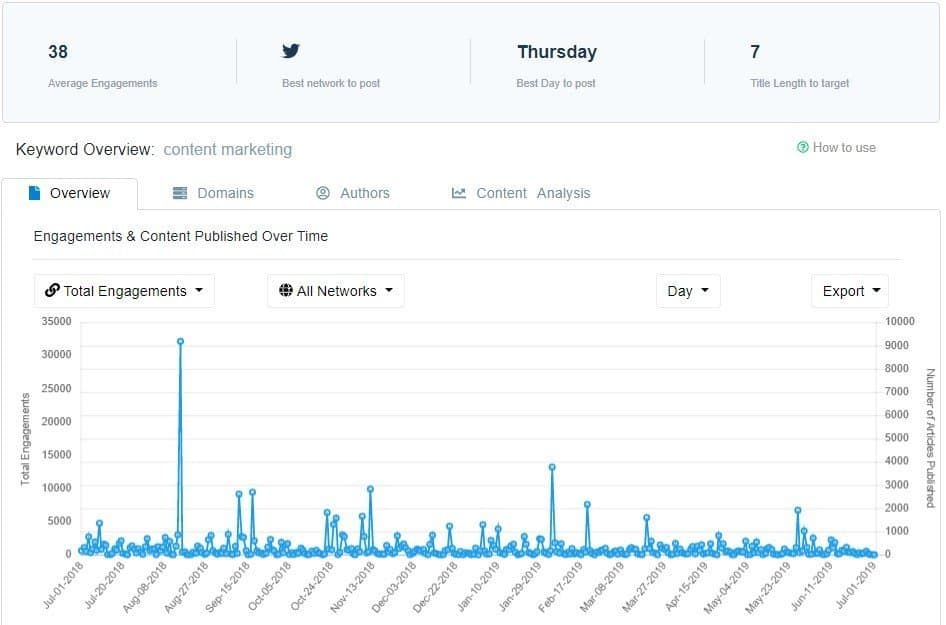
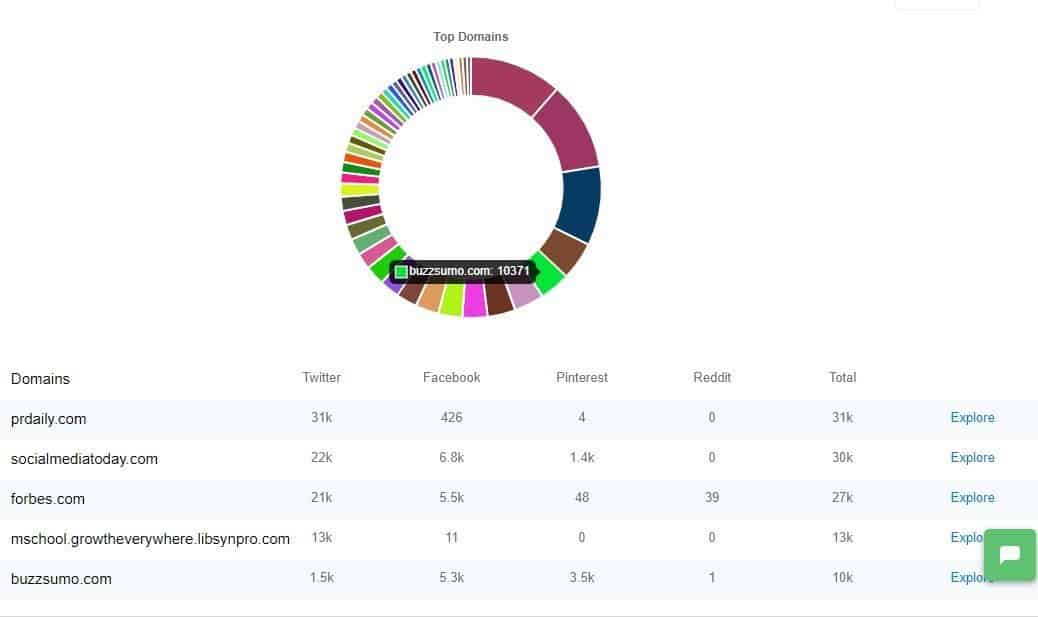
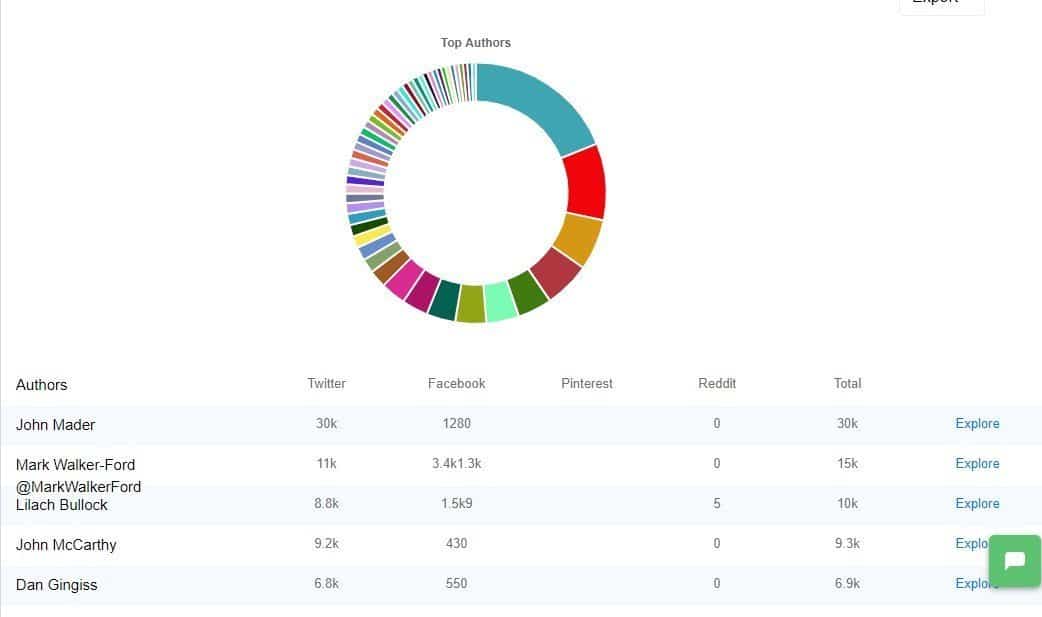
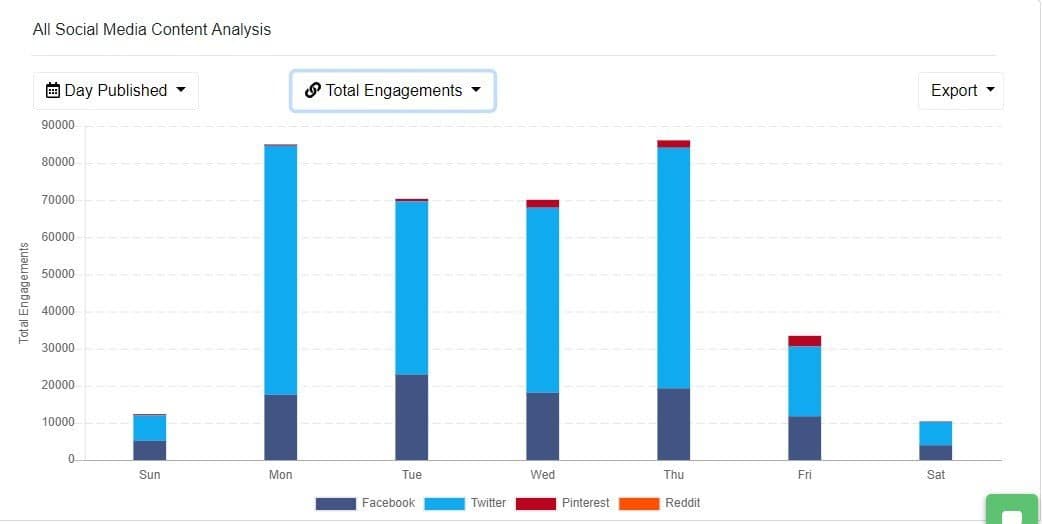
    Screenshot from Buzzsumo. All articles are written by the same Neil Patel except the one from pokernews.com

    Even if you haven’t heard of this Neil Patel fella, the fact that his articles are published on Entrepreneur, Forbes, and others makes him, well, kind of a big deal as a writer.

    4. Develop your screening process

    Once you have handpicked a shortlist of writers for the job, it’s time to take a closer look at each of the candidates and see if they are perfect for the job. Below are ways that you can do to help pick out the best writer from the lot:

    Talk to each of them

    Writing ability is one of the many factors that you need to consider when choosing a freelance writer. Sure, the writer can’t probably whip up a damn good article in his/her sleep, but if s/he’s a pain in the ass to work with, then you may have to twice of hiring this person.

    Before are other things that you need to weigh on when screening writers:

    Temperament

    Does the writer rely on striking inspiration before s/he writes or is this persona a reliable hand when it comes to writing? Some writers need to get their creative juices flowing first before they hit the keyboard. There’s nothing wrong with this, but you may risk hiring an unreliable writer who is dependent on his/her mood that day for writing.

    Availability

    You can’t blame freelance writers if they have other clients on the side. However, you may encounter writers who will use their current workload as leverage to get higher pay from you. At the same time, you’re not sure where their loyalty lies. They might be saying the right things now. But behind your back, they could be focusing on their on their other clients and give no time for your projects.

    Communication

    A writer who doesn't respond to your urgent messages and emails is a big red flag. Their lack of communication will compromise your projects.

    You don’t want to work with a writer you can’t contact. A writer who doesn’t respond to your urgent messages and emails is a big red flag. Their lack of communication will compromise your projects. It would be best if you had someone whom you could reach out at certain times without fail to make sure that the project is going smoothly.

    Receptive to feedback

    Writing is a deeply personal experience. Therefore, it is rare for writers not to feel the heat whenever an editor rejects their work with critiques on them. An exceptional writer takes constructive criticism in stride and learns from his/her mistakes. The writer may not have to agree with you or your editor sometimes, but if s/he displays grace under fire, you may have a keeper.

    These factors and more must be part of your interview process. Ask questions that reveal more about the writer, which gives you more insights into the factors mentioned above. Schedule a Skype call so you can ask more questions along the way based on their answers.

    Request them to write an article for you

    There’s no question that all of whom you’ve chosen for the job are good writers. However, asking them to write a brand new article for you is sensible as part of the job requirement.

    Once you have selected from a pool of writers, have them write an article for you about your topic of choice. Give them 24 hours to finish the article. Some writers won’t be bothered to write a sample piece for you, which is good. This will allow you to immediately separate lazy writers from serious ones.

    The test article for #freelance #writer will answer questions about their non-writing capabilities, such as timeliness, organization skills, work attitude, and more.

    Also, the sample works they have submitted are good indicators of how they write at their best. The writers will only send you the best material they have written. Therefore, an actual writing exercise allows you to see how they work in a live setting.

    Will the work they’ll be submitting to you on par with the sample works they gave you earlier? Can they work well under pressure or not? Can they thrive with or without instructions? The test article they will write for you answers these questions.

    Lastly, while specifying the number of words or tone of voice and providing their resources for the article it would be nice, but it’s not necessary. This would allow them to showcase their proficiency in researching and writing the article on time. Little directions also allow them to write an article aligning with their personality.

    Pay for the article(?)

    Some would be annoyed at this suggestion, but there’s a good reason why you should pay them even if they’re just writing an article for you.

    Some writers may write for free, but the good ones don’t come cheap. Therefore…

    If you want to attract good writers, you need to offer a fee for their article.

    Some writers won’t bother writing the article if they’re not getting paid for it. On their defense, they might have written more than enough articles over the years to prove their worth to you. Consider this quote from a seasoned freelance writer:

    nicole dieker

    [A]sking for a sample article—as opposed to asking for portfolio clips—is a strong indicator that this company expects to be working with entry-level writers. At this point in my career, for example, I would not work for a client who asked me for a 600-word sample. I have over 800 articles, written for a variety of publications, in my freelance portfolio. That should be enough sample material for any potential client. –Nicole Dieker, “Ask a Freelancer: Is It Ethical for a Company to Make Me Write a Sample on Spec?

    If you can’t get rid of asking for sample works, at least ensure that accomplished writers get compensated for his/her efforts. For writers with a chip on their shoulders, you can probably afford to take the risk and get them to write for free, although I would advise against it. You don’t have to pay much for the sample articles. Just compensate them with just enough via PayPal or wire transfer for the effort they’ve put into their writing.

    Discuss the payment terms

    Once you approve a writer’s article, it’s time to discuss money. For some writers, how much you will compensate them will help them decide whether to accept the job.

    You should have indicated the price you’re willing to pay on the job posting so writers already know what offer to expect from you.

    Schedule of payment

    Will you pay the salary once or twice every month? Some people have no problem with either option, but some might want to receive payment twice a month. Just be open to this option, as writers may ask about it.

    Transaction fee

    If you will pay via PayPal, mention if you can or cannot shoulder the transaction fee. If not, it could take a fraction of their income when withdrawing the money from PayPal. While it may not be a big deal to some, it could prove crucial for some.

    Other benefits

    If you’re not offering much money, you can compensate by offering benefits. Paid leaves, regular government contributions, discounts to establishments, and other perks can go a long way to some. In fact, some people prefer working for a client that leaves room for fast, professional growth. It sounds cliche, but if you can offer this opportunity with proof to back it up, it would make for a very enticing offer for writers.

    offer non monetary benefits

    As a freelance writer, I believe clients should pay at least 50% before starting a project with me. I believe that if the client is serious about working with me, s/he needs to put up half of the total amount first. It helps to have a proven track record of published content online to command this request. I don’t offer a refund for the 50% if they are unhappy with the results. So far, everybody is satisfied with the work I’m putting out for them.

    Paying half of the payment upfront may sound like a big risk to some, but it is an occupational hazard. You need to trust the writer for him/her to be able to write great content for you. Putting up with half the payment is a great way to show your trust.

    5. Prime your writer with an onboarding process

    Once you have finally agreed with the writer and s/he signed on the dotted line of your contract, you should onboard him/her to your business culture.

    You can show a glimpse of your company’s personality during the interview and screening process. However, now that the writer is part of your vibrant time, it’s time to show him/her the whole picture.

    If you don’t have an employee onboarding process for your business yet, then consider developing one now, as Lauren Moon suggests:

    lauren moon trello

    Like all first impressions, you only have one shot to get it right. The first week is the time to be as thorough as possible with management and HR logistics as well as intangibles throughout the onboarding process. Important information that falls through the cracks or isn’t conveyed properly means that employees’ knowledge bases are inconsistent. Inconsistencies at work, when multiplied, can turn into a disparate company culture. – Lauren Moon, “New Employee Onboarding: A Success Template For Every Hire

    A simple tool like Trello will help you build a simple onboarding process to help get freelance writers up to speed.

    trello onboarding
    Here is a screen capture of Trello’s New Hire Onboarding board. Each task is organized accordingly so new hires know what to do after signing the contract with you. Click on the “Copy Board” button if you want to use the same template for your business.

    The things you need to include in your onboarding process depend on the maturity of your business. At the very least, however, it should include the following:

    • What to do on your first day – Include modules, introductory videos, and tasks s/he needs to accomplish to help get the writer’s thumb on the pulse of your business.
    • FAQ – Create an internal knowledge base that covers basic questions that your writer and every new employee need to know.
    • Meet the team – Introduce your writer to all your staff and team members. If done through Trello, you can make the introductions fun by requiring the writers to answer questions posed by the members.

    Of course, your onboarding process doesn’t have to go through Trello. The tool makes it easier for remote team members to communicate and collaborate on projects. If you have other methods that let you effectively onboard your freelance writer, then, by all means, stick with that.

    Conclusion

    The process of how to hire a freelance writer is painstaking. It will require you to jump a couple of hoops and probably hire the wrong ones at first. However, by following the ways in this post, you will find a diamond in the rough that will take your content efforts to new heights.

    It’s just a matter of being patient and taking your time to scout the right people for the writing job. Again, it won’t be easy, but this post and the perspective that comes with up should prepare you for the challenge ahead.

    FREE E-BOOK!

    To make sure that you hire the best freelance writer from the lot, unlock the gated content below to learn the questions you need to ask them during the interview!

  • PlagiarismCheck.org Review: Eliminate Duplicate Content!

    PlagiarismCheck.org Review: Eliminate Duplicate Content!

    In this PlagiarismCheck org review, you will learn if this tool can be used for your content creation.

    Plagiarism-checking tools are common to academic institutions.

    Professors use it to see if the students wrote the essays themselves and didn’t copy and paste content online.

    However, site owners and bloggers want to ensure they have unique content.

    This way, they can rank on search engines and generate more organic traffic.

    Therefore, if you’re in the latter camp, then keep reading!

    PlagiarismCheck org review: Introduction

    As a site owner, you want to publish the most actionable and useful content for your target audience. You need to write content that packs a punch to build readership and increase your organic search visibility. Long gone are mediocre articles that repeat what’s already been mentioned online. By providing new insights and ideas about a tried and true topic, you open the doors to your blog for more visitors and subscribers.

    This reason is why you hired first-class bloggers to write your bidding. By enlisting the top writers you can find with the task of writing great content, you ease the burden of worrying about churning out content that’ll keep your readers happy and grow your readership even more.

    In line with excellent content, you need to make sure that each post you publish is fresh and unique. While Google has changed its stance regarding duplicate content, it still puts the premium on unique articles. There’s no room for plagiarism at the top stop of search results.

    Therefore, while you can sleep tight knowing that your writers will do a great job with your blog content, you can’t be too sure that the content they’ll be publishing on your site is as unique as you think. Some writers are “savvy” enough to plagiarize the content they write and get to pass it off as 100% unique. You shouldn’t tolerate these tactics, especially if your goal is to make money with your blog.

    As your solution to this problem, you need a tool that will help you keep tabs on your writers and make sure that the content they submit to you is unique enough to your like. PlagiarismCheck.org is a tool that you want to consider using down the line.

    PlagiarismCheck.org is an online tool that helps you analyze content using its sophisticated plagiarism detection engine. It will draw data from online resources and cross-reference it with the content for review and provide you with information on whether the article cites uncredited resources or copied text verbatim.

    A quick look at the tool

    Upon signing up for an account and logging in, you are directed to your account dashboard, where you can drag the file for checking.

    Christopher Jan Benitez PlagiarismCheck.org Review: Eliminate Duplicate Content Once and For All! 2

    The UX allows you to drag and drop the document onto the screen and proceed with checking it for plagiarism issues. Another cool thing about PlagiarismCheck.org is the ability to review documents in multiple formats. Most of the plagiarism checkers only support .doc and .docx formats. PlagiarismCheck.org not only supports both file types and similar ones (.odt, .rtf), but also .pdf files.

    For testing on the tool, I’ll be reviewing an unpublished article I wrote a while back. I am sure that I didn’t plagiarize content for this article (from my recollection at least). Using the tool, we’ll see if my thoughts hold up.

    After dragging the file to the box, click on Proceed.

    Christopher Jan Benitez PlagiarismCheck.org Review: Eliminate Duplicate Content Once and For All! 3

    A pop-up box will open to show you if you have enough credits to run the plagiarism check. A page contains 275 words, so the article I upload has between 551-825 words.

    Christopher Jan Benitez PlagiarismCheck.org Review: Eliminate Duplicate Content Once and For All! 4

    Once you have enough credits to push through with the review, click the Continue button.

    It will take a couple of seconds to complete the review. Once done, you will see the overview of the check and the ability to click on the PDF file of the review for your reference.

    Christopher Jan Benitez PlagiarismCheck.org Review: Eliminate Duplicate Content Once and For All! 5

    Here’s a screenshot of the report of the file:

    Christopher Jan Benitez PlagiarismCheck.org Review: Eliminate Duplicate Content Once and For All! 6

    The formatting of the document is stripped down of its format features. It would probably be nice if PlagiarismCheck.org retained the appearance of the text so users can identify the sections of the article they wrote.

    However, as it stands, you can show the PDF file to the student or writer who plagiarized the content as proof that they took someone else’s work and tried to make it their own. You can take the necessary actions from here.

    Who is PlagiarismCheck.org for?

    Ideally, PlagiarismCheck.org is perfect for educators who check essays, theses, and term papers submitted by students and ensure that they didn’t plagiarize their work. Using PlagiarismCheck.org, they can automate the process of checking for stolen content so they can filter the copied work and focus on the work of those with unique content.

    Conversely, students will benefit from using PlagiarismCheck.org if they want to ensure that their paper is 100% unique before submitting it to their teachers.

    So, as a website owner, how is a tool geared towards the academe help me build better content for my blog/s?

    Aside from the benefits mentioned above, PlagiarismCheck.org is a perfect companion for marketers building websites for link building. If you buy expired domains with existing link equity and turn them into functional sites, then you’ll need to publish content on them. At the same time, to lower costs, you want to hire writers who are good enough to help you post unique content on your sites. Since Google values fresh content and undermines plagiarized ones, PlagiarismCheck.org will keep your writers in check. Using this tool, you can vet out content with duplicate content with a few clicks of a button and get the author to rewrite it.

    Use tool to review plagiarized content

    I will run another check using the tool. This time, I will examine content that is copied from a published post and see how PlagiarismCheck.org picks up the source where I lifted the text from. The article in question is this one, which I posted less than a week ago.

    From the dashboard, you can paste the text into the box and click Proceed.

    Christopher Jan Benitez PlagiarismCheck.org Review: Eliminate Duplicate Content Once and For All! 7

    Upon proceeding and waiting for the results to come in, I was surprised to see that it failed to pick up the link where I lifted the text word for word. Also, you can view all documents on My Documents for your reviews.

    Christopher Jan Benitez PlagiarismCheck.org Review: Eliminate Duplicate Content Once and For All! 8

    You can expand the report without downloading the PDF file by clicking on the View Results.

    Christopher Jan Benitez PlagiarismCheck.org Review: Eliminate Duplicate Content Once and For All! 9

    I was initially surprised that the tool wasn’t able to pick up the source where the text was originally published. A hypothesis I could think of is that the page was published less than a week and the tool’s algorithm hasn’t picked up the page yet.

    To test my hypothesis further, I will run another plagiarism check on the same domain but use content that’s been published for a year. I’m referring to this post. It is possible that the tool wasn’t able to update its algorithm yet. We’ll see if it can pick up the plagiarized content from there.

    After posting and uploading the copied and pasted text for processing PlagiarismCheck.org was able to detect the text as duplicate content.

    Christopher Jan Benitez PlagiarismCheck.org Review: Eliminate Duplicate Content Once and For All! 10

    Here’s a peek of the review:

    Christopher Jan Benitez PlagiarismCheck.org Review: Eliminate Duplicate Content Once and For All! 11

    Use the tool to review rewritten content

    For people to pass through content off as unique, they replace different words in an existing article with synonym and rearrange the order of the content. Technically, while Google may consider the content as unique, it’s not fresh at all. Of course, the naked eye can’t spot these rewritten or spun content, which is why you need a tool like PlagiarismCheck.org to help you determine these types of content.

    For this example, I will be taking a block of text from Wikipedia about Orange is the New Black.

    Christopher Jan Benitez PlagiarismCheck.org Review: Eliminate Duplicate Content Once and For All! 12

    I will then spin it using The Best Spinner’s demo tool here:

    Christopher Jan Benitez PlagiarismCheck.org Review: Eliminate Duplicate Content Once and For All! 13

    Now that I’ve automatically rewritten the content, I will copy and paste the text on PlagiarismCheck.org to see if the tool can detect that the article is rewritten and spun from Wikipedia’s page.

    After the review, the results were positive – PlagiarismCheck.org was able to identify the plagiarized content.

    Christopher Jan Benitez PlagiarismCheck.org Review: Eliminate Duplicate Content Once and For All! 14

    Below is the screen caps of the report:

    Christopher Jan Benitez PlagiarismCheck.org Review: Eliminate Duplicate Content Once and For All! 15

    Compared to Grammarly Premium

    I have covered Grammarly Premium extensively on my blog. I think that it’s a tool that all content writers and bloggers must have in their arsenal. However, aside from its grammar checking features, I’d like to focus on its plagiarism checker feature, which I feel is not as strong as it is.

    To compare Grammarly Premium and PlagiarismCheck.org, I took this article from Ezinearticles.com and used it on both tools. My goal is to see how good their plagiarism checkers are and which one is better.

    Here’s the result from Grammarly Premium:

    Christopher Jan Benitez PlagiarismCheck.org Review: Eliminate Duplicate Content Once and For All! 16

    Keep in mind that I copied and pasted the text from EzineArticles to Grammarly Premium, and it only revealed 19 copies words.

    Looking at PlagiarismCheck.org, we will see why this tool is a much superior choice for your all plagiarism checking needs.

    Christopher Jan Benitez PlagiarismCheck.org Review: Eliminate Duplicate Content Once and For All! 17

    This comparison goes to show you that PlagiarismCheck.org is unlike any other tool that you’ve come across with. While it does one thing, it does it better than even one of the best writing tools can ever imagine.

    Pricing

    PlagiarismCheck.org offers competitive pricing for its tool.

    Christopher Jan Benitez PlagiarismCheck.org Review: Eliminate Duplicate Content Once and For All! 18

    The pricing is geared towards educators who want to filter student essays to see if they plagiarized their papers. The most affordable plan for people who check papers from hundreds of students is the Premium one, which costs $0.17 per page (150 pages in total).

    For site owners, I would imagine that the price would be a bit high, given that it only checks for plagiarized content. However, if anything, PlagiarismCheck.org complements your existing reviewing and publishing process. Tools there claim to do everything but can’t deliver on all fronts. If you truly value the ability to produce high-quality and unique content on your blog, then PlagiarismCheck.org is a good tool for you.

    Verdict

    Video summary is created using InVideo.

    As seen above, PlagiarismCheck.org is everything you can expect from a plagiarism-checking tool. It helps you determine whether a piece of content is copied or not. It’s a no-frills tool that gets the job done, plain and simple.

    While I mentioned earlier that the tool cannot check the content recently published online, I think it goes to all plagiarism-checking tools. Indexing content and including them in the database takes time and resources. I assume that the tool waits for Google to cache the content before including it in their database. The process may take more than a week for the tool to pick, which is reasonable enough given to the volume of content published daily. Therefore, it’s unfair to criticize tools like PlagiarismCheck.org if they can’t deliver up-to-the-second data for duplicate content.

    While the tool is perfect for educators, there is space for site owners to use PlagiarismCheck.org as part of their content publishing strategy. It’s easy to use upon signing up – no learning curve necessary.

  • How to Use SEMrush to Boost Your Blog Content’s SEO

    How to Use SEMrush to Boost Your Blog Content’s SEO

    SEO is not for the weak of heart.

    The process of optimizing for organic search involves research, critical thinking, and a bit of elbow grease all rolled into one. Only people who have the patience to analyze hard data and put them into concrete actions will succeed in getting their sites ranked at the top of Google search results.

    However, it’s one thing that you know the process. It’s another to actually do it.

    Ideally, an effective SEO strategy runs for years in order to keep your site on the first page of search results at the very least. That includes mining organic search for relevant information to help you develop the tactics that will comprise your strategy.

    Manually combing through search results is not recommended because it will take too much of your time just to collect the data. Even then, some of the information you will have collected may change over time due to the changes in the Google algorithm.

    Therefore, you need all the help you can get regarding developing and implementing an SEO campaign. The help usually comes in the form of an SEO tool that will:

    • help you determine the best target keywords to optimize for each of your pages
    • crafting content based on the keyword you’ve chosen
    • acquiring backlinks for your content through competitor research

    All these things can be done effectively using SEMrush*.

    semrush logo - How to Use SEMrush to Boost Your Blog Content's SEO

    In this post, I will discuss how to use SEMrush to help you choose target keywords for your content, develop the best content possible for your post, and build relevant and contextual links to your post based on your competition.

    For the sake of example, I will be using the post “MASSIVE LIST: 1,343 Blogs that Accept Guest Posts” and share with you how I developed the post from the ground up using SEMrush and some examples on how to run a link building strategy for it.

    Let’s jump right to it, shall we?

    Keyword Difficulty Tool

    For keyword ideas before writing your post, go to the Keyword Difficulty Tool page under the Keywords Analytics category.

    On this page, you should already have a keyword phrase in mind that you want to optimize for. The purpose of the Keyword Overview is to validate whether the keyword has lots of search volume and is not difficult to rank for relative to other related search phrases.

    At the same time, you want to look for better-related keywords to optimize for.

    Initially, I was torn between “sites that accept guest posts” and “blogs that accept guest posts” as my keyword. Using this tool, let’s see which between the two is better.

    From the screenshot above, “blogs that accept guest posts” returns with data and the other keyword doesn’t. This means that the former keyword phrase is search more often than the other one, so It’s best to optimize for the keyword with better performance based on the data.

    Keyword Overview

    I clicked on the “blogs that accept guest posts,” which brought me to the Keyword Overview page of that keyword.

    What you want to look for in this section are the related keywords. You may see better-performing keywords based on volume.

    Looking at the screenshot above, it seems like there is.

    To make sure that “blogs that accept guest blogging” is the best option among related keywords, click on it and look for related keywords again. If you can’t find a keyword phrase with higher search volume, then I may have unearthed the keyword to use for my blog post.

    However, search volume is just one of the many factors to consider when choosing keywords. You also need to factor in the difficulty of ranking on top of search results for that keyword.

    Initially, you should look for the SERP that is displayed at the bottom of the Keyword Overview page.

    SEMrush will show you the top 100 site pages ranking for the keyword that is clustered into 20s.

    From here, you need to analyze each page and manually identify the strengths and weaknesses of each. Once you’ve gathered data from at least the top 10 results for your keyword, you can take actions on your findings and develop the necessary content that is better than the ones appearing on the first page.

    While this process remains the best way to analyze each page, it takes a lot of times to open all the pages and see them for yourself. If you want to hasten the process of finding the difficulty of your chosen keyword, SEMrush has features that suit your needs.

    SEMrush

    Keyword Analytics

    Semrush has a pretty solid keyword research tool for finding the best search terms to optimize your site pages with. It is arguably much better than the data provided by the free keyword tools.

    It is best practice to gather as many viable keywords that you can find. While search volume is important, you also need to look at other factors like keyword relevance and difficult (more on this later). Therefore, I took the opportunity to look into other related keywords by viewing the full report.

    You will be redirected to a page with the complete list of related keywords.

    Among the data featured on the table, you need to look into keyword difficulty. This metric factors into the pages from the SERP and aggregates the data into a figure with 100 as the highest score, which means that it is next to impossible to rank for the keyword. Therefore, the lower the KD, the better your chances of ranking for that page on the first page of search results.

    You can arrange the list according to KD.

    However, doing this showed me keywords will little relevance to the initial keyword I entered.You need to factor in the Related % column of the list so you can choose from highly similar and related keywords.

    Upon further inspection, I have narrowed down the keywords to two:

    • blogs that accept guest posts
    • blogs looking for guest posts

    In the end, I decided to go with “blogs that accept guest posts” for the following reasons:

    • Higher relevance – Both keywords have 75%, which is the highest relevance score from the list
    • (Relatively) competitive search volume – My chosen keyword has 70 search volume compared to 10 with the other one.
    • Low KD – It has a relatively low keyword difficulty with 56.6, which ranks the 59th out of the 310 related keywords.

    Verifying the keywords one more time

    Since the related keywords are derived from the original chosen keyword “blogs that accept guest blogging,” I would like to pit it with the chosen phrase from the Related Keyword page to settle on which KW to use for the content.

    After running both using the Keyword Difficulty page, it appears that there is a clear winner.

    Sine “blogs that accept guest blogging” does not have available data, it makes “blogs that accept guest posts” as the de facto winner!

    SEO Content Template

    Now that I have chosen the keyword for my content, it’s time for me to use tool’s SEO Content Template feature. This feature allows you to create content that people want to link out to and site owners would want to publish as a guest post (yep, this tactic still works).

    As mentioned earlier, manually analyzing each page from search results for my keyword is a time-consuming process. Therefore, I can just bank this feature from SEMrush so I can simply focus on the data and use the suggestions in crafting my post.

    Enter the keyword on the search bar to create the SEO template.

    The screenshot above shows actionable information I can use with the content I will develop for my chosen keyword. Personally, I find the readability score and word count recommendation to be the most helpful.

    Their purpose is to help you create better content than the ones appearing on search results. However, these are just suggestions so you can decide on whether to do them or not for your content. For example,3,978 words for a post may be too much for my liking. After all, more words don’t necessarily mean better content in most cases.

    Aside from the key recommendations (based on your Google top 10 rivals), the template also shows the general SEO recommendations regarding the H1, meta description, page title, and text.

    As part of SEO’s best practices, you need to build links for your site pages to increase your site’s SEO performance. Once the post has been published, marketers look for link building opportunities in the hopes of getting that all-valuable backlink from high-authority sites.

    However, in my experience, it is best that you find the opportunities before writing the post. I have detailed the process in depth in this post I wrote for SEMrush which still holds up.

    In a nutshell, by identifying opportunities, you can design your content that caters to the page or domain you want to acquire a link from.

    This process will require me to do the following:

    • Uncover the backlinks of the 10 top-ranking pages for my keyword
    • Identify how I can link back to those pages
    • Use the findings to create content that will increase the chances of getting a link from that page

    The method of link building requires you to consider all pages ranking on SERP to be your competitors. Your purpose is to try and hijack their position by analyzing the backlink profile of the ranking page so you can find a way to link to those pages as well.

    Go to the Keyword Analysis and check the SERP of the first page. Click on the first result to show the Domain Analytics overview of the page.


    The top-ranking page (EffectiveBusinessIdeas.com) has only four backlinks.

    To analyze the kind of links the top-ranking page has, I need to click on all the pages with its backlink in it. In this case, I need to check the ProCoach.com page myself.

    Before we check out the page, you need to understand the three types of backlinks that you can acquire from a page:

    • Within content – Author features the link in the article.
    • Comment – A blogger leaves a link to the page in his/her comment or enters the URL of the page which then is linked to his/her name.
    • List of links – The resource page is littered with links from relevant articles and content about its topic.

    Now that we have that covered, let’s check one of the pages with the backlink of your competitor:


    As you can see, the link is found within the content. A possible reason for this is that the author found the content on search results or s/he is connected with the owner of EffectiveBusinessIdeas.com. I’m leaning towards the former since it ranks at the very top of the keyword I’m also trying to rank for.

    There are two ways that you can get a link from this page with the content you’re developing:

    • Comment with a link to your relevant post – Really simple and straightforward, but only if commenting is enabled on the page. However, it depends on whether the site owner is stingy when it comes to comments. If you’re not sure on how to proceed with crafting your blog comments, you need to read this excellent post at Smart Blogger.
    • Blogger outreach – Build a relationship with the site owner by sending him/her an email and mentioning your latest post that you want him/her to link to. Of course, you need to approach this strategy with a lighter hand to not turn off the site owner. Read this post I wrote about blogger outreach before you consider implementing this tactic.

    Once you have identified the process on how you plan on acquiring the link, you need to find an angle on how you can pitch your post to the site in order to get a backlink.

    Looking at the EffectiveBusinessIndeas.com page, while there are a lot of things going for it, there are holes in the post that you can take advantage of, namely:

    • The limited number of sites to write for – At the beginning of the article, the author mentions that there are over 20 sites listed per category, which isn’t a lot. When developing my content, I can list down more than 20 – or even 3x – a number of sites that accept guest posts.
    • Find more niches – The post features 24 categories as of writing, which is exhaustive in itself. However, maybe there are other niches I can uncover that I could include in my post.
    • Content formatting – The post doesn’t have any images and doesn’t have social sharing buttons to make it easier for readers to like or tweet the post.

    These are some initial factors that I can capitalize on when developing link building opportunities for my content. Now, the challenge is replicating the process on all backlinks of your competitors. I’m not gonna lie – this is a very time-consuming process, albeit a necessary one if you want to jumpstart the acquisition of link for your content. You could probably outsource someone or delegate this task to someone else so you can focus on developing the content.

    You can even potential unearth more backlinks, you can try using Buzzsumo. Read this post I wrote about how to use Buzzsumo to create killer content. The process I shared in the post goes together well with creating content using SEO’s content template.

    SEMrush

    Wrapping it up

    SEMrush is an excellent SEO and content tool to help you supercharge your blog’s SEO performance. Applying the process religiously on all your posts will help you reach your audience by ranking high up on Google organic search and increase your traffic in the process.

    SEMrush costs $99/month but you can sign up for a free account and get limited access to some of the data. Doing so gives you an idea on how to use SEMrush and whether or not it’s the SEO tool for you. Click here to sign up for an account.

    How to Use SEMrush to Boost Your Blog Contents SEO
  • Airstory Review: A Game Changing Content Creation Tool?

    Airstory Review: A Game Changing Content Creation Tool?

    Writing is a very personal practice.

    There are millions of possibilities to write a particular thought or idea, and a writer only has to settle on just one. As more ideas pile up, an author sticks to a specific style that defines him or her. It is the beauty that is inherent in writing, which paves the way for distinct storytellers, novelists, and nonfiction writers.

    Part of what makes writing unique is the process. Each writer has their quirks and methods that compose how they come up with their content.

    The problem starts when the writing process becomes too convoluted and is, therefore, counterproductive to the goal it is set to achieve. The method may work wonders for some, but what if there’s a way for them to make a much more streamlined writing process?

    However, is it possible to believe that you can streamline your writing process to concoct much better content in less time?

    At least, that’s what this Airstory review is set to achieve.

    In this objective and unbiased review, I attempt to take a closer look at Airstory and how it could benefit writers from all walks of life using a set of criteria that I believe are relevant to determine its effectiveness. Also, I will provide my take on why I feel the way I feel towards Airstory.

    tl;dr

    • Airstory’s drag-and-drop card system is full of potential uses.
    • As a tool to help you create better content in less time, Airstory is not that valuable.
    • Aside from the card system, the Web Clipper is a great way to annotate content quickly and easily. The one-click import to WordPress saves you time from copying, pasting, and uploading content to your site.
    • For $25/month,  it’s not necessarily a bad deal, considering how easy it’ll make content collaboration for users. At the same time, it’s not the most affordable deal, either.
    • Airstory provides enough tutorials and support on their site to help you get on board with the tool for your content needs.

    What’s the story, Airstory?

    Pros

    • Drag and drop cards to add content, a game-changer
    • Templates provide you with keys to success

    Cons

    • Not very user-friendly
    • Ultimately unnecessary

    My main gripe with Airstory is that it tries to homogenize the writing process, which is why some people will find the tool useless. I believe that some writing processes can be developed into much simpler tasks. However, if the process works, why fix it? Airstory seems to impose a specific workflow that can be considered radical by others already set with a writing process. Also, aside from the fact that you can create content using free and less constricting tools, why settle with Airstory?

    Airstory is an app made for content creators who want to produce content on the go. Whether you’re a blogger, copywriter, or social media specialist, there is something to like about Airstory.

    The team behind Airstory are the same people who run Copyhackers.

    The ultimate plan developed by Joanna Wiebe is to make writing easy. While there are tools on the market that work perfectly fine and even help aid your writing process to create awesome content, Airstory aims to streamline all the tasks involved in writing to help you create killer content in less time.

    https://www.youtube.com/watch?v=NEu4PrK_rks

    “While Copy Hackers teaches you to write copy that converts, Airstory helps you write it. It’s a drag-and-drop document builder. It is to document what LeadPages and Unbounce are to landing pages.1″

    In simpler terms, I would describe it as “project management for writers.”

    Similar to tools like Trello and Wrike, you can consolidate all your content projects in a single place, so you don’t have to sift through different folders in your local or cloud drive. Airstory is also perfect for multiple writers collaborating on a piece. The tool is agile enough to help writers get on track with their respective projects so they can meet their deadlines.

    How to judge Airstory?

    It is almost impossible to judge a tool that’s based on something purely subjective. There is no single correct answer when it comes to the writing process. It can be as convoluted and unproductive as it could be as long as it delivers results.

    However, for the sake of reviewing Airstory,  we need to establish variables to help see the tool from a more qualitative perspective.

    • Uniqueness – What sets Airstory apart from other writing tools and even SEO content software?
    • Usefulness – How valuable is Airstory as a tool to help you create better content in less time?
    • Features – Do the features present in Airstory fulfill the promise of making you write faster?
    • Price – Is the cost of using Airstory over a long period justified?
    • Support – Are the people behind Airstory providing you enough support to use the tool?

    How to use Airstory to simplify your blogging process

    Airstory feels like a mystery. It means what it says, and yet it is difficult, at least for me, to visualize how the tool works. The site offers enough support to help you get your feet off the ground using this tool. However, sometimes, it’s better to just push through with the tool head-on and see what you can create with it.

    Therefore, instead of laying down the details for you, I published a YouTube video explaining how I use Airstory to write this review and other features you need to know about the tool.

    In the video, you will learn:

    • what makes Airstory different from usual word processing tools
    • why the drag and drop cards innovates the way you approach content creation
    • how the Airstory Researcher Web Clipper can help you annotate content from other sites on the fly
    • how the different templates available in its library can help remove the guesswork from the writing process

    Note from the Editor

    This is the first time I’m using video in my reviews. I used Screencast-o-matic to record the video and publish it on Youtube for sharing. If you have thoughts about the review, please let me know so I can work on the kinks and provide you with better video content moving forward 🙂

    Pros

    Drag and drop cards to add content a game changer

    Most of the writing tools offered in today’s market are limited to grammar editors, headline checkers, distraction-free editors, and the like. It doesn’t have the sophisticated UX seen in most project management tools, nor does it have functions that could really that your writing process to the next level.

    Airstory is the bridge where writers can cross towards a more automated way of writing. The drag and drop card feature is a brazen way to make content creation possible with just a few clicks of a button.

    This feature is perfect for some reasons. If you’re a writer, you can use cards to build your ideas and save citations using the Airstory Researcher Web Clipper Chrome extension that you can use later. Once you save your ideas using the browser extension, you can just drag the cards into the text editor and expand your thoughts from there.

    Airstory researcher web clipper

    If you like to curate content on your blog or site or build a writing portfolio to show prospects, you can use the Airstory Research to create citations from some of the best posts in your niche and publish a weekly post about them.

    If you’re a manager of a writing team or an editor, you can assign them cards to fill out regarding the sections in the content that you are building. After that, you can simply form the content by dragging the cards and repositioning them as you see fit in the content. You can then comment on the sections if you want the writers to edit and elaborate on their ideas.

    If you’re not on a desktop and need to create content, you can access Airstory from your tablet and use the pre-filled cards to build your content from scratch.

    There are simply endless ways that you can do to create content using Airstory. It’s a very exciting feature that could challenge the way content is written and produced!

    Templates provide you keys to success

    I am not a fan of templates. The fact that you have the option to use them only makes them prone for other people to abuse them to no one. Therefore, what was once an effective template that aims to increase conversion and engagement or whatnot is now ineffective and run down the ground.

    However, I don’t feel the same way about the templates found in Airstory. After all, the best copywriters in the industry developed the templates. So if there’s anything to abuse in this world, it has to be Airstory templates.

    To access the templates, you need to download them by opening a new window to all the available files. Honestly, I’m not sure why I had to download them from a subdomain and not just have them readily available from the dashboard. My best guess is that they’re measuring the performance of each template and see which one gets the most downloads so they can develop more templates related to them. If that’s the case, it still bogs down the experience of using the tool.

    Airstory Templates

    Going back to the templates, there are currently 26 available ranging from headline hacks to blog post formulas and even an email sequence script. The template will help you build your version of the content without having to start from a clean slate.These allow you to supercharge your content writing so you can finish faster and quicker.

    Cons

    Not very user-friendly

    Upon signing up for an account, Airstory greets users with a somewhat complex dashboard. There are lots of buttons and sections to choose from that it prevents me from a decision which one to click on.

    Airstory dashboard

    Eventually, you’ll get the hang of the tool after playing around with it for a while. However. I think the tool would benefit from a more useful layout that engages and gets them on board with the tool even without having prior knowledge about it.

    Ultimately unnecessary

    While it seems like Airstory is reinventing the wheels with its features, it feels like it doesn’t. If you’re fine using Google Docs to collaborate with writers or Trello to manage all your writing tasks, then I don’t see why people have to line up for Airstory. It’s probably cool to drag and drop cards to create your content, or you can collaborate on Google Docs to build the article, which is pretty much the same thing.

    It does complement your use of Google Docs and Evernote since both sync up nicely with the tool. However, I feel that something is lacking in Airstory in that you don’t need it in the grand scheme of things, at least for now. It’s a great tool if you want to simplify some of the more tedious and repetitive tasks in writing, which is a great selling point. But I feel that Airstory could be more than what it is.

    Qualifying Airstory as a content tool

    I sincerely feel that Airstory is something special. The drag-and-drop content cards are something to build on in the future and can probably revolutionize how online writing is done. There are also features like WordPress integration that allow you to collaborate on a post and save it as a draft on WordPress along with the images. This is an excellent way to upload your content on the CMS instead of copying and pasting the text while uploading the photos individually.

    Still, I can’t shake off the fact that Airstory is something that I can’t wholeheartedly recommend to anyone, especially those whose writing habits are set.

    Airstory has reiterated that it aims to complement the existing process and make it easier, and it also makes it seamless for non-writers to create content using the tool. Regardless, I feel that it’ll take more than drag-and-drop cards to get more people to buy into the idea of Airstory.

    Final words

    Video summary above created using InVideo.

    Airstory

    • UNIQUENESS
    • USEFULNESS
    • FEATURES
    • PRICE
    • SUPPORT

    Conclusion

    The concept behind the tool is visionary, but the execution needs a lot of work, in my opinion. However, Airstory breaks new ground in the content creation field. Despite its inherent faults, it treads new territory regarding how we view content creation from a business and productivity standpoint. I honestly cannot wait for the team behind Airstory to continue to develop the tool and fulfill its true potential.
    3.7/5
    1. Airstory writing software by Copy Hackers, Today, We Are Fools. Happily. (Or why we built and are finally launching Airstory.), https://copyhackers.com/2017/02/airstory/