
Here’s a truth most content marketers don’t want to hear.
You’re probably sitting on a goldmine of content that’s slowly dying.
I know because I’ve been there. After years of publishing content, I realized that some of my best posts were buried in the archives, losing traffic month after month. The fix wasn’t creating more content. It was making what I already had work harder.
That’s what this guide is about. I’ll show you exactly how to optimize and repurpose your existing content so you can squeeze every drop of value from the work you’ve already done.
- Why Content Optimization and Repurposing Matter
- Identifying Content to Optimize
- The Content Refresh Process
- Specific Optimization Tactics
- Content Consolidation
- Content Repurposing Execution
- Platform-Specific Adaptation
- Tools for Optimization and Repurposing
- Building an Optimization Workflow
- Measuring Optimization Success
- Common Optimization Mistakes
- Content Optimization Checklist
- Start Optimizing Your Content Today
Why Content Optimization and Repurposing Matter
Most content has a shelf life.
Facts get outdated. Rankings slip. Formats start to feel stale compared to newer competitors.
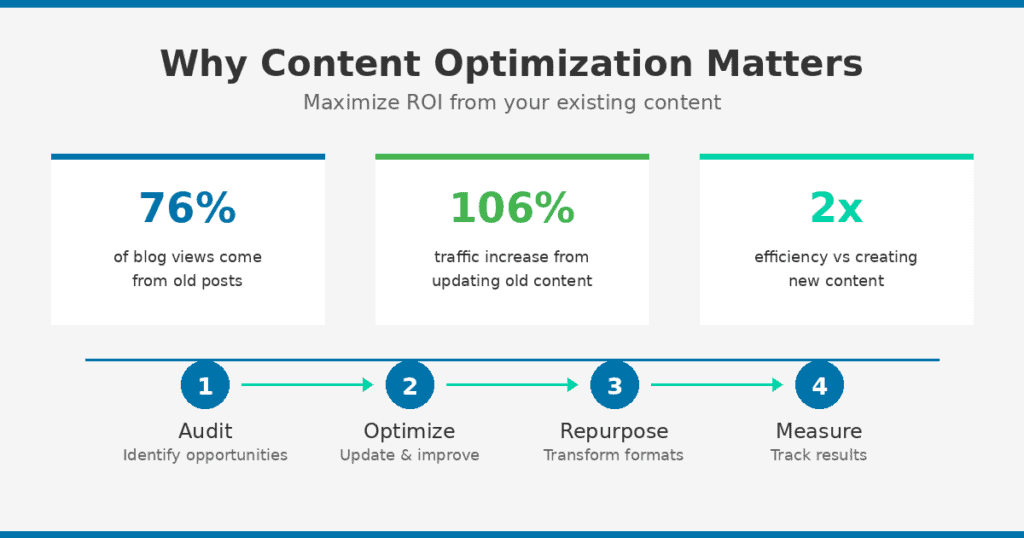
But here’s the thing. HubSpot found that 76% of their monthly blog views came from old posts. Not new content. Old stuff they’d written months or years ago.
And when you update that old content? Studies show you can increase organic traffic by up to 106%.
Think about that for a second.
You could spend 10 hours creating something brand new. Or you could spend 2 hours updating something that already has backlinks, authority, and ranking potential.
Smart marketers spend as much time optimizing existing content as creating new content. It’s not glamorous work, but it moves the needle.
Optimization vs. Repurposing: What’s the Difference?
Let me clear this up because people mix these terms all the time.
Optimization is improving existing content to perform better in its current format. You’re updating a blog post to rank higher or convert better.
Repurposing is transforming content into different formats for new platforms and audiences. You’re turning that blog post into a video, a podcast episode, or a LinkedIn carousel.
Both strategies maximize ROI from your content investment. And honestly? You should use them together. Optimize first, then repurpose the improved version.
Identifying Content to Optimize
Not all content is worth updating.
I’ve wasted hours refreshing posts that were never going to rank no matter what I did. The topic was too competitive. The search intent had shifted. Or there just wasn’t enough search volume to justify the effort.
You need to prioritize strategically. Use data to identify high-opportunity content rather than guessing.
High-Priority Optimization Targets
Here’s where I focus my optimization efforts:
Page 2 content (positions 11-20). These are your biggest opportunities. You’re so close to ranking. Small improvements can push you onto page 1 where the real traffic lives.
High impressions, low CTR. You’re ranking but nobody’s clicking. Your title or meta description isn’t compelling enough. This is often a 20-minute fix that can double your traffic.
Declining traffic. Posts that used to perform well but are dropping. Something changed. Maybe competitors published better content. Maybe your information got outdated.
High-traffic, outdated content. Still getting visits but the information is wrong or stale. This is urgent. You’re potentially damaging your credibility every day you leave it.
Evergreen topics with old dates. The topic is timeless but that “Published: 2022” date makes visitors bounce. People want current information.
Using Data to Prioritize
I use Google Search Console religiously for this.
Look for pages with impressions but poor CTR or rankings in the 11-30 range. These are your quick wins.
In Google Analytics, identify pages with declining traffic over the past 6-12 months. Something’s wrong and needs attention.
If you have access to SEO tools, track keyword position changes and content gaps. You’ll spot opportunities you’d never find manually.
Create a simple spreadsheet with these columns: URL, current traffic, keyword positions, last updated, and priority score. Then work through it systematically.
Focus on pages where 20% effort can yield 80% improvement.
Content to Skip or Delete
Some content isn’t worth saving.
Completely off-topic content that doesn’t serve your audience? Delete it.
Thin content with no traffic, no backlinks, and no strategic value? Delete it.
Time-sensitive content that’s expired and can’t be updated, like event recaps or dated news? Delete it.
Duplicate content covering the same topic as stronger pages? Redirect it to the better version.
Be ruthless. Every weak page on your site dilutes your overall authority.
The Content Refresh Process
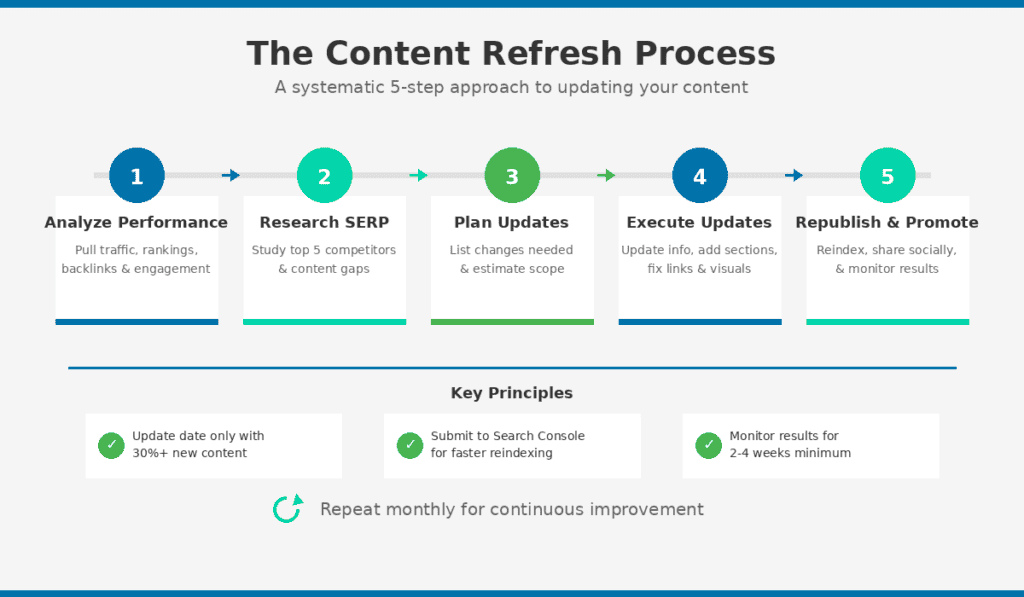
I’ve refined this process over years of updating content for myself and clients.
A systematic approach ensures consistent quality and efficient use of time. Document your process so it becomes repeatable.
And remember: a refresh is more than a quick edit. It’s a comprehensive update.
Step 1: Analyze Current Performance
Before touching anything, pull your data.
What’s the current traffic? What keywords does the page rank for? How many backlinks does it have? What’s the engagement like?
Check Search Console for the actual queries bringing impressions. You might discover the page ranks for keywords you never targeted. That’s valuable information.
Note which competitor content is now outranking you. You’ll need to study them.
Step 2: Research the Current SERP
Search your target keyword and really look at what’s ranking.
What do the top 5 results cover that you don’t? What format are they using? Are they lists, guides, or videos? How comprehensive are they?
Check the “People Also Ask” boxes. Those questions reveal what searchers actually want to know.
This research will show you exactly what you need to add or change.
Step 3: Plan Your Updates
Don’t just dive in and start editing randomly.
List the specific changes needed based on your research. Identify outdated facts, statistics, or examples that need replacing. Note missing sections to add.
Plan structural improvements. Does it need better subheadings? Better formatting?
Estimate the scope. Is this a minor refresh that’ll take 30 minutes? Or a major rewrite that needs several hours?
Step 4: Execute Updates
Now you do the work.
Update outdated information first. This is highest priority because wrong information actively hurts you.
Add missing sections that competitors cover. Fill the content gaps.
Improve structure and formatting for readability. Break up walls of text. Add subheadings where needed.
Refresh visuals. Screenshots from 2022 make your whole article look outdated.
Update internal links to point to your newer content. Verify all external links still work.
Step 5: Republish and Promote
Only update the publish date if you’ve made substantial changes. I’m talking 30% or more new content.
Submit the updated URL to Google Search Console for reindexing. This speeds up the process.
Share the refreshed content on social media. Include it in your email newsletter.
Then monitor performance over 2-4 weeks to measure impact.
Specific Optimization Tactics
Let me get tactical. Here’s exactly what to do when you’re optimizing.
Updating Outdated Information
This is table stakes. Outdated info kills trust instantly.
Replace old statistics with current data. Always check publication dates on your sources.
Update tool recommendations. Remove discontinued products. Add new alternatives that have launched since you originally published.
Revise best practices that have changed. This is especially important in tech and marketing where things evolve fast. What worked in 2024 might be outdated in 2026.
Update screenshots to reflect current interfaces. Nothing screams “old content” like a screenshot of a tool that looks completely different now.
Remove references to past dates. Instead of “In 2023…” use relative language or update to current.
Improving Headlines and Meta Descriptions
Your headline determines whether people click. Your meta description gives them reasons to.
Check if your current title actually matches what searchers want. Sometimes search intent shifts and your original angle no longer fits.
Add the current year to headlines where freshness matters. “Best SEO Tools for 2026” tells Google and users this is current.
Make meta descriptions more compelling. Include a clear value proposition. Why should someone click your result instead of the others?
Include your target keyword naturally in both. Don’t stuff it. But make sure it’s there.
Strengthening Content Depth
Add sections that competitors have but you’re missing.
Answer “People Also Ask” questions within your content. These show you what searchers actually want to know.
Include more examples, case studies, or data points. Generic advice is everywhere. Specific details make your content valuable.
Add expert quotes or original insights. Anything that shows expertise, experience, and authority.
Create comparison tables for complex topics. They’re skimmable and help readers make decisions.
Improving Readability and Structure
Most people scan content. They don’t read every word.
Break up long paragraphs. Aim for 2-4 sentences max. This article you’re reading right now? I’m keeping paragraphs short on purpose.
Add subheadings every 200-300 words. They help scanners navigate and help SEO.
Convert dense text to bullet points where appropriate. Lists are easier to digest than walls of prose.
Add a table of contents for long-form content. Helps users jump to what they need.
Use bold text to highlight key points. But don’t overdo it or nothing stands out.
Refreshing Visual Content
Visuals matter more than most people realize.
Update screenshots to show current software interfaces. Old screenshots make your entire article look outdated.
Replace generic stock photos with custom graphics or better images. If I see that same pointing-at-laptop stock photo one more time…
Create infographics to visualize complex data. They’re shareable and break up text.
Add relevant videos. Either yours or embedded from YouTube. Video increases time on page.
Ensure all images have descriptive alt text. It helps accessibility and SEO.
Compress images for faster loading. Page speed matters for rankings and user experience.
Fixing Technical Issues
Check for broken internal and external links. Use Screaming Frog or Ahrefs to find them fast.
Verify the page loads quickly. Check Core Web Vitals in Search Console.
Ensure mobile formatting looks good. Pull up your article on your phone. Does anything look broken?
Update schema markup if you’re using it. Add or improve table of contents navigation.
Content Consolidation
This is one of the most powerful optimization tactics that people overlook.
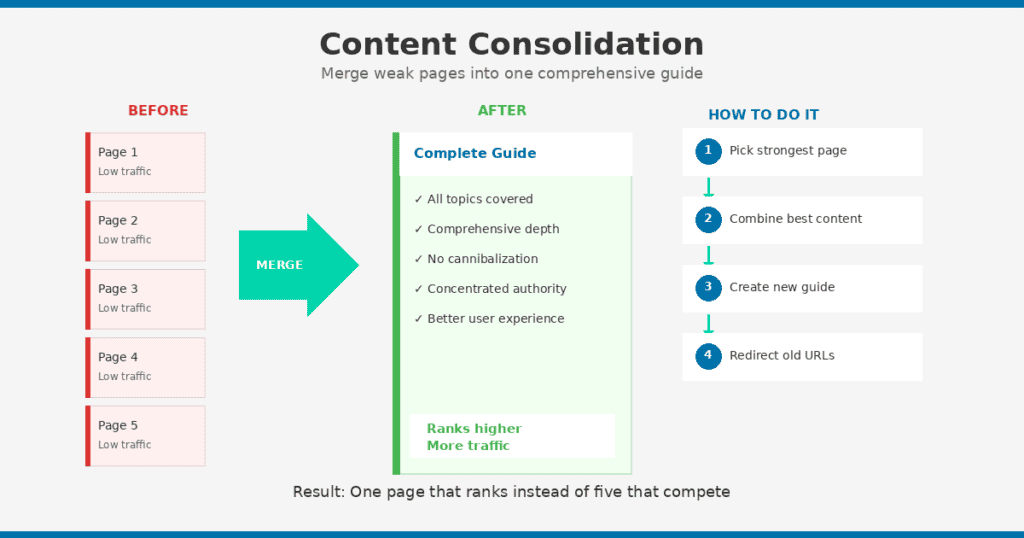
Multiple thin pages on similar topics compete with each other. It’s called keyword cannibalization and it’s hurting your rankings.
Merging those weak pages into one comprehensive guide often outperforms several scattered articles. You’re concentrating authority instead of diluting it.
When to Consolidate
Consolidate when you have multiple pages targeting the same or very similar keywords.
Consolidate when several pages have low traffic individually but cover related topics.
Consolidate when you have a listicle and a detailed how-to on the same subject. Pick one and make it comprehensive.
Consolidate when old content plus newer updates created redundant coverage. It happens. You forget you already wrote about something.
Consolidate when competitor comprehensive guides are outranking your fragmented content.
How to Consolidate
Here’s my process:
Identify the “survivor” page. Choose the one with most traffic, most backlinks, or the best URL. This is your foundation.
Extract valuable content from pages being merged. Don’t throw away good sections just because they’re on weaker pages.
Create a comprehensive new version. Combine the best elements. Fill gaps. Update everything.
Set up 301 redirects. Point all old URLs to the consolidated page. This preserves your link equity.
Update internal links. Find and update any links pointing to old URLs across your site.
Remove old pages from sitemap. Submit an updated sitemap to Search Console.
Consolidation Example
Let me show you what this looks like in practice.
Before: 5 separate pages
- What is keyword research
- “How to do keyword research”
- “Best keyword research tools”
- “Long-tail keywords explained”
- “Keyword research mistakes”
After: 1 comprehensive guide
- “The Complete Guide to Keyword Research” (covers all topics, 4,000+ words)
- All 5 old URLs redirect to new guide
- One page now ranks instead of five competing
That’s consolidation. Simple concept, powerful results.
Content Repurposing Execution
Repurposing is about transforming your content for different formats and platforms.
The goal? Reach audiences who prefer different content types. Not everyone reads blog posts. Some people prefer video. Others like podcasts. Some scroll LinkedIn all day.
One important point: this isn’t the same as cross-posting. Each format should feel native to its platform. Copy-pasting your blog post as a LinkedIn update doesn’t work.
Selecting Content to Repurpose
Start with high-performing content. It’s already proven to resonate with your audience.
Choose evergreen topics that remain relevant across formats. Repurposing time-sensitive content is usually a waste.
Avoid content that’s outdated. Fix it first, then repurpose the improved version.
Look for content with clear takeaways, data points, or step-by-step processes. These translate well across formats.
Content with strong visuals or quotable insights repurposes especially well.
Blog Post to Social Media Posts
LinkedIn posts:
Extract one key insight and expand with your perspective. Add your own take, not just a summary.
Use a bold opening hook. Something that stops the scroll.
Keep to 150-300 words for optimal engagement.
Add a question to encourage comments.
Link back to full article in the first comment, not the post itself. LinkedIn’s algorithm penalizes external links in posts.
Twitter/X threads:
Break the post into 5-10 key points.
First tweet needs to hook people. Make them want the rest of the thread.
Each tweet should stand alone while connecting to the whole.
End with a summary and link to the full piece.
Instagram carousels:
Create 5-10 slides covering main points.
First slide needs an attention-grabbing title.
One concept per slide with minimal text.
Use consistent brand colors and fonts.
Last slide should have a CTA: save, follow, or check link in bio.
Blog Post to Email Newsletter
Don’t just paste your blog post into an email. That’s lazy and your subscribers will notice.
Lead with why this matters to them. What’s the benefit of reading?
Include 3-5 key takeaways in bullet form.
Add your personal commentary or additional insights. Give them something they can’t get just by reading the blog.
Link to the full post for those who want more depth.
Blog Post to Video Content
YouTube video:
Use your blog structure as a script outline. Don’t read it word-for-word.
Add personality. Talk to the camera. Share opinions. Be human.
Include visual demonstrations, screen recordings, or B-roll.
Optimize title and description separately for YouTube search. YouTube SEO is its own thing.
Embed the finished video back in your original blog post. This improves both pieces.
Short-form video (TikTok, Reels, Shorts):
Focus on ONE tip or insight from the post. Just one.
Hook viewers in the first 1-2 seconds. You have no time to waste.
Keep it under 60 seconds. Often 15-30 seconds is optimal.
Add captions. Most people watch without sound.
Create multiple short videos from one long post. That’s efficient repurposing.
Blog Post to Podcast Episode
Use the post as talking points, not a script to read.
Expand with personal stories and examples. Podcasts are conversational.
Add tangents, opinions, humor. Things you might edit out of written content work great in audio.
Consider interviewing an expert on the topic for added depth.
Link to the written post in show notes.
Long-Form Content to Lead Magnet
Turn a comprehensive guide into a downloadable PDF.
Create a checklist from a how-to article.
Design a template based on your process post.
Compile related posts into an ebook.
Gate the download to capture email addresses. This builds your list.
Webinar/Video to Written Content
Transcribe the video using Descript, Otter.ai, or similar tools.
Edit the transcript into readable blog post format. Transcripts need heavy editing to read well.
Add subheadings, formatting, and images.
Pull quotes for social media graphics.
Create short clips for social platforms.
Platform-Specific Adaptation
Each platform has different audiences, expectations, formats, and algorithms.
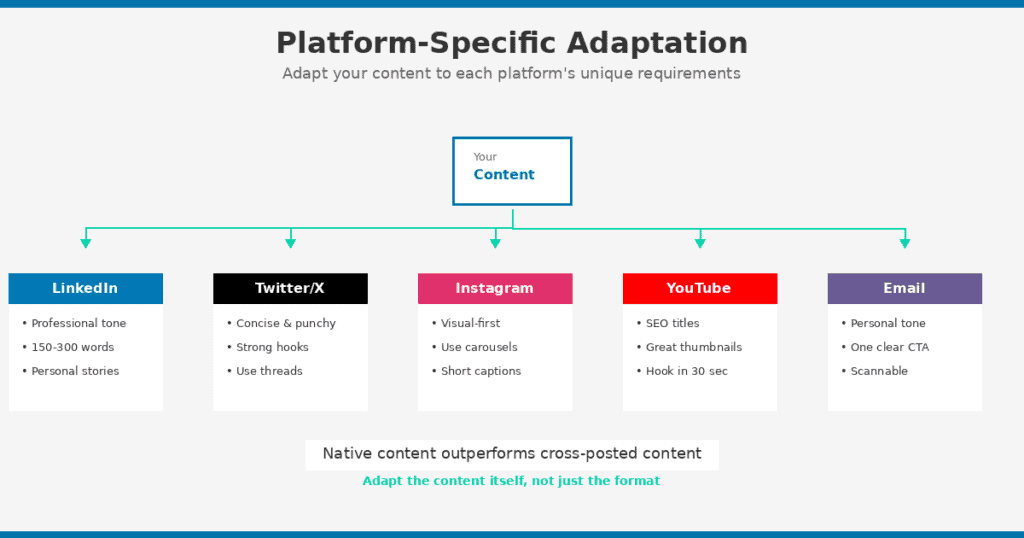
Simply resizing or reformatting isn’t enough. You need to adapt the content itself.
Native content outperforms cross-posted content every single time. Invest the extra effort.
Professional tone but approachable. You can be personal without being unprofessional.
Personal stories and lessons learned perform really well here.
Data and insights with business application get engagement.
Optimal post length: 150-300 words, or longer thought leadership pieces.
Carousels and documents get high engagement.
Best posting times: Tuesday through Thursday, during business hours.
Twitter/X
Concise, punchy, and opinionated wins.
Threads allow deeper dives. 5-15 tweets is the sweet spot.
Strong hooks are essential. Nobody clicks “show more” on boring first tweets.
Quote tweets with your take build engagement better than plain retweets.
Optimal single tweets: 70-100 characters.
Visual-first. Image and graphic quality matters most.
Carousels outperform single images for educational content.
Reels get the highest reach for attracting new audiences.
Captions can be long (up to 2,200 characters) but front-load the important stuff.
Use 3-5 relevant hashtags. Don’t go overboard.
Stories for behind-the-scenes and direct engagement.
YouTube
It’s a search engine. Treat titles and descriptions like SEO.
Longer videos (8-15 minutes) often perform better than very short ones.
Thumbnails are as important as content quality. Maybe more.
The first 30 seconds determine if viewers stay or leave.
Chapters help with watch time and search visibility.
Description links drive traffic back to your site.
Subject line is your headline. Make it count.
Personal tone, like you’re writing to one person.
Keep it scannable with clear formatting.
One clear CTA per email. Don’t confuse people with multiple asks.
Preview text matters almost as much as the subject line.
Segment your list to match content to audience interest.
Tools for Optimization and Repurposing
You don’t need every tool. But having the right ones makes this work much easier.
Content Analysis and Audit
Google Search Console. Free performance data, keyword queries, indexing status. Start here.
Google Analytics. Traffic trends, user behavior, conversion tracking.
Screaming Frog. Site crawling, broken link detection, technical audits.
Semrush/Ahrefs. Keyword tracking, content gap analysis, competitor research.
Surfer SEO. Content scoring and optimization recommendations based on what’s ranking.
Writing and Editing
Grammarly. Grammar, spelling, and clarity improvements. I use it on everything.
Hemingway Editor. Readability scoring and simplification suggestions.
Clearscope/MarketMuse. Content optimization based on top-ranking pages.
ChatGPT/Claude. Brainstorming, outlining, draft improvement. Always edit the output yourself.
Visual Content Creation
Canva. Graphics, carousels, infographics, social media images. Essential for non-designers.
Loom. Quick screen recordings and video explanations.
Descript. Video editing, transcription, audiogram creation.
Figma. Custom graphics and templates if you want more control than Canva.
Repurposing and Distribution
Repurpose.io. Automated content transformation workflows.
Buffer/Hootsuite. Social media scheduling across platforms.
Headliner. Turn audio into video with waveforms and captions.
Opus Clip. AI-powered short clip extraction from long videos.
Building an Optimization Workflow
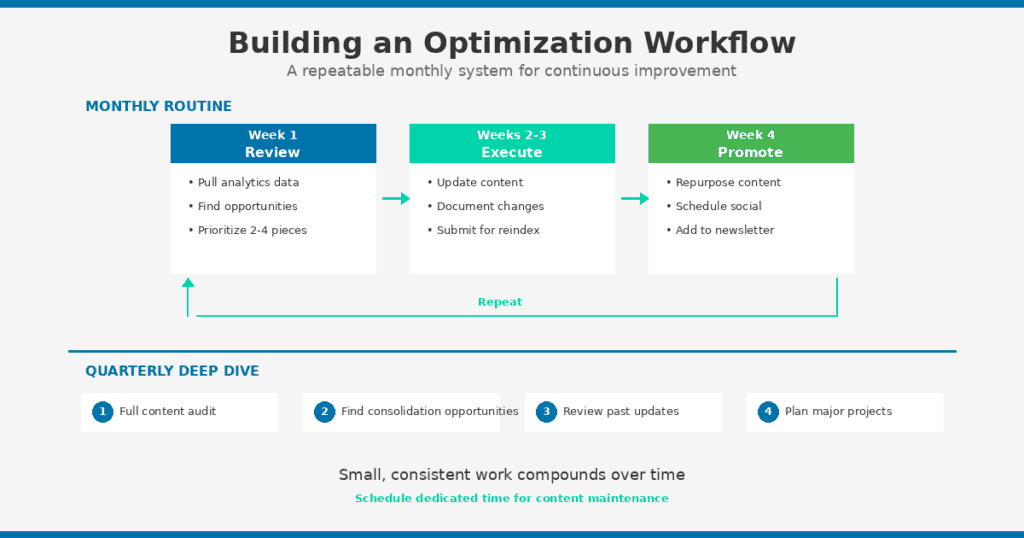
Make optimization a regular habit, not a one-time project.
Build systems so this work becomes efficient and repeatable. Schedule time specifically for content maintenance.
Monthly Optimization Routine
Week 1: Review analytics and identify optimization candidates.
Pull Search Console and Analytics data. Note declining pages and quick-win opportunities. Prioritize 2-4 pieces to update this month.
Week 2-3: Execute updates.
Work through your prioritized content. Document changes made. Submit to Search Console for reindexing.
Week 4: Repurpose and promote.
Transform updated content into new formats. Schedule social media distribution. Add to your email newsletter queue.
Quarterly Deep Dive
Do a full content audit every quarter.
Identify consolidation opportunities. Review performance of previously updated content.
Adjust your strategy based on what’s working. Plan larger content refresh projects.
This rhythm keeps your content library healthy without overwhelming you.
Measuring Optimization Success
Track results so you understand what’s working.
Give updates time to show results. Rankings don’t change overnight. Wait 2-4 weeks minimum before judging.
Document before and after metrics. You need this data to prove the ROI of optimization work.
Key Metrics to Track
Organic traffic. Compare 30 days before vs. 30 days after update.
Keyword rankings. Track position changes for target keywords.
Click-through rate. Has your improved title and meta description helped?
Time on page. Are readers engaging more with improved content?
Conversions. Is updated content driving more desired actions?
Tracking Repurposing ROI
Traffic to original content from repurposed pieces tells you if promotion is working.
Engagement metrics on each platform: likes, shares, comments.
New audience reach: followers gained, new email subscribers.
Time saved vs. creating net-new content. This is the real ROI of repurposing.
Total impressions across all formats from a single piece of content.
Common Optimization Mistakes
I’ve made most of these mistakes myself. Learn from my pain.
Optimization Mistakes
Updating the date without making substantial changes. This is deceptive and hurts trust. Google isn’t stupid either.
Over-optimizing for keywords at the expense of readability. If it reads like a robot wrote it, you’ve gone too far.
Ignoring search intent changes. What ranks now may be completely different from when you originally published. Recheck the SERP.
Forgetting to redirect consolidated pages. You’re throwing away link equity. Set up those 301s.
Not tracking results. If you don’t measure, you can’t learn what works.
Repurposing Mistakes
Cross-posting identical content without platform adaptation. This is lazy and it shows.
Repurposing outdated content. Fix it first. Don’t spread bad information across more platforms.
Losing your voice when adapting formats. The format changes, but your personality should stay consistent.
Trying to repurpose everything. Focus on high performers. Not all content deserves repurposing.
Ignoring platform-specific best practices. What works on LinkedIn doesn’t work on TikTok. Adapt.
Content Optimization Checklist
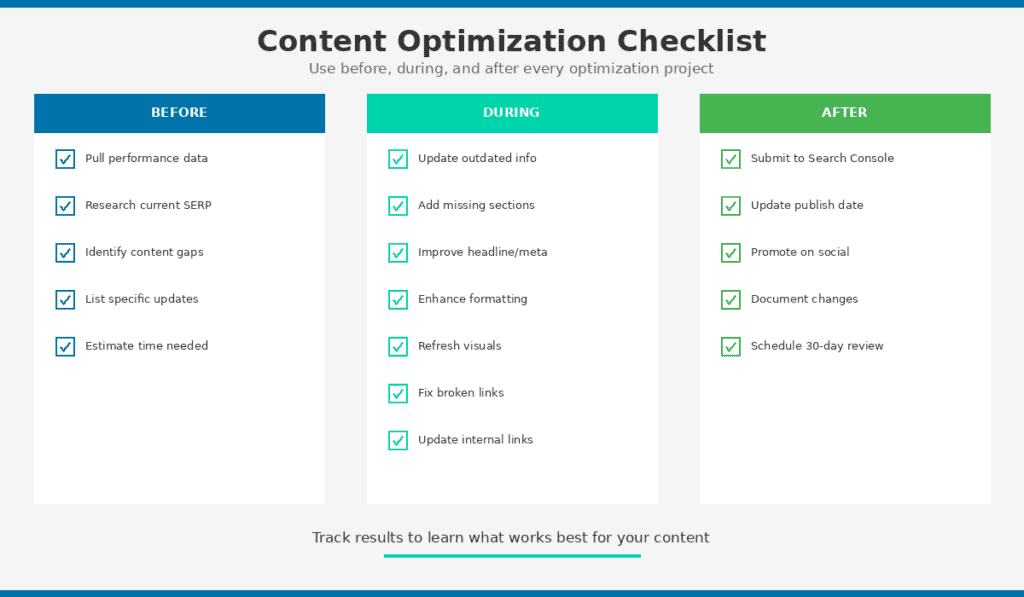
Use this before, during, and after every optimization project.
Before Optimizing
- Pull current performance data (traffic, rankings, CTR)
- Research current SERP for target keyword
- Identify content gaps and missing sections
- List specific updates needed
- Estimate time required
During Optimization
- Update outdated facts, stats, and examples
- Add missing sections competitors cover
- Improve headline and meta description
- Enhance readability and formatting
- Refresh or add visual content
- Fix broken links
- Update internal links
After Optimization
- Submit to Search Console for reindexing
- Update publish date (only if substantial changes)
- Promote on social and email
- Document changes made
- Schedule follow-up review (30 days)
Before Repurposing
- Content is high-performing or recently updated
- Topic is evergreen (or refreshed)
- Clear takeaways identified for extraction
- Target platforms selected
- Platform-specific adaptations planned
Start Optimizing Your Content Today
You don’t need to overhaul your entire content library at once.
Pick one declining post. Run through the refresh process. Measure the results.
Then do it again next week.
Small, consistent optimization work compounds over time. In six months, you’ll have a content library that’s actively working for you instead of slowly dying.
The content you’ve already created is an asset. Start treating it like one.
Related resources: