
Technical SEO is the foundation that determines whether your content ever appears in search results. You can write the best article in your industry, but if search engines cannot crawl, index, or render your pages properly, that content remains invisible to your target audience.
This guide covers everything you need to know about technical SEO in 2026, from crawlability basics to Core Web Vitals optimization. Whether you are an SEO professional managing client sites or a content marketer looking to understand why certain pages underperform, you will find actionable strategies here.
- What Is Technical SEO?
- Crawling and Indexability
- Robots.txt Configuration
- XML Sitemaps
- Site Architecture and URL Structure
- Internal Linking Strategy
- Core Web Vitals and Page Speed
- Mobile Optimization and Mobile-First Indexing
- HTTPS and Site Security
- Structured Data and Schema Markup
- Duplicate Content and Canonicalization
- Technical SEO Audit Process
- WordPress-Specific Technical SEO
- Common Technical SEO Mistakes to Avoid
- Technical SEO Monitoring and Maintenance
- Technical SEO Tools Checklist
- Taking Action on Technical SEO
What Is Technical SEO?
Technical SEO is the practice of optimizing your website’s infrastructure so search engines can crawl, index, and render it effectively. Think of it as the plumbing behind your website. Visitors never see it, but everything breaks down without it.
The key distinction is this: content SEO focuses on what you say, while technical SEO focuses on how you deliver it. Both matter, but technical issues can completely block even exceptional content from ranking.
Why Technical SEO Matters in 2026
Only 33% of websites pass Google’s Core Web Vitals test. This means technical issues are widespread, creating a significant competitive opportunity for those who address them.
AI search systems like Google AI Overviews, ChatGPT, and Perplexity rely heavily on technical signals to understand and cite content. If your site has crawling issues or poor structured data, AI systems may overlook your content entirely when generating answers.
Poor technical health causes invisible ranking failures. Pages that look perfectly fine to visitors may never appear in search results because Google cannot access or understand them properly.
Technical SEO vs. On-Page SEO vs. Off-Page SEO
Understanding how these three pillars work together helps you prioritize your optimization efforts.
Technical SEO covers crawlability, indexability, site speed, security, and mobile optimization. These are the behind-the-scenes factors that determine whether search engines can access your content.
On-Page SEO focuses on content quality, keyword optimization, meta tags, and internal linking. This is what most people think of when they hear “SEO.” For tips on improving your on-page optimization, see our guide on how to increase your SEO score.
Off-Page SEO involves backlinks, brand mentions, social signals, and online reputation. These external factors signal authority and trustworthiness to search engines.
Crawling and Indexability
Before your pages can rank, search engines must first discover them (crawling) and save them in their database (indexing). Crawling issues are often invisible because pages simply do not appear in search results without any obvious error messages.
Fixing crawl issues should be your first priority in any technical SEO audit. Everything else depends on search engines being able to access your content.
How Search Engines Crawl Websites
Search engine bots like Googlebot follow links to discover pages across the web. They start with known pages and follow links to find new content, much like a person browsing from page to page.
Google allocates a “crawl budget” to each site, which is the number of pages it will crawl within a given timeframe. For small sites with a few hundred pages, this rarely matters. But large or complex sites may have important pages missed if crawl budget gets wasted on low-value URLs like duplicate pages, infinite pagination, or outdated content.
Checking Your Indexing Status
Google Search Console is your primary tool for understanding indexing status. The “Pages” report shows which URLs are indexed and which are excluded, along with specific reasons for exclusion.
Common exclusion reasons include noindex tags, crawl blocks in robots.txt, redirect issues, and duplicate content. Each requires a different fix, so understanding the specific reason matters.
The URL Inspection tool lets you check individual pages and request indexing for new content. This is particularly useful when you publish time-sensitive content or make significant updates to existing pages.
Common Crawling Issues and Fixes
Orphan pages have no internal links pointing to them, making them difficult for search engines to discover. The fix is straightforward: add contextual links from relevant pages elsewhere on your site.
Crawl traps occur when infinite pagination, faceted navigation, or calendar widgets create endless URLs for bots to follow. Use robots.txt directives or noindex tags to prevent bots from getting stuck in these loops.
Blocked resources happen when CSS or JavaScript files are blocked in robots.txt. This prevents Google from rendering pages properly, which can hurt rankings. Ensure all rendering resources are accessible to crawlers.
Robots.txt Configuration
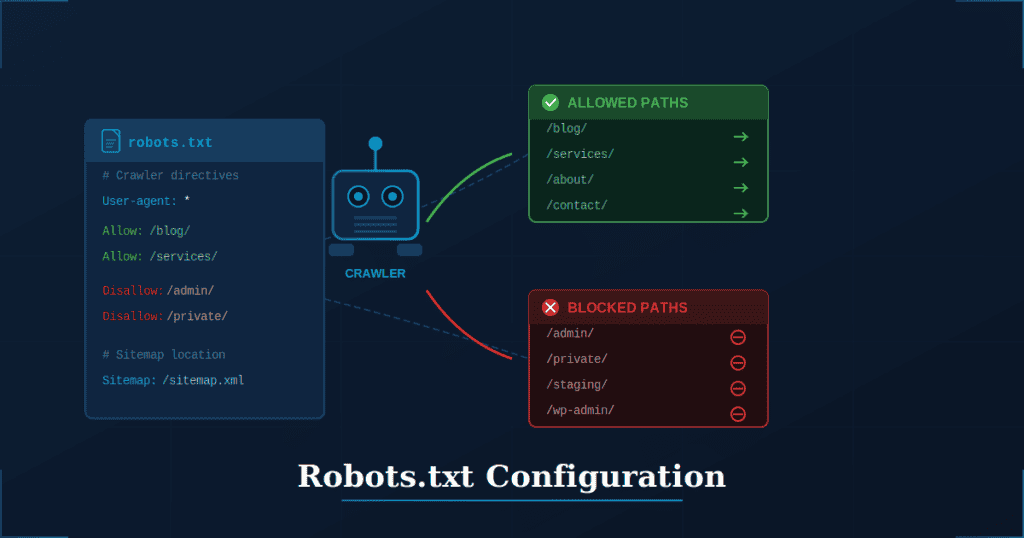
The robots.txt file is a simple text document that tells search engine crawlers which URLs they can and cannot access. It lives at the root of your domain (example.com/robots.txt) and applies to the entire site.
One critical clarification: robots.txt controls crawling, not indexing. If external sites link to a page you have blocked in robots.txt, Google may still index that page based on the link information alone. You just will not have control over how it appears in search results.
Misconfigured robots.txt is a common cause of SEO disasters. Always test changes in a staging environment before deploying to production.
Robots.txt Syntax and Structure
The User-agent directive specifies which crawler the rules apply to. Using an asterisk (*) applies rules to all crawlers, while specific names like “Googlebot” target individual bots.
The Disallow directive blocks specific paths from being crawled. For example, “Disallow: /admin/” prevents crawlers from accessing anything in the admin directory.
The Allow directive permits crawling of specific paths within a disallowed directory. This is useful when you want to block most of a section but allow access to certain files.
Best Practices for Robots.txt
Block low-value pages that waste crawl budget. This includes admin areas, internal search results, staging environments, and any URLs that serve no purpose in search results.
Never block CSS, JavaScript, or image files. Google needs these resources to render pages properly. Blocking them often causes pages to look broken in Google’s eyes, which hurts rankings.
Include your XML sitemap URL at the bottom of the file for easy discovery. The format is simple: “Sitemap: https://yoursite.com/sitemap.xml”
Managing AI Crawlers
New AI bots from companies like OpenAI (GPTBot) and Anthropic generally follow robots.txt directives. You can block or allow them specifically using their user-agent names.
Blocking AI crawlers means your content will not be cited in AI-generated answers. This protects your content from being used in training data, but it also reduces visibility in AI search experiences.
Consider your goals carefully. If appearing in AI search results matters for your business, allow these crawlers access. If protecting proprietary content takes priority, blocking makes sense.
XML Sitemaps
XML sitemaps are files that list all important URLs on your site to help search engines discover content. They function as a roadmap, telling crawlers exactly which pages exist and when they were last updated.
Sitemaps are especially valuable for large sites with thousands of pages, new sites without many external links, and sites with complex architectures where some pages might otherwise be difficult to find.
One important note: sitemaps do not guarantee indexing. They are a discovery aid that helps search engines find your content faster, but pages must still meet quality standards to be indexed and ranked.
Creating an Effective Sitemap
Include only canonical, indexable URLs that you actually want appearing in search results. Avoid listing redirects, noindexed pages, or duplicate content.
Keep individual sitemaps under 50,000 URLs and 50MB in size. For larger sites, create a sitemap index file that references multiple smaller sitemaps organized by section or content type.
Update sitemaps automatically whenever content is added, modified, or removed. Most CMS platforms and SEO plugins handle this automatically, but verify it is working correctly.
Submitting Your Sitemap
Submit sitemaps directly through Google Search Console and Bing Webmaster Tools. This ensures search engines are aware of your sitemap immediately rather than waiting for natural discovery.
Reference your sitemap in robots.txt using the Sitemap directive. This provides another discovery mechanism and is considered best practice.
Monitor sitemap errors in Search Console regularly. Fix any URLs returning 404 errors, redirects, or other issues that prevent proper crawling.
Sitemap Types for Different Content
Standard XML sitemaps work for most web pages, but specialized formats exist for different content types.
Image sitemaps help search engines discover and index important images, particularly useful for visual-heavy sites or those relying on image search traffic.
Video sitemaps include metadata like title, description, and thumbnail for video content, increasing the chances of appearing in video search results.
News sitemaps are designed for time-sensitive news articles and have specific requirements for sites participating in Google News.
Site Architecture and URL Structure
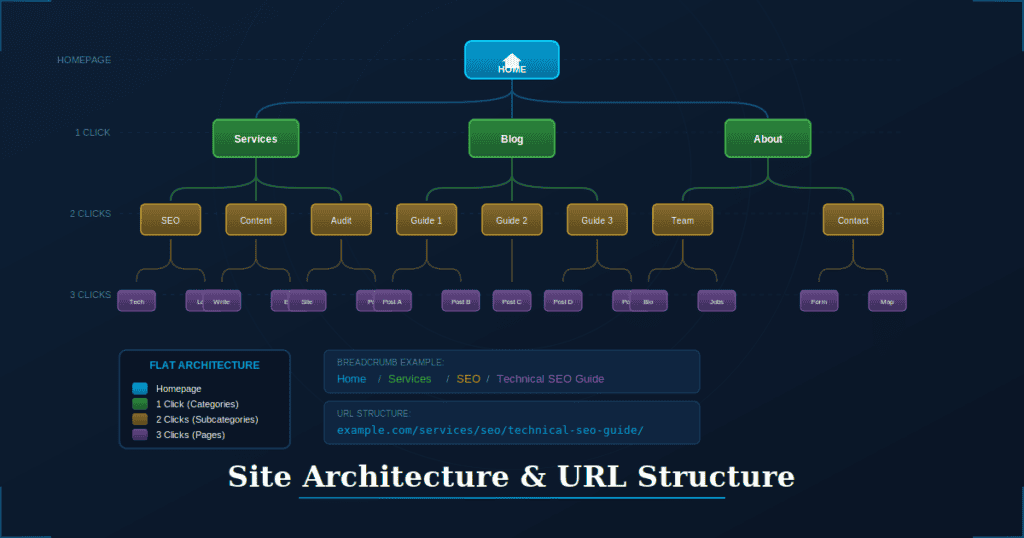
Site architecture refers to how pages are organized and linked together. Good architecture serves two purposes: it helps search engines understand content relationships and importance, and it helps users navigate your site efficiently.
Poor architecture is one of the most common and fixable technical SEO problems. The good news is that restructuring requires no new content, just thoughtful reorganization of what already exists.
Flat vs. Deep Site Architecture
Flat architecture keeps important pages within three clicks of the homepage. This structure ensures that authority flows efficiently from your homepage to key content, and it signals to search engines that these pages matter.
Deep architecture buries pages four or more clicks from the homepage. These deeply nested pages may be treated as lower priority by Google because they appear less important based on their placement in the site hierarchy.
The goal is creating a logical hierarchy where authority flows naturally from high-value pages to supporting content, following topical relationships that make sense to both users and search engines.
URL Best Practices
Keep URLs short, descriptive, and keyword-rich. Compare “/technical-seo-guide/” to “/page?id=12345” and you will immediately see which one communicates more to both users and search engines.
Use hyphens to separate words, not underscores. Search engines treat hyphens as word separators, while underscores join words together.
Follow a consistent pattern that reflects your site hierarchy. For example, “/blog/seo/technical-seo-guide/” clearly indicates where content belongs within the site structure.
Breadcrumb Navigation
Breadcrumbs show users their current location in the site hierarchy and provide easy navigation back to parent sections. They appear as a trail of links, typically near the top of the page.
Implement breadcrumb schema markup so Google can display breadcrumbs directly in search results. This improves click-through rates by showing users exactly where they will land on your site.
Ensure breadcrumbs reflect actual site structure and use descriptive anchor text. Breadcrumbs that say “Home > Page > Page” help no one.
Internal Linking Strategy
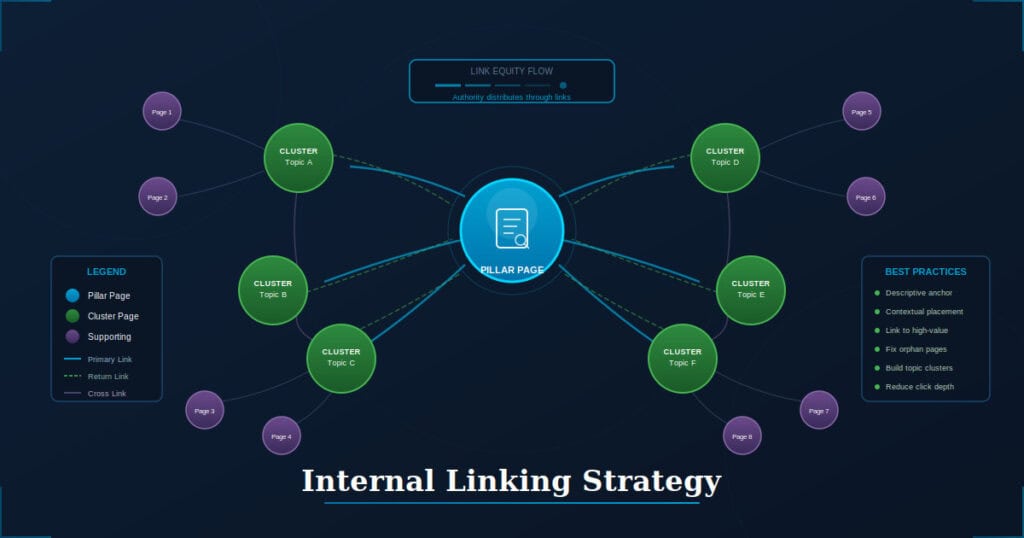
Internal links connect pages within your site and distribute authority throughout. They are one of the most powerful and underused SEO tools available, largely because they require no external outreach or content creation.
Research shows that 82% of potential internal linking opportunities are missed on the average website. This represents a significant opportunity to improve rankings without acquiring new backlinks.
For comprehensive strategies on connecting your content effectively, explore our resources on content marketing and SEO best practices.
How Internal Links Impact SEO
Internal links help search engines discover pages, particularly those not included in main navigation menus. A page with no internal links pointing to it may never be crawled or indexed.
Pages receiving more internal links are generally seen as more important. This is one way you can signal to Google which pages deserve ranking priority on your site.
Link equity flows through internal links. High-authority pages, especially those with strong external backlinks, can boost the rankings of pages they link to.
Internal Linking Best Practices
Link strategically from high-authority pages to pages you want to rank better. Identify which pages have the most external backlinks and add relevant internal links from those pages.
Use descriptive, keyword-rich anchor text that tells users and search engines what to expect on the destination page. Avoid generic anchors like “click here” or “read more.”
Place important links in main content areas rather than footers or sidebars. Contextual links within body content carry more weight than navigational links repeated across every page.
Topic Clusters and Pillar Pages
Build pillar pages that cover broad topics comprehensively. These serve as the central hub for a topic, linking out to more specific content and establishing your site as an authority.
Create cluster content addressing specific subtopics, with each piece linking back to the pillar page. This creates a clear topical structure that search engines can understand.
Interlink cluster pages to each other where relevant. This web of related content builds topical authority and helps users explore related information.
Finding and Fixing Internal Link Issues
Identify orphan pages using site audit tools like Screaming Frog or Semrush. These are pages with no internal links pointing to them, making them nearly invisible to search engines.
Fix broken internal links returning 404 errors. These create poor user experiences and waste the link equity that should flow to other pages.
Reduce click depth for important pages by adding links from higher-level pages. If a key page requires five clicks to reach from the homepage, add shortcuts from more prominent pages.
Core Web Vitals and Page Speed
Core Web Vitals are Google’s metrics for measuring real-world user experience. They focus on loading speed, interactivity, and visual stability, which are the factors that most directly impact how users perceive your site.
Page speed directly affects rankings, bounce rates, and conversions. Slow sites frustrate users, who leave before engaging with your content or completing purchases.
With only 33% of websites passing Core Web Vitals, optimization creates significant competitive advantage. For more detailed optimization techniques, see our guide on website speed optimization.
Understanding the Three Core Web Vitals
LCP (Largest Contentful Paint) measures how long it takes for the main content to load. This is typically the largest image or text block visible when the page first loads. Aim for under 2.5 seconds.
INP (Interaction to Next Paint) measures how quickly the page responds to user interactions like clicks, taps, or key presses. This replaced FID in 2024. Aim for under 200 milliseconds.
CLS (Cumulative Layout Shift) measures visual stability during page load. High CLS scores mean elements jump around as the page loads, frustrating users trying to click on something. Aim for a score under 0.1.
How to Measure Core Web Vitals
Google Search Console provides a site-wide Core Web Vitals report showing which URLs have Good, Needs Improvement, or Poor status. This gives you an overview of your entire site’s performance.
PageSpeed Insights offers URL-level analysis with both lab data (simulated tests) and field data (real user measurements). Lab data helps diagnose issues, while field data shows actual user experience.
Chrome DevTools Lighthouse provides detailed diagnostics and specific recommendations for improvement. This is useful for developers working on fixes.
Optimizing LCP (Loading Speed)
Optimize and compress images since they are typically the largest elements on a page. Use modern formats like WebP, which offer better compression than JPEG or PNG.
Eliminate render-blocking resources by deferring non-critical CSS and JavaScript. Critical styles should load immediately, while everything else can wait.
Use a Content Delivery Network (CDN) to serve content from servers geographically closer to users. This reduces latency and speeds up loading times.
Implement lazy loading for images below the fold. This means images only load as users scroll toward them, improving initial page load time.
Optimizing INP (Interactivity)
Minimize JavaScript execution time by deferring non-critical scripts. Large JavaScript bundles that execute immediately block user interactions.
Break up long tasks into smaller chunks. JavaScript tasks running longer than 50 milliseconds can block the main thread and delay response to user input.
Remove unnecessary third-party scripts that slow down interactions. Each analytics tool, chat widget, or advertising script adds execution time.
Use web workers for heavy computations. This moves processing off the main thread, keeping the page responsive during complex operations.
Optimizing CLS (Visual Stability)
Always include width and height attributes on images and videos. This allows browsers to reserve the correct space before the media loads.
Reserve space for ads and embeds before they load. Dynamic content that loads after the initial render often causes layout shifts.
Avoid inserting content above existing content. Adding elements at the top of the page pushes everything else down, creating frustrating shifts.
Use CSS aspect-ratio for responsive elements. This maintains proportions while allowing elements to scale with screen size.
Mobile Optimization and Mobile-First Indexing
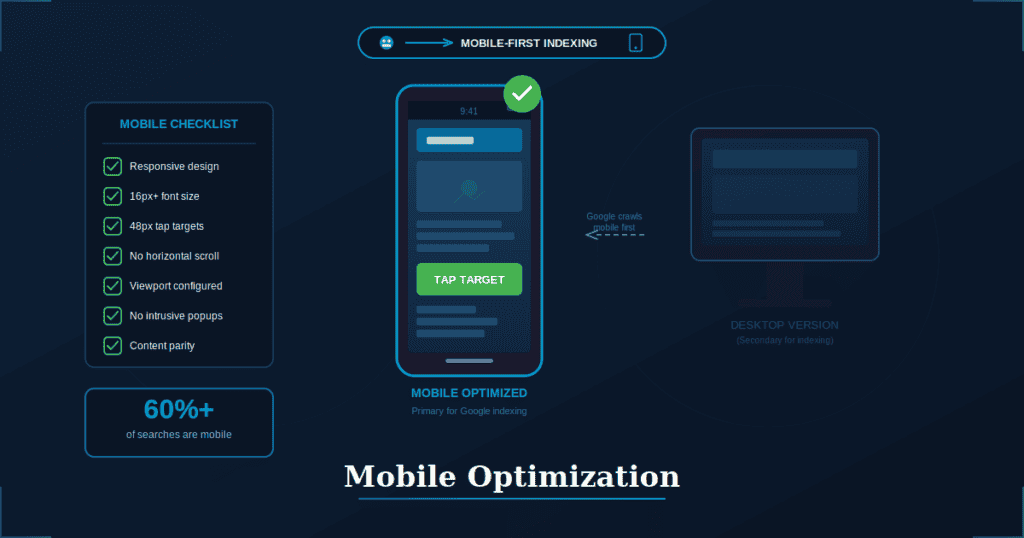
Google primarily uses the mobile version of your site for indexing and ranking. This means whatever content and functionality exists on mobile is what Google sees, regardless of what your desktop version offers.
Mobile devices account for over 60% of organic searches, making mobile experience critical for reaching most of your audience. A site that works poorly on mobile loses the majority of potential visitors.
What Mobile-First Indexing Means
Google’s crawler (Googlebot) primarily crawls and indexes the mobile version of your site. Desktop versions are secondary considerations.
If your mobile site is missing content that exists on desktop, that content may not be indexed or ranked. Ensure parity between versions.
Separate mobile sites using subdomains (m.example.com) should have equivalent content to desktop versions. Better yet, use responsive design that serves the same content to all devices.
Mobile Optimization Best Practices
Use responsive design that adapts layout and content to all screen sizes. This is Google’s recommended approach and simplifies maintenance.
Ensure text is readable without zooming. The minimum recommended font size is 16 pixels for body text.
Make tap targets large enough and properly spaced for finger interaction. Buttons and links should be at least 48 pixels in size with adequate spacing between them.
Avoid intrusive interstitials that block content on mobile. Full-screen popups that prevent users from accessing content quickly lead to ranking penalties.
Testing Mobile Usability
Use Google Search Console’s Mobile Usability report to identify issues affecting your site. The report flags specific problems on individual URLs.
Test pages manually on multiple devices and screen sizes. Automated testing catches many issues, but nothing replaces actually using your site on a phone.
Check for common problems including text too small to read, clickable elements positioned too close together, and content wider than the screen.
HTTPS and Site Security
HTTPS encrypts data traveling between your server and users’ browsers, protecting sensitive information from interception. For any site collecting personal data, passwords, or payment information, HTTPS is essential.
HTTPS is a confirmed Google ranking signal. Sites without HTTPS are at a disadvantage compared to encrypted competitors, all else being equal.
Browsers now display security warnings on HTTP pages, damaging user trust. Visitors seeing “Not Secure” warnings often leave immediately, regardless of your content quality.
Implementing HTTPS
Obtain an SSL/TLS certificate from a trusted certificate authority. Many hosting providers offer free certificates through Let’s Encrypt, making cost no barrier to implementation.
Install the certificate on your server and configure your site to serve all pages over HTTPS. Your hosting provider can usually help with this configuration.
Update internal links, canonical tags, and sitemaps to use HTTPS URLs. This ensures consistency and prevents mixed-protocol issues.
Common HTTPS Issues
Mixed content occurs when HTTP resources like images or scripts load on HTTPS pages. This triggers browser warnings and compromises security. Audit your site for any HTTP references.
Redirect chains happen when multiple redirects occur from HTTP to HTTPS. Each redirect adds latency. Aim for single, direct redirects.
Certificate errors from expired or misconfigured certificates break site access entirely. Set up monitoring and renewal reminders well before expiration.
Additional Security Considerations
Implement HSTS (HTTP Strict Transport Security) to force HTTPS connections for all users. This prevents downgrade attacks that attempt to serve HTTP versions.
Use secure cookies and appropriate Content Security Policy headers. These additional security measures protect against various attack vectors.
Keep your CMS, plugins, and server software updated to patch vulnerabilities. Outdated software is a primary target for attackers.
Structured Data and Schema Markup
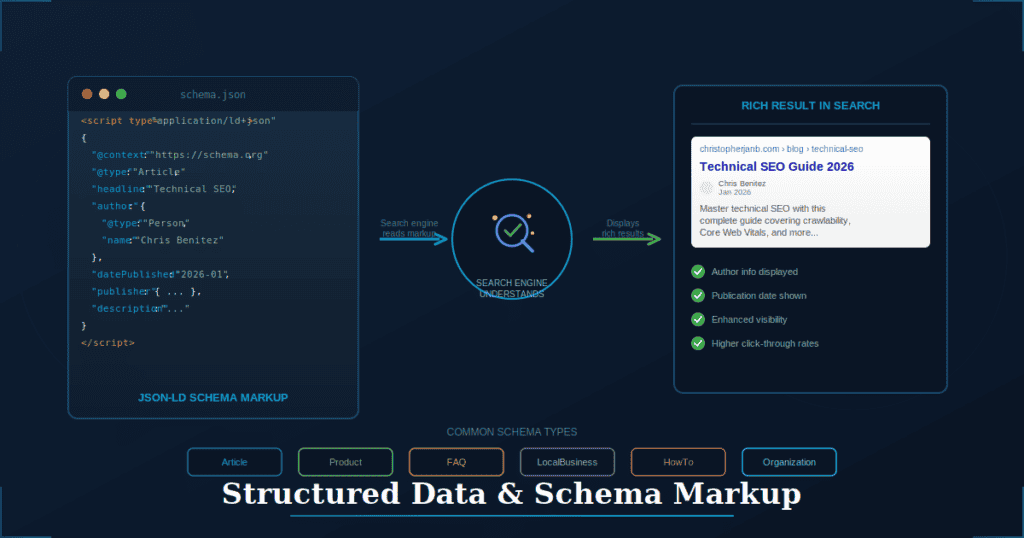
Schema markup is code that helps search engines understand the meaning and context of your content. Rather than just seeing text on a page, search engines can understand that text represents a product, recipe, event, or FAQ.
Properly implemented schema can trigger rich results in search, including star ratings, FAQ accordions, product information, and more. These enhanced listings stand out in search results and typically receive higher click-through rates.
Schema is increasingly important for AI search. When systems like Google AI Overviews generate answers, structured data helps them accurately understand and cite your content.
How Schema Markup Works
Schema uses vocabulary from Schema.org, a collaborative project by Google, Bing, Yahoo, and Yandex. This shared vocabulary ensures consistent interpretation across search engines.
JSON-LD is the recommended format for implementing schema. It is clean, flexible, and does not interfere with visible page content. The code typically sits in the head section of your HTML.
Search engines read the markup, understand content context, and may display enhanced search results based on that understanding. Not all schema types trigger rich results, but they all help search engines comprehend your content.
Essential Schema Types
Organization or LocalBusiness schema communicates brand information, contact details, and social profiles. This helps establish your entity in Google’s knowledge graph.
Article or BlogPosting schema identifies author, publish date, and headline for content pages. This is particularly important for news and blog content.
Product schema includes name, price, availability, and reviews for e-commerce pages. This can trigger rich product listings in search results.
FAQ schema marks up question and answer pairs that can appear directly in search results, expanding your listing and providing immediate value to searchers.
HowTo schema structures step-by-step instructions with potential for rich result display, including images for each step.
Implementing and Testing Schema
Add JSON-LD markup to the head or body of relevant pages. Many CMS platforms and SEO plugins can automate this process.
Use Google’s Rich Results Test to validate markup and preview potential rich results. This tool shows exactly what Google can understand from your schema.
Monitor rich result performance in Google Search Console’s Enhancements reports. These reports show which pages have valid schema and track impressions from rich results.
Duplicate Content and Canonicalization
Duplicate content occurs when the same or very similar content appears on multiple URLs. This confuses search engines about which version should be indexed and ranked.
Research shows that 41% of websites have internal duplicate content issues. This is extremely common and often occurs unintentionally through technical site configuration.
Common Causes of Duplicate Content
URL parameters create multiple versions of the same page. Sorting options, filters, and tracking parameters each generate unique URLs with identical content.
Protocol and subdomain variations occur when HTTP/HTTPS and www/non-www versions are all accessible. This can quadruple your pages in Google’s eyes.
Printer-friendly pages, session IDs, and pagination all create additional URLs pointing to the same or similar content.
Syndicated content appearing on multiple websites creates cross-domain duplication, which requires different handling than internal duplicates.
Using Canonical Tags
The rel=”canonical” tag tells search engines which URL is the preferred version of a piece of content. Search engines typically respect this signal when determining which URL to index and rank.
Place canonical tags in the head section of every page, including self-referencing canonicals. This explicitly states your preferred URL even when no duplicates exist.
Ensure canonical URLs are absolute (complete URLs including protocol and domain) and point to indexable pages. Canonical tags pointing to redirects or noindexed pages create problems.
Other Duplicate Content Solutions
301 redirects permanently redirect duplicate URLs to the canonical version. This is the strongest signal and passes link equity to the destination page.
URL parameter handling can be configured in Google Search Console to tell Google how specific parameters should be treated.
Noindex tags work for pages that serve a purpose for users but should not appear in search results.
Consolidation merges thin or duplicate pages into comprehensive resources. This is often the best solution for content that has fragmented across multiple URLs. For professional assistance with content consolidation, explore our content audit services.
Technical SEO Audit Process
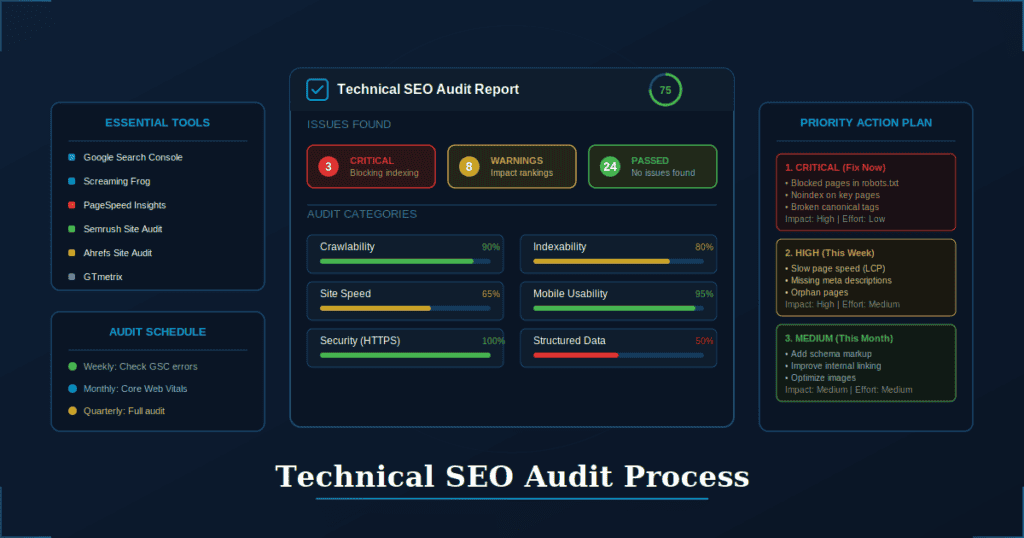
A technical SEO audit systematically identifies issues preventing optimal search performance. Rather than guessing what might be wrong, audits provide data-driven insights into actual problems.
Audits should be conducted quarterly as routine maintenance and immediately after major site changes like redesigns, migrations, or CMS updates.
Prioritizing fixes by impact and effort ensures efficient use of resources. Some issues are quick wins with immediate benefits, while others require significant development work for marginal gains. Learn more about our approach to SEO audit services.
Essential Audit Tools
Google Search Console provides indexing status, Core Web Vitals data, mobile usability reports, and security issue notifications. This is free and essential for every website.
Screaming Frog crawls your site to find broken links, redirects, duplicate content, and missing meta tags. The free version handles up to 500 URLs.
PageSpeed Insights and Lighthouse offer performance metrics and optimization recommendations for individual pages.
Semrush and Ahrefs Site Audit features provide comprehensive technical analysis with prioritized recommendations, though these require paid subscriptions.
Key Areas to Audit
Crawlability encompasses robots.txt configuration, sitemap accuracy, crawl errors, and orphan page identification.
Indexability includes noindex tag review, canonical tag accuracy, duplicate content issues, and thin content identification.
Site speed covers Core Web Vitals performance, page load times, and resource optimization opportunities.
Mobile addresses responsiveness, mobile usability issues, and mobile-first indexing readiness.
Security involves HTTPS implementation, mixed content identification, and certificate validity verification.
Creating an Audit Action Plan
Categorize issues by severity. Critical issues block indexing entirely. High-priority issues impact rankings. Medium-priority issues represent best practices worth addressing when time allows.
Estimate effort required for each fix. Quick wins can be implemented in minutes, while development projects may require weeks of work.
Prioritize high-impact, low-effort fixes first. These deliver the fastest results and build momentum for tackling larger issues.
Document everything and track progress over time. This creates accountability and helps demonstrate the value of technical SEO work.
WordPress-Specific Technical SEO
WordPress powers over 40% of websites, making it the most common CMS by a wide margin. While WordPress is fundamentally SEO-friendly, proper configuration is essential for optimal performance.
Plugins can automate many technical SEO tasks but can also create problems when misconfigured or when too many are installed. WordPress-specific issues require WordPress-specific solutions.
Essential WordPress SEO Settings
Set your preferred domain (www or non-www) under Settings > General. This should match your Search Console and analytics configuration.
Configure permalink structure to use post names (example.com/post-name/) rather than the default query string format. Find this under Settings > Permalinks.
Verify your site is not set to “Discourage search engines from indexing” under Settings > Reading. This checkbox is intended for development sites and will prevent indexing if enabled.
Recommended SEO Plugins
Yoast SEO or Rank Math provide comprehensive SEO management including sitemaps, schema markup, and redirect functionality. Choose one, not both.
WP Rocket or LiteSpeed Cache handle caching and performance optimization. These significantly improve page speed with minimal configuration.
Smush or ShortPixel compress and optimize images automatically. Large images are one of the most common performance problems on WordPress sites.
Use plugins sparingly. Each plugin adds code that must execute, potentially slowing your site and creating security vulnerabilities. Only install what you genuinely need.
WordPress Performance Optimization
Choose a quality hosting provider optimized for WordPress. Shared hosting works for small sites, but growing sites benefit from managed WordPress hosting.
Use a lightweight, well-coded theme. Many themes include features you will never use, adding weight and complexity to every page load.
Limit plugins to essential ones and keep them updated. Outdated plugins are security risks and may conflict with newer WordPress versions.
Implement caching, minification, and CDN integration. Performance plugins like WP Rocket handle most of this configuration automatically.
Common Technical SEO Mistakes to Avoid
Understanding common mistakes helps you avoid them during development and spot them during audits. These issues are widespread, meaning fixing them puts you ahead of most competitors.
Crawling and Indexing Mistakes
Accidentally blocking important pages in robots.txt is surprisingly common, especially after copying configurations between sites. Always review robots.txt after any changes.
Using noindex tags on pages you want ranked often happens when development noindex tags are not removed before launch.
Leaving staging sites accessible to search engines can cause duplicate content issues and leaked content. Protect staging environments with authentication or robots.txt blocking.
Creating infinite crawl paths through filters, faceted navigation, or calendar widgets wastes crawl budget and can trap search engine bots.
Performance Mistakes
Unoptimized images in wrong formats, at excessive sizes, or missing dimension attributes are the most common performance problem. Always compress images and specify dimensions.
Render-blocking JavaScript and CSS delays page rendering. Defer or async non-critical resources.
Too many third-party scripts and trackers accumulate over time as different teams add analytics, chat widgets, and marketing tools. Audit and remove unused scripts regularly.
Not implementing browser caching or compression means browsers download resources repeatedly. These are basic optimizations that most hosting configurations should handle automatically.
Structural Mistakes
Orphan pages with no internal links remain invisible to search engines. Every important page needs at least one contextual internal link.
Broken internal and external links create poor user experiences. Run regular checks and fix or remove broken links.
Inconsistent URL structures and trailing slashes create duplicate content issues. Choose a format and maintain it consistently.
Missing or incorrect canonical tags fail to resolve duplicate content problems. Audit canonicals regularly to ensure they point to the correct pages.
Technical SEO Monitoring and Maintenance
Technical SEO is ongoing work, not a one-time project. Issues arise from software updates, new content, server changes, and accumulated technical debt. Regular monitoring catches problems before they impact rankings.
Proactive maintenance is easier and less costly than reactive fixes after traffic drops. By the time you notice a ranking drop, the underlying issue may have affected indexing for weeks.
Setting Up Monitoring
Configure Google Search Console alerts for crawl errors, security issues, and manual actions. Email notifications ensure you learn about problems quickly.
Set up uptime monitoring to catch server outages immediately. Third-party tools like UptimeRobot or Pingdom provide instant alerts when your site goes down.
Use rank tracking to spot unusual drops that may indicate technical problems. Sudden ranking changes often correlate with technical issues that automated monitoring might miss.
Regular Maintenance Tasks
Weekly: Check Search Console for new errors or warnings. Address any critical issues immediately.
Monthly: Review Core Web Vitals performance, run a quick site crawl, and check for broken links.
Quarterly: Conduct a full technical audit, review and update redirects, and clean up outdated content.
After major changes: Audit affected areas specifically, verify indexing is working correctly, and monitor for issues over the following weeks.
Preparing for Site Migrations
Create a comprehensive URL mapping document showing every old URL and its corresponding new destination. Missing redirects cause traffic loss and indexing problems.
Implement 301 redirects for all changed URLs before launching the new site. Test redirects thoroughly in a staging environment.
Update internal links, canonical tags, and sitemaps to reference new URLs. Old references can create redirect chains and confusion.
Monitor traffic, rankings, and crawl errors closely for three to six months post-migration. Issues often surface gradually as Google recrawls the site.
Technical SEO Tools Checklist
Having the right tools makes technical SEO work more efficient and thorough. This checklist covers essential tools for every aspect of technical optimization.
Crawling and Indexing Tools
Google Search Console is free and essential for every website. It provides direct insight into how Google sees your site.
Bing Webmaster Tools matters if Bing traffic is relevant to your audience. It offers similar functionality to Search Console.
Screaming Frog SEO Spider is the industry standard desktop crawler. The free version handles up to 500 URLs, which is sufficient for many sites.
Performance Tools
Google PageSpeed Insights provides free Core Web Vitals analysis with both lab and field data.
GTmetrix offers free detailed performance reports with waterfall charts showing exactly what loads and when.
WebPageTest provides free advanced testing from multiple locations with filmstrip visualization of page loading.
Audit and Analysis Tools
Semrush Site Audit delivers comprehensive technical analysis with a prioritized issue list. A paid subscription is required, though limited free functionality exists.
Ahrefs Site Audit provides detailed technical SEO reports integrated with backlink data. This requires a paid subscription.
Sitebulb offers visual, intuitive technical audits with clear explanations of issues. This is a paid desktop application.
Schema and Structured Data Tools
Google Rich Results Test validates schema markup and previews how rich results might appear. This is free and essential for schema implementation.
Schema Markup Generator tools create JSON-LD code from simple form inputs. Several free options exist online.
Schema.org provides reference documentation for all schema types, properties, and expected values.
Taking Action on Technical SEO
Technical SEO may seem overwhelming given the breadth of factors involved, but start with the fundamentals. Ensure your site can be crawled and indexed, fix obvious speed issues, and implement proper security. These basics put you ahead of a significant portion of websites.
Use the tools and processes described in this guide to audit your current site, identify issues, and prioritize fixes. Focus on high-impact items first, and build regular maintenance into your workflow to prevent issues from accumulating.
If you need expert assistance with technical SEO audits or content optimization, explore our SEO audit services and content reoptimization services. With over a decade of SEO experience, Christopher Jan Benitez helps clients identify and resolve technical issues that hold their content back from ranking potential.